1. Introdución
Welcome to the user manual for your Fujitsu FMV LIFEBOOK A574 laptop. This guide provides essential information to help you set up, operate, maintain, and troubleshoot your device. Please read this manual thoroughly to ensure proper use and to maximize the performance and longevity of your laptop.
2. Configuración
2.1 Desembalaxe e inspección inicial
Carefully remove the laptop and all accessories from the packaging. Verify that all components are present: the Fujitsu FMV LIFEBOOK A574 laptop, AC adapter, and power cord. Inspect the laptop for any physical damage. If any damage is found or components are missing, contact your vendor immediately.
2.2 Conexión de enerxía
- Connect the AC adapter to the power input port on the side of the laptop.
- Conecte o cable de alimentación ao adaptador de CA.
- Conecte o outro extremo do cable de alimentación a unha toma eléctrica conectada a terra.
The laptop battery will begin charging automatically. It is recommended to fully charge the battery before initial use.
2.3 Arranque inicial e configuración de Windows 10
Press the power button to turn on the laptop. The system will guide you through the initial setup process for Windows 10. Follow the on-screen instructions to configure language, region, user accounts, and privacy settings.
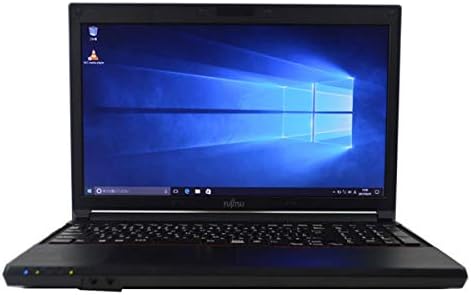
Figure 2.3.1: Fujitsu FMV LIFEBOOK A574 laptop powered on, displaying the Windows 10 desktop.
2.4 Conectando a Wi-Fi
- After Windows 10 setup, click the Wi-Fi icon in the taskbar (usually in the bottom-right corner).
- Select your desired wireless network from the list of available networks.
- Click 'Connect' and enter the network security key (password) if prompted.
- Once connected, the Wi-Fi icon will indicate an active connection.
2.5 Emparejamento Bluetooth
- Ir a Configuración > Dispositivos > Bluetooth e outros dispositivos.
- Asegúrate de que o Bluetooth estea activado On.
- Pon o dispositivo Bluetooth no modo de sincronización.
- Fai clic Engade Bluetooth ou outro dispositivo e selecciona Bluetooth.
- Selecciona o teu dispositivo da lista e segue as instrucións que aparecen na pantalla para completar o emparellamento.
3. Instrucións de funcionamento
3.1 Teclado e panel táctil
The Fujitsu FMV LIFEBOOK A574 features a full-size keyboard with a dedicated numeric keypad for efficient data entry. The integrated touchpad allows for precise cursor control and supports multi-touch gestures.

Figura 3.1.1: detallada view of the laptop's keyboard and touchpad area.
Funcións do teclado:
- Teclas de función (F1-F12): Often combined with the 'Fn' key for special functions like brightness control, volume adjustment, Wi-Fi toggle, etc.
- Teclado numérico: Provides a convenient layout for number input, similar to a desktop keyboard.
Xestos do touchpad:
- Toca simple: Fai clic co botón esquerdo.
- Toque con dous dedos: Fai clic co botón dereito.
- Desprazamento con dous dedos: Desprázate cara arriba ou abaixo.
- Pinch-to-Zoom: Achegar ou afastar o contido.
3.2 Optical Drive (DVDROM)
Your laptop is equipped with a DVDROM drive, allowing you to read CDs and DVDs.

Figure 3.2.1: The optical drive tray extended from the side of the laptop.
Using the Optical Drive:
- Press the eject button on the drive or right-click the drive icon in 'This PC' and select 'Eject'.
- Carefully place a CD or DVD onto the tray with the label side facing up.
- Gently push the tray back into the laptop until it clicks into place.
- The disc content should automatically appear or can be accessed via 'This PC'.
3.3 USB Ports and Audio Output
The laptop includes multiple USB ports for connecting peripherals such as external hard drives, mice, and keyboards. A 3.5mm audio jack is provided for connecting headphones or external speakers.
3.4 Pre-installed Office Software
This laptop comes with office software pre-installed, enabling you to perform productivity tasks such as word processing, spreadsheets, and presentations immediately.
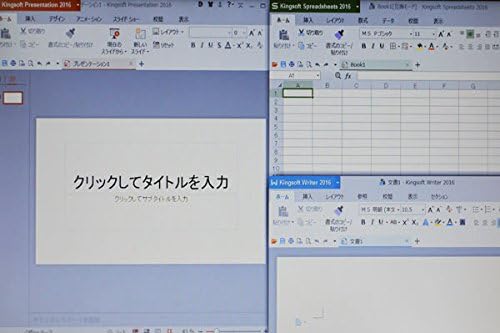
Figure 3.4.1: The laptop display showing multiple office applications running simultaneously.
4. Mantemento
4.1 Instrucións de limpeza
- Pantalla: Use un pano suave e sen pelusa lixeiramente dampLavar con auga ou cun limpador de pantallas. Evitar produtos químicos agresivos.
- Teclado e Casing: Usa un pano suave e seco. Para a sucidade persistente, un pano lixeiramente seco.amp Pódese usar un pano cunha solución de xabón suave, garantindo que non entre líquido no dispositivo.
- Portos: Use aire comprimido para eliminar o po dos portos.
4.2 Actualizacións de software
Regularly update your Windows 10 operating system and drivers to ensure optimal performance, security, and compatibility. Go to Configuración > Actualización e seguridade > Actualización de Windows para comprobar e instalar actualizacións.
4.3 Coidado coa batería
- Evite descargar completamente a batería con frecuencia.
- Garda o portátil nun lugar fresco e seco cando non o uses durante períodos prolongados.
- Se o gardas durante un período prolongado, asegúrate de que a batería estea cargada entre o 50 e o 60 % aproximadamente.
5 Solución de problemas
This section addresses common issues you might encounter with your Fujitsu FMV LIFEBOOK A574.
5.1 Sen enerxía
- Asegúrate de que o adaptador de CA estea conectado correctamente tanto ao portátil como a unha toma de corrente que funcione.
- Comprobe se a toma de corrente funciona conectando outro dispositivo.
- Proba cunha toma de corrente diferente.
5.2 Wi-Fi Not Connecting
- Verifica que o Wi-Fi estea activado na configuración de Windows.
- Reinicie o seu enrutador e módem sen fíos.
- Asegúrate de introducir o contrasinal wifi correcto.
- Try connecting to a different Wi-Fi network if available.
5.3 Rendemento lento
- Pecha as aplicacións innecesarias que se executan en segundo plano.
- Comprobe e instale as actualizacións pendentes de Windows.
- Executa unha limpeza e desfragmentación do disco (para o HDD).
- Scan for malware or viruses using reputable antivirus software.
If you continue to experience issues, please refer to the official Fujitsu support websitio web ou póñase en contacto co servizo de atención ao cliente para obter máis axuda.
6. Especificacións
Below are the key technical specifications for the Fujitsu FMV LIFEBOOK A574 laptop:
| Característica | Especificación |
|---|---|
| Marca | Fujitsu |
| Nome do modelo | A574 |
| Factor de forma | Portátil |
| Sistema Operativo | Windows 10 |
| Tipo de CPU | Intel Core i3 4000M (4th Gen) |
| Capacidade RAM | 8 GB DDR3 |
| Almacenamento | Disco duro de 500 GB |
| Tamaño de visualización | 15.6 polgadas |
| Resolución | 1366 x 768 píxeles |
| Procesador gráfico | Gráficos integrados Intel |
| Unidade óptica | DVDROM |
| Conectividade sen fíos | Wi-Fi, Bluetooth |
| Portos | USB, Headphone Jack |
7. Garantía e soporte
Your Fujitsu FMV LIFEBOOK A574 laptop is covered by a manufacturer's warranty. Please refer to the warranty card included with your product for specific terms and conditions, including warranty duration and coverage details.
For technical support, driver downloads, or service inquiries, please visit the official Fujitsu support website or contact their customer service department. Keep your product's serial number handy when seeking support.
Soporte Fujitsu Websitio: https://www.fujitsu.com/global/support/


