1. Introdución
This manual provides essential information for the safe and efficient operation of your OMNITRONIC PM-322P 3-Channel DJ Mixer. Please read these instructions thoroughly before using the device to ensure proper functionality and to prevent damage.
The OMNITRONIC PM-322P is a robust and versatile 3-channel DJ mixer designed for various audio mixing applications, featuring integrated Bluetooth connectivity and a USB MP3 player.

Figura 1: En ángulo view of the OMNITRONIC PM-322P DJ Mixer, showcasing its compact design and accessible controls.
2. Instrucións de seguridade
- Le todas as instrucións antes de utilizar o dispositivo.
- Conserve este manual para futuras consultas.
- Non expoña o dispositivo á choiva nin á humidade.
- Asegúrese de que haxa unha ventilación axeitada; non obstrua as aberturas de ventilación.
- Only connect to a grounded power outlet with the specified voltage (240 voltios).
- Non abra o dispositivo casing; encomende todo o mantemento a persoal cualificado.
- Evite colocar o dispositivo preto de fontes de calor ou baixo a luz solar directa.
- Limpar só cun pano seco.
3. Características clave
- 3 canles de entrada: Each channel features gain control, a 3-band equalizer (High, Mid, Low), a Cue button for pre-listening, and a smooth channel fader.
- Transmisión de audio Bluetooth integrada: Seamlessly stream music wirelessly from your Bluetooth-enabled portable devices directly to the mixer.
- DJ Microphone Channel: Dedicated microphone input with independent volume control and a 2-band equalizer for vocal adjustments.
- MP3 Player with USB Port: Reproducir audio files directly from a USB storage device, with track information displayed on a clear blue LCD.
- Construción robusta: Deseñado para unha maior durabilidade e un rendemento fiable.
4. Controis e conexións
4.1 Controis do panel frontal

Figura 2: Arriba view of the OMNITRONIC PM-322P DJ Mixer, highlighting the main control surface.
- Porto USB: For connecting USB storage devices to the integrated MP3 player.
- MP3/Bluetooth Module: Includes LCD display, playback controls (Play/Stop, Skip), and Pairing button for Bluetooth.
- Channel Gain Controls (CH 1-3): Adjust the input level for each channel.
- 3-Band Equalizer (High, Mid, Low): Tone controls for each channel.
- Cue Buttons (CH 1-3): Activates pre-listening for the respective channel through headphones.
- Channel Faders (CH 1-3): Adjust the volume level of each channel in the mix.
- Microphone Level Control (MIC LEVEL): Axusta o volume do micrófono conectado.
- Microphone 2-Band Equalizer (MIC HIGH, MIC LOW): Tone controls for the microphone input.
- X-Fader Reverse Switch: Reverses the direction of the crossfader.
- X-Fader Curve Control: Adjusts the crossfader curve from sharp to smooth.
- Crossfader (CH 2/CH 3): Blends between channels 2 and 3.
- Master Level Control: Axusta o volume de saída xeral.
- Cue Level Control: Axusta o volume da saída dos auriculares.
- Cue Mix/PGM Control: Blends between the Cued signal and the Program (Master) signal in the headphones.
- Medidores de nivel LED: Visual indication of output levels.
- Headphone Output (1/4" TRS): For connecting headphones for monitoring.
4.2 Conexións do panel traseiro
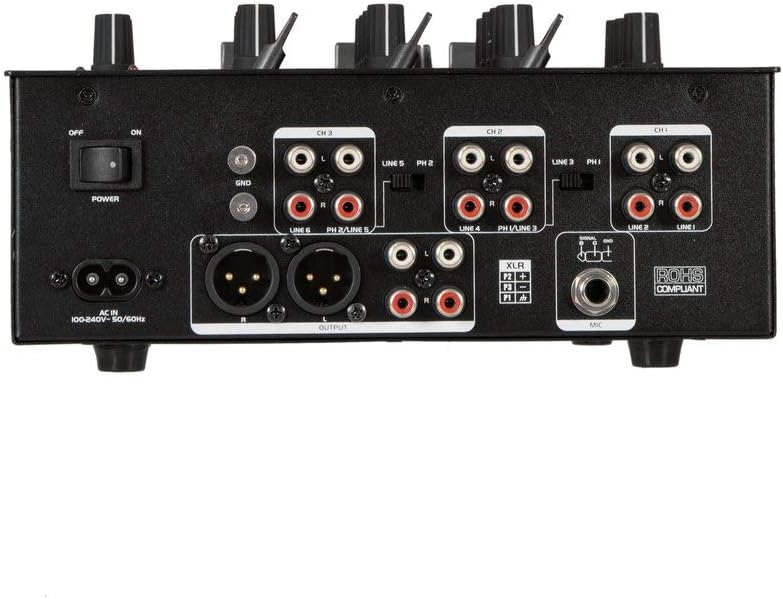
Figura 3: Rear panel of the OMNITRONIC PM-322P DJ Mixer, showing all input and output ports.
- Interruptor de alimentación (aceso/apagado): Activa ou desactiva o mesturador.
- AC EN: Power input for the included power cable (100-240V AC, 50/60Hz).
- Ground Terminal (GND): For connecting a turntable ground wire.
- Channel 3 Inputs (LINE 5/PH 2, LINE 6): RCA inputs for line-level devices (CD players, media players) and phono-level devices (turntables).
- Channel 2 Inputs (LINE 3/PH 1, LINE 4): RCA inputs for line-level devices and phono-level devices.
- Channel 1 Inputs (PLAYER/LINE 1, LINE 2): RCA inputs for line-level devices.
- Master Output (XLR, RCA): Balanced XLR and unbalanced RCA outputs for connecting to a power amplifier ou altofalantes activos.
- Entrada de micrófono (XLR): Entrada XLR balanceada para conectar un micrófono dinámico.
5. Configuración
- Conexión de alimentación: Connect the provided power cable to the AC IN socket on the rear panel and then to a suitable grounded power outlet (240V).
- Conexión de saída: Connect the MASTER OUTPUT (XLR or RCA) to your amplifier or active speaker system.
- Dispositivos de entrada:
- Connect turntables to the PHONO inputs (CH 2 or CH 3) and ensure the PH/LINE switch is set to PH. Connect the turntable's ground wire to the GND terminal.
- Connect CD players, media players, or other line-level devices to the LINE inputs (CH 1, CH 2, or CH 3). Ensure the PH/LINE switch is set to LINE for channels 2 and 3.
- Connect a microphone to the XLR MIC input on the rear panel.
- Auriculares: Connect your headphones to the 1/4" TRS HEADPHONE output on the front panel.
- Configuración inicial: Before powering on, ensure all channel faders are down, gain controls are at minimum, and the Master Level is at minimum.
- Encendido: Xire o interruptor POWER do panel traseiro á posición ON.
6. Funcionamento
6.1 Playing Audio from Input Channels
- Select the desired input source (LINE or PHONO) using the switch on the rear panel for Channels 2 and 3. Channel 1 is LINE only.
- Start playback on your connected audio source (turntable, CD player).
- Slowly increase the GAIN control for the selected channel until the LED level meter shows a strong signal without clipping (red LEDs).
- Adjust the 3-band EQ (HIGH, MID, LOW) to shape the sound of the channel.
- Raise the channel fader to bring the audio into the main mix.
- Adjust the MASTER LEVEL control to set the overall output volume.
- Use the CUE button to pre-listen to a channel through your headphones before fading it into the mix. Adjust CUE LEVEL and CUE MIX/PGM as needed.
6.2 Using the MP3 Player (USB)
- Insert a USB storage device (formatted as FAT32) containing MP3 files no porto USB.
- The LCD display will show track information.
- Use the PLAY/STOP button to start or pause playback.
- Use os botóns SKIP (<< / >>) para navegar entre as pistas.
- The MP3 player typically routes to Channel 1. Adjust Channel 1's GAIN, EQ, and FADER controls as described above.
Transmisión de audio Bluetooth 6.3
- Press the PAIRING button on the MP3/Bluetooth module. The Bluetooth indicator will flash, indicating it's in pairing mode.
- On your Bluetooth-enabled device (smartphone, tablet), search for available Bluetooth devices and select "OMNITRONIC PM-322P".
- Unha vez emparellado, o indicador Bluetooth acenderase de forma fixa.
- Start playing audio on your connected device. The Bluetooth audio will route to Channel 1.
- Adjust Channel 1's GAIN, EQ, and FADER controls to mix the Bluetooth audio.
6.4 Uso do micrófono
- Connect a dynamic microphone to the XLR MIC input on the rear panel.
- Speak into the microphone and slowly increase the MIC LEVEL control until the desired volume is achieved without distortion.
- Use the MIC HIGH and MIC LOW controls to adjust the tone of your voice.
7. Mantemento
- Limpeza: Disconnect the device from power before cleaning. Use a soft, dry cloth to wipe the surface. Do not use liquid cleaners or solvents.
- Almacenamento: When not in use for extended periods, store the mixer in a dry, dust-free environment.
- Servizo: No interior non hai pezas reparables polo usuario. Encargue toda a reparación a persoal de servizo cualificado.
8 Solución de problemas
| Problema | Causa posible | Solución |
|---|---|---|
| Sen poder | Power cable disconnected; Power switch off; Outlet fault. | Comprobe a conexión do cable de alimentación; asegúrese de que o interruptor de alimentación estea aceso; probe a toma de corrente con outro dispositivo. |
| Sen saída de son | Master Level too low; Channel fader down; Gain too low; Amplifier/speakers off or disconnected. | Increase Master Level; Raise channel fader; Increase channel Gain; Check ampconexións do amplificador/altofalante e alimentación. |
| Son distorsionado | Gain too high (clipping); Input signal too strong; Faulty cable. | Reduce channel Gain; Check input signal level; Replace cables. |
| Bluetooth non se sincroniza | Mixer not in pairing mode; Device too far; Device already paired to another unit. | Press PAIRING button; Move device closer; Disconnect from other Bluetooth devices. |
| USB MP3 player not working | USB device not formatted correctly (FAT32); No MP3 files; USB device faulty. | Ensure USB is FAT32 and contains MP3s; Try a different USB device. |
9. Especificacións
| Modelo: | PM-322P |
| Fabricante: | Steinigke Showtechnic GmbH |
| Número de canles: | 3 |
| Tecnoloxía de conectividade: | Bluetooth, USB |
| Fonte de enerxía: | Cable eléctrico |
| Voltage: | 240 voltios AC |
| Peso do artigo: | 3.18 quilogramos |
| Entrada de audio: | XLR (Microphone), RCA (Line/Phono) |
| Tipo de conector de saída: | XLR, TRS 1/4", RCA |
| Model Number (Manufacturer): | 8283410 |
| UPC: | 04026397653403 |
10. Garantía e soporte
For warranty information and technical support, please contact the manufacturer, Steinigke Showtechnic GmbH, or your authorized dealer. Keep your proof of purchase for any warranty claims.
For further assistance, please visit the official OMNITRONIC websitio web ou consulte co seu distribuidor local.


