1. Introdución
This user manual provides comprehensive instructions for the APPS2Car 14'' Gooseneck Car Phone Holder, Model H5-S3L. This heavy-duty phone holder is designed for secure mounting in various vehicles, including trucks, and features a flexible long arm with an anti-shake stabilizer and a strong suction cup for optimal viewing e estabilidade.
Key features include a 14-inch aluminum arm for flexible adjustment, industrial-strength suction for secure attachment, and 360-degree rotation for versatile viewing angles. It is compatible with most smartphones between 4.7 and 6.7 inches.
2. Compoñentes do produto
The APPS2Car 14'' Gooseneck Car Phone Holder consists of the following main components:
- Phone Holder Cradle: Suxeita o teu teléfono intelixente de forma segura.
- 360° Rotate Ball Joint: Allows for full rotation and angle adjustment of the phone cradle.
- 14-inch Gooseneck Arm: Flexible aluminum arm for positioning the phone holder.
- Base de ventosa: Provides strong adhesion to surfaces like windshields or dashboards.
- Anti-Shake Stabilizer: An additional support base for enhanced stability.
- Botón de liberación rápida: For easy insertion and removal of the phone.
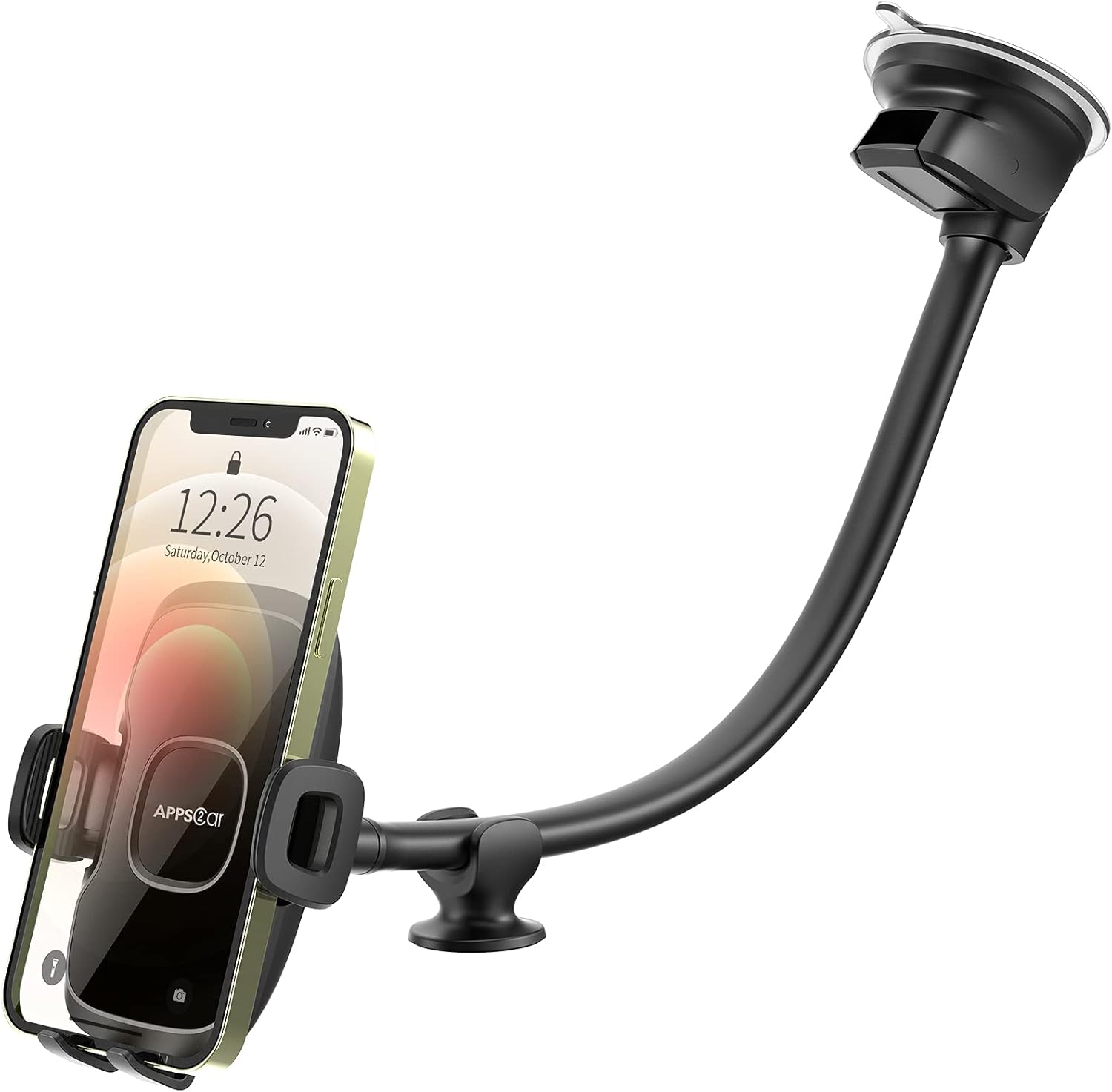
Figura 2.1: Máisview of the APPS2Car Gooseneck Car Phone Holder.

Figure 2.2: Key components of the phone holder, including the 360-degree rotating ball, anti-shake stabilizer, and quick release mechanism.
3. Configuración e instalación
Follow these steps to properly install your APPS2Car Gooseneck Car Phone Holder:
- Prepare a superficie: Choose a clean, flat surface on your windshield or dashboard. Ensure the surface is free of dust, dirt, and oils. For textured dashboards, it is recommended to use a 3M dashboard mat (not included) for optimal adhesion.
- Attach the Phone Cradle: Connect the phone holder cradle to the 360° rotate ball joint on the gooseneck arm. Tighten the securing nut to ensure a firm connection.
- Apply Anti-Static Film (Optional but Recommended): The suction cup is equipped with an anti-static film. Peel off the protective film from the suction cup and apply it to your chosen mounting surface. This helps prevent adhesive residue.
- Mount the Suction Cup: Press the suction cup firmly against the prepared surface. Push down the lever on the suction cup base to create a vacuum seal and lock it in position.
- Position the Anti-Shake Stabilizer: If using, peel off the protective film from the anti-shake stabilizer and position it on the dashboard to provide additional support for the gooseneck arm.
- Adjust the Gooseneck Arm: Bend and shape the 14-inch gooseneck arm to achieve your desired viewing angle and position, ensuring it does not obstruct your sight while driving.
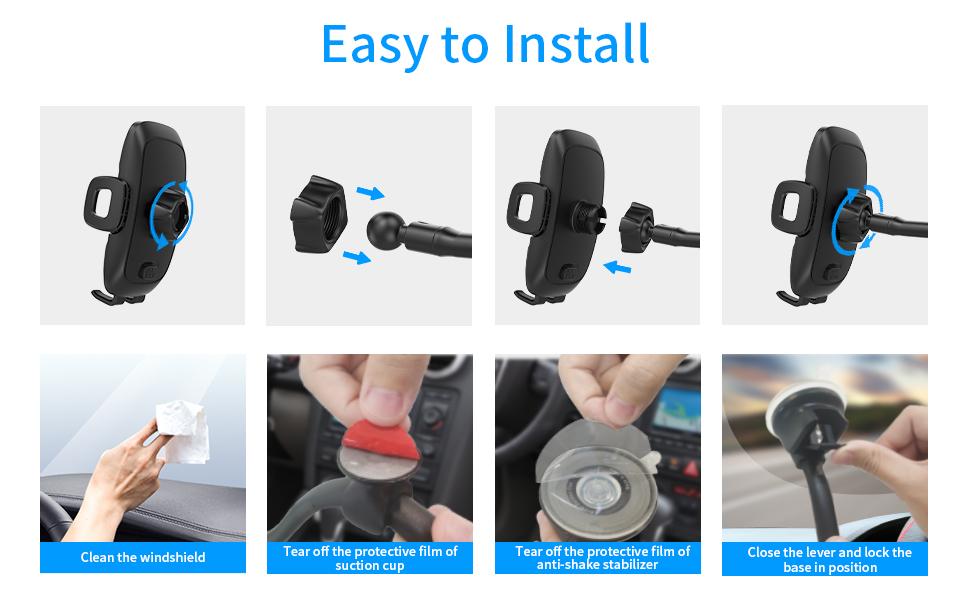
Figura 3.1: Guía visual para o proceso de instalación.
4. Instrucións de funcionamento
Using your APPS2Car phone holder is simple and designed for one-handed operation:
- Inserción do teléfono: Press the quick release button located on the back of the phone cradle. The side clamps will open. Place your smartphone into the cradle and gently squeeze the side clamps until they securely hold your device.
- Extracción do teléfono: Press the quick release button to release the side clamps, then carefully remove your phone.
- Axustando ViewÁngulo de ing: The phone cradle features a 360-degree rotating ball joint, allowing you to rotate your phone to portrait or landscape mode. The flexible gooseneck arm can be bent and adjusted to position your phone at the optimal viewing height and distance, ensuring it does not block your view da estrada.

Figure 4.1: Proper placement to avoid obstructing sight.

Figure 4.2: The holder provides double stability, even on challenging road conditions.
5. Mantemento
To ensure the longevity and optimal performance of your phone holder, follow these maintenance guidelines:
- Limpeza da ventosa: If the suction cup loses its stickiness, rinse it with warm water and let it air dry. Do not use harsh chemicals or abrasive materials, as this can damage the adhesive properties.
- Limpeza xeral: Wipe the phone holder and arm with a soft, damp cloth to remove dust and grime. Avoid excessive moisture.
- Almacenamento: When not in use for extended periods, detach the holder from the mounting surface and store it in a cool, dry place away from direct sunlight.
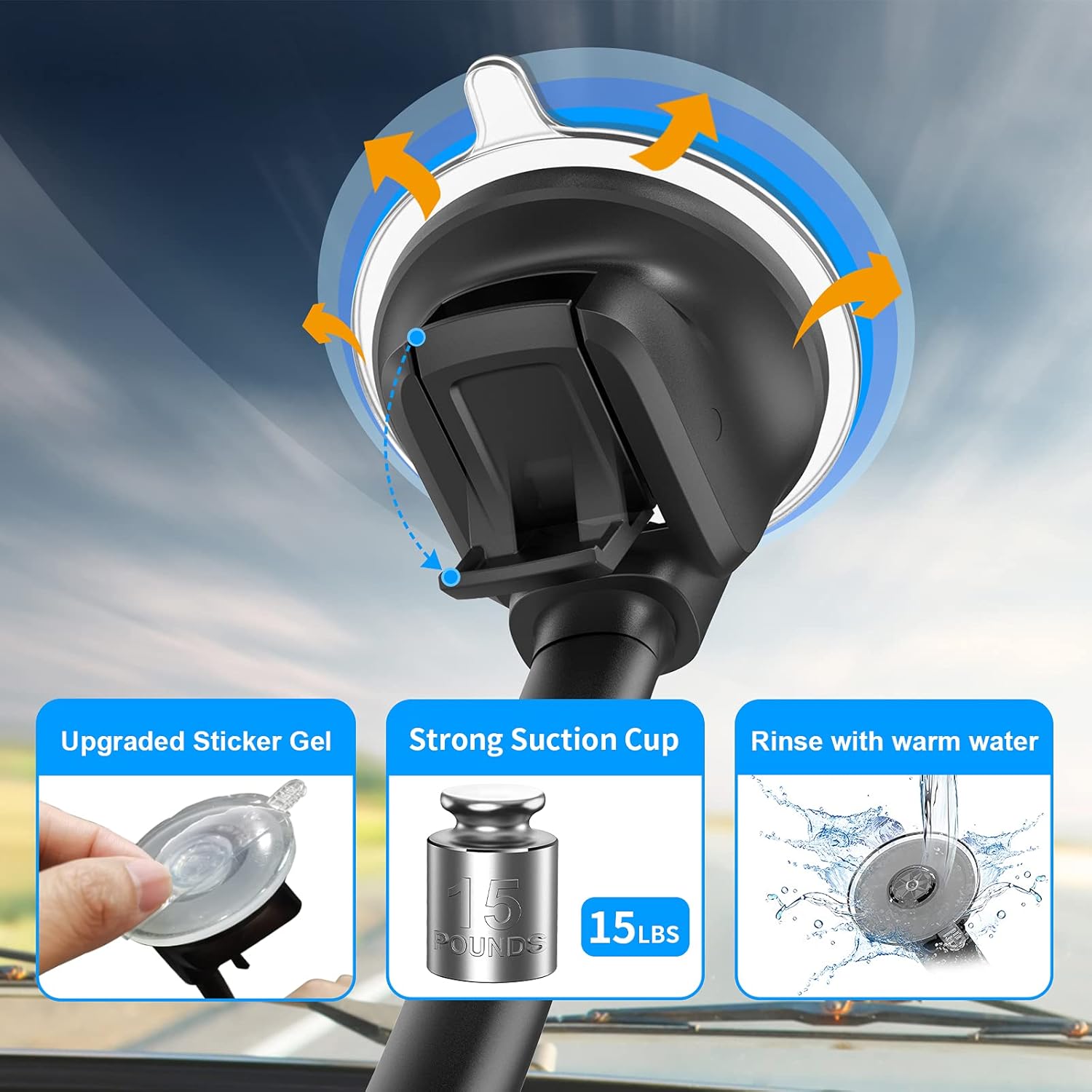
Figure 5.1: Maintaining the suction cup for strong adhesion.
6 Solución de problemas
If you encounter issues with your APPS2Car phone holder, refer to the following common problems and solutions:
| Problema | Causa posible | Solución |
|---|---|---|
| Suction cup does not stick firmly. | Surface is dirty, oily, or textured; suction cup is dirty or dry. | Clean the mounting surface thoroughly. Rinse the suction cup with warm water and let it air dry. For textured dashboards, use a 3M dashboard mat. Ensure the lever is fully engaged. |
| Phone does not fit in the cradle. | Phone size is outside the compatible range (4.7-6.7 inches); phone case is too thick. | Verify your phone's dimensions. The holder is not compatible with otterbox cases, pop socket cases, and wallet cases thicker than 0.6 inches. Remove overly thick cases if necessary. |
| Holder shakes or vibrates excessively. | Gooseneck arm is not properly positioned; anti-shake stabilizer is not used or improperly placed. | Adjust the gooseneck arm to a more stable position. Ensure the anti-shake stabilizer is firmly attached and providing support. |
7. Especificacións
| Característica | Detalle |
|---|---|
| Dimensións do produto | 6 x 3 x 2 polgadas |
| Peso do elemento | 8.4 onzas |
| Número de modelo do artigo | H5-S3L |
| Características especiais | 14 inch Long Arm Car Phone Holder Mount, Flexible Long Arm Truck Phone Holder, Industrial-Strength Suction Cup, Hands-free & One hand operation, Support Thick Cases |
| Dispositivos compatibles | Smartphones |
| Modelos de teléfonos compatibles | iPhone 16 Pro Max/16 Pro/16 Plus/16/15 Pro Max/15 Pro/15 Plus/15/14 Plus/14 Pro/14 Pro Max/13/12 Pro Max Mini iPhone X iPhone XR iPhone 8 iPhone 8 Plus iPhone 7 iPhone 6 Plus, Samsung Galaxy S23/S22/S22+/S21/S21+/S21 Ultra/S20 Ultra/S20/S10 Plus/S10/S9/S8/S7/S6, Note 20/Note 10/Note 9/Note 8, Nexus 5/5X/6P, LG V35/V30/V20, Moto G/Z/X, OnePlus, and other Android smartphones (between 4.7 - 6.7 inches). Not compatible with otterbox cases, pop socket cases, and wallet cases thicker than 0.6-inch. |
| Tipo de montaxe | Windshield/Dashboard/Dash (suitable for Truck, SUV, Semi-truck) |
| Cor | Espello Negro |
| Fabricante | APPS2Car |
| País de Orixe | China |
| Data de primeira dispoñibilidade | 19 de setembro de 2019 |
8. Garantía e soporte
Specific warranty information for the APPS2Car 14'' Gooseneck Car Phone Holder is not provided in the product details. For warranty claims, technical support, or further assistance, please contact APPS2Car customer service directly through their official websitio web ou o vendedor onde se comprou o produto.
Tamén podes visitar o APPS2Car Store on Amazon para máis información.


