1. Produto rematadoview
The Milwaukee M18 PACKOUT Radio Charger (Model 2950-20) is a durable, high-performance audio solution designed for jobsite environments. It integrates seamlessly with the PACKOUT modular storage system, providing robust sound, charging capabilities for M18 batteries, and device charging via USB.
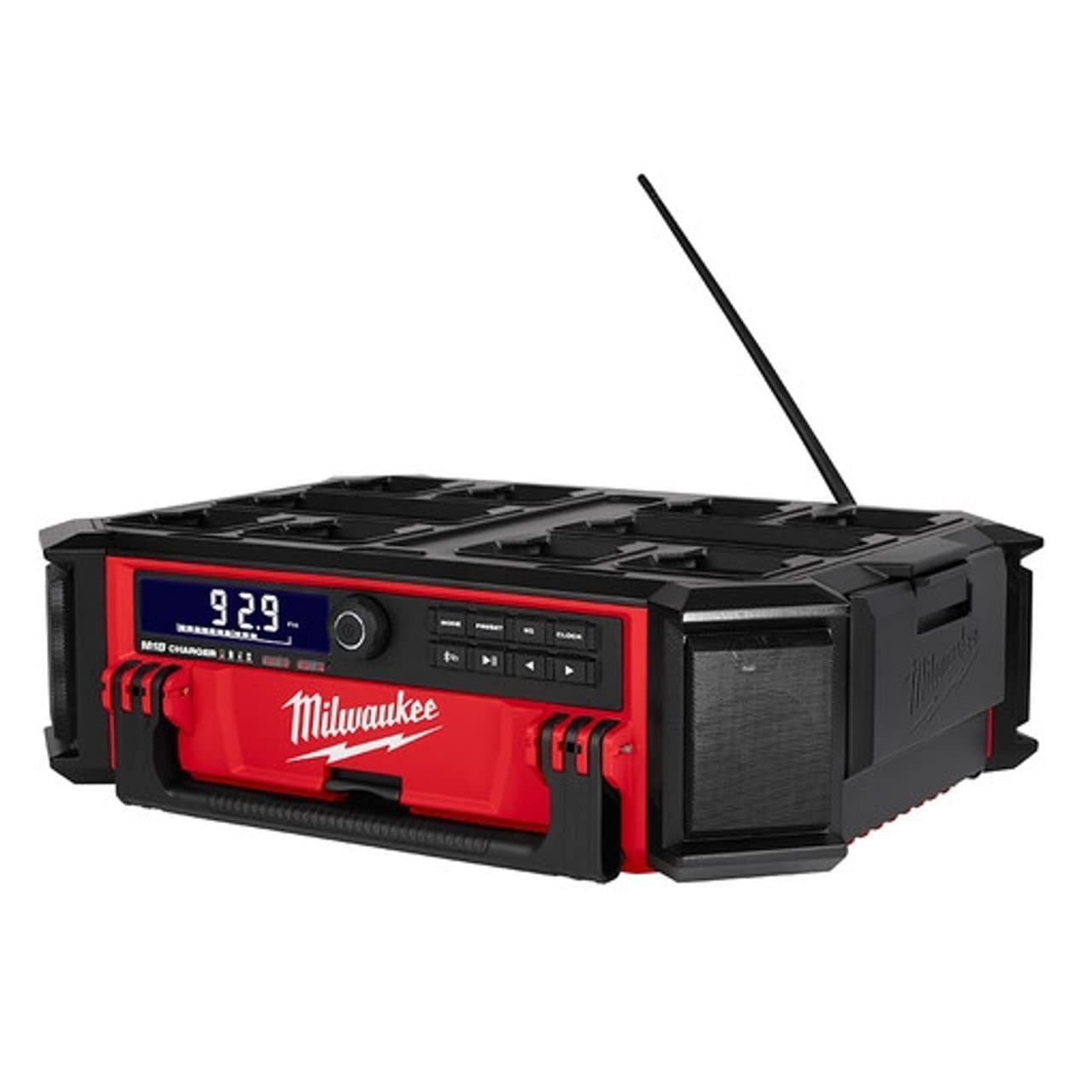
Figure 1: Milwaukee M18 PACKOUT Radio Charger (Model 2950-20) with key dimensions.
2. Configuración
2.1 Instalación da batería
- Locate the battery compartment on the side of the unit.
- Open the weather-sealed compartment cover.
- Insert a fully charged Milwaukee M18 battery into the designated slot until it clicks securely into place.
- Close the compartment cover firmly to ensure a weather-sealed connection.
2.2 Conexión de alimentación
- For AC power and battery charging, locate the integrated power cord on the side of the unit.
- Unwrap the power cord from its storage hooks.
- Conecte o cable de alimentación a unha toma de corrente estándar de 120 V CA.
- The unit will automatically begin charging any inserted M18 battery.
3. Instrucións de funcionamento
3.1 Controisview
The control panel features a central power/volume knob, mode selection buttons, preset buttons, equalizer controls, and a clock button. Playback controls (play/pause, skip forward/backward) are also present.

Figura 2: detallada view do panel de control.
3.2 Acendido/apagado e volume
- To power on/off: Press and hold the central power/volume knob.
- To adjust volume: Rotate the central power/volume knob clockwise to increase volume and counter-clockwise to decrease.
3.3 Radio Operation (AM/FM, Presets)
- Preme o MODO button to cycle through available modes (Bluetooth, AM, FM, Auxiliary).
- Once in AM or FM mode, use the forward/backward arrow buttons to tune to desired stations.
- To save a preset: Tune to the desired station, then press and hold a PRESET button (1-9) until the display confirms storage.
- Para recuperar unha predefinición: prema brevemente o botón correspondente PRESET botón.
3.4 Conectividade Bluetooth
- Preme o MODO button until "Bluetooth" is selected. The Bluetooth indicator will flash.
- On your mobile device, enable Bluetooth and search for "Milwaukee Radio".
- Select the radio from your device's Bluetooth list to pair. The indicator will become solid when connected.
- Use your device or the radio's playback controls (play/pause, skip) to manage audio.
3.5 Dispositivos de carga
- Open the weather-sealed compartment on the side of the unit.
- Locate the USB charging port inside.
- Connect your mobile device or other USB-powered device using a compatible USB cable.
- Close the compartment cover to protect your device from jobsite elements while charging.
3.6 Equalizer and Clock Settings
- Preme o EQ button to access equalizer settings (Bass, Treble). Use the arrow buttons to adjust levels.
- Preme o RELOXO button to set the time. Use the arrow buttons to adjust hours and minutes, then press RELOXO de novo para confirmar.
4. Mantemento
- Limpeza: Limpar a unidade co anuncioamp cloth. Do not use harsh chemicals or abrasive cleaners. Ensure all compartments are closed before cleaning.
- Almacenamento: Store the radio in a dry, protected area when not in use. Ensure the power cord is neatly wrapped and secured.
- Coidado da batería: Always use genuine Milwaukee M18 batteries. Follow battery charging and storage guidelines provided with your M18 batteries.
5 Solución de problemas
- Sen enerxía: Ensure the unit is properly plugged into an AC outlet or that a charged M18 battery is securely installed. Check the power outlet for functionality.
- Sen son: Verify volume is turned up. Check that the correct audio source (AM/FM/Bluetooth/Aux) is selected. Ensure Bluetooth device is paired and playing audio.
- Mala recepción de radio: Extend the antenna fully. Try repositioning the unit to improve signal.
- Problemas de sincronización Bluetooth: Ensure the radio is in Bluetooth mode and discoverable. Forget the device on your mobile phone and attempt to re-pair. Ensure no other devices are actively connected to the radio.
- A batería non se carga: Confirm the unit is plugged into a live AC outlet. Ensure the M18 battery is correctly inserted. Check for any error indicators on the display.
6. Especificacións
| Característica | Especificación |
|---|---|
| Número de modelo | 2950-20 |
| Fabricante | Milwaukee Electric |
| Fonte de enerxía | Battery Powered (M18) / AC Power |
| Dimensións do produto | 22 cm de longo x 6.7 cm de ancho x 16.2 cm de alto |
| Peso do elemento | 4 libras |
| Conectividade | Bluetooth, USB, AM/FM Radio |
| Estilo de visualización | LCD |
| Características especiais | Built-In Clock, Weather-Sealed Compartment, Bottle Opener |
7. Garantía e soporte
This Milwaukee M18 PACKOUT Radio Charger is covered by a Manufacturer Warranty. For specific warranty details, registration, or support, please refer to the documentation included with your product or visit the official Milwaukee Electric websitio. Garde o recibo da compra como xustificante de compra para reclamacións de garantía.


