1. Produto rematadoview
The EARISE M37 is a portable 100W PA system designed for various audio applications, including home parties, small events, and karaoke. It features a wooden cabinet for enhanced acoustics, built-in Bluetooth connectivity, and comes with two wireless microphones for immediate use. The system supports multiple audio inputs including AUX and USB, offering versatile playback options.

Image: The EARISE M37 PA system, showcasing its wooden box design and two included wireless microphones.
2. Información de seguridade
- Non expoña a unidade á choiva nin á humidade para evitar incendios ou descargas eléctricas.
- Do not open the cabinet. There are no user-serviceable parts inside. Refer all servicing to qualified personnel.
- Asegúrese de que haxa unha ventilación axeitada arredor da unidade. Non bloquee as aberturas de ventilación.
- Evite colocar a unidade preto de fontes de calor como radiadores, rexistros de calor, estufas ou outros aparellos (incluídos amplificadores) que producen calor.
- Protexa o cable de alimentación para evitar que se pise ou se pinche, especialmente nos enchufes, tomas de corrente e no punto de saída do aparello.
- Desenchufe este aparello durante tormentas eléctricas ou cando non se use durante longos períodos de tempo.
3. Contido do paquete
Comprobe se o paquete contén os seguintes elementos:
- EARISE M37 PA System Unit
- 2 x micrófonos sen fíos
- Mando a distancia
- Adaptador de alimentación
- Manual de usuario (este documento)

Image: A visual representation of key features and included accessories: wireless microphone, Bluetooth 4.2, USB auto-play, and remote controller.
4. Características e compoñentes do produto
Familiarize yourself with the main components and controls of your EARISE M37 PA System.

Image: The control panel of the EARISE M37, showing various inputs and adjustment knobs. Key controls include: Mode, Previous/Next Track, Play/Pause, Record, EQ, Light, Mic 1/2 inputs, AUX In/Out, USB, TF card slot, DC Power In, ON/OFF switch, Charging indicator, ECHO, DELAY, MIC VOL, MASTER VOL, TREBLE, EXTRA BASS, and BASS.
Funcións do panel de control:
- MODO: Alterna entre os modos de entrada (Bluetooth, AUX, USB, tarxeta TF).
- Pista anterior/seguinte: Navigates tracks during media playback.
- Reproducir/Pausa: Controla a reprodución multimedia.
- Rexistro: Initiates or stops recording (requires USB/TF storage).
- EQ: Adjusts equalization settings.
- Luz: Controla a iluminación LED integrada.
- MIC 1 / MIC 2: Inputs for wired microphones (if used).
- AUX IN / AUX OUT: Audio input and output jacks for external devices.
- USB: USB port for media playback or recording.
- TF: TF (MicroSD) card slot for media playback or recording.
- DC Power IN: Power input for charging and operation.
- ACENDIDO APAGADO: Power switch for the unit.
- Indicador de carga: Light indicating charging status.
- ECO: Axusta o efecto de eco para os micrófonos.
- RETRASO: Axusta o efecto de retardo para os micrófonos.
- MIC VOL: Axusta o volume dos micrófonos.
- MESTRAL VOL: Controla o volume xeral do sistema.
- TREBLE: Axusta a saída de audio de alta frecuencia.
- BAIXO EXTRA: Mellora a saída de audio de baixa frecuencia.
- BAIXO: Axusta a saída de audio de baixa frecuencia.
5. Configuración
5.1 Charging the PA System
Before first use, fully charge the PA system. Connect the provided power adapter to the "DC Power IN" port on the unit and plug it into a standard wall outlet. The charging indicator light will show the charging status. A full charge provides up to 7 hours of play time.

Image: Illustration highlighting the 3600mAh battery capacity, providing up to 7 hours of continuous play time.
5.2 Configuración do micrófono sen fíos
The two wireless microphones are pre-paired with the PA system. Insert AA batteries (not included) into each microphone. Turn on the microphones using their respective power switches. They should automatically connect to the PA system.
5.3 Conexión de fontes de son
Conexión Bluetooth:
- Turn on the EARISE M37 PA system.
- Preme o MODO button until the display shows "Bluetooth" or a Bluetooth icon.
- No teu dispositivo móbil (teléfono intelixente, tableta, etc.), activa o Bluetooth e busca os dispositivos dispoñibles.
- Select "EARISE M37" from the list. Once connected, you will hear a confirmation sound.

Image: A hand holding a smartphone displaying a Bluetooth connection screen, indicating the ease of pairing with the EARISE M37 PA system.
Reproducción de tarxetas USB/TF:
Insira unha unidade flash USB ou unha tarxeta TF (MicroSD) que conteña son MP3 files into the respective port. The system will automatically detect and begin playing music. Use the Previous/Next Track and Play/Pause buttons to control playback.
Entrada AUX:
Conecte un dispositivo de son externo (por exemplo, un reprodutor de MP3, un ordenador) ao AUX IN port using a 3.5mm audio cable (not included). Press the MODO button until AUX input is selected.
6. Instrucións de funcionamento
6.1 Encendido/apagado
To turn the unit on or off, use the ON/OFF interruptor situado no panel de control.
6.2 Adjusting Volume and Effects
- MESTRAL VOL: Rotate this knob to adjust the overall volume of the PA system.
- MIC VOL: Axusta o volume dos micrófonos conectados.
- ECHO / DELAY: Use these knobs to add or reduce echo and delay effects to the microphone sound.
- TREBLE / BASS / EXTRA BASS: Axuste estes botóns para axustar con precisión as frecuencias altas e baixas da saída de audio.
6.3 Uso de micrófonos
Once the wireless microphones are powered on and connected, speak into them. Adjust the MIC VOL, ECO, e RETRASO knobs on the PA system to achieve the desired sound. For optimal performance, hold the microphone a few inches from your mouth.

Image: Two individuals enjoying karaoke with the EARISE M37 PA system and its wireless microphones, demonstrating typical usage.
6.4 Función de gravación
To record audio (e.g., microphone input or music playback), ensure a USB flash drive or TF card is inserted into the corresponding slot. Press the RECORDAR button to start recording. Press it again to stop. Recorded filegardaranse no dispositivo de almacenamento inserido.
7. Mantemento
- Limpa a unidade cun pano suave e seco. Non empregues produtos de limpeza abrasivos nin solventes.
- Store the PA system in a cool, dry place away from direct sunlight and extreme temperatures.
- If the unit will not be used for an extended period, fully charge the battery before storage and recharge it every few months to maintain battery health.
8 Solución de problemas
| Problema | Causa posible | Solución |
|---|---|---|
| Sen poder | Battery drained; Power cable not connected. | Charge the unit; Ensure power cable is securely connected. |
| Non hai son dos micrófonos | Microphones off; Batteries low/dead; MIC VOL too low. | Turn on microphones; Replace batteries; Increase MIC VOL. |
| Bluetooth non se conecta | PA system not in Bluetooth mode; Device too far; Interference. | Press MODE button to select Bluetooth; Move device closer; Restart both devices. |
| A tarxeta USB/TF non se reproduce | Incorrecto file formatado; Tarxeta/unidade non inserida correctamente; Corrompido files. | Garantir files are MP3; Reinsert card/drive; Try different files/device. |
9. Especificacións
| Característica | Detalle |
|---|---|
| Marca | OURO |
| Modelo | M37 |
| Potencia de saídatage | 100 vatios |
| Fonte de enerxía | Alimentado por batería |
| Tecnoloxía de conectividade | Bluetooth, USB, AUX |
| Versión Bluetooth | 4.2 (da imaxe) |
| Entrada de audio | Wireless Microphone, AUX |
| Número de canles | 2 |
| Peso do elemento | 11.62 libras |
| Dimensións do paquete | 18.7 x 12 x 11.9 polgadas |
| Dimensións do produto (aprox.) | 32.5 cm (12.8 in) H x 25.5 cm (10 in) W x 23.8 cm (9.4 in) D |
| Cor | Negro |
| Tipo de montaxe | Mesa |
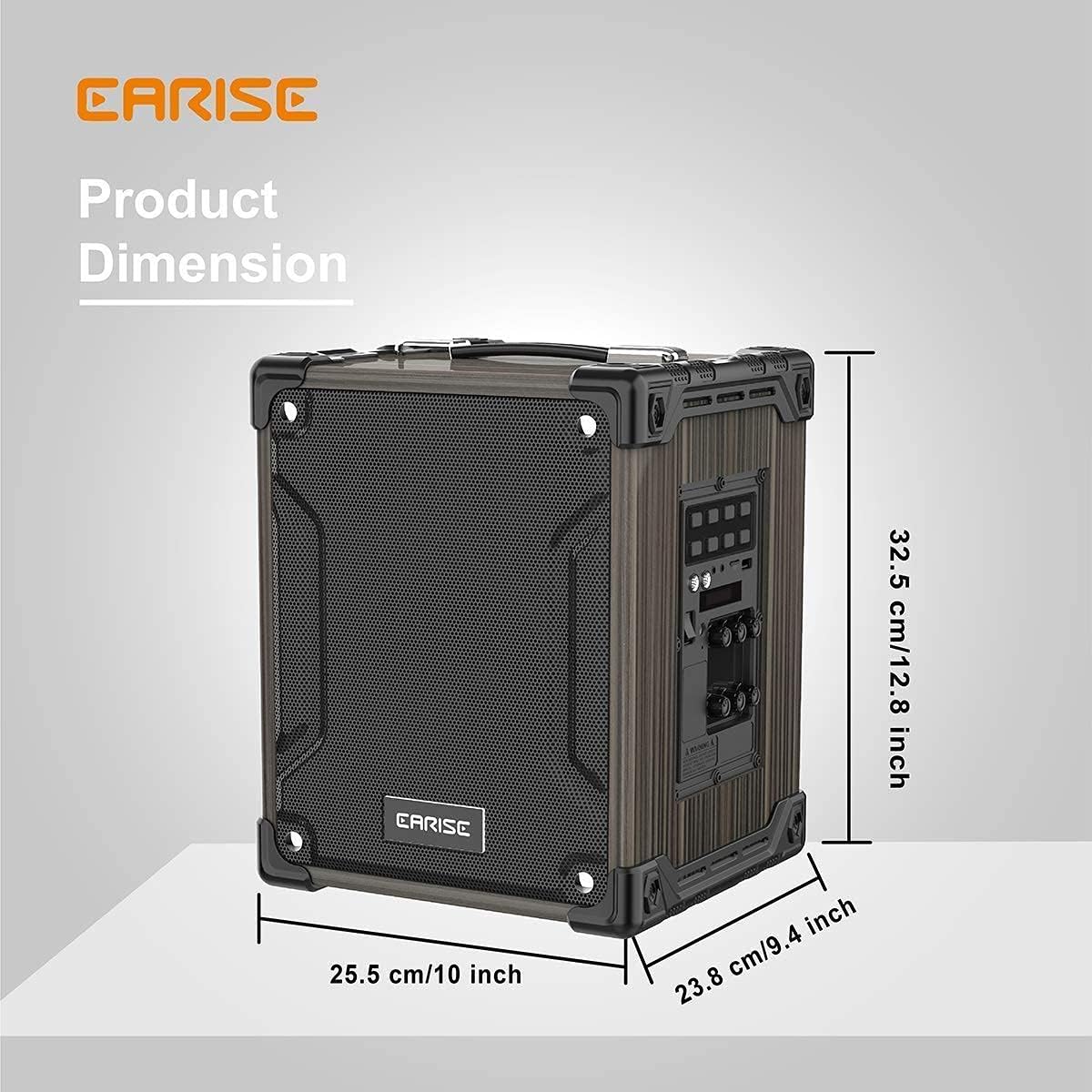
Image: Product dimensions of the EARISE M37, measuring approximately 32.5 cm (12.8 inches) in height, 25.5 cm (10 inches) in width, and 23.8 cm (9.4 inches) in depth.
10. Garantía e soporte
For warranty information or technical support, please refer to the contact details provided with your purchase or visit the official EARISE websitio. Garda o comprobante de compra para reclamacións de garantía.


