1. Introdución
The REOLINK E1 4MP Indoor WiFi Pan Tilt Camera is a versatile security solution designed for indoor monitoring. It offers high-definition video, advanced detection capabilities, and flexible control options to help you keep an eye on your home, pets, or baby. This manual provides essential information for setting up, operating, and maintaining your camera.
2. Que hai na caixa
- REOLINK E1 Camera
- 5V1A Power Adapter (with 3m power cable)
- Placa de montaxe
- Plantilla de orificio de montaxe
- Guía de inicio rápido
3. Guía de configuración
3.1 Acendido
Connect the provided 5V1A power adapter to the camera's power port and plug it into a standard electrical outlet. The camera will power on and initiate its startup sequence.
3.2 Downloading the Reolink App
Download the official Reolink App from the Apple App Store (for iOS devices) or Google Play Store (for Android devices). Create an account or log in if you already have one.
3.3 Conectando a Wi-Fi
Open the Reolink App and tap the '+' icon to add a new device. Scan the QR code located on the bottom of your camera. Follow the on-screen prompts to connect the camera to your 2.4GHz Wi-Fi network. Ensure your Wi-Fi password is correct. The camera will provide voice prompts during the connection process.
3.4 Inserción dunha tarxeta MicroSD (opcional)
For local storage, gently slide the camera lens upwards to reveal the microSD card slot. Insert a microSD card (up to 512GB, not included) into the slot until it clicks into place. The camera supports continuous recording or motion-triggered recording to the card.
3.5 Opcións de montaxe
The camera can be placed on a flat surface or mounted to a wall or ceiling using the included mounting plate and screws. Use the mounting hole template to mark drilling positions. Ensure the camera is positioned to cover your desired monitoring area.

Image: REOLINK E1 4MP Indoor WiFi Camera showing various mounting positions (tabletop, wall, ceiling).
4. Instrucións de funcionamento
4.1 En directo View e control de panorámica/inclinación
Once connected, open the Reolink App and tap on your camera to access the live view. Use the on-screen joystick or swipe gestures to remotely pan (355°) and tilt (50°) the camera lens, providing 360° coverage of your room.

Image: REOLINK E1 4MP Indoor WiFi Camera demonstrating 360-degree pan and tilt functionality for comprehensive room coverage.
4.2 Conversación bidireccional
Toca a icona do micrófono na transmisión en directo view interface to enable two-way audio. You can speak through your phone, and your voice will be transmitted through the camera's speaker. This feature is ideal for communicating with family members, pets, or deterring intruders.
4.3 Detección intelixente e alertas
The camera features smart human and pet detection, reducing false alarms. It also includes instant cry alerts for baby monitoring. Configure alert settings (push notifications, email alerts) in the app to receive real-time notifications when motion or crying sounds are detected.
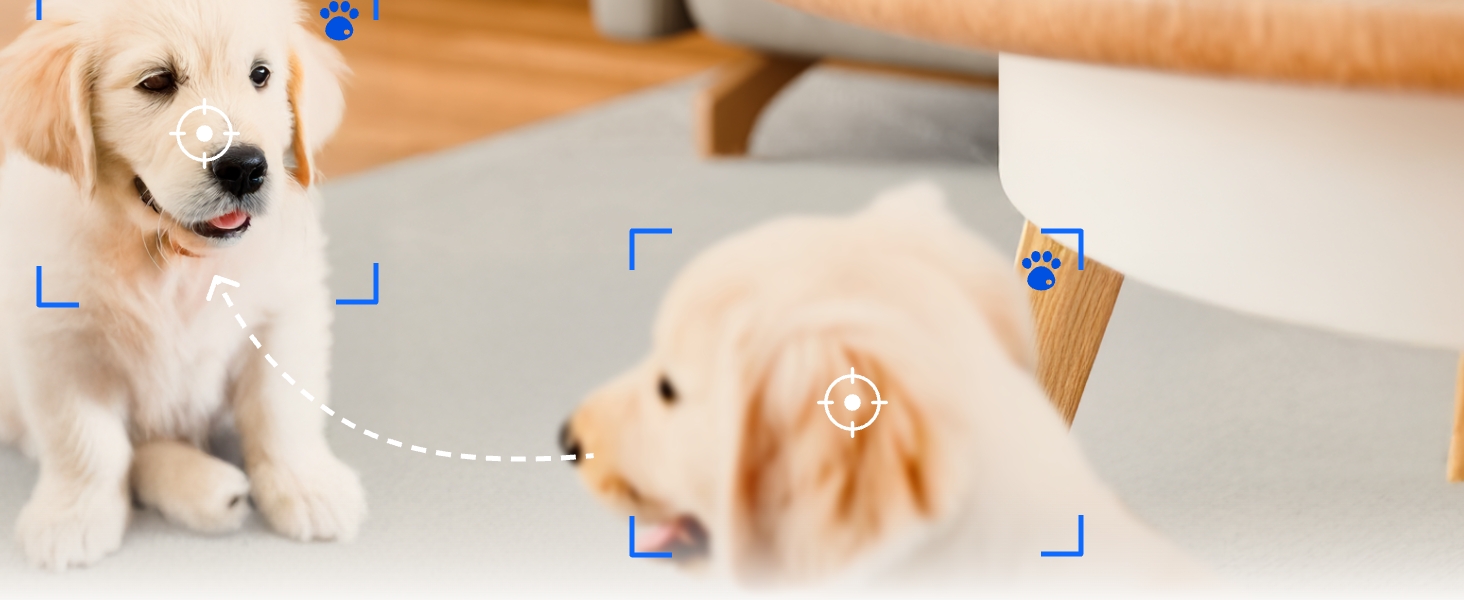
Image: REOLINK E1 4MP Indoor WiFi Camera showcasing intelligent detection of people and pets, with notification icons.
4.4 Seguimento automático
Enable auto-tracking in the app settings. The camera will automatically follow detected human or pet movement within its field of view, garantindo unha supervisión continua da actividade.
4.5 Modo de privacidade
Activate Privacy Mode via the Reolink App to physically block the camera's view and mute audio when privacy is desired. This ensures no recording or live viewing occurs during this period.

Image: REOLINK E1 4MP Indoor WiFi Camera with Privacy Mode enabled, showing the camera lens obscured and audio muted.
4.6 Gravación e reprodución
Foo gravadotage can be accessed and played back through the Reolink App. If a microSD card is installed, you can review historical recordings. Cloud storage options are also available via subscription.
4.7 Multi-User Remote Access
Share access to your camera with up to 10 users. Up to 4 users can view the live feed simultaneously. Manage user permissions within the app settings.
4.8 Integración de fogares intelixentes
The REOLINK E1 camera is compatible with Amazon Alexa and Google Assistant, allowing for voice-controlled monitoring and integration into your smart home ecosystem.
5. Funcións máisview
- 4MP HD & Night Vision: Enjoy 4MP clarity with enhanced infrared night vision for sharper images, even in low light conditions.
- Instant Cry Alerts & Two-Way Talk: Receive immediate alerts for crying sounds and communicate remotely using the two-way audio feature.
- 360° Coverage & Auto Tracking: With 355° pan and 50° tilt, the camera provides full 360° coverage and automatically tracks movement.
- Múltiples opcións de almacenamento: Supports up to a 512GB microSD card, Reolink NVR, and Reolink Home Hub/Home Hub Pro for local storage.
- Convenient Management & Privacy Mode: Manage your camera easily with the free Reolink App. Activate Privacy Mode to disable camera view and audio when needed.

Image: REOLINK E1 4MP Indoor WiFi Camera, showcasino seu deseño compacto e a súa lente.
Video: Official Reolink video demonstrating the E1 4MP Indoor WiFi Camera's features for baby and pet monitoring.
6. Mantemento
- Limpeza: Use a soft, dry cloth to clean the camera lens and body. Avoid harsh chemicals or abrasive materials.
- Actualizacións de firmware: Regularly check the Reolink App for firmware updates to ensure your camera has the latest features and security enhancements.
- Ciclo de enerxía: If the camera experiences issues, unplug the power adapter for 10 seconds and then plug it back in to restart the device.
7 Solución de problemas
- Cámara sen conexión: Check Wi-Fi connection, ensure the camera is powered on, and try restarting your router.
- Non se pode conectar á wifi: Verify your Wi-Fi password, ensure you are connecting to a 2.4GHz network, and try moving the camera closer to the router.
- Falsas alarmas: Adjust motion detection sensitivity and set up custom motion zones in the app to reduce unwanted alerts.
- No Recording to MicroSD Card: Ensure the microSD card is correctly inserted, formatted within the app, and not full.
8. Especificacións
| Resolución de captura de vídeo | 4 MP |
| Tecnoloxía de conectividade | WiFi 2.4 GHz |
| Características especiais | 4MP, Auto Tracking, Instant Cry Alerts, 2.4G WiFi, Night Vision, 2-Way Talk |
| Uso interior/exterior | Interior |
| Dispositivos compatibles | Reolink PoE NVR, Reolink WiFi NVR, Reolink Home Hub Pro, Reolink Home Hub |
| Tipo de controlador | Amazon Alexa, Asistente de Google |
| Fonte de enerxía | Eléctrico con cable (5 V CC, 3 W) |
| Range de visión nocturna | 40 pés |
| Campo de View | 80 graos |
| Dimensións do elemento | 2.99 x 2.76 x 4.21 polgadas |
9. Garantía e soporte
The REOLINK E1 camera comes with a 2-year manufacturer warranty. For technical support, troubleshooting, or warranty claims, please visit the official REOLINK websitio web ou póñase en contacto directamente co servizo de atención ao cliente.


