Produto rematadoview
This manual provides instructions for the Elekpia Replacement Remote Control, designed for use with various MAG IPTV Linux Set-Top Box models. This remote offers a direct replacement solution, requiring no complex programming or pairing.
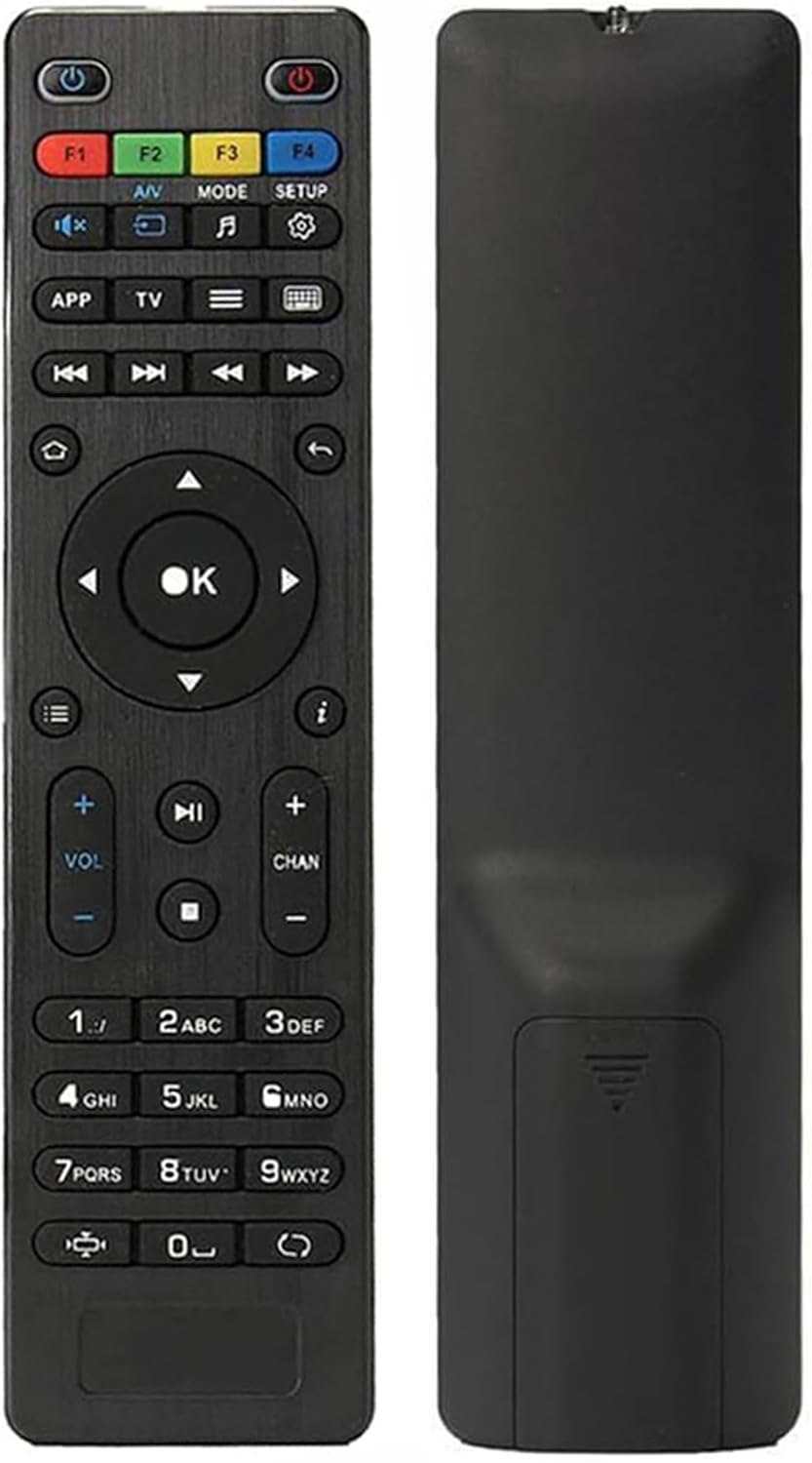
Imaxe: Anverso e reverso view of the Elekpia replacement remote control. The remote is black with clearly labeled buttons on the front, and a smooth, ergonomic back.
Características principais:
- Compatible with a wide range of MAG IPTV Linux Set-Top Box models, including MAG250, MAG254, 255, 256, 257, 260, 275, 349, 350, 351, 352, and MAG322W1.
- No programming or pairing required; functions immediately upon battery installation.
- Alimentado por dúas pilas AAA (non incluídas).

Image: The remote control is shown alongside a list of compatible MAG models, emphasizing its broad compatibility with various MAG IPTV Linux Set-Top Boxes.
Configuración
Setting up your new Elekpia remote control is a straightforward process. Follow these steps to begin using your remote.
1. Instalación da batería
- Localice o compartimento da batería na parte traseira do control remoto.
- Deslice a tapa do compartimento da batería.
- Insert two (2) AAA batteries, ensuring the positive (+) and negative (-) terminals align correctly with the indicators inside the compartment.
- Pecha a tapa do compartimento da batería de forma segura.
2. Uso inicial
This remote control is designed to work directly with compatible MAG IPTV Linux Set-Top Boxes without the need for programming or pairing. Once batteries are installed, point the remote at your set-top box and begin using it.
Instrucións de funcionamento
Familiarize yourself with the functions of each button on your Elekpia remote control to effectively navigate and control your MAG IPTV Linux Set-Top Box.

Image: A detailed diagram illustrating the layout and function of each button on the remote control, including power, navigation, volume, channel, and media playback controls.
Funcións dos botóns do control remoto| Botón | Función |
|---|
| Botón de encendido (⏻) | Turns the Media Player On/Off. |
| F1, F2, F3, F4 | Additional functions (may vary by device). |
| A/V | Changes audio mode. |
| MODO | Accesses setup menu. |
| CONFIGURACIÓN | Accesses setup menu. |
| APP | Menú contextual. |
| TV | Quick TV access. |
| Menú (☰) | Guía de TV. |
| Teclado (⌨) | Virtual keyboard. |
| Frechas de navegación (Arriba, Abaixo, Esquerda, Dereita) | Navega polos menús e opcións. |
| Botón OK | Confirma as seleccións. |
| Atrás/Volta (↩) | Volve á pantalla anterior. |
| Casa (⌂) | Volve á pantalla de inicio. |
| Información (ⓘ) | Mostra información. |
| Subir/Baixar o volume (VOL + / -) | Axusta o nivel de volume. |
| Canle arriba/abajo (CHAN + / -) | Switches channels. |
| Silenciar (🔇) | Activa/desactiva o son. |
| Reproducir/Pausa (▶⏸) | Plays or pauses media. |
| Pare (⏹) | Detén a reprodución multimedia. |
| Saltar cara adiante/atrás (⏭⏮) | Skips to the next/previous track or chapter. |
| Reprodución rápida (⏩) | Fast forwards through media. |
| Teclado numérico (0-9) | Direct input for channel numbers or other numerical data. |
| Relación de aspecto (◧) | Cambia a relación de aspecto. |
| Actualizar (↻) | Initiates an update (functionality may vary). |
Mantemento
Un mantemento axeitado garante a lonxevidade e o rendemento óptimo do seu mando a distancia.
1. Substitución da batería
Replace batteries when the remote's responsiveness decreases or it stops functioning. Always use new AAA batteries and dispose of old batteries responsibly according to local regulations.
2. Limpeza
To clean the remote, gently wipe its surface with a soft, dry cloth. For stubborn dirt, slightly dampen the cloth with water or a mild, non-abrasive cleaner. Avoid using excessive liquid or harsh chemicals, as these can damage the remote's electronics or finish.
3. Almacenamento
When not in use for extended periods, it is recommended to remove the batteries to prevent potential leakage and damage to the remote.
Resolución de problemas
If you encounter issues with your remote control, refer to the following common problems and their solutions.
Problemas comúns e solucións| Problema | Causa posible | Solución |
|---|
| O mando a distancia non responde. | Dead or incorrectly installed batteries. Obstruction between remote and set-top box. Remote out of range. | Replace batteries with new AAA batteries, ensuring correct polarity. Remove any obstructions. Ensure you are within effective range of the set-top box. |
| Buttons are sticky or hard to press. | Accumulation of dirt or debris under the buttons. Internal mechanism issue. | Gently clean around the buttons with a soft, dry cloth or a cotton swab. If the issue persists, it may indicate internal wear. |
| O control remoto funciona de forma intermitente. | Low battery power. Infrared sensor on remote or set-top box is dirty or obstructed. | Replace batteries. Clean the infrared sensor on both the remote and the set-top box. Ensure a clear line of sight. |
| Remote does not control the set-top box. | Incompatible set-top box model. | Verify that your MAG IPTV Linux Set-Top Box model is listed as compatible (MAG250, MAG254, 255, 256, 257, 260, 275, 349, 350, 351, 352, MAG322W1). |
Especificacións
Especificacións do produto| Característica | Detalle |
|---|
| Número de modelo | Elekpia mag 254 remote |
| Dispositivos compatibles | MAG250, MAG254, 255, 256, 257, 260, 275, 349, 350, 351, 352 IPTV Linux Set-Top Box, MAG322W1 |
| Fonte de enerxía | 2 pilas AAA (non incluídas) |
| Dimensións (L x W x H) | 7 x 1.8 x 0.6 polgadas (aproximadamente) |
| Peso do elemento | 1.76 onzas (aproximadamente) |
| Cor | Negro |
| Característica especial | Deseño ergonómico |
Garantía e Soporte
Information regarding product warranty and customer support is not provided within this instruction manual. For warranty details or technical assistance, please refer to the product packaging or contact the retailer/manufacturer directly.
Manufacturer: Elekpia Factory


