1. Introdución
This manual provides detailed instructions for the Amazon Basics Aluminum Type-C Docking Station. This device expands the connectivity of your USB-C enabled laptop or tablet, offering a wide range of ports for various peripherals and external displays. Please read this manual thoroughly before use to ensure proper operation and to maximize the product's functionality.
2. Características do produto
- Deseño multiporto 11 en 1: Integrates Mini DisplayPort, HDMI, VGA, 3 USB-A ports, Ethernet, SD/TF card reader, 3.5mm audio jack, and a Type-C charging port (PD 100W).
- Saída de vídeo de alta resolución: Supports Ultra HD 4K output via Mini DisplayPort/HDMI and Full HD 1080P via VGA, allowing for mirroring or extending your display to HDTVs, monitors, or projectors. Note: 4K resolution is supported at 30Hz refresh rate.
- Transferencia rápida de datos: Three USB 3.0 A ports provide data transfer speeds up to 5Gbps, backward compatible with USB 2.0/1.0.
- Stable Network Connection: 1000Mbps RJ45 Ethernet port ensures a fast and reliable wired network connection.
- Lector de tarxetas universal: Integrated SD and TF slots allow simultaneous reading of universal SD and Micro SD memory cards.
- Entrega de enerxía: Type-C charging port supports Power Delivery (PD) up to 100 watts for charging your host device.
- Conectividade de audio: Conector de audio de 3.5 mm para auriculares ou altofalantes.
- Construción duradeira: Features an aluminum pedestal-style housing for enhanced durability and heat dissipation.
3. Contido do paquete
- Amazon Basics Aluminum Type-C Docking Station
- Manual de usuario
4. Produto rematadoview and Port Layout
Familiarize yourself with the various ports and their functions on your docking station.

Imaxe: Primeiro plano view of the Amazon Basics Type-C Docking Station's ports, including Ethernet, Mini DisplayPort, HDMI, VGA, and USB-C.
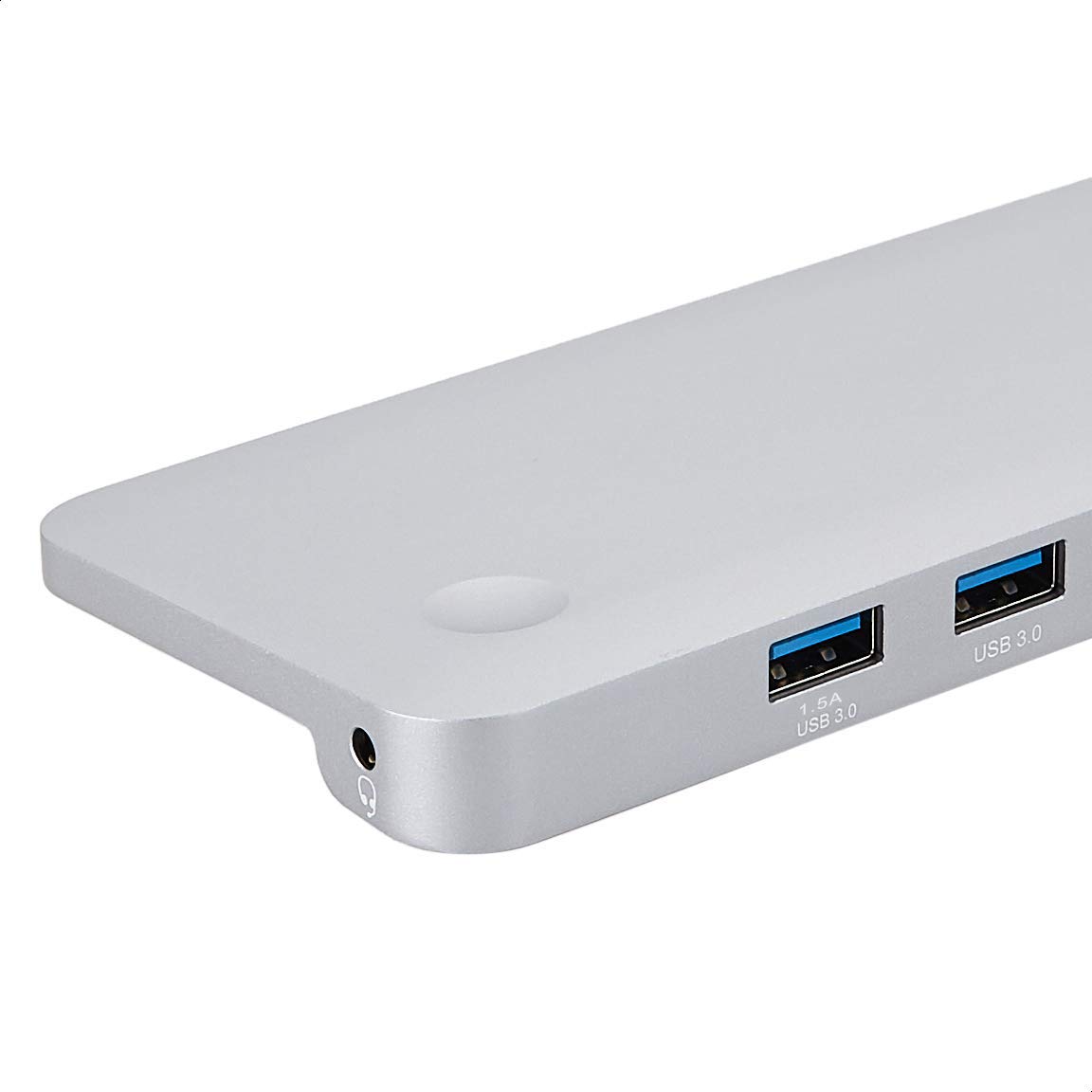
Imaxe: Detallada view of the USB 3.0 ports and 3.5mm audio jack on the Amazon Basics Type-C Docking Station.
- Conector de host USB-C: Connects to your laptop or tablet's USB-C port.
- Portos USB 3.0 (x3): For connecting USB devices such as external hard drives, keyboards, mice, or USB flash drives.
- Ranura para tarxetas SD: For reading standard SD memory cards.
- Ranura para tarxetas TF (Micro SD): For reading Micro SD memory cards.
- Porto Ethernet RJ45: Para conexión de rede por cable.
- Mini DisplayPort: Para conectar a unha pantalla externa.
- Porto HDMI: Para conectar a unha pantalla externa.
- Porto VGA: Para conectar a unha pantalla externa.
- Conector de audio de 3.5 mm: Para conectar auriculares ou altofalantes.
- Porto de carga USB-C PD: For connecting a USB-C power adapter to charge your host device and power the docking station.
5. Instrucións de configuración
Siga estes pasos para configurar a súa estación de acoplamento:
- Conectar ao dispositivo anfitrión: Plug the integrated USB-C host connector cable from the docking station into an available USB-C port on your laptop or tablet. Ensure your host device's USB-C port supports DisplayPort Alt Mode (DP Alt Mode) for video output functionality.
- Conectar a alimentación (opcional pero recomendado): If your host device requires charging or if you are connecting power-intensive peripherals, connect your USB-C power adapter (up to 100W) to the USB-C PD Charging Port on the docking station. This will charge your host device and provide stable power to the docking station and connected peripherals.
- Conectar periféricos: Connect your desired peripherals (e.g., external monitors, USB devices, Ethernet cable, SD/TF cards, audio devices) to the corresponding ports on the docking station.

Image: Amazon Basics Type-C Docking Station connected to a laptop, with multiple peripherals like a USB drive and external display cables plugged in.
6. Instrucións de funcionamento
6.1. Saída de vídeo
- Connect your monitor or projector to the HDMI, Mini DisplayPort, or VGA port.
- Your operating system should automatically detect the external display. You may need to adjust display settings (e.g., extend, duplicate) in your computer's display preferences.
- The docking station supports 4K resolution at 30Hz refresh rate via HDMI and Mini DisplayPort. For optimal performance, ensure your display and cables support the desired resolution and refresh rate.
- Dual video display is supported, allowing you to mirror or expand your screen across multiple monitors.
6.2. USB Data Transfer
- Plug your USB devices into the USB 3.0 ports.
- The ports support data transfer speeds up to 5Gbps.
6.3. Conexión Ethernet
- Connect an Ethernet cable from your router or modem to the RJ45 Ethernet port on the docking station.
- Your computer should automatically establish a wired network connection.
6.4. SD/TF Card Reader
- Insert your SD or TF (Micro SD) card into the corresponding slot.
- The cards will appear as removable drives on your computer, allowing you to access and transfer files. Ambas as dúas ranuras pódense usar simultaneamente.
6.5. Saída de audio
- Connect your headphones or speakers to the 3.5mm audio jack.
- You may need to select the docking station as the default audio output device in your computer's sound settings.
6.6. Entrega de potencia (PD)
- Connect your laptop's USB-C power adapter to the USB-C PD Charging Port on the docking station.
- This port supports up to 100W power delivery to charge your host device while using the docking station.
7. Compatibilidade
This docking station is compatible with a wide range of USB-C enabled devices, including but not limited to:
- MacBook Pro 2018/2017/2016
- iPad Pro 2018
- Mac mini 2018
- MacBook Air
- iMac 2017
- Samsung Note 9
- HUAWEI MateBook X
- Dell XPS 13
- ThinkPad
- Chromebook
Importante: This product functions only with computers that support DisplayPort Alt Mode (DP Alt Mode) via their USB-C port. Please verify your computer's specifications for compatibility before use.
8 Solución de problemas
- Sen saída de visualización:
- Asegúrate de que o porto USB-C do teu dispositivo anfitrión sexa compatible co modo alternativo de DisplayPort.
- Check all cable connections (USB-C to host, video cable to monitor).
- Verify the external monitor is powered on and set to the correct input source.
- Proba a reiniciar o teu ordenador.
- 4K Resolution Not Working at 60Hz:
- This docking station supports 4K resolution at a maximum refresh rate of 30Hz. If your monitor is set to 4K@60Hz, it will not display correctly. Adjust your display settings to 4K@30Hz or a lower resolution with a higher refresh rate if desired.
- Dispositivos USB non recoñecidos ou desconectados:
- Ensure the docking station is receiving sufficient power. Connect a USB-C power adapter to the PD port if you are using multiple power-intensive USB devices.
- Try connecting the USB device directly to your computer to confirm it is functional.
- Reconnect the docking station to your computer.
- Sen conexión de rede a través de Ethernet:
- Comprobe a conexión do cable Ethernet tanto á estación de acoplamento como ao seu enrutador/módem.
- Verify your network settings on your computer.
- Asegúrate de que o teu router/módem funcione correctamente.
- Sen saída de audio:
- Asegúrate de que os auriculares ou altofalantes estean conectados correctamente á toma de son de 3.5 mm.
- Check your computer's sound settings and select the docking station as the default audio output device.
- O dispositivo anfitrión non está a cargar:
- Ensure a compatible USB-C power adapter is connected to the docking station's USB-C PD Charging Port.
- Verify that your host device supports USB-C Power Delivery.
- Comprobe se o adaptador de corrente e o cable están danos.
9. Especificacións
| Característica | Especificación |
|---|---|
| Marca | Conceptos básicos de Amazon |
| Número de modelo | UTC-DOCK01-PRO |
| Cor | Gris |
| Dimensións (LxWxH) | 28 x 7.5 x 1.4 centímetros (11.02 x 2.95 x 0.55 polgadas) |
| Peso do elemento | 317 g (0.32 quilogramos) |
| Portos totais | 11 |
| Portos USB | 3 x USB 3.0 tipo A |
| Portos de saída de vídeo | 1 x HDMI, 1 x Mini DisplayPort, 1 x VGA |
| Resolución HDMI | Ata 4K@30Hz |
| Mini DisplayPort Resolution | Ata 4K@30Hz |
| Porto Ethernet | RJ45 Gigabit Ethernet (10/100/1000Mbps) |
| Lector de tarxetas | SD and TF (Micro SD) slots, simultaneous read |
| Porto de audio | 3.5mm Jack de audio |
| Porto de carga USB-C PD | Ata 100 vatios |
| Interface de hardware | Ethernet, HDMI, Mini DisplayPort, VGA, USB-A, USB-C, SD/TF, Audio |
10. Mantemento
- Limpeza: Use a soft, dry cloth to clean the docking station. Avoid using liquid cleaners or aerosols.
- Almacenamento: Garde o dispositivo nun lugar fresco e seco, lonxe da luz solar directa e de temperaturas extremas.
- Manexo: Evita deixar caer o dispositivo nin sometelo a impactos fortes. Non intentes desmontar nin modificar a estación de carga.
11. Información de seguridade
- Manteña o dispositivo lonxe da auga, do lume e de ambientes con alta humidade.
- Non expoña o dispositivo a temperaturas extremas.
- Emprega só adaptadores e cables de alimentación compatibles.
- Manter fóra do alcance dos nenos.
- If the device is damaged or malfunctions, discontinue use immediately and contact customer support.
12. Garantía e soporte
This Amazon Basics product comes with a Garantía limitada de 1 anos from the date of purchase. This warranty covers manufacturing defects and workmanship under normal use. It does not cover damage caused by misuse, accident, modification, or unauthorized repair.
For warranty claims, technical support, or further assistance, please contact Amazon Basics customer service through your Amazon purchase history or the official Amazon Basics support channels.


