1. Introdución e finalview
The OSD Audio MX1680 GEN2 is a high-performance, multi-channel amplifier designed for distributed audio systems. This Class D amplifier provides 16 channels across 8 independent zones, delivering 80 Watts per channel into 4 Ohms or 50 Watts per channel into 8 Ohms. It is suitable for both residential and commercial audio installations, serving as a main amplifier for multi-room audio or integrating into home theater systems.
Key features include front-panel on/off buttons for each zone, efficient Class D amplification for low distortion, and built-in protection circuitry against thermal overload and short circuits. Its slim, 2U rack-mountable design (hardware included) allows for flexible installation.

Imaxe 1.1: Parte dianteira e traseira view of the OSD Audio MX1680 GEN2 Multi-Zone Digital Ampmáis vivo.
2. Información de seguridade
Please read and understand all safety instructions before operating this device. Retain this manual for future reference.
- Fonte de enerxía: Conecta o ampo adaptador só co tipo de fonte de alimentación indicado na unidade. Asegúrese de que o volumetage é o correcto para a túa rexión.
- Ventilación: Do not block any ventilation openings. Install in accordance with the manufacturer's instructions. Maintain adequate space around the unit for proper airflow.
- Auga e humidade: Non expoña este aparello á choiva nin á humidade. Non coloque obxectos cheos de líquidos, como vasos, enriba do aparello.
- Calor: Non instale preto de fontes de calor como radiadores, rexistros de calor, cociñas ou outros aparellos (incluíndo amplificadores) que producen calor.
- Conexión a terra: This appliance must be grounded. Ensure the power cord is connected to a properly grounded outlet.
- Servizo: Non intente atender este produto vostede mesmo. Remita todo o servizo a persoal de servizo cualificado.
- Limpeza: Desconecte a unidade da toma de corrente antes de limpala. Use un pano seco para limpar.
3. Configuración e instalación
3.1 Desembalaxe
Elimina con coidado amplifier from its packaging. Verify that all components listed in the 'What's in the Box' section are present. This includes the MX1680 GEN2 amplifier and the Quick Start Guide.
3.2 Colocación
The MX1680 GEN2 is designed for rack mounting (2U height) or placement on a flat, stable surface. Ensure adequate ventilation around the unit to prevent overheating. Avoid placing it near other heat-generating equipment.
3.3 Conexións
Refer to the rear panel diagram for all input and output connections.
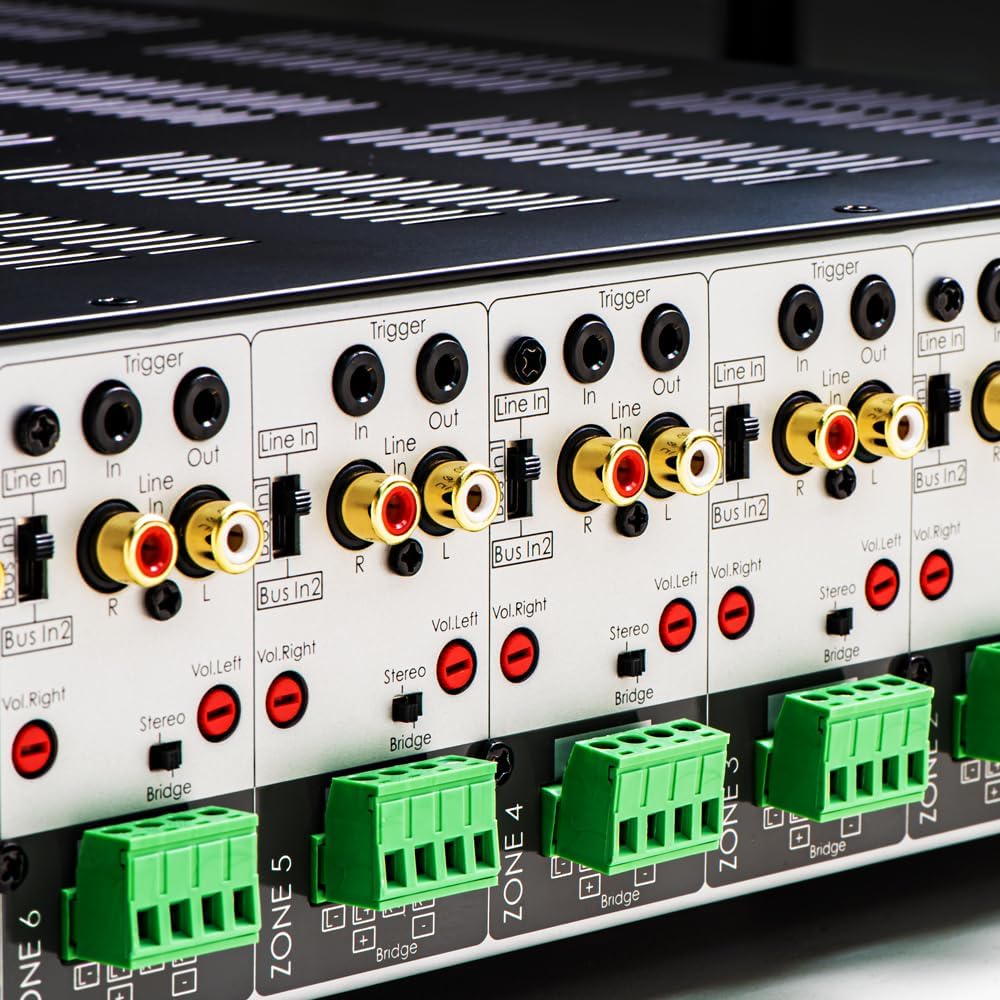
Imaxe 3.1: Detallada view of the rear panel input and output connections.
- Saídas de altofalantes: Connect your speakers to the corresponding zone terminals. Ensure correct polarity (+ to + and - to -). The amplifier supports both 4-ohm and 8-ohm speakers. For bridged mode operation, refer to section 4.3.
- Line Inputs (RCA): Each zone has a dedicated stereo RCA Line In. Connect your audio sources (e.g., pre-amplifier, media player) to these inputs.
- Bus Inputs (RCA): O amplifier features two stereo Bus Inputs (Bus In 1, Bus In 2). These allow a single audio source to be distributed to multiple zones.
- Saídas de liña (RCA): Each zone also has a stereo RCA Line Out, allowing the audio signal from that zone to be passed to another amplifier ou dispositivo de audio.
- Activar entrada/saída: The 12V Trigger In allows the amplifier to be turned on/off by an external device. The 12V Trigger Out can be used to control other devices.
- Entrada de enerxía CA: Connect the supplied power cord to the AC IN receptacle and then to a suitable wall outlet.

Imaxe 3.2: Detallada view of Bus inputs and Trigger connections on the rear panel.
4. Instrucións de funcionamento
4.1 Encendido/apagado
Press the main power button on the front panel to turn the amplifier on or off. A red LED indicator will illuminate when the unit is powered on.

Image 4.1: Front panel power button.
Control de zona 4.2
Each of the 8 zones has a dedicated button on the front panel. Pressing a zone button will activate or deactivate that specific audio zone. The corresponding LED will indicate the zone's status.

Image 4.2: Front panel zone selection buttons.
4.3 Input Selection and Volume Adjustment
On the rear panel, each zone features switches for input selection and rotary controls for volume adjustment:
- Selector de entrada: A slide switch allows you to select the audio input for each zone: Liña de entrada (dedicated input for that zone), Bus In 1, ou Bus In 2.
- Controis de volume: Separate rotary controls for Left and Right channels (Vol. Left, Vol. Right) allow for precise volume balancing within each zone.
- Stereo/Bridge Switch: A switch allows you to configure the zone for stereo operation or bridged mono operation. In bridged mode, two amplifier channels combine to deliver higher power to a single speaker. Ensure the speaker impedance is appropriate for bridged mode (typically 8 ohms minimum).
4.4 Audio Sensing
O amplifier incorporates an audio sense feature that automatically activates a zone when an input signal is detected and turns it off after a period of no signal. This helps conserve power and prolong the unit's lifespan.

Imaxe 4.3: Ex.ample of multi-zone audio distribution with the ampmáis vivo.
5. Mantemento
The OSD Audio MX1680 GEN2 amplifier requires minimal maintenance. Follow these guidelines to ensure optimal performance and longevity:
- Limpeza: Periodically wipe the exterior surfaces with a soft, dry cloth. Do not use liquid cleaners or aerosol sprays, as they may damage the finish or internal components.
- Ventilación: Ensure that the ventilation openings on the top and sides of the unit remain clear of dust and obstructions. Dust accumulation can impede airflow and lead to overheating.
- Conexións: Occasionally check all cable connections to ensure they are secure and free from corrosion. Loose connections can lead to signal loss or degradation.
- Almacenamento: Se almacena o ampo refrigerador durante un período prolongado, desconécteo da corrente e gárdeo nun lugar fresco e seco, lonxe da luz solar directa e de temperaturas extremas.
6 Solución de problemas
If you experience issues with your MX1680 GEN2 amplifier, consult the following troubleshooting guide. For problems not resolved here, please contact OSD Audio support.
| Problema | Causa posible | Solución |
|---|---|---|
| Sen poder | Cable de alimentación desconectado; Toma de corrente avariada; Amplifier fuse blown | Check power cord connection; Test outlet with another device; Contact service for fuse replacement. |
| No sound from a zone | Zone not activated; Incorrect input selected; Source device off/muted; Speaker wires loose/incorrectly connected; Volume too low | Press the zone button on the front panel; Verify input selector switch position; Check source device; Inspect speaker connections; Adjust zone volume controls. |
| Son distorsionado | Input signal too high; Speaker impedance mismatch; Faulty speaker cable; Ampsobrequecemento do lifier | Reduce source device output level; Ensure correct speaker impedance (4 or 8 ohms, or 8 ohms for bridged); Check speaker cables; Ensure proper ventilation. |
| Amplifier shuts off unexpectedly | Overheating; Short circuit in speaker wiring; Protection circuit activated | Ensure proper ventilation; Check all speaker wiring for shorts; Allow unit to cool down before restarting. |
7. Especificacións
| Característica | Especificación |
|---|---|
| Número de modelo | MX1680-GEN2 |
| Canles | 16 Channels (8 Zones) |
| Potencia de saída (4 ohmios) | 80 Watts per channel (1KHz) |
| Potencia de saída (8 ohmios) | 50 Watts per channel (1KHz) |
| Ampclase máis viva | Clase D |
| Dimensións do produto (L x W x H) | 16.81 x 16.14 x 3.46 polgadas |
| Peso do elemento | 23 libras |
| Montable en rack | Yes (2U, hardware included) |
| Fabricante | Audio OSD |
| Data de primeira dispoñibilidade | 31 de xaneiro de 2020 |
8. Información da garantía
Warranty information for the OSD Audio MX1680 GEN2 amplifier is typically provided with your purchase documentation or can be found on the official OSD Audio website. Please refer to these resources for details regarding warranty coverage, terms, and conditions.
9. Apoio
For technical assistance, product inquiries, or service requests, please contact OSD Audio customer support. You can typically find contact information, including phone numbers and email addresses, on the official OSD Audio websitio:
Please have your model number (MX1680-GEN2) and purchase details ready when contacting support.


