1. Introdución
The Insta360 ONE R Twin Edition is a versatile action camera system featuring an innovative modular design. It allows users to interchange between a 4K Wide Angle Mod and a Dual-Lens 360 Mod, providing flexibility for various shooting scenarios. This camera is equipped with FlowState stabilization for smooth footage, IPX8 waterproofing for underwater use, and AI-powered editing features to streamline your workflow. This manual provides essential information for setting up, operating, and maintaining your Insta360 ONE R Twin Edition.
2. Contido do paquete
Verifique que todos os elementos que se indican a continuación estean incluídos no seu paquete:
- 1x 4K Wide Angle Mod
- 1x Dual-Lens 360 Mod
- 1x Core (main processing unit with touch screen)
- 1x Battery Base
- 1 tapas de lente
- 1x Soporte de montaxe
- 1x cable de carga USB-C

Image: The Insta360 ONE R Twin Edition packaging box with all included accessories laid out, including the camera modules, battery base, mounting bracket, and cables.
3. Produto rematadoview
The Insta360 ONE R system consists of several key modules that can be assembled to form your desired camera configuration.
3.1 Core Module
This is the central processing unit of the camera, featuring a touch screen for live preview, settings adjustment, and playback.
3.2 Lens Modules
- 4K Wide Angle Mod: Captures crisp 4K 60fps wide-angle video and high-resolution photos.
- Dual-Lens 360 Mod: Records immersive 5.7K 360-degree video, allowing for reframing after capture.
3.3 Battery Base
Provides power to the camera system. It connects directly to the Core and lens modules.
3.4 Soporte de montaxe
Essential for securing the assembled camera and ensuring its IPX8 waterproof rating. It also provides standard action camera mounts.

Image: The Insta360 ONE R camera system showing the main core with a screen, the 4K wide-angle lens attached, and the 360 dual-lens module detached, ready for interchange.

Image: An exploded diagram illustrating the individual components of the Insta360 ONE R: the Core, Battery Base, 4K Wide Angle Mod, Dual-Lens 360 Mod, and the Mounting Bracket.
4. Configuración
4.1 Assembling the Camera
- Choose your desired lens module (4K Wide Angle Mod or Dual-Lens 360 Mod).
- Align the chosen lens module with the Core module and the Battery Base. Ensure the connectors are properly aligned.
- Press the modules together firmly until they click into place.
4.2 Carga da batería
Connect the included USB-C charging cable to the camera's USB-C port and a USB power adapter (not included). The indicator light will show charging status. A full charge typically takes approximately 65 minutes.
4.3 Inserción dunha tarxeta MicroSD
The Insta360 ONE R requires a MicroSD card (UHS-I V30 speed class or above, exFAT format, max 1TB) to store footage. Open the battery base cover, insert the MicroSD card with the contacts facing the screen, and close the cover securely.
4.4 Using the Mounting Bracket
For optimal protection and to ensure the IPX8 waterproof rating, always use the Insta360 ONE R with its dedicated Mounting Bracket. Insert the assembled camera into the bracket and secure the latch. The bracket provides standard 1/4-inch screw mounts for accessories.
5. Instrucións de funcionamento
5.1 Encendido/apagado
- Encendido: Preme o botón de acendido unha vez.
- Apagado: Manteña premido o botón de acendido durante 2 segundos.
5.2 Gravación básica
- Cambiar modos: Swipe left or right on the touch screen to cycle through video, photo, and other modes.
- Iniciar/Deter a gravación: Press the Shutter Button once to start or stop recording/capture.
5.3 Características principais
FlowState Stabilization
The camera utilizes FlowState stabilization to achieve smooth, gimbal-like footage without the need for external stabilizers. This technology employs a scene-detection algorithm to maintain steady video even in challenging conditions or low light.
Impermeabilización IPX8
The Insta360 ONE R is IPX8 waterproof to a depth of 5 meters (16.4 feet) when fully assembled and installed within its included Mounting Bracket. Ensure all modules are securely connected and the bracket is properly latched before exposing the camera to water.
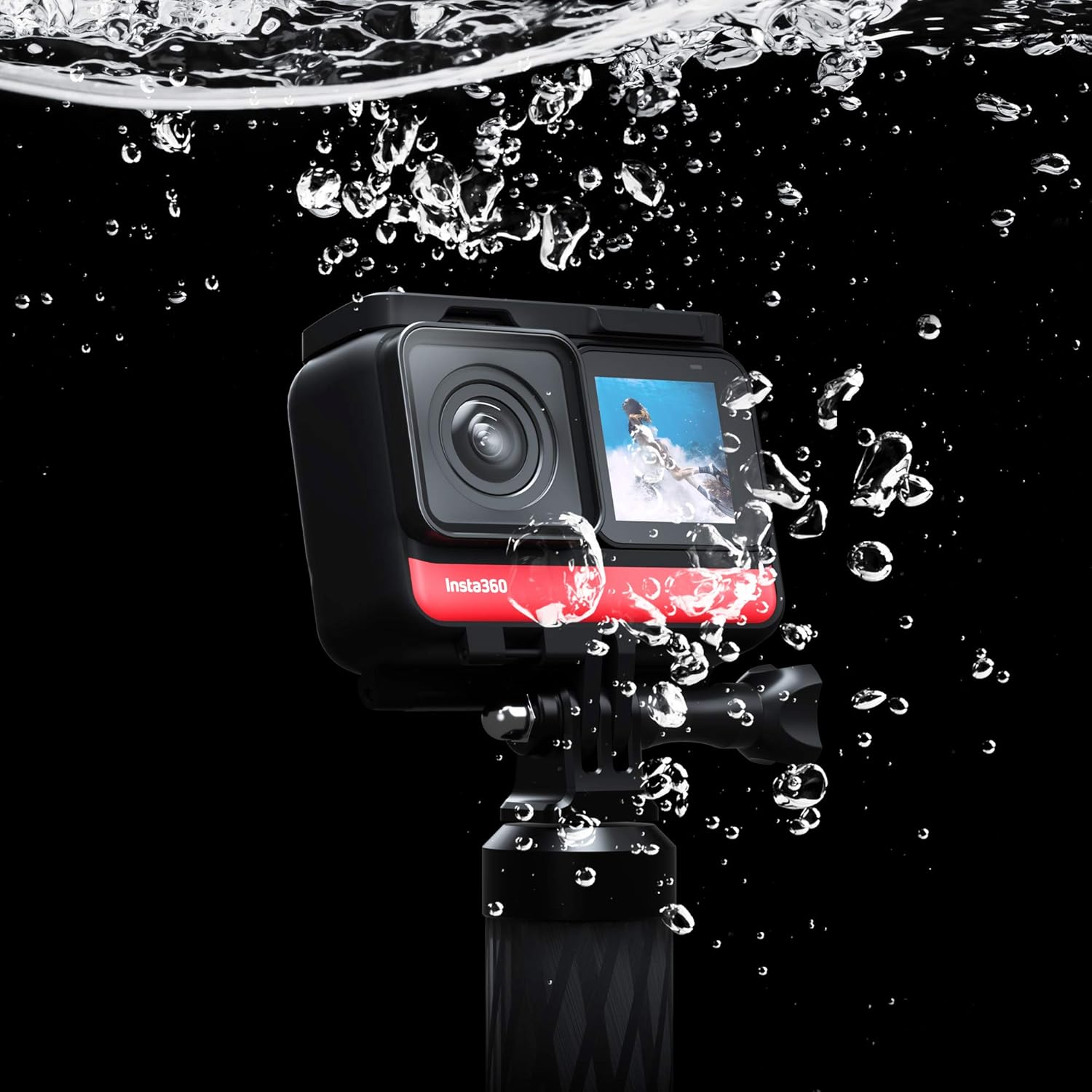
Image: The Insta360 ONE R camera, encased in its mounting bracket, is shown partially submerged in water with bubbles, demonstrating its IPX8 waterproof capability.
Invisible Selfie Stick Effect
When using the Dual-Lens 360 Mod with an official Insta360 selfie stick, the stick can be automatically removed from your footage during editing, creating unique third-person perspectives and aerial-like shots.

Image: A person riding a white horse in a field, holding a selfie stick that has been digitally removed from the final image, showcasing the 'Invisible Selfie Stick' effect.
AI Editing (Shot Lab & FlashCut)
The Insta360 app offers AI-powered editing tools. Laboratorio de tiro provides a range of smart templates for creative 360-degree camera techniques, automatically mastering your edits. FlashCut analyzes your footage based on theme, quality, and capture time to create cinematic clips.
Super 5.7K 360 and 4K Wide Angle
The Dual-Lens 360 Mod records in Super 5.7K resolution, utilizing H.265 encoding and advanced AI processing for detailed footage. The 4K Wide Angle Mod captures sharp 4K video at 60 frames per second.

Image: A split image demonstrating the two primary modes: the top half shows 4K Wide Angle footage of a person mountain biking, and the bottom half shows 5.7K 360 footage of a person snowboarding.
5.4 Modos de disparo avanzados
- Starlapse Mode: Automatically adjusts exposure settings for capturing stunning timelapses of the night sky.
- HDR Photo + Video: Supports High Dynamic Range capture to preserve detail in both highlights and shadows.
- Night Shot: Optimizes settings for natural, clear, and vibrant photos in low-light conditions.
- Modo lento: Records 360-degree slow-motion at 3K100fps or 1080p wide-angle footage at up to 200fps.
6. Mantemento
6.1 Limpeza
- Lentes: Use a soft, lint-free cloth specifically designed for optical lenses. Avoid abrasive materials.
- Corpo: Limpe o corpo da cámara cun pano limpo,amp pano. Non use deterxentes ou disolventes fortes.
6.2 Coidado coa batería
- Store the camera with the battery partially charged (around 50%) if not used for extended periods.
- Evite expor a batería a temperaturas extremas.
6.3 Precaucións de impermeabilización
- Always ensure the camera is fully assembled and secured in the Mounting Bracket before water exposure.
- Check that the battery base cover and any other ports are properly sealed.
- Despois de usala en auga salgada, enxágüe a cámara con auga doce e séquea ben.
7 Solución de problemas
7.1 A cámara conxélase ou deixa de responder
If the camera freezes, perform a hard reset by pressing and holding the Power Button for approximately 7-10 seconds until it powers off. Then, restart the camera.
7.2 Duración curta da batería
- Asegúrese de que a batería estea completamente cargada antes de usala.
- Recording in higher resolutions (e.g., 5.7K) or at higher frame rates consumes more power.
- As temperaturas extremadamente frías poden reducir o rendemento da batería.
- Considerar a compraasing additional battery bases for extended shooting sessions.
7.3 MicroSD Card Errors
- Ensure your MicroSD card meets the recommended specifications (UHS-I V30 or above, exFAT format).
- Format the MicroSD card within the camera's settings.
- If errors persist, try a different, high-quality MicroSD card.
7.4 Sobrequecemento
The camera may become warm during extended recording, especially in high-resolution modes or warm environments. If the camera overheats, it may automatically shut down to prevent damage. Allow it to cool down before resuming use.
7.5 Fogging Lenses
Lens fogging can occur due to temperature differences and humidity, especially when moving from a cold to a warm environment or vice-versa. Ensure lenses are clean and dry before use. Anti-fog inserts can be used in humid conditions.
8. Especificacións
| Característica | Detalle |
|---|---|
| Dimensións do produto | 1.89 x 1.69 x 2.83 polgadas |
| Peso do elemento | 6.1 onzas |
| Número de modelo do artigo | CINAKGP/A |
| Baterías | 1 batería de polímero de litio (incluída) |
| Fabricante | Insta360 |
| Tecnoloxía do sensor fotográfico | CMOS BSI |
| Resolución de captura de vídeo | 4K (up to 5.7K with 360 Mod) |
| Distancia focal máxima | 14.4 mm |
| Apertura máxima | f/3 |
| Tipo de memoria flash | MicroSD (UHS-I V30 or above) |
| Formato de captura de vídeo | INSV |
| Formato de audio compatible | AAC |
| Tamaño da pantalla | 1 polgadas |
| Tecnoloxía de conectividade | HDMI, USB |
9. Garantía e soporte
9.1 Guía do usuario
For a more detailed user guide, please refer to the official PDF document available online: Insta360 ONE R User Guide (PDF).
9.2 Garantía do produto
Information regarding the product warranty is typically provided with your purchase documentation or can be found on the official Insta360 websitio. Garde o comprobante de compra para reclamacións de garantía.
9.3 Atención ao cliente
For technical assistance, troubleshooting beyond this manual, or warranty inquiries, please visit the official Insta360 support websitio web ou póñase en contacto directamente co servizo de atención ao cliente.


