1. Introdución
This manual provides detailed instructions for the safe and effective operation of your PIXEL G1s RGB Video Light. Please read this manual thoroughly before use and retain it for future reference. The PIXEL G1s is a versatile and portable RGB video light designed for various photography and videography applications, featuring app control, a high-capacity battery, and multiple lighting effects.
2. Contido do paquete
Verifique que todos os artigos que se indican a continuación estean incluídos no seu paquete. Se falta algún artigo ou está danado, póñase en contacto co seu vendedor.
- 1 x PIXEL G1s RGB Video Light
- 1 x 1/4” Screw
- 1 adaptador de cabeza esférica
- 1 x cable de carga tipo C
- 1 x Manual de usuario

Image: Contents of the PIXEL G1s package.
3. Características do produto
- Control práctico por aplicación: Adjust hue (0-359°), saturation (0-100%), brightness (0-100%), and color temperature (2500K-8500K) via smartphone.
- Batería de alta capacidade: Built-in 6400mAh battery provides over 210 minutes of runtime at 100% brightness. Full charge in approximately 2.5 hours via USB Type-C.
- Montaxe versátil: 360° rotating arm with cold shoe allows for flexible positioning on cameras, microphones, or smartphones.
- Precision LCD Display: Intuitive screen provides real-time readings of settings and battery level.
- 10 Scene Effects: Pre-programmed lighting effects for various creative scenarios.
- Construción duradeira: Aluminum alloy body ensures longevity and portability.

Imaxe: Máis deview of the PIXEL G1s RGB Video Light.
4. Configuración
4.1 Carga inicial
Before first use, fully charge the PIXEL G1s using the provided Type-C charging cable. Connect the cable to the USB Type-C port on the device and a compatible USB power source. The LCD display will indicate charging status.

Image: Charging the PIXEL G1s via USB Type-C.
4.2 Attaching the Ball Head Adapter
The included ball head adapter allows for versatile mounting. Screw the 1/4” screw into the bottom of the light, then attach the ball head adapter to the screw. This assembly can then be mounted onto tripods, light stands, or camera hot shoes.

Image: Demonstrating the 360° rotating arm and mounting options.
5. Instrucións de funcionamento
5.1 Encendido/apagado
To power on the device, slide the power switch located on the side of the unit. To power off, slide the switch back to the OFF position.
5.2 Controles e pantalla
The PIXEL G1s features an intuitive LCD display on the back and control dials/buttons on the side for easy adjustment.

Image: LCD display and control buttons.
5.3 Modos de funcionamento
The light offers several modes for different lighting needs:
- CCT Mode (Color Temperature): Adjust brightness from 0-100% and color temperature from 2500K (warm) to 8500K (cool).
- Modo RGB: Adjust hue (0-359°), saturation (0-100%), and brightness (0-100%) to achieve any desired color.
- Special Effects Mode: Choose from 10 pre-programmed scene effects like lightning, ambulance, police, fire truck, candle light, and more.

Image: Visual guide for brightness, color temperature, and RGB adjustments.
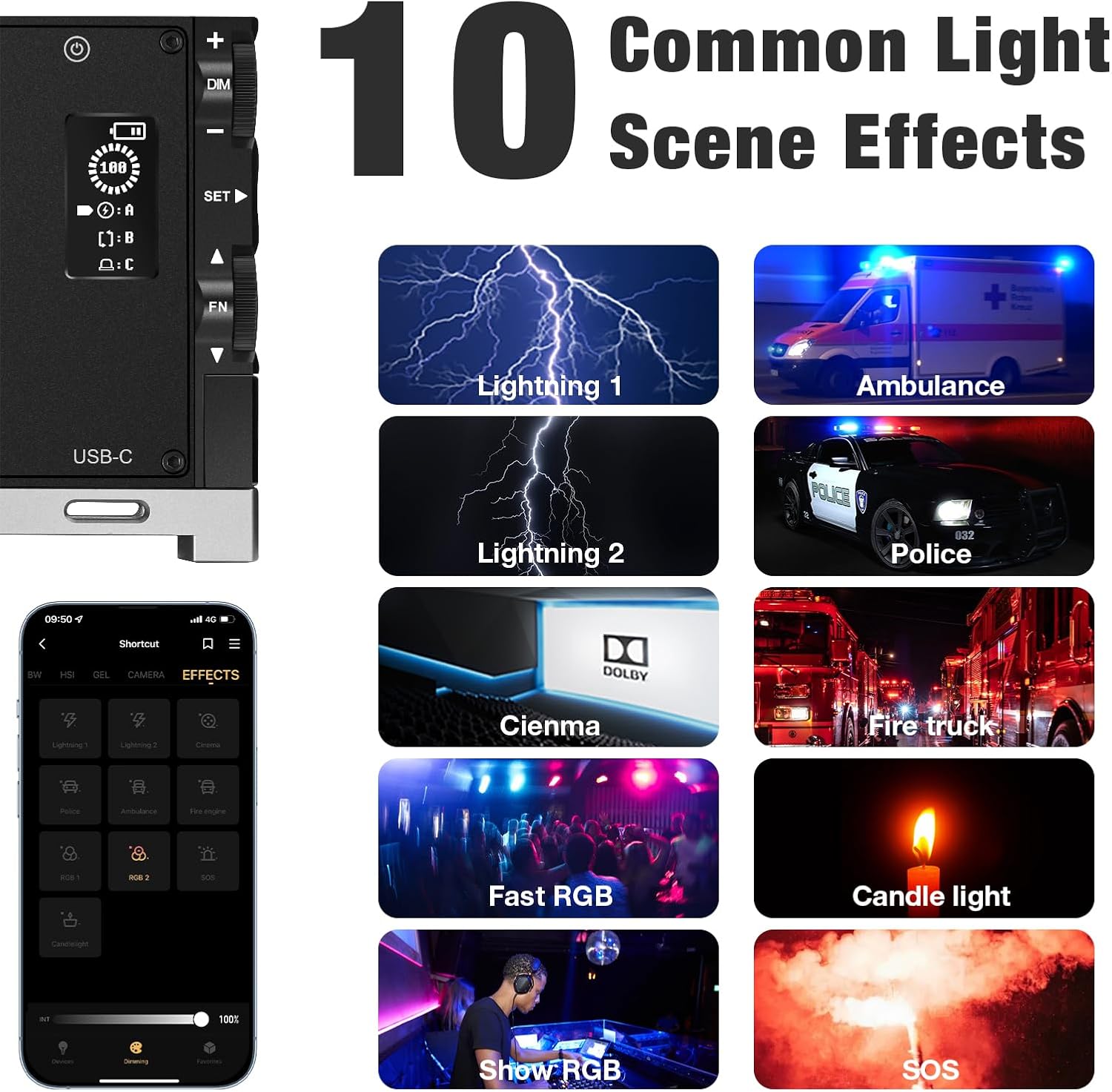
Imaxe: Examples of the 10 common light scene effects.
5.4 Control APP
Download the official PIXEL app to control the G1s light wirelessly via your smartphone. The app provides comprehensive control over all settings and effects, offering enhanced flexibility.

Image: Smartphone app interface for wireless control.
Official Product Video: PIXEL G1s RGB Video Light Overview
Este vídeo ofrece unha breve introduciónview of the PIXEL G1s RGB Video Light's features and functionality.
6. Carga e batería
The PIXEL G1s is equipped with a 6400mAh rechargeable Lithium-Ion battery. A full charge takes approximately 2.5 hours using the provided USB Type-C cable. The battery provides up to 210 minutes of continuous use at 100% brightness. The device includes built-in overheating protection for safe operation.
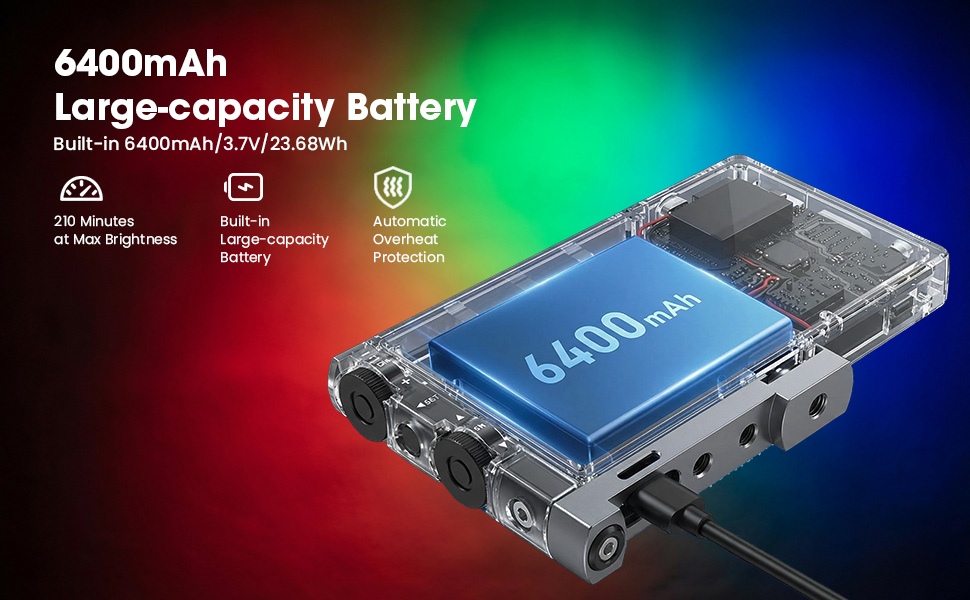
Imaxe: Especificacións da batería e detalles de carga.
7. Opcións de montaxe
The PIXEL G1s is designed for flexible mounting:
- 1/4” Screw Hole: Standard screw hole for attaching to tripods, light stands, or other photography accessories.
- Ball Head Adapter: Use the included ball head adapter for 360° rotation and tilt, allowing precise light positioning.
- Montaxe de zapata fría: The rotating arm features a cold shoe mount for attaching to cameras or other compatible devices.

Image: Different mounting and positioning examples.
8. Mantemento
- Keep the device dry. Do not expose it to moisture or rain.
- Clean the light panel and body with a soft, dry cloth. Avoid using harsh chemicals or abrasive materials.
- Garda o dispositivo nun lugar fresco e seco cando non estea en uso.
- Evite deixar caer ou someter o dispositivo a fortes impactos.
9 Solución de problemas
- A luz non se acende: Asegúrate de que a batería estea cargada. Comproba a posición do interruptor de alimentación.
- Problemas de conexión coa aplicación: Ensure Bluetooth is enabled on your smartphone and the light. Restart both the app and the light.
- Inconsistent brightness/color: Check the settings on the LCD display or within the app. Ensure the device is not in a low power state.
10. Especificacións
| Especificación | Detalle |
|---|---|
| Marca | PIXEL |
| Número de modelo | g1s |
| Dimensións do produto | 5.1" de longo x 0.6" de ancho x 2.1" de alto (5.1 x 0.6 x 2.7 polgadas) |
| Peso do elemento | 1.06 libras |
| Tipo de batería | 1 batería de iones de litio (incluída) |
| Capacidade da batería | 6400 mAh |
| Duración da batería (100 % de brillo) | minutos 210 |
| Tempo de carga | Aprox. 2.5 horas |
| Rango de temperatura de cor | 2500K-8500K |
| Tecnoloxía de conectividade | USB |
| Interface de hardware | USB |
11. Garantía e soporte
For warranty information and customer support, please refer to the official PIXEL websitio web ou póñase en contacto co seu vendedor. Garde o recibo da compra como proba de compra.


