Introdución
This manual provides comprehensive instructions for the setup, operation, and maintenance of your LISTO RC4875 TV Remote Control. Please read this manual carefully before using the device to ensure proper functionality and longevity.
Produto rematadoview
The LISTO RC4875 is an infrared remote control designed for use with televisions. It features 25 buttons for comprehensive control of your TV functions.

Figura 1: Fronte view of the LISTO RC4875 TV remote control. This image displays the full layout of the 25 buttons, including numerical keys, channel and volume controls, navigation buttons, and colored function keys.
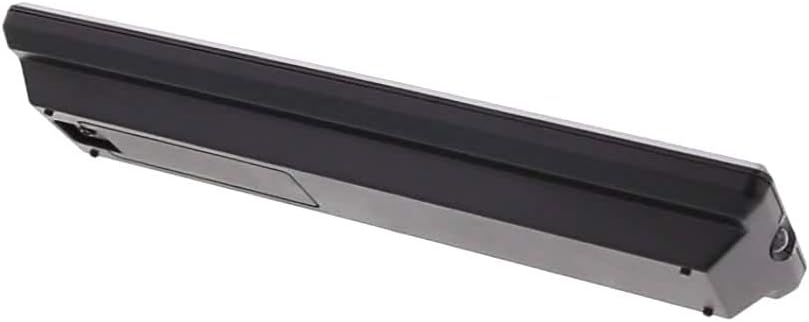
Figura 2: Lateral view of the LISTO RC4875 TV remote control. This image highlights the sleek profile of the remote and indicates the location of the battery compartment on the rear side.
Configuración
1. Instalación da batería
- Localice o compartimento da batería na parte traseira do control remoto.
- Deslice a tapa da batería cara abaixo ou na dirección indicada por unha frecha para abrila.
- Inserir dous novos Alcalino batteries (not included), ensuring the positive (+) and negative (-) terminals align correctly with the markings inside the compartment.
- Pecha a tapa da batería deslizándoa de volta ao seu lugar ata que faga clic de forma segura.
2. Initial Pairing (If Applicable)
The LISTO RC4875 remote control is designed to work with compatible televisions using infrared technology. In most cases, no special pairing is required. Simply point the remote at your TV and press a button. If the remote does not respond, ensure the batteries are correctly installed and the TV's infrared receiver is not obstructed.
Note: This remote is designed for a single device (television) and uses infrared connectivity. It does not support Bluetooth or Wi-Fi pairing.
Instrucións de funcionamento
To operate your television with the LISTO RC4875 remote control, ensure you have a clear line of sight between the remote's infrared emitter and your TV's infrared receiver.
Funcións básicas:
- Botón de encendido: Prema para acender ou apagar o televisor.
- Botóns numéricos (0-9): Use to directly enter channel numbers.
- Volume Up/Down (+V / -V): Axusta o volume do son.
- Channel Up/Down (+P / -P): Change TV channels sequentially.
- Botón de silencio: Silenciar ou activar o son do televisor.
- Botóns de navegación (Arriba, Abaixo, Esquerda, Dereita, Aceptar): Navegar polos menús e confirmar as seleccións.
- Botón de menú: Acceder ao menú principal do televisor.
- Botón de saída: Exit from menus or current screens.
- Botón de fonte/entrada: Cambia entre diferentes fontes de entrada (HDMI, AV, etc.).
- Botóns de cores (vermello, verde, amarelo, azul): These buttons typically correspond to specific functions within TV menus or smart TV applications, as indicated on your TV screen.
Uso óptimo:
- Apunta o mando a distancia directamente ao televisor.
- Maintain a maximum distance of 10 meters (approximately 33 feet) from the TV for optimal performance.
- Avoid placing objects between the remote and the TV's infrared receiver.
Mantemento
Un mantemento axeitado garante a lonxevidade e o funcionamento fiable do seu mando a distancia.
- Limpeza: Use a soft, dry cloth to wipe the surface of the remote control. Do not use liquid cleaners, abrasive pads, or chemical solvents, as these can damage the surface or internal components.
- Substitución da batería: Replace batteries when the remote's response becomes sluggish or stops working. Always replace both batteries at the same time with new Alcalino baterías.
- Almacenamento: Se non vai usar o mando a distancia durante un período prolongado, retire as pilas para evitar fugas e posibles danos no mando a distancia. Gárdeo nun lugar fresco e seco.
- Evita gotas: Protexa o mando a distancia de golpes e caídas, que poden danar os circuítos internos.
Resolución de problemas
If you encounter issues with your LISTO RC4875 remote control, refer to the following common problems and solutions:
| Problema | Causa posible | Solución |
|---|---|---|
| O mando a distancia non responde. | Pilas gastadas ou inseridas incorrectamente. Obstrución entre o mando a distancia e o televisor. O mando a distancia está fóra do alcance. | Substitúe as baterías por outras novas Alcalino ones, ensuring correct polarity. Remove any obstructions. Move closer to the TV (within 10 meters). |
| Buttons are not working consistently. | Low battery power. Dirt or debris under buttons. | Replace batteries. Gently clean around the buttons with a dry cloth. |
| Remote only works sometimes. | Interference from other electronic devices or strong light sources. Weak infrared signal. | Ensure no strong light sources (like direct sunlight) are hitting the TV's IR receiver. Try moving the TV or remote to reduce interference. Replace batteries. |
| Remote does not control TV functions. | Remote is not compatible with the TV. | Verify that the remote control model RC4875 is compatible with your specific television model. This remote is designed for general TV use but specific TV models might require specific codes or programming (though this model is typically plug-and-play for compatible TVs). |
Especificacións
| Característica | Detalle |
|---|---|
| Marca | Listo |
| Número de modelo | RC4875 (3380585002611) |
| Cor | Negro |
| Tecnoloxía de conectividade | Infravermello (IR) |
| Dispositivos compatibles | Televisión |
| Máximo de dispositivos compatibles | 1 |
| Número de botóns | 25 |
| Tipo de controlador | Control de botón |
| Rango máximo | 10 metros |
| Tipo de batería | Alcalino (non incluído) |
Garantía e Soporte
Information regarding specific warranty terms, availability of spare parts, or software updates for the LISTO RC4875 remote control is not provided in the available product data.
For further assistance or inquiries, please refer to the contact information provided by your retailer or the product manufacturer, Listo.


