1. Introdución
Welcome to the user manual for your Nokia 216 Dual SIM mobile phone. This guide provides essential information to help you set up, operate, and maintain your device. The Nokia 216 (RM-1187) is a classic feature phone designed for reliable communication, featuring dual SIM capability, a 2.4-inch display, and a VGA camera.
Please read this manual carefully to ensure proper use and to get the most out of your phone.
2. Contido do paquete
Asegúrate de que todos os elementos estean presentes no paquete do produto:
- Nokia 216 Dual SIM Mobile Phone (RM-1187)
- Batería
- Adaptador de alimentación
- Cable USB
3. Dispositivo rematadoview
Familiarize yourself with the key components of your Nokia 216 phone.
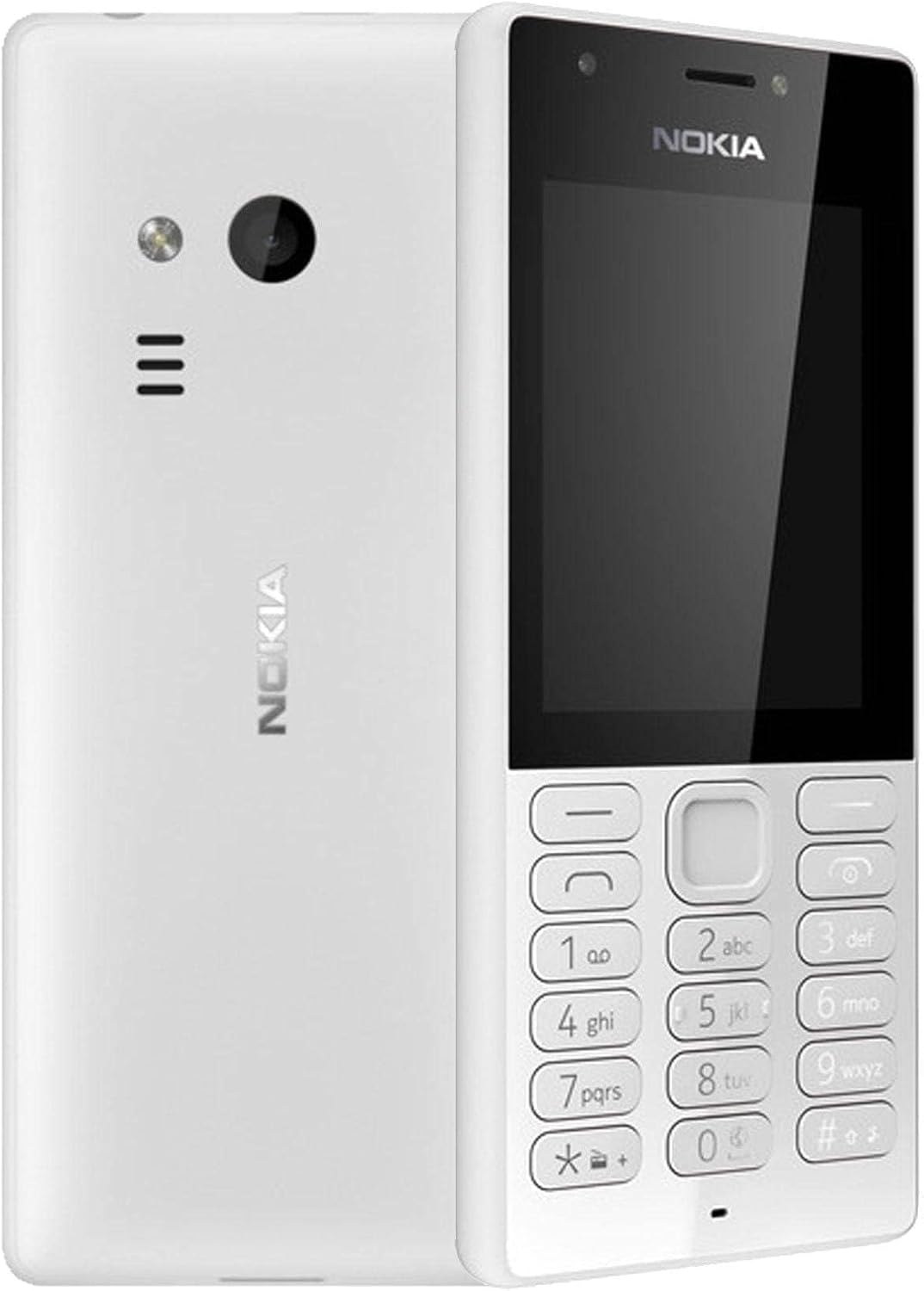
Figura 3.1: Fronte e traseiro view of the Nokia 216 Dual SIM mobile phone. The front shows the display, earpiece, and numeric keypad. The back features the rear camera, LED flash, and loudspeaker grille.

Figura 3.2: Fronte view of the Nokia 216 Dual SIM mobile phone. This image highlights the 2.4-inch display, the navigation keys, and the alphanumeric keypad for dialing and text input.

Figura 3.3: De volta view of the Nokia 216 Dual SIM mobile phone. This view shows the rear VGA camera lens, the LED flash, and the Nokia branding.
Compoñentes clave:
- Visualización: 2.4-inch QVGA screen.
- Teclado: Alphanumeric keypad for dialing and text entry, with navigation keys.
- Cámara traseira: VGA camera with LED flash.
- Altofalante: For audio playback and hands-free calls.
- Micrófono: Para a entrada de voz durante chamadas e gravacións.
- Conector de audio de 3.5 mm: Para auriculares ou altofalantes externos.
- Porto de carga: Micro-USB port for charging and data transfer.
4. Configuración
4.1. Inserir a(s) tarxeta(s) SIM
- Turn off the phone and disconnect any charger.
- Carefully remove the back cover by prying it open from the notch.
- Se a batería está dentro, levántaa.
- Insert the SIM card(s) into the designated slot(s) with the gold contacts facing down. For dual SIM models, ensure both SIMs are correctly seated.
- If applicable, insert a microSD card into its slot for additional storage.
- Substitúe a batería.
- Aliña a tapa traseira e prémea firmemente ata que encaixe no seu lugar.
4.2. Cargue a batería
- Conecte o adaptador de alimentación a unha toma de corrente.
- Plug the micro-USB end of the cable into the phone's charging port.
- O indicador da batería na pantalla mostrará o estado de carga.
- Once fully charged, disconnect the charger from the phone and then from the wall outlet.
5. Instrucións de funcionamento
5.1. Acendido/apagado
- Para acender: Press and hold the power key (usually the red 'End Call' key) until the phone vibrates and the Nokia logo appears.
- Para apagar: Press and hold the power key until the 'Power off' option appears on the screen, then select it.
5.2. Facer chamadas
- Desde a pantalla de inicio, introduza o número de teléfono usando o teclado numérico.
- Press the green 'Call' key to initiate the call.
- To end a call, press the red 'End Call' key.
5.3. Sending Text Messages (SMS)
- Ir a Menú > Mensaxes > Crear mensaxe.
- Escriba a súa mensaxe usando o teclado.
- Introduza o número de teléfono do destinatario ou seleccione un dos contactos.
- Seleccione Enviar.
5.4. Usando a cámara
- Ir a Menú > Cámara.
- Encadra a túa foto usando a pantalla.
- Press the center navigation key to take a photo.
6. Mantemento e coidados
To ensure the longevity and optimal performance of your Nokia 216, follow these care guidelines:
- Keep the device dry: Moisture can damage electronic circuits.
- Use original accessories: Only use batteries, chargers, and accessories approved by Nokia.
- Limpar suavemente: Use a soft, clean, dry cloth to clean the surface of the device.
- Evita temperaturas extremas: Do not expose your device to very high or low temperatures.
- Manipular con coidado: Evite deixar caer ou someter o dispositivo a fortes impactos.
7 Solución de problemas
If you encounter issues with your Nokia 216, try these common troubleshooting steps:
| Problema | Solución |
|---|---|
| O teléfono non se acende | Asegúrate de que a batería estea cargada. Conecta o cargador e inténtao de novo. Comproba se a batería está inserida correctamente. |
| Sen sinal de rede | Comprobe se a tarxeta SIM está inserida correctamente. Móvase a unha zona con mellor cobertura de rede. Reinicie o teléfono. |
| A batería non se está cargando | Ensure the charger is properly connected to both the phone and the power outlet. Try a different power outlet or charger. Check for any damage to the charging port. |
| Non se poden facer nin recibir chamadas | Check network signal. Ensure your SIM card is active and has sufficient credit/plan. Verify that call barring is not enabled. |
8. Especificacións
| Característica | Detalle |
|---|---|
| Marca | Nokia |
| Nome do modelo | RM-1187 |
| Sistema Operativo | Symbian 9.1 (Series 30) |
| Tamaño da pantalla | 2.4 polgadas |
| Resolución de pantalla | 240 x 320 píxeles |
| Taxa de actualización | 90 Hz |
| Tamaño da RAM instalada | 256 MB |
| Capacidade de almacenamento da memoria | 3.9 GB (Internal, likely for system/apps, expandable via microSD) |
| Modelo CPU | A10 |
| Tecnoloxía Celular | 2G |
| Tecnoloxías de comunicación sen fíos | Celular |
| Tecnoloxías de Conectividade | USB, Bluetooth, Wi-Fi |
| GPS | A-GPS |
| Primary Device User Interface | Buttons, Numeric Keypad, Microphone |
| Outras características da cámara | Rear Camera (VGA) |
| Jack de audio | 3.5 mm |
| Factor de forma | Clásico |
| Cor | Gris |
| Tempo de conversa | Ata 18 horas |
| Peso do elemento | 339 gramos |
| Dimensións do paquete | 13.4 x 12.6 x 3.6 cm |
| O que hai na caixa | Adaptador de alimentación, cable USB |
9. Garantía e soporte
For warranty information, please refer to the warranty card included in your product package or visit the official Nokia website. If you require further assistance or technical support, please contact Nokia customer service through their official channels.
Garda o teu recibo de compra como xustificante de compra para reclamacións de garantía.