1. Introdución
The KLIM Light v2 is a high-performance wireless gaming keyboard designed for an optimal typing and gaming experience. Featuring a Spanish ES layout, vibrant RGB backlighting, and a long-lasting rechargeable battery, this keyboard offers instant connectivity and enhanced durability. This manual provides detailed instructions for setting up, operating, maintaining, and troubleshooting your KLIM Light v2 keyboard.
2. Configuración
2.1 Contido do paquete
- KLIM Light v2 Wireless Gaming Keyboard
- Receptor USB
- Cable de carga USB
2.2 Conexión do teclado
- Localiza o receptor USB, que normalmente se garda nun compartimento do teclado.
- Plug the USB receiver into an available USB port on your computer, console (PS4/PS5, Xbox), or other compatible device.
- The keyboard will automatically connect. No additional drivers are required for installation.

The KLIM Light v2 Wireless Gaming Keyboard, featuring a Spanish ES layout, is shown with its compact USB receiver, ready for instant plug-and-play connectivity.
2.3 Carga do teclado
The KLIM Light v2 keyboard features a built-in rechargeable Lithium Ion battery. To charge:
- Connect the supplied USB charging cable to the keyboard's charging port.
- Plug the other end of the USB cable into a powered USB port (e.g., computer, USB wall adapter).
- The charging indicator light will illuminate. Once fully charged, the light will turn off or change color.
- The keyboard can be used while charging. A full charge typically takes 4-6 hours.

This image illustrates the keyboard's power management features, including adjustable backlighting brightness, an automatic stand-by mode after 120 seconds of inactivity, and its extended battery capacity.
3. Instrucións de funcionamento
3.1 Control da retroiluminación
The KLIM Light v2 features stunning rainbow RGB backlighting. You can adjust the lighting to suit your preference:
- Axuste de brillo: Use the dedicated keys (often Fn + arrow keys or specific lighting keys) to cycle through different brightness levels or turn the backlighting off completely.
- Modos de iluminación: Switch between static and breathing modes using the designated function keys.
- Nota: The colors of the rainbow backlighting are fixed and not customizable.

The keyboard's vibrant rainbow RGB backlighting is displayed, emphasizing its quiet membrane keys and soft-touch typing experience, ideal for use in low-light environments.
3.2 Funcións clave
- Membrane Keys: The keyboard utilizes membrane keys with a short travel distance, providing a responsive and quiet typing experience.
- Teclas multimedia: Access various multimedia functions (e.g., volume control, play/pause) using the Fn key in combination with the corresponding function keys (F1-F12).
- Baixo Profile Deseño: O baixo profile keys contribute to comfortable and efficient typing.
3.3 Modo de aforro de enerxía
To conserve battery life, the keyboard features an automatic stand-by mode. After approximately 120 seconds of inactivity, the keyboard will enter a low-power state. Press any key to wake it up instantly.
4. Mantemento
4.1 Xestión da batería
- Regularly charge the keyboard to maintain optimal battery performance.
- Evita descargar completamente a batería con frecuencia, xa que isto pode reducir a súa vida útil total.
- If the keyboard is not used for an extended period, charge it periodically to prevent deep discharge.
4.2 Limpeza
To clean your KLIM Light v2 keyboard:
- Disconnect the keyboard from its power source and turn it off.
- Use un pano suave e sen pelusa lixeiramente dampmantelo con auga ou unha solución de limpeza suave.
- Wipe the keycaps and surface gently. Avoid excessive moisture.
- The keyboard has an IP03 water resistance rating, offering protection against light splashes, but it is not fully waterproof and should not be submerged.

Un máisview of the KLIM Light v2's key features, including its wireless connectivity, RGB lighting, anti-ghosting technology, 2ms response time, compact design, IP03 water resistance, and long-lasting battery.
5 Solución de problemas
5.1 Problemas de conectividade
- O teclado non responde: Asegúrate de que o receptor USB estea conectado correctamente a un porto USB que funcione. Proba cun porto USB diferente.
- Conexión intermitente: Ensure the keyboard is within the operating range (up to 10 feet) of the USB receiver and there are no significant obstructions.
- Retardo ou atraso: Ensure the keyboard is sufficiently charged. Low battery can affect wireless performance.
5.2 Problemas de carga
- O teclado non carga: Verify the USB charging cable is properly connected to both the keyboard and a powered USB source. Try a different USB cable or port.
- A batería non mantén a carga: If the battery life significantly decreases or the keyboard fails to hold a charge after repeated attempts, contact KLIM customer support.
5.3 A tecla non responde
- Asegúrate de que o teclado estea completamente cargado.
- If specific keys are unresponsive, try cleaning around the keycap to remove any debris.
- Se o problema persiste, ponte en contacto co servizo de atención ao cliente para obter máis axuda.
5.4 Soporte xeral
For any issues not covered in this section, please refer to the KLIM customer support resources mentioned in the Warranty and Support section.
6. Especificacións
| Característica | Especificación |
|---|---|
| Dimensións do produto | 17.13 x 5.47 x 1.14 polgadas |
| Peso do elemento | 1.19 libras |
| Fabricante | KLIM |
| Número de modelo do artigo | k69es |
| Baterías | Requírese 1 batería de iones de litio (incluída) |
| Marca | KLIM |
| Dispositivos compatibles | Laptop, Mac, PC, PS4/PS5, Xbox |
| Tecnoloxía de conectividade | Sen fíos |
| Descrición do teclado | Spanish ES Layout |
| Usos recomendados para o produto | Escritorio |
| Característica especial | Travel, Water-resistant (IP03) |
| Cor | Negro |
| Soporte de cores de retroiluminación do teclado | RGB (Rainbow) |
| Compoñentes incluídos | Cable USB |
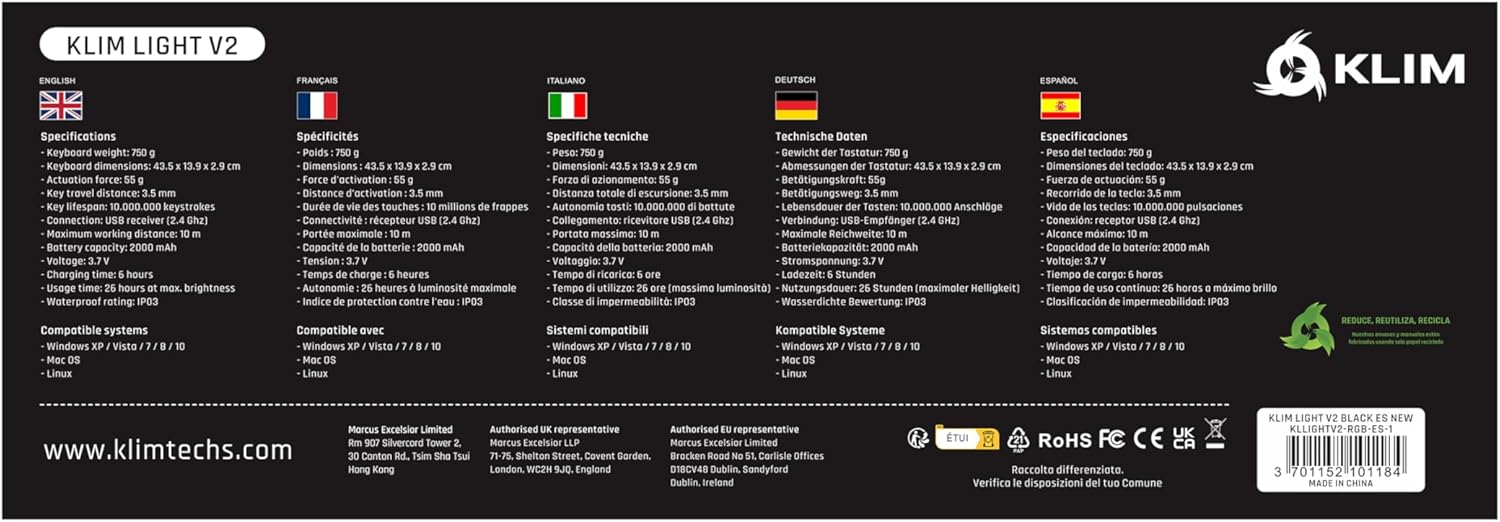
A comprehensive table detailing the technical specifications of the KLIM Light v2 keyboard, presented in multiple languages, covering aspects such as weight, dimensions, battery type, and system compatibility.
7. Garantía e atención ao cliente
KLIM stands behind the quality of its products. The KLIM Light v2 Wireless Gaming Keyboard comes with an unbeatable 5 ano de garantía.
If you encounter any issues or have questions regarding your product, KLIM provides Atención ao cliente 24 horas ao día, 7 días á semana. Please visit the official KLIM website or contact their support team directly for assistance.

KLIM's commitment to quality and customer satisfaction is underscored by its 5-year product protection, ensuring long-term reliability for your keyboard.


