1. Introdución
Thank you for choosing the Xiaomi Mi 55-inch 4K UHD Smart Android TV. This manual provides essential information for the safe and efficient use of your television. Please read it thoroughly before operating the device and retain it for future reference.

Imaxe 1.1: Fronte view of the Xiaomi Mi 55-inch 4K UHD Smart Android TV.
2. Información de seguridade
Para garantir un funcionamento seguro e evitar danos, observe as seguintes precaucións:
- Non expoña o televisor á choiva nin á humidade.
- Non bloquee as aberturas de ventilación.
- Asegúrese de que a conexión a terra sexa axeitada para o enchufe de alimentación.
- Evite colocar o televisor sobre superficies inestables.
- Keep the TV away from direct sunlight, heat sources, and open flames.
- Desconecte o televisor durante as tormentas eléctricas ou cando non o use durante períodos prolongados.
- Encargue toda a reparación a persoal de servizo cualificado.
3. Contido do paquete
Verifica que todos os elementos estean presentes no paquete:
- 1 × Xiaomi Mi 55-inch TV
- 1 × Remote control with voice control
- 1 × Remote control batteries
- 1 × cable de alimentación
- 1 × User manual (this document)
- 1 × Support legs
- 4 × Screws for support legs
4. Configuración
4.1. Instalación física
Your TV can be installed on a stand or wall-mounted. The TV is VESA mounting standard compatible.
4.1.1. Instalación do stand
- Coloque con coidado o televisor boca abaixo sobre unha superficie suave e plana para evitar danar a pantalla.
- Attach the support legs to the designated slots at the bottom of the TV using the provided screws. Ensure they are securely fastened.
- Coloque o televisor sobre unha superficie estable e nivelada.
4.1.2. Montaxe na parede (opcional)
If you choose to wall-mount your TV, use a VESA-compatible wall mount kit (sold separately) and follow the instructions provided with the wall mount. Ensure the wall can support the weight of the TV.
4.2. Conexión de periféricos
Conecta os teus dispositivos externos aos portos do televisor:
- HDMI: Connect Blu-ray players, game consoles, or set-top boxes to the HDMI ports (3 available). HDMI ARC is supported for audio return channel functionality.
- USB: Conecta dispositivos de almacenamento USB para a reprodución multimedia (2 dispoñibles).
- LAN: Para unha conexión a internet por cable, conecte un cable Ethernet ao porto LAN.
- Saída de audio dixital (óptica): Conéctese a un sistema de son externo para obter son dixital de alta calidade.
4.3. Acendido inicial
- Conecta o cable de alimentación ao televisor e despois a unha toma de corrente.
- Prema o botón de acendido/apagado do mando a distancia ou do televisor.
- Siga as instrucións en pantalla para completar a configuración inicial, incluíndo a selección do idioma, a conexión de rede (Wi-Fi ou Ethernet) e o inicio de sesión na conta de Google.
5. Instrucións de funcionamento
5.1. Control remoto
The included remote control allows you to navigate the TV's features. It supports voice control for convenient interaction with Google Assistant.
- Botón de encendido: Acende ou apaga o televisor.
- Panel de navegación (Arriba/Abaixo/Esquerda/Dereita/Aceptar): Navega polos menús e selecciona opcións.
- Botóns de volume: Axusta o nivel de son.
- Botóns da canle: Cambia as canles de televisión.
- Botón do Asistente de Google: Activa o control por voz.
- Botón de inicio: Volve á pantalla de inicio de Android TV.
- Botón Atrás: Volve á pantalla anterior.
- Botóns da aplicación: Dedicated buttons for popular apps like Netflix and YouTube.
5.2. Funcións da Smart TV (Android TV)
Your TV runs on Android TV (version 9), providing access to a wide range of smart features:
- Asistente de Google: Usa comandos de voz para buscar contido, controlar dispositivos domésticos intelixentes e obter información.
- Google Play Store: Download and install various apps, games, and streaming services.
- Chromecast integrado: Transmite contido desde o teu teléfono intelixente, tableta ou ordenador directamente á televisión.
- Aplicacións preinstaladas: Access Netflix, YouTube, and a web navegador directamente.
- Compatibilidade coa aplicación SmartThings: Integrate with other compatible smart home devices.
5.3. Axustes de imaxe e son
Axusta a configuración da imaxe e o son para optimizar o teu viewexperiencia:
- Modos de imaxe: Select from various presets (e.g., Standard, Vivid, Movie, Game) or customize brightness, contrast, color, and sharpness.
- HDR: The TV supports HDR for enhanced contrast and color with compatible content.
- Modos de son: Choose from presets like Standard, Music, Movie, or customize equalizer settings.
- DTS/Dolby Audio: The TV supports DTS and Dolby audio technologies for immersive sound.
6. Mantemento
6.1. Limpeza
Para limpar o televisor:
- Desconecte sempre o televisor antes de limpalo.
- Usa un pano suave e seco para limpar a pantalla e a carcasa.
- Para marcas difíciles, espolvoree lixeiramenteampEnxágüe o pano con auga ou cun limpador de pantallas especializado. Nunca pulverice o limpador directamente sobre a pantalla.
- Evite o uso de limpadores abrasivos ou disolventes.
6.2. Actualizacións de software
Periodically check for software updates to ensure your TV has the latest features and performance improvements. Updates can usually be found in the TV's settings menu under 'About' or 'System Update'.
7 Solución de problemas
Se tes algún problema, consulta os seguintes problemas e solucións comúns:
| Problema | Posible Solución |
|---|---|
| Sen poder | Check if the power cable is securely connected and the power outlet is working. Try a different outlet. |
| Sen imaxe, pero hai son | Asegúrate de que estea seleccionada a fonte de entrada correcta. Comproba as conexións dos cables aos dispositivos externos. |
| Sen son, pero si imaxe | Comproba o nivel de volume e a configuración de silenciamento. Verifica as conexións do cable de son. Se usas son externo, asegúrate de que estea acendido e configurado correctamente. |
| O control remoto non funciona | Replace batteries. Ensure there are no obstructions between the remote and the TV. Re-pair the remote if it's a Bluetooth remote. |
| Non se pode conectar á wifi | Check if the Wi-Fi router is on and working. Re-enter the Wi-Fi password. Try restarting the TV and router. |
| As aplicacións son lentas ou fallan | Pecha as aplicacións non utilizadas. Borra a caché da aplicación. Reinicia a televisión. Asegúrate de ter unha velocidade de internet suficiente. |
Se o problema persiste, póñase en contacto co servizo de atención ao cliente.
8. Especificacións
| Característica | Detalle |
|---|---|
| Número de modelo | L55M5-5ASP |
| Tamaño da pantalla | 55 polgadas |
| Tecnoloxía de visualización | LED |
| Resolución | 3840 x 2160 (4K UHD) |
| Taxa de actualización | 60 Hz |
| Viewángulo ing | 178 graos |
| Características do vídeo | Soporte HDR |
| Sistema Operativo | Android TV (Android 9) |
| RAM | 2 GB |
| Capacidade de almacenamento | 8 GB |
| Saída de audio | 2 altofalantes de 10 W |
| Tecnoloxías de audio | DTS/Dolby Audio |
| Funcións intelixentes | Google Assistant, Google Play, Web Browser, SmartThings app support, YouTube, Netflix (subscription not included), Chromecast built-in, DVB-T2 + DVB-C tuner |
| Conectividade | 3 x HDMI (with ARC), 2 x USB, 1 x LAN (Ethernet 100Mbps), 1 x Digital Optical Audio Out, Built-in Wi-Fi (2.4G/5G), Bluetooth 4.2 |
| Relación de aspecto | 16:9 |
| Estándar de montaxe | Compatible con VESA |
| Dimensións do produto (ancho x fondo x alto) | 124.2 x 24.5 x 78 cm (con soporte) |
| Peso do produto | 13 kg |
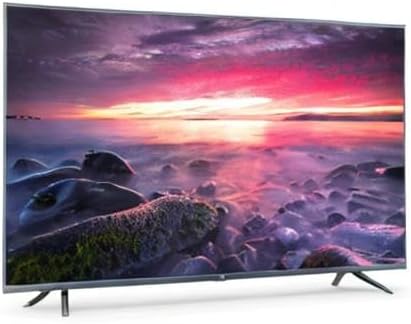
Image 8.1: Energy efficiency label for the Xiaomi Mi 55-inch TV.
9. Garantía e soporte
Para obter información sobre a garantía, consulte a tarxeta de garantía incluída co produto ou visite o sitio web oficial de Xiaomi. websitio web para a túa rexión. Garda o recibo da compra como proba de compra.
For technical support, troubleshooting assistance beyond this manual, or service inquiries, please contact Xiaomi customer service through their official channels.