1. Introdución
This manual provides detailed instructions for the safe and effective use of your Elecom LBT-TWS05BK True Wireless Bluetooth Earphones. Please read this manual thoroughly before using the product and retain it for future reference.
The Elecom LBT-TWS05BK earphones are designed for stable connectivity, superior comfort, and high usability, delivering rich audio performance. They feature an ergonomic design, advanced communication technology, and convenient smart features.
2. Información de seguridade
Para garantir un funcionamento seguro e evitar danos, observe as seguintes precaucións:
- Non expoñas os auriculares nin a caixa de carga a temperaturas extremas, humidade ou líquidos.
- Evite deixar caer ou someter o dispositivo a fortes impactos.
- Non intente desmontar nin modificar o produto. Isto anulará a garantía.
- Manter fóra do alcance dos nenos e animais.
- Escoita a niveis de volume moderados para evitar danos auditivos.
- Be aware of your surroundings when using the earphones, especially in traffic or dangerous situations.
3. Contido do paquete
Verifica que todos os elementos estean presentes no paquete do teu produto:
- Elecom LBT-TWS05BK True Wireless Bluetooth Earphones (Left and Right)
- Estuche de carga
- Cable de carga USB (tipo A a tipo C)
- Ear Caps (XS, S, M, L sizes; M size pre-installed)
- Manual de instrucións
4. Produto rematadoview
Familiarize yourself with the components of your Elecom LBT-TWS05BK earphones.

Imaxe: Primeiro plano view of the Elecom LBT-TWS05BK true wireless earbuds, showcasing their sleek black design and the ELECOM branding.

Image: The Elecom LBT-TWS05BK earbuds placed inside their compact charging case, ready for storage or charging.
The earphones feature a compact design with a 6.0mm diameter external magnetic dynamic driver for clear sound. The charging case is designed for single-handed operation with a push-button lid.
5. Configuración
5.1. Carga dos auriculares e da funda
- Connect the supplied USB Type-A to Type-C cable to the charging case's USB Type-C port and a USB power source.
- The LED indicators on the charging case will show the charging status. Four LEDs indicate a full charge.
- Coloca os auriculares na caixa de carga. Comezarán a cargarse automaticamente.
- A 15-minute charge provides approximately 1 hour of music playback. A full charge of the earphones allows for about 5 hours of continuous music playback or 4.5 hours of talk time. The charging case can recharge the earphones up to 2.5 times, providing a total of about 17.5 hours of use.
5.2. Emparejamento Inicial
The Elecom LBT-TWS05BK supports auto-pairing and Google Fast Pair for compatible Android devices.

Image: An illustration demonstrating the Google Fast Pair feature, where simply opening the charging case near a compatible smartphone prompts a pairing notification. Also shows the one-push open mechanism of the case.
- Asegúrate de que o Bluetooth do teu teléfono intelixente estea activado.
- Abre a caixa de carga. Os auriculares entrarán automaticamente no modo de emparellamento.
- For Android devices with Google Fast Pair, a notification will appear on your screen. Tap to connect.
- For other devices, go to your device's Bluetooth settings and select "LBT-TWS05BK" from the list of available devices.
- Once paired, the earphones will automatically connect to the last paired device when removed from the case.
5.3. Colocación dos auriculares
The earphones feature an ergonomic design for optimal fit and stability.
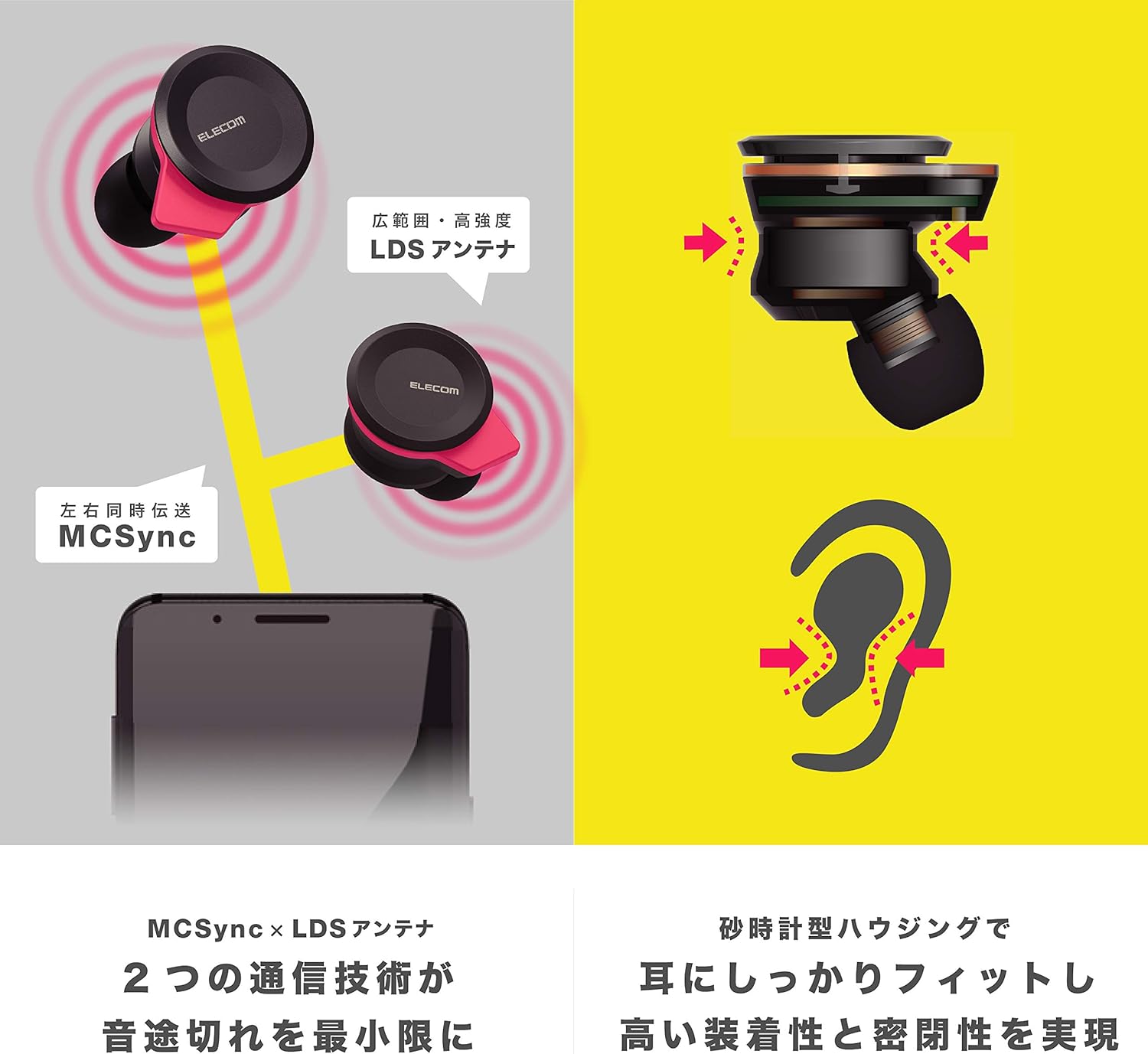
Image: An illustration showing the ergonomic hourglass shape of the earbud designed to fit securely in the ear, alongside a diagram explaining the MCSync and LDS antenna technologies for stable communication.
- Select the ear caps that provide the best seal and comfort from the four included sizes (XS, S, M, L). The M size is pre-installed.
- Insira suavemente o auricular no canal auditivo.
- Adjust the earbud so that the hourglass shape is firmly seated between your ear tragus and anti-tragus for a stable fit.
6. Instrucións de funcionamento
The Elecom LBT-TWS05BK earphones offer various functions for audio playback, calls, and smart assistant interaction.
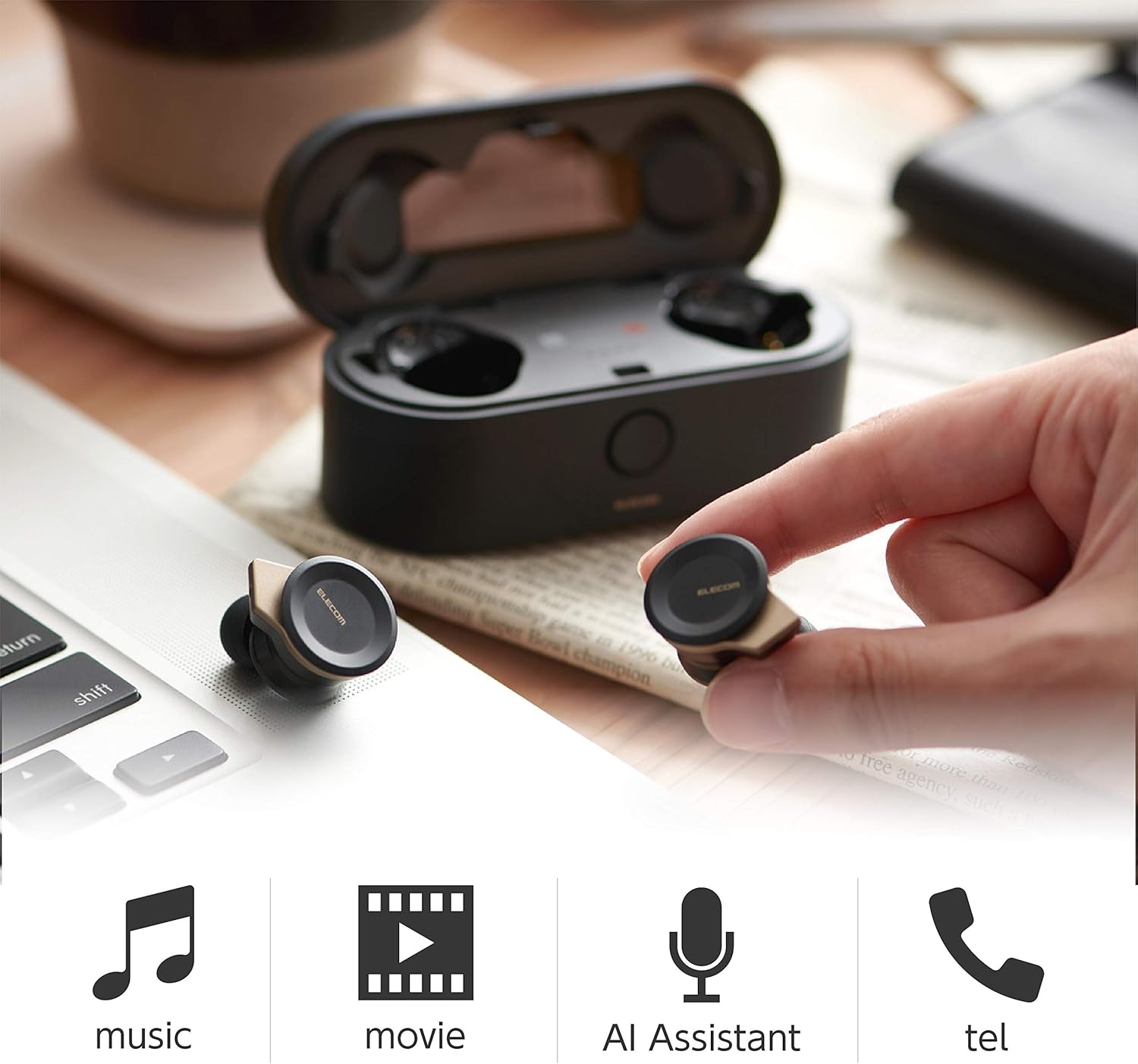
Image: The Elecom LBT-TWS05BK earbuds displayed with icons representing their versatile uses: music playback, movie watching, AI assistant activation, and phone calls.
6.1. Acendido/apagado
- Encendido: Remove the earphones from the charging case. They will power on automatically.
- Apagado: Volve colocar os auriculares na caixa de carga. Apagaranse automaticamente.
6.2. Reprodución de música
Use the buttons on the earphones to control music playback (specific button functions may vary, refer to quick start guide for exact mapping):
- Reproducir/Pausa: Presión única en calquera dos auriculares.
- Próxima pista: Prema dúas veces no auricular dereito.
- Pista anterior: Prema dúas veces no auricular esquerdo.
- Control de volume: Adjust via your connected device or voice assistant.
6.3. Xestión de chamadas
The right earbud supports calls and voice AI functions.
- Responder/Finalizar chamada: Single press on the right earbud.
- Rexeitar a chamada: Manteña premido o auricular dereito durante 2 segundos.
6.4. Voice AI Activation
Compatible with voice AI assistants like Siri and Google Assistant.
- Activate Voice AI: Triple press on the right earbud.
6.5. External Sound Capture Function
This function allows you to hear surrounding sounds while wearing the earphones.
- Activar/Desactivar: Manteña premido o auricular esquerdo durante 2 segundos.
7. Mantemento
Un mantemento axeitado garante a lonxevidade e o rendemento dos teus auriculares.
- Limpeza: Usa un pano suave e seco para limpar os auriculares e a caixa de carga. Non empregues produtos de limpeza abrasivos nin disolventes.
- Tapóns para as orellas: Remove and clean ear caps regularly with water and mild soap. Ensure they are completely dry before reattaching.
- Almacenamento: Cando non os uses, garda os auriculares na súa funda de carga para protexelos do po e dos danos.
- Coidado da batería: Avoid fully discharging the battery frequently. Charge regularly to maintain battery health.
8 Solución de problemas
If you encounter issues with your Elecom LBT-TWS05BK earphones, refer to the following common solutions:
- Sen problemas de son/conexión:
- Ensure earphones are charged and powered on.
- Comproba se o Bluetooth está activado no teu dispositivo.
- Tenta volver emparellar os auriculares co teu dispositivo.
- Ensure earphones are within the 10m transmission distance.
- Os auriculares non cargan:
- Verifica que o cable de carga estea conectado de forma segura tanto á caixa como á fonte de alimentación.
- Check if the charging case has sufficient battery.
- Ensure the earphones are correctly seated in the charging case.
- Mala calidade de son:
- Ensure ear caps provide a good seal in your ear.
- Limpa calquera residuo das boquillas dos auriculares.
- Acércate máis ao dispositivo conectado para mellorar a intensidade do sinal.
- Voice AI/Calls Not Working on Left Earbud:
- Note that calls and voice AI functions are only compatible with the right earbud.
9. Especificacións
| Característica | Especificación |
|---|---|
| Número de modelo | LBT-TWS05BK |
| Método de comunicación | Bluetooth Standard Version 5.0 |
| Saída | Clase de potencia Bluetooth 1 |
| Distancia máxima de transmisión | Aprox. 10 m |
| Banda de frecuencia | 2.4 GHz |
| Método de modulación | FHSS (espectro de propagación de salto de frecuencia) |
| Bluetooth Pro compatiblefiles | A2DP, AVRCP, HFP, HSP |
| A2DP Compatible Codec | SBC, AAC |
| A2DP Compatible Content Protection | SCMS-T |
| Maximum Registration Capacity | 8 dispositivos |
| Multipoint (Simultaneous Standby) | Non compatible |
| Tipo de controlador | 6.0mm diameter external magnetic dynamic driver (ETEMDriver) |
| Tecnoloxía da Comunicación | MCSync (MultiCast Synchronization), LDS Antenna |
| Micrófono | High-quality MEMS microphone with HDVoice |
| Tempo de conversa continua | Aprox. 4.5 horas |
| Continuous Music Playback Time | Aprox. 5 horas |
| Tempo total de reprodución (co estoxo de carga) | Aprox. 17.5 horas |
| Porto de carga | USB tipo C |
| Carga rápida | 15 min charge for 1 hour playback |
| Peso | 61 gramos (peso total do paquete) |
| Material | Plástico |
| Nivel de resistencia á auga | Resistente á auga |
| Dispositivos compatibles | Smartphones, Tablets, iOS Devices, Android Devices |
10. Garantía e soporte
For warranty information and customer support, please refer to the official ELECOM websitio web ou póñase en contacto co seu distribuidor local. Garde o comprobante de compra para reclamacións de garantía.


