1. Introdución
This manual provides detailed instructions for the setup, operation, maintenance, and troubleshooting of your iProda T1045A 10.1 inch Android Tablet. Please read this manual thoroughly before using your device to ensure proper functionality and to maximize your user experience.
The iProda T1045A is a 10.1-inch tablet featuring an HD IPS display with 1280x800 resolution, powered by a 64-bit Quad-core processor running Android 9 Pie. It includes 3GB RAM, 64GB internal storage expandable up to 128GB via TF card, dual-band Wi-Fi, HDMI output, and a 5000mAh battery for extended use.
2. Produto rematadoview
2.1 Contido do paquete
Ao abrir o paquete, comproba que estean presentes todos os elementos:
- iProda T1045A 10.1 inch Android Tablet
- Cable USB
- Adaptador de alimentación
- Manual de usuario (este documento)

Image: Contents of the iProda T1045A tablet package.
2.2 Disposición do dispositivo
Familiarize yourself with the physical components and ports of your tablet:
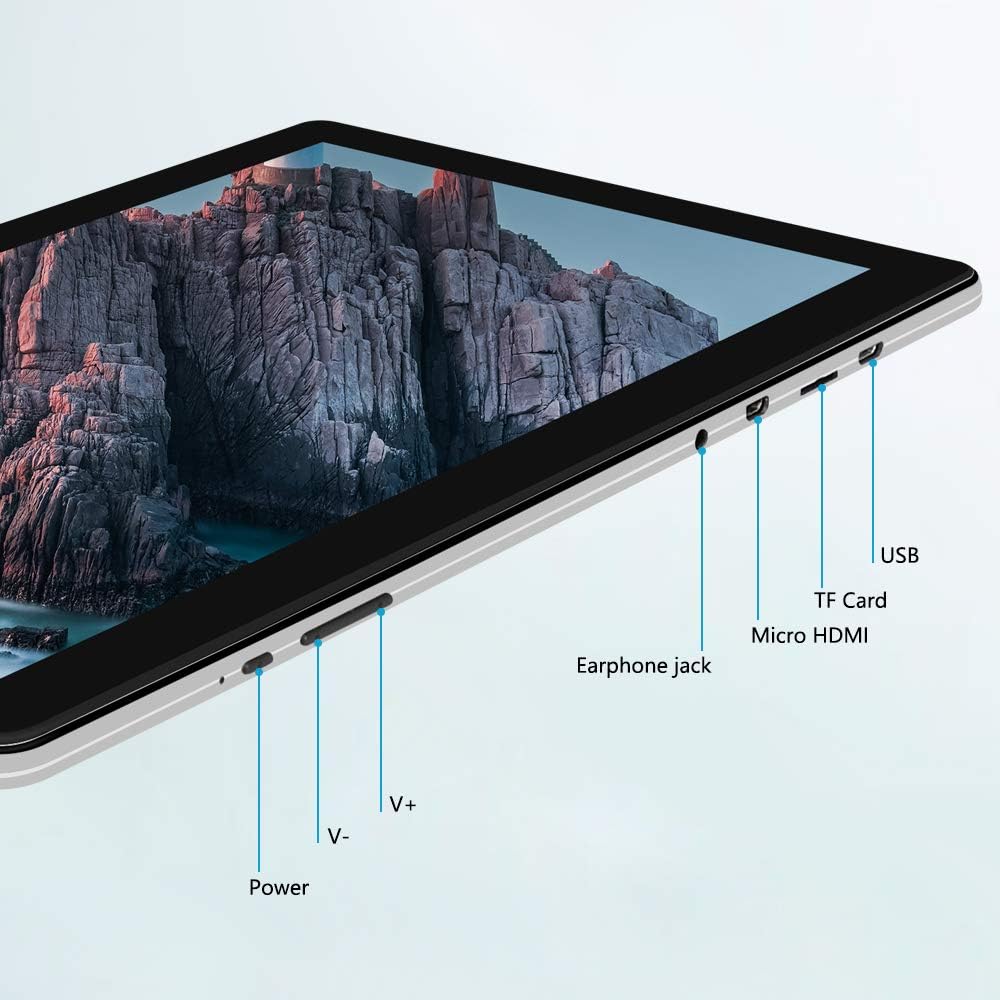
Imaxe: Lateral view of the iProda T1045A tablet highlighting port locations.
- Botón de encendido: Press and hold to power on/off or restart the tablet. Short press to turn the screen on/off.
- Volume Buttons (V+, V-): Axusta o volume de audio.
- Conector para auriculares: Conecta auriculares de 3.5 mm.
- Ranura para tarxetas TF: Insert a microSD card for expandable storage (up to 128GB).
- Porto micro HDMI: Connect to an external display using a Micro HDMI to HDMI cable.
- Porto USB: Connect to a computer for data transfer or for charging the device.
3. Configuración
3.1 Carga inicial
Before first use, fully charge the tablet. Connect the provided USB cable to the tablet's USB port and the power adapter, then plug the adapter into a wall outlet. The charging indicator will typically illuminate. A full charge may take several hours.
3.2 Acendido/Apagado
- Para acender: Manteña premido o botón de acendido ata que a pantalla se ilumine.
- Para apagar: Mantén premido o botón de acendido/apagado ata que apareza un menú de acendido/apagado na pantalla. Selecciona "Apagar" e confirma.
- Para reiniciar: No menú de enerxía, selecciona "Reiniciar".
- Pantalla activada/desactivada: Briefly press the Power button to turn the screen off (sleep mode) or wake it up.
3.3 Asistente de configuración inicial
The first time you power on the tablet, you will be guided through an initial setup process. Follow the on-screen prompts to:
- Seleccione o seu idioma preferido.
- Conéctate a unha rede wifi.
- Configura a túa conta de Google (opcional, pero recomendable para descargas de aplicacións).
- Configura a configuración de data e hora.
3.4 Inserting a TF Card (MicroSD)
Para ampliar o almacenamento da tableta:
- Locate the TF card slot on the side of the tablet.
- Carefully insert a microSD card (up to 128GB) into the slot with the gold contacts facing down until it clicks into place.
- Para retirala, empurre a tarxeta con coidado cara a dentro ata que salte.
4. Instrucións de funcionamento
4.1 Navegación básica
The iProda T1045A uses a touch-sensitive screen for navigation:
- Toca: Selecciona un elemento ou abre unha aplicación.
- Mantén premido: Acceder a menús contextuais ou mover iconas.
- Pasar o dedo: Desprácese polas listas ou alterne entre as pantallas de inicio.
- Beliscar: Achegar ou afastar imaxes e web páxinas.
4.2 Conexión Wi-Fi
Para conectarse a unha rede sen fíos:
- Ir a Configuración > Rede e Internet > Wi-Fi.
- Activar/desactivar Wi-Fi On.
- Seleccione a rede desexada da lista.
- Introduza o contrasinal se lle solicita e logo toque Conectar.
The tablet supports both 2.4G and 5G dual-band Wi-Fi for faster and more stable connections.
4.3 Emparejamento Bluetooth
To pair with Bluetooth devices (e.g., headphones, speakers):
- Ir a Configuración > Dispositivos conectados > Bluetooth.
- Activa o Bluetooth On.
- Asegúrate de que o teu dispositivo Bluetooth estea no modo de emparellamento.
- Select your device from the list of available devices and follow any on-screen prompts to complete pairing.
4.4 Uso das cámaras
The tablet is equipped with a 2MP front camera and a 5MP rear camera.
- Abre o Cámara application from the app drawer.
- Toca a icona da cámara para cambiar entre as cámaras dianteira e traseira.
- Tap the shutter button to take photos or start/stop video recording.

Image: Tablet in use, showcasing its camera capabilities.
4.5 Connecting to an External Display (HDMI)
To display your tablet's screen on a larger monitor or TV:
- Connect one end of a Micro HDMI cable to the tablet's Micro HDMI port.
- Connect the other end of the cable to an HDMI input on your external display.
- Selecciona a fonte de entrada HDMI correcta na túa pantalla externa.
- The tablet's screen content should now be mirrored on the external display.
4.6 Xestión de aplicacións
The tablet runs Android 9 Pie and supports applications from the Google Play Store.
- Instalación de aplicacións: Abre o Play Store aplicación, busca a aplicación desexada e toca Instalar.
- Desinstalación de aplicacións: Tap and hold an app icon on the home screen or in the app drawer, then drag it to "Uninstall" or select "App info" and choose "Uninstall". Alternatively, go to Configuración > Aplicacións e notificacións, selecciona a aplicación e toca Desinstalar.
5. Mantemento
5.1 Limpeza do dispositivo
Para limpar a tableta:
- Apague a tableta antes de limpala.
- Use un pano suave e sen fiapos, lixeiramente dampenxugado con auga ou un limpador de pantallas para limpar a pantalla e o corpo.
- Evita o uso de produtos químicos agresivos, produtos de limpeza abrasivos ou humidade excesiva.
5.2 Actualizacións de software
Periodically check for software updates to ensure optimal performance and security:
- Ir a Configuración > Sistema > Avanzado > Actualización do sistema.
- Follow the on-screen instructions to download and install any available updates. Ensure your tablet is sufficiently charged or connected to power during updates.
5.3 Xestión do almacenamento
To manage internal storage and the TF card:
- Ir a Configuración > Almacenamento.
- Aquí podes view storage usage, free up space, and manage files on both internal storage and the inserted TF card.
6 Solución de problemas
This section addresses common issues you might encounter with your iProda T1045A tablet.
6.1 O dispositivo non se acende
- Ensure the tablet is sufficiently charged. Connect it to the power adapter and allow it to charge for at least 30 minutes before attempting to power on again.
- Try holding the Power button for 10-15 seconds to force a restart.
6.2 Problemas de conexión Wi-Fi
- Verifica que o Wi-Fi estea activado en Configuración.
- Asegúrate de introducir o contrasinal wifi correcto.
- Reinicia o teu enrutador Wi-Fi e a tableta.
- Try connecting to a different Wi-Fi network to determine if the issue is with the tablet or the network.
6.3 Rendemento lento
- Pecha as aplicacións en segundo plano innecesarias.
- Clear cached data for apps in Configuración > Aplicacións e notificacións > [Nome da aplicación] > Almacenamento e caché > Borrar caché.
- Ensure sufficient free storage space. Uninstall unused apps or move large files to a TF card.
- Reinicie a tableta.
6.4 A batería esgótase rapidamente
- Reduce o brillo da pantalla.
- Desactiva o Wi-Fi, o Bluetooth e o GPS cando non estean en uso.
- Close background apps that consume significant power.
- Comprobar o uso da batería en Configuración > Batería para identificar aplicacións que consumen moita enerxía.
- Ensure the tablet is not allowed to run below 15% charge frequently, as this can impact battery longevity.
6.5 Restablecemento de fábrica
Se se producen problemas persistentes, un restablecemento de fábrica pode resolvelos. Aviso: Isto borrará todos os datos da túa tableta. Fai unha copia de seguridade dos datos importantes antes de continuar.
- Ir a Configuración > Sistema > Avanzado > Restablecer opcións.
- Seleccione Borrar todos os datos (restablecemento de fábrica).
- Confirma a túa decisión e segue as instrucións en pantalla.
7. Especificacións
Below are the technical specifications for the iProda T1045A tablet:
| Nome do modelo | T1045A |
| Sistema Operativo | Android 9 Pie |
| Tamaño de visualización | 10.1 polgadas |
| Resolución de visualización | 1280 x 800 píxeles (HD IPS) |
| Procesador | MediaTek Quad-core 1.5Ghz |
| RAM | 3 GB |
| Almacenamento interno | SSD de 64 GB |
| Almacenamento ampliable | Up to 128 GB via TF Card (MicroSD) |
| Coprocesador gráfico | ARM Mali-T720 MP2 |
| Cámara traseira | 5 MP |
| Cámara frontal | 2 MP |
| Capacidade da batería | Polímero de litio de 5000 mAh |
| Duración media da batería | Ata 8 horas |
| Conectividade sen fíos | Dual-Band Wi-Fi (802.11a/b/g/n), Bluetooth 4.0 |
| Portos | 1x USB 2.0, 1x Micro HDMI, 3.5mm Earphone Jack, TF Card Slot |
| Dimensións | 34.5 x 19.7 x 5.5 cm |
| Peso | 550 g |

Imaxe: Especificacións clave de rendemento da tableta.

Image: Tablet portability and battery details.
8. Garantía e soporte
8.1 Garantía do produto
The iProda T1045A tablet comes with a 12 meses de garantía desde a data de compra. Esta garantía cobre defectos de fabricación e avarías en condicións de uso normal. Non cobre danos causados por mal uso, accidentes, reparacións non autorizadas ou desgaste normal.
8.2 Atención ao cliente
If you encounter any issues not covered in the troubleshooting section or require further assistance, please contact iProda customer support. Refer to your purchase documentation or the iProda official websitio para información de contacto.
When contacting support, please have your tablet's model number (T1045A) and purchase details readily available.


