Introdución
Grazas pola compraasing the Altec Lansing AL-5003 Multimedia DJ Trolly Speaker. This speaker is designed to deliver powerful audio for various applications, including parties and surround sound systems. Featuring wireless connectivity, a built-in trolley for portability, and multiple input options, the AL-5003 offers a versatile audio experience. Please read this manual carefully to ensure proper setup, operation, and maintenance of your speaker.
Instrucións de seguridade importantes
- Read these instructions thoroughly before operating the speaker.
- Conserve este manual para futuras consultas.
- Non expoñas o altofalante á choiva nin á humidade.
- Non bloquee ningunha abertura de ventilación.
- Non instale preto de fontes de calor como radiadores, rexistros de calor, cociñas ou outros aparellos (incluíndo amplificadores) que producen calor.
- Protexa o cable de alimentación para evitar que se pise ou se pinche, especialmente nos enchufes, tomas de corrente e no punto de saída do aparello.
- Use só anexos/accesorios especificados polo fabricante.
- Desenchufe este aparello durante tormentas eléctricas ou cando non se use durante longos períodos de tempo.
- Encargue toda a reparación a persoal de servizo cualificado.
Contido do paquete
Comprobe se o paquete contén os seguintes elementos:
- Altec Lansing AL-5003 Multimedia DJ Trolly Speaker
- Cable de alimentación
- Control remoto
- Manual de usuario
- Auxiliary Cable (may vary by region)
Produto rematadoview
The AL-5003 speaker features a robust design with integrated wheels and a handle for easy transport. It includes a powerful 10-inch speaker and a 1-inch tweeter, providing clear and dynamic sound. The control panel is located on the top of the unit, offering easy access to various functions.
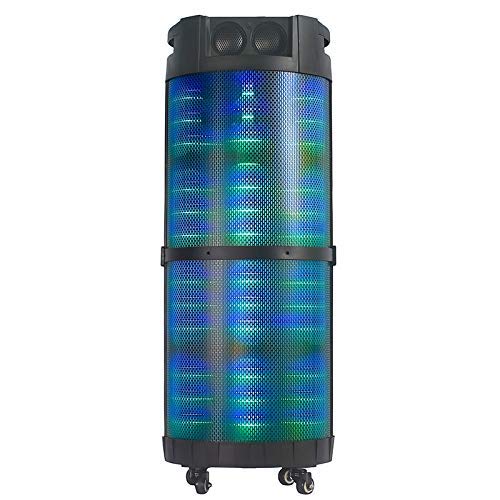
Imaxe 1: Fronte view of the Altec Lansing AL-5003 speaker, showcasing its cylindrical design and illuminated grille. The speaker features a sturdy build with integrated wheels at the base for portability.
Panel de control e conexións
The top panel of the speaker houses the main controls and input/output ports.
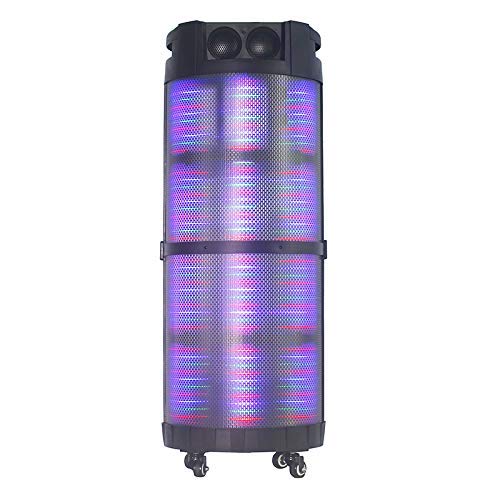
Imaxe 2: Arriba abaixo view of the AL-5003 speaker, highlighting the control panel with various buttons and knobs, along with the top-mounted speakers. This view also shows the integrated handle for easy transport.
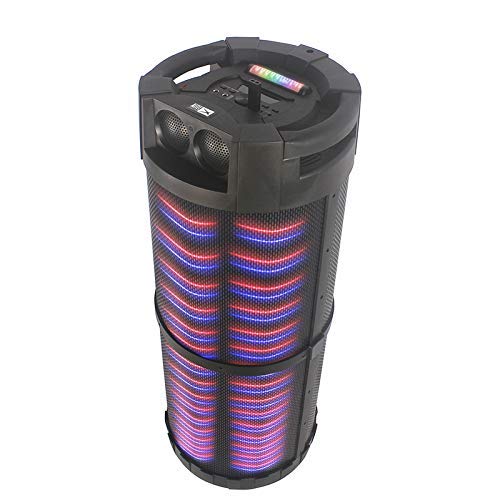
Imaxe 3: En ángulo view of the AL-5003 speaker, providing a perspective of its overall structure, including the side grille and the top control area. The dynamic lighting effects are visible through the mesh.
Common controls include Power, Volume, Mode selection, Play/Pause, Track Skip, and inputs for USB, Auxiliary, and potentially Microphone (if available on the model).
Instrucións de configuración
- Desembalaxe: Retire con coidado o altofalante e todos os accesorios da embalaxe. Garde a embalaxe para futuros transportes ou almacenamentos.
- Colocación: Place the speaker on a stable, flat surface. Ensure there is adequate ventilation around the unit. For optimal sound, position the speaker in a central location within the listening area.
- Conexión de alimentación: Connect the provided power cord to the AC input on the speaker and then plug it into a standard wall outlet (AC 100-240V, 50/60Hz).
- Cargo inicial (se corresponde): If the speaker has an internal battery (Lead Acid battery mentioned in specs), it is recommended to fully charge it before first use. The charging indicator light will typically show charging status.
- Encendido: Press the Power button on the control panel or remote control to turn on the speaker.
Instrucións de funcionamento
1. Modo Bluetooth
- Activar Bluetooth: Turn on the speaker. Press the "Mode" button on the control panel or remote until "Bluetooth" or "BT" is displayed (or indicated by a blue LED). The speaker will enter pairing mode, indicated by a flashing light or audible prompt.
- Emparejamento co dispositivo: On your mobile device (smartphone, tablet, laptop), go to Bluetooth settings and enable Bluetooth. Busca available devices. You should see "AL-5003" or "Altec Lansing" in the list. Select it to pair.
- Confirmación de conexión: Once successfully paired, the speaker will emit a confirmation sound, and the Bluetooth indicator light will become solid.
- Reprodución: Start playing audio on your connected device. Use the speaker's volume controls or your device's volume controls to adjust the sound level. Use the Play/Pause, Next, and Previous buttons on the speaker or remote to control playback.
2. Auxiliary (AUX) Mode
- Conecte o cable AUX: Insert one end of a 3.5mm auxiliary cable into the AUX input port on the speaker. Connect the other end to the headphone jack or audio output of your external audio device (e.g., MP3 player, laptop).
- Seleccionar o modo AUX: Press the "Mode" button on the speaker or remote until "AUX" is displayed or indicated.
- Reprodución: Play audio from your connected device. Adjust volume using both the speaker's controls and your device's volume.
3. Modo de reprodución USB
- Inserir unha unidade USB: Inserir unha unidade flash USB que conteña son MP3 files no porto USB do altofalante.
- Seleccionar o modo USB: The speaker may automatically switch to USB mode. If not, press the "Mode" button until "USB" is displayed or indicated.
- Reprodución: O altofalante comezará a reproducir audio automaticamente files from the USB drive. Use the Play/Pause, Next, and Previous buttons to control playback.
4. Karaoke Function (if applicable)
If your AL-5003 model includes a microphone input, you can use it for karaoke:
- Conectar o micrófono: Plug a wired microphone into the designated microphone input jack.
- Axustar o volume: Use the dedicated Microphone Volume knob (if present) to adjust the microphone's volume.
- Control de eco: Some models may have an Echo knob to add an echo effect to the microphone audio.
5. Operación de control remoto
The included remote control provides convenient access to all major functions:
- Potencia: Turn the speaker On/Off.
- Modo: Switch between Bluetooth, AUX, USB, and other available modes.
- Volume +/-: Axuste o volume mestre.
- Reproducir/Pausa: Iniciar ou pausar a reprodución.
- Anterior/Seguinte: Saltar á pista anterior ou seguinte.
- EQ: Select different equalizer presets (if available).
- Silenciar: Silenciar ou activar o son.
Mantemento
- Limpeza: Usa un pano suave e seco para limpar o exterior do altofalante. Non empregues produtos de limpeza líquidos nin materiais abrasivos.
- Almacenamento: Cando non o use durante períodos prolongados, garde o altofalante nun lugar fresco e seco, lonxe da luz solar directa e de temperaturas extremas.
- Coidado da batería: If the speaker has a built-in rechargeable battery, avoid fully discharging it frequently. For long-term storage, charge the battery to approximately 50-70% every few months to prolong its lifespan.
- Ventilación: Asegúrese de que as aberturas de ventilación non estean bloqueadas para evitar o sobrequecemento.
Resolución de problemas
| Problema | Causa posible | Solución |
|---|---|---|
| Sen poder | Power cord not connected; Power outlet not working; Speaker is off; Battery drained. | Ensure power cord is securely connected. Try a different outlet. Press the Power button. Charge the battery. |
| Sen son | Volume too low; Incorrect mode selected; Device not connected properly; Mute function active. | Increase volume on speaker and source device. Select the correct input mode (Bluetooth, AUX, USB). Reconnect device. Check if mute is active on remote. |
| Fallo de sincronización de Bluetooth | Speaker not in pairing mode; Device Bluetooth off; Speaker too far from device; Interference. | Ensure speaker is in Bluetooth pairing mode. Turn on Bluetooth on your device. Move device closer to speaker. Turn off other Bluetooth devices nearby. |
| A reprodución USB non funciona | Unidade USB non inserida correctamente; Incompatible file format; USB drive corrupted. | Reinsert USB drive. Ensure files are in MP3 format. Try a different USB drive. |
| O control remoto non funciona | Batteries drained; Obstruction between remote and speaker; Remote not pointed at sensor. | Replace remote control batteries. Remove any obstructions. Point remote directly at the speaker's IR sensor. |
Especificacións
| Característica | Detalle |
|---|---|
| Nome do modelo | Altec Lansing AL-5003 Multimedia DJ Trolly Speaker |
| Tipo de altofalante | Son envolvente |
| Característica especial | Sen fíos |
| Usos recomendados | For Surround Sound Systems, Party |
| Dispositivos compatibles | Gaming Console, Karaoke Machine, Laptop, MP3 Player, Smartphone, Tablet |
| Configuración da canle de son envolvente | 1.0 |
| Método de control | Mando a distancia |
| Tecnoloxía de comunicación sen fíos | Bluetooth |
| Tamaño do altofalante | 10 polgadas |
| Fonte de enerxía | Eléctrico con cable |
| Diámetro do tweeter | 1 polgadas |
| Compatible con entradas de audio | Auxiliar, USB |
| Conectividade dos altofalantes | Wired (for power), Wireless (Bluetooth) |
| Audio Wattage | 100 vatios |
| Composición da pila da batería | Ácido de chumbo |
| Tipo de montaxe | Piso de pé |
Garantía e Soporte
Altec Lansing products are manufactured to the highest quality standards. For information regarding warranty coverage, technical support, or service inquiries, please refer to the warranty card included with your product or visit the official Altec Lansing website. Please have your model number (AL-5003) and purchase details ready when contacting support.
Websitio: www.alteclansing.com (This is a generic link, actual link might vary by region)


