1. Introdución
This manual provides detailed instructions for the installation, operation, and maintenance of your JVC KD-TD71BT CD Receiver. The KD-TD71BT is a versatile car audio system featuring CD playback, AM/FM tuner, built-in Bluetooth for hands-free calling and audio streaming, front USB and AUX inputs, and integrated Amazon Alexa functionality. It also includes advanced audio processing technologies like a 13-band equalizer, K2 Technology, Time Alignment, Space Enhancement, and Sound Lift for an optimized listening experience. Please read this manual thoroughly before using the product to ensure correct operation and to prevent damage.
2. Información de seguridade
- Seguridade na condución: Always operate the unit safely. Do not perform any operations that distract you from driving.
- Control de volume: Manteña o volume a un nivel no que aínda poida escoitar os sons exteriores, como os vehículos de emerxencia.
- Fonte de alimentación: Esta unidade está deseñada para sistemas eléctricos de 12 V CC con toma de terra negativa.
- Instalación: Ensure proper installation to prevent fire, electric shock, or other injuries. Consult a qualified technician if unsure.
- Evitar a humidade: Non expoña a unidade á choiva nin á humidade para evitar incendios ou descargas eléctricas.
- Ventilación: Asegúrese de que haxa unha ventilación axeitada arredor da unidade para evitar o sobrequecemento.
3. Contido do paquete
Verifica que todos os elementos estean presentes no paquete:
- JVC KD-TD71BT CD Receiver Unit
- Wired Microphone (for Bluetooth hands-free calling)
- Cableado
- Hardware de montaxe
- Manual de instrucións (este documento)
4. Configuración e instalación
Proper installation is crucial for optimal performance and safety. If you are unsure about any part of the installation process, it is recommended to consult a professional car audio installer.
4.1. Antes da instalación
- Disconnect the negative terminal of the car battery to prevent short circuits.
- Asegúrate de ter todas as ferramentas e accesorios de montaxe necesarios.
- Review your vehicle's wiring diagram.
4.2. Conexións de cableado
Connect the wiring harness provided with the unit to your vehicle's wiring. Pay close attention to the color codes and functions of each wire.
- amarelo: 12 V constantes (batería)
- Vermello: 12 V conmutados (ignición/accesorio)
- Negro: Terra
- Azul/Branco: Acendido remoto (para ampantena de potencia/amplificador)
- Fíos dos altofalantes: Connect to corresponding vehicle speakers (e.g., White/White-Black for Front Left, Gray/Gray-Black for Front Right, Green/Green-Black for Rear Left, Purple/Purple-Black for Rear Right).
- Entrada de micrófono: Connect the supplied wired microphone to the dedicated input jack for Bluetooth hands-free calling.

Imaxe: Traseira view of the JVC KD-TD71BT CD Receiver. This image displays the various connection ports, including the main wiring harness connector on the left, RCA pre-outs for external amplifiers, and the antenna input on the right. The heat sink is also visible in the center.
4.3. Montaxe da Unidade
Secure the unit into the dashboard opening using the provided mounting sleeve and brackets. Ensure the unit is firmly seated and does not obstruct any vehicle controls.
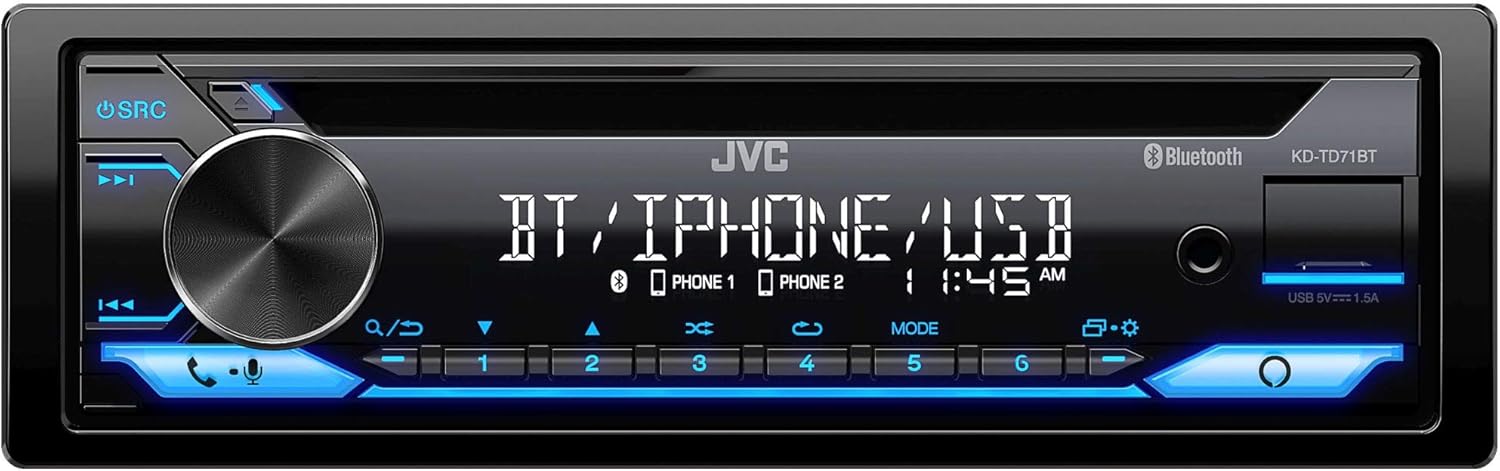
Imaxe: Fronte view of the JVC KD-TD71BT CD Receiver. This image shows the main display, the large rotary volume knob, source button, track controls, and the CD slot. The front USB and AUX inputs are also visible on the right side of the faceplate.
5. Instrucións de funcionamento
5.1. Funcionamento básico
- Encendido/apagado: Preme o SRC botón para acender a unidade. Prema e manteña premido o botón SRC botón para apagalo.
- Control de volume: Xire o botón rotatorio grande para axustar o nivel de volume.
- Selección da fonte: Preme o SRC button repeatedly to cycle through available sources (CD, Tuner, Bluetooth Audio, USB, AUX).
- Menú/Configuración: Preme o MENÚ button (often integrated with the volume knob press) to access system settings.
5.2. Funcións de Bluetooth
The KD-TD71BT features Bluetooth for hands-free calling and wireless audio streaming.
- Emparellar un dispositivo:
- Activa o Bluetooth no teu dispositivo móbil.
- Select "KD-TD71BT" from the list of available devices.
- Confirm the pairing on both devices if prompted. The unit supports Bluetooth Automatic Pairing.
- Chamadas mans libres:
- Answer/End Call: Press the CHAMAR button (often a dedicated button or part of the volume knob function).
- Dialing: Use the unit's controls or your phone to dial.
- Transmisión de audio: Select Bluetooth Audio as the source. Play music from your paired device. The unit supports Streaming DJ, allowing up to 5 Bluetooth devices to be connected simultaneously for music streaming.
- 2-Phones Full-Time Connection: The unit can maintain a full-time connection with two Bluetooth-enabled phones simultaneously, allowing for seamless switching between devices for calls or music.
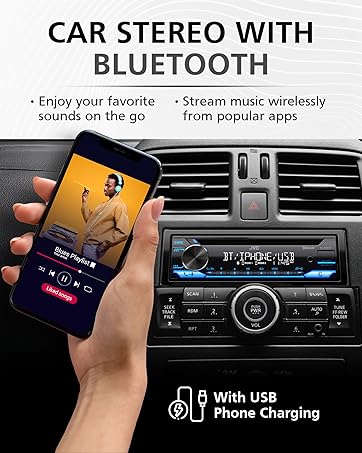
Imaxe: A hand holding a smartphone displaying a music playlist, positioned next to a car stereo. The car stereo's display shows "BT / IPHONE / USB", indicating its Bluetooth and USB capabilities. This illustrates the unit's ability to connect with smartphones for audio playback.
5.3. USB and AUX Inputs
- Reprodución USB: Connect a USB storage device to the front USB port. The unit supports MP3, WMA, WAV, AAC, and FLAC audio file playback. Use the track controls to navigate. The USB port also provides 1.5A charging for compatible devices.
- Entrada AUX: Connect an external audio player to the front 3.5mm AUX input using a stereo mini-jack cable. Select AUX as the source.
5.4. Reprodución de CD
- Insert a CD into the disc slot. The unit will automatically switch to CD source and begin playback.
- Usa o SEGUIR ARRIBA/ABAIXO botóns para saltar pistas.
- Preme o PAUSA/REPRODUCIR botón para pausar ou retomar a reprodución.
5.5. Sintonizador AM/FM
- Select Tuner as the source.
- Usa o BUSCA buttons to find radio stations.
- Mantén premido BUSCA for automatic station search.
- Store favorite stations using the preset buttons (1-6).
5.6. Amazon Alexa Integration
The KD-TD71BT features built-in Amazon Alexa.
- Activación: Connect your smartphone via Bluetooth and ensure the JVC Remote App is installed and configured with your Amazon Alexa account.
- Comandos de voz: Press the dedicated Alexa button (or activate via the JVC Remote App) and speak your commands, such as "Alexa, play music," "Alexa, get directions," or "Alexa, check the weather."
6. Configuración de audio
Customize your listening experience using the advanced audio settings. Access these settings through the unit's menu.
- Ecualizador gráfico de 13 bandas: Adjust specific frequency bands to tailor the sound to your preference. Eleven preset EQ settings are also available.
- Aliñación horaria: Adjust the delay of individual speaker outputs to ensure sound from all speakers reaches the listener at the same time, creating a more focused soundstage.
- Space Enhancement: Digitally expands the sound field to create a larger, more immersive listening environment.
- Elevación do son: Virtually adjusts the height of the sound image, making it appear as if the sound is coming from the dashboard rather than the floor.
- Tecnoloxía K2: JVC's proprietary technology that reproduces the original master sound by expanding the bit rate and frequency range.
7. Mantemento
- Limpeza da unidade: Use a soft, dry cloth to wipe the faceplate. For stubborn dirt, dampgl o pano con auga. Nunca use produtos de limpeza ou disolventes abrasivos.
- Coidado do reprodutor de CD: Use only standard, round CDs. Avoid using irregularly shaped discs or discs with labels that may peel off. Keep the disc tray clean.
- Substitución de fusibles: Se a unidade non se acende, comprobe o fusible situado na parte traseira da unidade. Substitúao por un fusible do mesmo tamaño. ampclasificación erage.
8 Solución de problemas
If you encounter issues with your KD-TD71BT, refer to the following common problems and solutions.
| Problema | Causa posible | Solución |
|---|---|---|
| Sen poder | Fusible fundido; cableado incorrecto; problema coa batería do vehículo. | Check and replace fuse; verify wiring connections; check car battery. |
| Sen son | Volume too low; mute activated; speaker wiring issue; incorrect source selected. | Increase volume; deactivate mute; check speaker connections; select correct source. |
| Bluetooth non se conecta | Bluetooth off on phone/unit; device not paired; interference. | Ensure Bluetooth is on; re-pair device; move closer to unit; restart phone/unit. |
| O CD salta ou non se reproduce | Dirty or scratched disc; unit vibration; foreign object in slot. | Clean disc; ensure stable mounting; check for obstructions. |
| Mala recepción de radio | Antena non conectada; antena danada; zona de sinal débil. | Check antenna connection; replace antenna if damaged; try a different location. |
9. Especificacións
Key technical specifications for the JVC KD-TD71BT CD Receiver:
- Número de modelo: KD-TD71BT (also referred to as KD-T710BT in some documentation)
- Fonte de alimentación: 12 V CC (terra negativa)
- Conectividade: Bluetooth, Front USB, Front AUX (3.5mm Jack)
- Carga USB: 1.5A
- Modo de saída de audio: Estéreo
- Configuración da canle de son envolvente: 2
- Equalizer: 13-Band Graphic EQ with 11 Presets
- Supported Audio Formats (USB/CD): MP3, WMA, WAV, AAC, FLAC
- Características especiais: Amazon Alexa Compatible, K2 Technology, Time Alignment, Space Enhancement, Sound Lift, Streaming DJ, 2-Phones Full-Time Connection, Steering Wheel Remote Ready
- Dimensións do produto: Aproximadamente 10 x 9 x 4 polgadas (25.4 x 22.86 x 10.16 cm)
- Peso do artigo: 3.19 libras (1.45 kg)
- Fabricante: JVC
10. Información da garantía
Os produtos JVC fabrícanse con estándares de alta calidade. Para coñecer os termos e condicións específicos da garantía, consulte a tarxeta de garantía incluída co produto ou visite o sitio web oficial de JVC. website. Warranty coverage typically includes defects in materials and workmanship for a specified period from the date of purchase. Keep your proof of purchase for warranty claims.
11. Atención ao cliente
If you require further assistance or have questions not covered in this manual, please contact JVC customer support.
- Oficial de JVC Websitio: www.jvc.com (for product information, FAQs, and support contact details)
- Recursos en liña: Check the support section of the JVC website for updated manuals, firmware, and troubleshooting guides.


