1. Introdución
This manual provides detailed instructions for the safe and efficient use of your Maxcom MM471 Senior Portable Phone. Designed with ease of use in mind, this device features large characters, big buttons, and an ergonomic design, making it ideal for seniors. Please read this manual thoroughly before operating your phone.

Figura 1: Fronte view of the Maxcom MM471 Senior Portable Phone.
2. Configuración
2.1 Contido do paquete
Asegúrate de que todos os elementos estean presentes no paquete:
- Maxcom MM471 Senior Portable Phone
- Batería
- Adaptador de carga
- Manual de usuario
2.2 Inserción da tarxeta SIM e da batería
The Maxcom MM471 supports dual SIM cards. Follow these steps to install your SIM card(s) and battery:
- Turn off the phone and disconnect it from any power source.
- Retire con coidado a tapa traseira do teléfono.
- Insira a(s) tarxeta(s) SIM na(s) ranura(s) designada(s) cos contactos dourados cara abaixo.
- Introduza a batería, asegurándose de que os contactos estean aliñados correctamente.
- Volva colocar a tapa traseira ata que encaixe firmemente no seu lugar.

Figura 2: Atrás view with battery and SIM card area.
2.3 Carga da batería
Before first use, fully charge the phone's battery:
- Connect the charging adapter to the phone's charging port or place the phone in its charging dock.
- Enchufe o adaptador a unha toma de corrente.
- O indicador da batería na pantalla mostrará o estado de carga.
- Unha vez cargado completamente, desconecte o cargador.
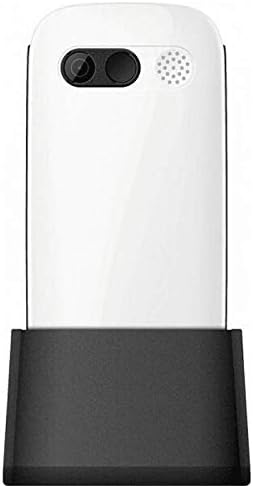
Figure 3: Phone in charging dock.
3. Instrucións de funcionamento
3.1 Acendido/Apagado
- Para acender: Manteña premido o Acender/Finalizar chamada botón ata que se ilumine a pantalla.
- Para apagar: Manteña premido o Acender/Finalizar chamada button until the power-off options appear, then select 'Power Off'.
3.2 Facer chamadas
- Desde a pantalla de inicio, introduza o número de teléfono usando o teclado numérico.
- Preme o Chamar botón (botón verde) para iniciar a chamada.
- Para finalizar a chamada, prema o botón Acender/Finalizar chamada botón (botón vermello).
3.3 Recepción de chamadas
- When a call comes in, the phone will ring and display the caller's number or name.
- Preme o Chamar button (green button) to answer.
- Para rexeitar a chamada, prema o botón Acender/Finalizar chamada botón (botón vermello).
3.4 Envío e recepción de mensaxes
- Navega ata o menú "Mensaxes" desde a pantalla principal.
- Selecciona "Nova mensaxe" para redactar unha mensaxe de texto.
- Enter the recipient's number and your message.
- Prema "Enviar".
- Received messages will appear in your 'Inbox'.
3.5 Managing Contacts
The phonebook can store up to 300 names.
- Vaia ao menú "Contactos" ou "Axenda".
- Select 'Add New Contact' to save a new number.
- Introduza o nome e o número de teléfono e, a seguir, garde.
- To call a contact, select their name from the list and press the Chamar botón.
3.6 Usando Bluetooth
Para conectar a dispositivos Bluetooth:
- Vaia a "Configuración" > "Bluetooth".
- Activa o Bluetooth.
- Seleccionar 'Busca devices' to find available Bluetooth accessories.
- Select the desired device and pair them.
3.7 Uso da lanterna
O teléfono inclúe unha lanterna incorporada para maior comodidade.
- To turn on the flashlight, locate the dedicated flashlight button (if available) or access it through the 'Tools' menu.
- Press the button or select the option again to turn it off.
4. Mantemento e coidados
To ensure the longevity and optimal performance of your Maxcom MM471 phone, follow these maintenance guidelines:
- Limpeza: Usa un pano suave e seco para limpar a superficie do teléfono. Evita produtos de limpeza líquidos ou materiais abrasivos.
- Temperatura: Non expoñas o teléfono a temperaturas extremas (calor ou frío) nin á luz solar directa durante períodos prolongados.
- Humidade: Keep the phone dry. Do not immerse it in water or expose it to high humidity.
- Almacenamento: When not in use for a long time, store the phone in a cool, dry place with the battery partially charged.
- Impacto: Evita deixar caer o teléfono ou sometelo a impactos fortes.
5 Solución de problemas
If you encounter issues with your phone, refer to the table below for common problems and solutions:
| Problema | Causa posible | Solución |
|---|---|---|
| O teléfono non se acende | A batería está esgotada ou non está inserida correctamente. | Cargue a batería. Asegúrese de que a batería estea inserida correctamente. |
| Non se poden facer nin recibir chamadas | No network signal, SIM card not inserted, or SIM card faulty. | Check network coverage. Reinsert SIM card(s). Contact your service provider. |
| Mala calidade das chamadas | Weak network signal, interference. | Move to an area with better signal. Avoid obstructions. |
| A batería esgotarase rapidamente | Excessive usage, background applications, old battery. | Reduce o brillo da pantalla. Pecha as aplicacións que non uses. Considera substituír a batería se é antiga. |
| O teclado non responde | Fallo de software, danos físicos. | Restart the phone. If the problem persists, contact support. |
6. Especificacións técnicas
Key technical details of the Maxcom MM471 Senior Portable Phone:
- Modelo: MM471
- Marca: Maxcom
- Cor: Branco
- Conectividade: Bluetooth
- Compatibilidade con tarxetas SIM: SIM dual
- Capacidade da axenda: 300 names
- Tempo de conversa: Ata 14 horas
- Interface: Botóns físicos
- Características especiais: Large characters, Big buttons, Ergonomic design, Speaker, Flashlight
7. Información sobre garantía e soporte
For detailed warranty information, please refer to the warranty card included with your product or visit the official Maxcom website. For technical support or service inquiries, please contact your retailer or the manufacturer's customer service department.


