1. Introdución
The AUVON TENS Unit is a professional, rechargeable muscle stimulator designed for pain relief and management. It utilizes Transcutaneous Electrical Nerve Stimulation (TENS) technology to excite and stimulate sensory nerves and muscles, activating the body's natural pain gate mechanism. This device is a non-invasive, drug-free method to help relax your body and manage various types of pain.
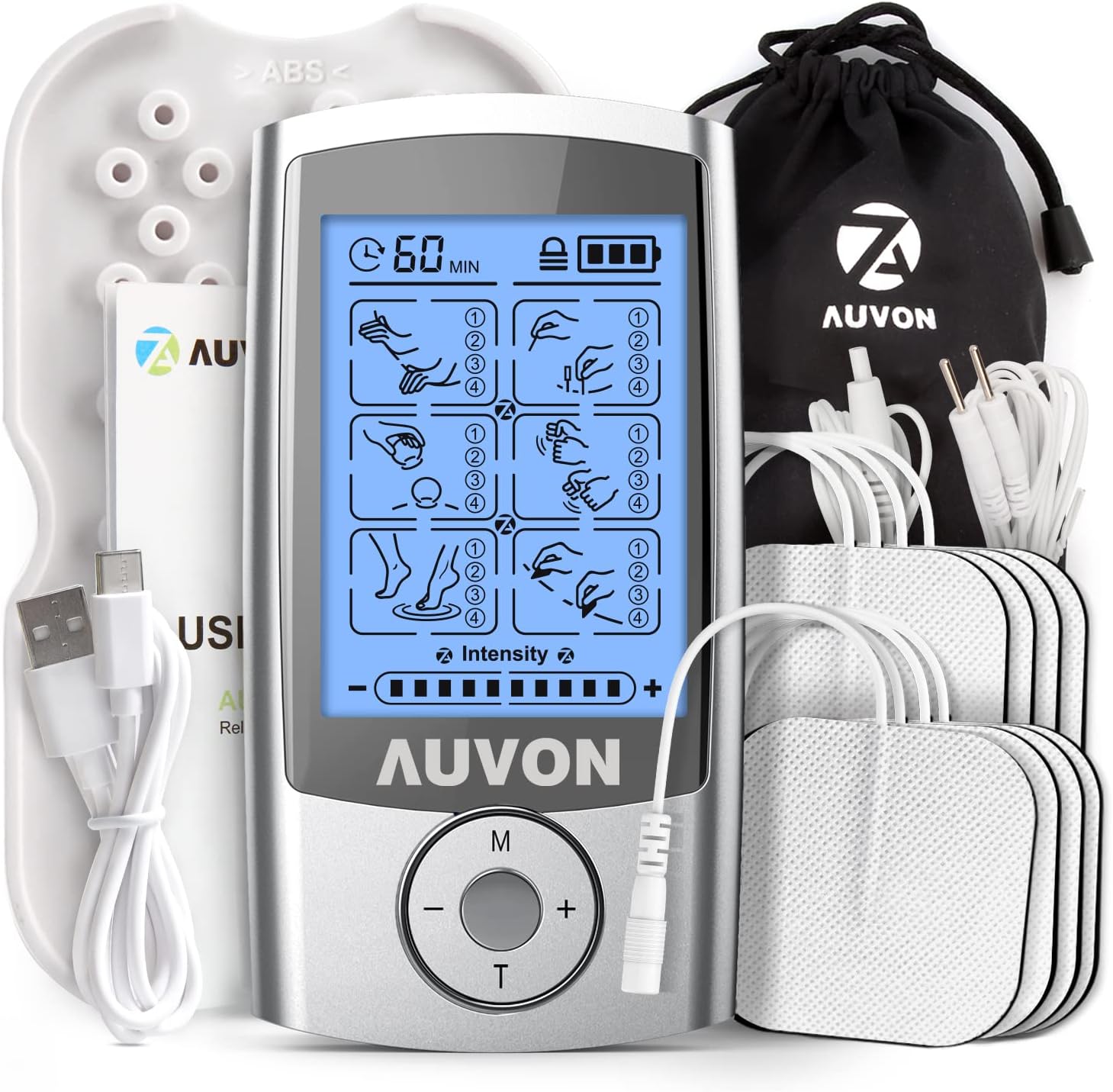
Image 1.1: The AUVON TENS Unit, including the main device, electrode pads, lead wires, USB-C cable, and storage pouch.

Image 1.2: The AUVON TENS unit is suitable for various users including office workers, those experiencing muscle fatigue, fitness enthusiasts, and elderly individuals seeking pain relief.
2. Important Safety Precautions and Warnings
Before using the AUVON TENS Unit, please read this manual carefully. Consult your physician if you have any pre-existing medical conditions. Do not use this device if you have any of the following:
- Any acute illness or infectious disease.
- Están embarazadas.
- Heart disease or abnormal blood pressure.
- Lack of skin sensation or abnormal skin problems in the application area.
- Any condition requiring active medical supervision.
Always follow the instructions for proper pad placement and intensity settings to avoid adverse reactions.
3. Que está incluído
Your AUVON TENS Unit package includes the following components:
- 1 x AUVON TENS Machine
- 8 x Square Electrode Pads (5.1 x 5.1 cm)
- 2 x Lead Wires (1/2 wire)
- 1 soporte para almofadas
- 1 x cable de carga USB tipo C
- 1 x bolsa de almacenamento
- 1 x Professional User Manual (this document)
4. Guía de configuración
4.1 Carga do dispositivo
The AUVON TENS Unit comes with a rechargeable lithium battery, providing up to 10 hours of continuous use on a full charge. The power indicator on the device will show the remaining battery life. A full recharge takes approximately 1 hour.
- Connect the USB Type-C charging cable to the charging port on the TENS unit.
- Plug the other end of the USB cable into a compatible USB wall charger (not included) or a computer's USB port.
- The battery indicator on the screen will show charging status. Once fully charged, disconnect the cable.
4.2 Colocación das almofadas de eléctrodos
The included electrode pads are designed for excellent self-adhesive performance and can be reused up to 45 times with proper care.
- Ensure the TENS unit is turned off before connecting pads.
- Connect the lead wires to the electrode pads by inserting the pin-style connectors into the pad's receptacles.
- Plug the other end of the lead wires into the output ports on the AUVON TENS unit.
- Carefully peel the protective film from the electrode pads.
- Apply the pads to clean, dry skin in the desired treatment area. Ensure the pads are firmly adhered to the skin.

Image 4.1: The AUVON TENS unit uses classic pin-style electrodes, which offer superior current stability and anti-corrosion properties compared to traditional button-style electrodes.
5. Instrucións de funcionamento
5.1 Acendido/Apagado
- To turn on the device, press and hold the Power button (usually marked 'M' or 'On/Off') until the screen illuminates.
- To turn off the device, press and hold the Power button again until the screen turns off.
5.2 Selecting Modes and Intensity
The AUVON TENS Unit offers 24 pre-programmed massage modes and 20 intensity levels for customized pain relief.

Image 5.1: Key features of the AUVON TENS unit, including 24 massage modes, 20 intensity levels, compact pocket size, up to 10 hours of usage, steady current delivery, and convenient USB-C recharging.
- After powering on, use the 'M' (Mode) button to cycle through the main massage modes. The device has 6 main massage modes, each containing multiple sub-modes, totaling 24 choices.
- Once a mode is selected, use the '+' and '-' buttons to adjust the intensity level. Start with a low intensity and gradually increase it until you feel a comfortable, yet effective, sensation. Avoid setting the intensity too high, which can cause discomfort.
5.3 Configuración do temporizador
The device features an adjustable timer to set the duration of your therapy session.
- Press the 'T' (Timer) button to adjust the session duration. The available time settings will be displayed on the screen.
- The device will automatically shut off once the set time has elapsed.

Image 5.2: This diagram illustrates common application areas for the TENS unit, including shoulders, hands, ankles, neck, elbows, knees, and lower back, to help relieve pain in various parts of the body.
6. Coidados e mantemento
6.1 Almacenamento do dispositivo
- When not in use, turn off the TENS unit.
- Garde a unidade nun lugar fresco e seco, lonxe da luz solar directa e de temperaturas extremas.
- Use the provided storage pouch to protect the device and accessories.
6.2 Coidado das almofadas de eléctrodos
Proper care of the electrode pads will extend their lifespan and ensure optimal performance.
- After each use, gently remove the pads from your skin.
- Cover the adhesive side of the pads with the included protective film and return them to the pad holder or their original packaging.
- If the pads lose some stickiness, apply a few drops of water to the adhesive surface and let them air dry for a few minutes. This can help restore their stickiness.
- Replace pads when they no longer adhere well to the skin or if they cause discomfort.

Image 6.1: This table highlights the superior qualities of AUVON GEL pads, including their origin (America), higher reusability (up to 45 times), lower resistance (45 Ω), biocompatibility, automated production, and 510K Biocompatibility Report, ensuring better conductivity and longevity compared to other gel pads.
6.3 Mantemento da batería
- Charge the device at least once every 3 months, even if not used regularly, to maintain battery health.
- Always use the provided USB Type-C cable for charging.
7 Solución de problemas
| Problema | Causa posible | Solución |
|---|---|---|
| O dispositivo non se acende. | Batería baixa ou dispositivo apagado. | Charge the device. Press and hold the Power button to turn on. |
| Sen sensación ou sensación débil. | Pads not properly adhered, lead wires loose, intensity too low, or pads worn out. | Ensure pads are firmly on skin. Check lead wire connections. Increase intensity gradually. Replace old pads. |
| Pads not sticking. | Skin is oily/dirty, pads are dry, or pads are worn out. | Clean and dry skin before application. Apply a few drops of water to pads and air dry. Replace pads. |
| Molestias durante o uso. | Intensity too high, improper pad placement, or skin irritation. | Decrease intensity. Adjust pad placement. Discontinue use if irritation persists and consult a doctor. |
8. Especificacións do produto
- Marca: AUVON
- Número de modelo: AS1080141
- ASIN: B08BFM6NPP
- Modos: 24 Pre-programmed Massage Modes
- Niveis de intensidade: 20 niveis axustables
- Batería: 1 x Lithium-ion (Included)
- Duración da batería: Ata 10 horas de uso continuo
- Tempo de carga: Aproximadamente 1 hora
- Electrodos: 8 x Square (5.1 x 5.1 cm), reusable up to 45 times
- Dimensións do paquete: 14.9 x 8.3 x 6.4 cm
- Peso: 270 gramos
- Fabricante: AUVON

Imaxe 8.1: Unha explosión view demonstrating the precise electronic circuitry and high-quality components within the AUVON TENS unit, ensuring optimal safety and performance (CE/ROHS Cleared).
9. Garantía e soporte
AUVON is committed to providing high-quality products and customer satisfaction. For any questions, concerns, or technical support regarding your AUVON TENS Unit, please refer to the contact information provided with your purchase or visit the official AUVON websitio.
Always consult a healthcare professional for medical advice or if you experience persistent pain or discomfort.


