Produto rematadoview
The FLEXISPOT EN2 Electric Standing Desk is designed to provide a versatile and ergonomic workspace. This whole-piece standing desk features a motorized height adjustment system, programmable memory presets, and integrated power solutions to enhance productivity and comfort.

Imaxe: The FLEXISPOT EN2 Electric Standing Desk in a home office, showcasing its spacious black tabletop and black frame. Two computer monitors are set up on the desk, with a chair positioned for sitting. A water cooler is visible to the left.
Seguridade e información importante
- Siga sempre atentamente as instrucións de montaxe.
- Use the desk on a stable surface.
- Manteña o escritorio lonxe de fontes de calor.
- Do not exceed the maximum weight recommendation of 154 pounds (55 kg) for the desk surface.
- Keep children and pets away from the desk when it is in motion.
- A montaxe pode requirir un berbequín eléctrico, que non está incluído.
Configuración e montaxe
The FLEXISPOT EN2 desk is designed for straightforward assembly. Ensure all parts are present and refer to the detailed instructions provided in the packaging. An electric drill may be required for certain steps.
Pasos de montaxe superadosview:
- Desembale todos os compoñentes e verifíqueos coa lista de pezas.
- Assemble the desk frame, attaching the feet and crossbeam.
- Attach the desktop to the assembled frame using the provided screws.
- Install the control panel and connect all necessary cables.
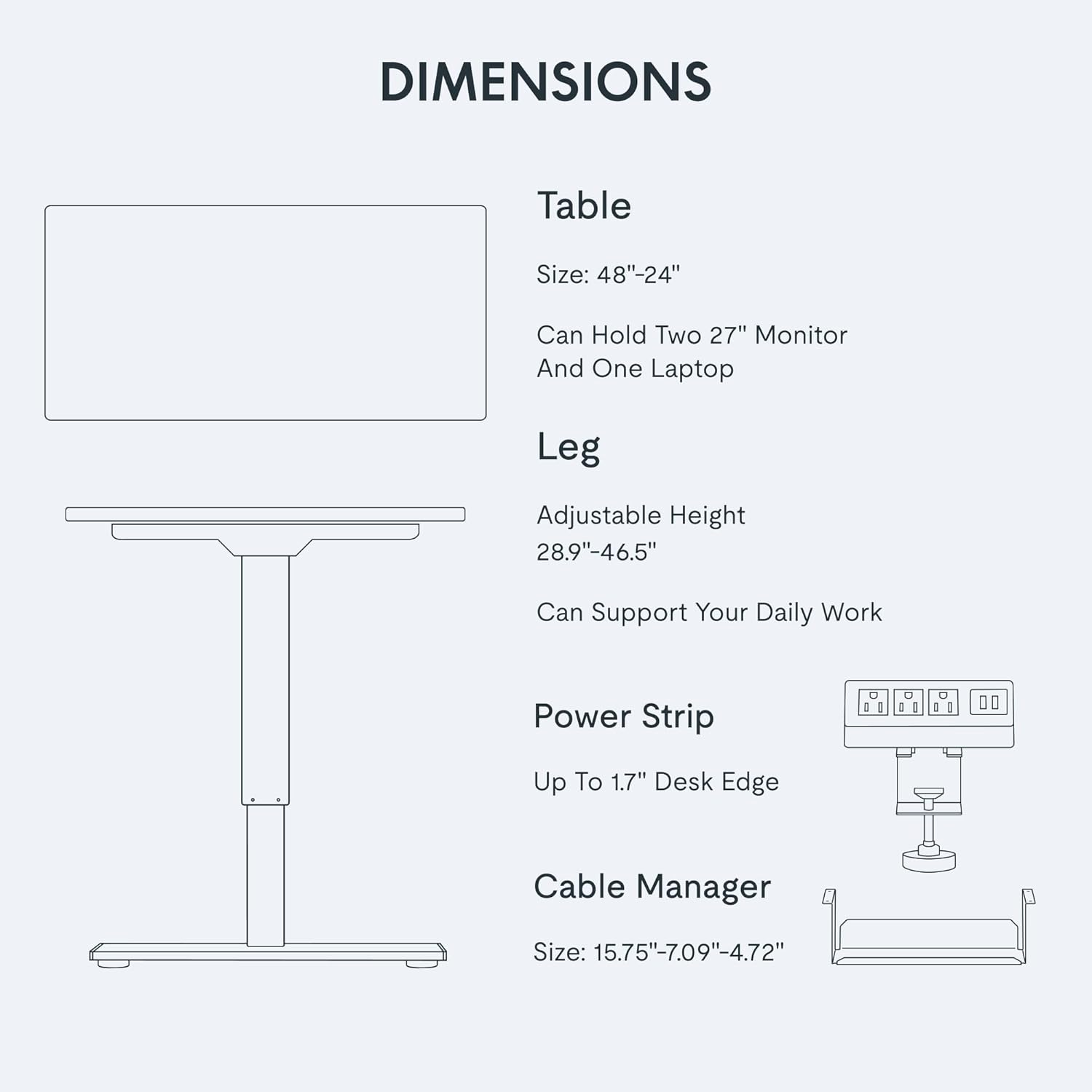
- Attach the removable desktop power outlet and cable management device.
Para obter unha guía visual sobre a montaxe, consulta o vídeo seguinte:
Vídeo: A seller-provided video demonstrating the assembly process of a FLEXISPOT electric standing desk, showing the frame construction and desktop attachment.
Instrucións de funcionamento
Axuste de altura:
The desk features a 6-button digital controller for easy height adjustment. Use the up and down arrows to manually adjust the desk height. The motorized system adjusts smoothly from 28.1 inches to 45.7 inches.
Presets de memoria:
The controller includes four programmable memory presets (buttons 1, 2, 3, 4). To set a preset:
- Axusta o escritorio á altura desexada usando as frechas arriba/abaixo.
- Press and hold one of the number buttons (1-4) until the display flashes or beeps, indicating the height is saved.
- Para recuperar unha altura gardada, simplemente prema o botón numérico correspondente.
Imaxe: Un primeiro plano view of the FLEXISPOT EN2's digital control panel, highlighting the LED display, up/down arrows, and four height setting buttons.
Toma de corrente extraíble para escritorio:
The desktop is equipped with 3 AC power outlets and 2 USB charging ports. This unit can be clipped to the back or side of your desk for convenient access to power for your electronic devices.
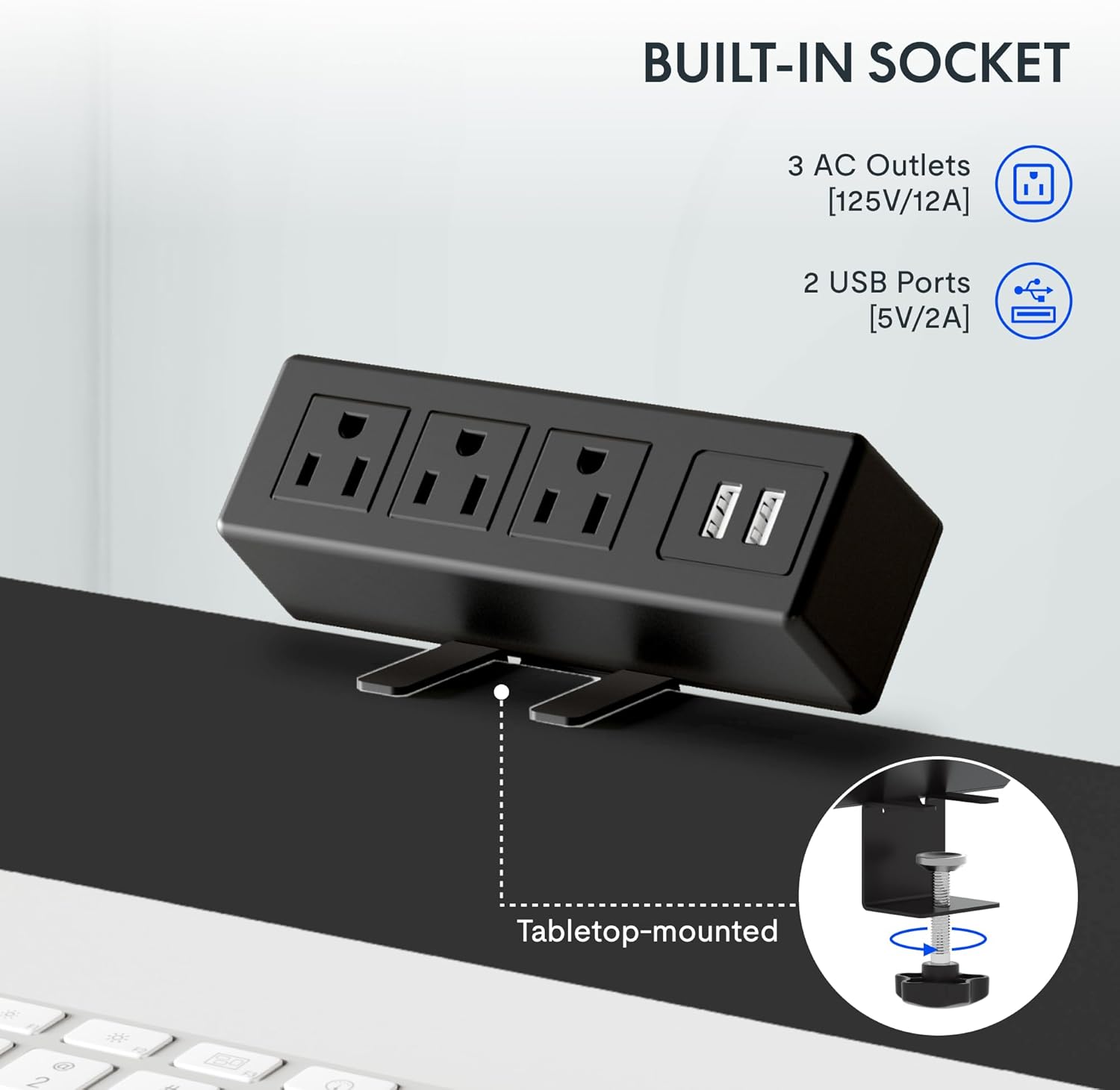
Imaxe: A detailed shot of the removable desktop power outlet, showing its three AC outlets and two USB ports, designed to clamp onto the desk edge.
Mantemento
Para garantir a lonxevidade e o rendemento óptimo do seu escritorio FLEXISPOT EN2, siga estas pautas de mantemento:
- Limpeza: Limpar a superficie do escritorio cun pano suave eamp pano. Evite produtos de limpeza abrasivos ou produtos químicos agresivos que poidan danar o acabado.
- Coidados do motor: The motor is designed for quiet operation. Avoid obstructing the motor or lifting mechanisms.
- Xestión de cables Regularly check and organize cables using the provided cable management device to prevent tangles and damage.
- Distribución de peso: Distribuír o peso uniformemente pola superficie de traballo para evitar tensións no motor e na estrutura.
Resolución de problemas
If you encounter any issues with your FLEXISPOT EN2 desk, refer to the following common troubleshooting tips:
- O escritorio non se move:
- Comprobe se o cable de alimentación está ben conectado tanto ao escritorio como á toma de corrente.
- Ensure there are no obstructions preventing the desk from moving up or down.
- Reset the system by unplugging the desk for 10 seconds and then plugging it back in.
- Movemento irregular:
- Verify that the desk is placed on a level surface.
- Asegúrate de que o peso estea distribuído uniformemente sobre o escritorio.
- Ruído durante o funcionamento:
- A quiet motor operation (less than 50 dB) is normal. Excessive noise may indicate an obstruction or loose component. Inspect the moving parts for any issues.
Se os problemas persisten, póñase en contacto co servizo de atención ao cliente.
Especificacións
| Característica | Detalle |
|---|---|
| Marca | FLEXISPOT |
| Número de modelo | EN 2 |
| Dimensións do escritorio | 48" de ancho x 24" de fondo |
| Rango de axuste de altura | 28.1" a 45.7" |
| Capacidade máxima de peso | 154 libras (55 kg) |
| Material de escritorio | Madeira certificada polo FSC |
| Material do marco | Aceiro de grao industrial |
| Nivel de ruído | Menos de 50 dB |
| Toma de corrente | 3 AC outlets, 2 USB charging ports |
| Tipo de controlador | 6-button digital with 4 memory presets |
Garantía e Soporte
FLEXISPOT provides the following warranty for your EN2 Electric Standing Desk:
- 5 ano de garantía: Abrangue cadros, motores e outros dispositivos mecánicos.
- 2 ano de garantía: Abarca controladores, interruptores e electrónica.
For technical support, warranty claims, or any questions regarding your product, please visit the official FLEXISPOT website or contact their customer service department. Keep your purchase receipt for warranty validation.
Podes atopar máis información e apoio en Tenda FLEXISPOT en Amazon.