1. Introdución
Grazas pola compraasing the MUSITREND M316 Bluetooth Turntable. This manual provides essential information for the safe and efficient operation of your record player. Please read it thoroughly before use and retain it for future reference.
2. Contido do paquete
- MUSITREND M316 Bluetooth Turntable
- Adaptador de alimentación
- Manual de usuario
- Adaptador de 45 rpm
- Cable USB
3. Produto rematadoview
3.1 Controis e características
Familiarize yourself with the turntable's controls and features:
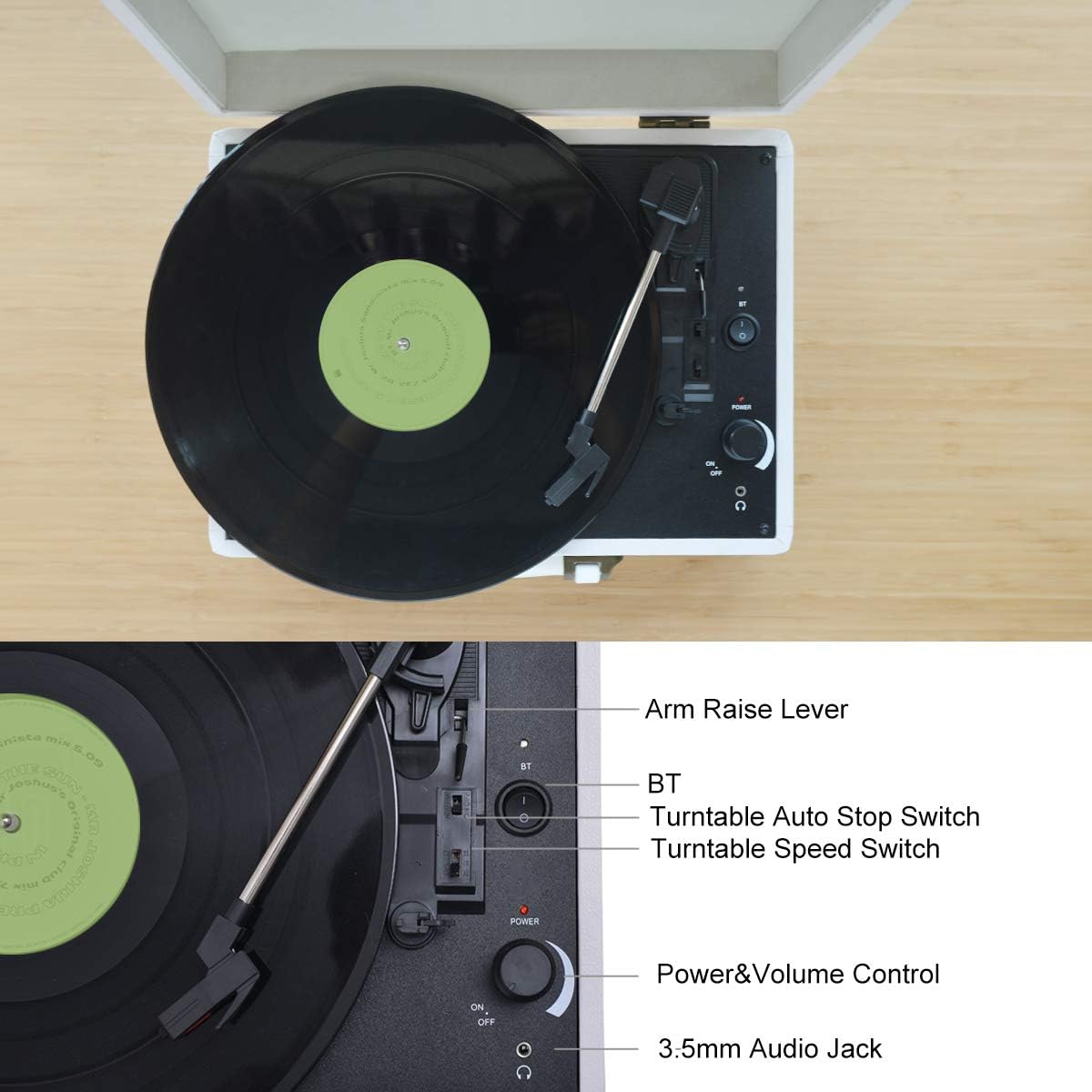
Imaxe 3.1: Arriba View Controis
This image displays the top panel of the turntable, highlighting key controls such as the Arm Raise Lever, Bluetooth (BT) switch, Turntable Auto Stop Switch, Turntable Speed Switch, Power & Volume Control knob, and 3.5mm Audio Jack.
- Arm Raise Lever: Lifts and lowers the tonearm.
- Interruptor BT: Activa o modo de emparellamento Bluetooth.
- Turntable Auto Stop Switch: Activa ou desactiva a parada automática do prato ao final dun disco.
- Turntable Speed Switch: Selects playback speed (33, 45, or 78 RPM).
- Control de volume e potencia: Turns the unit on/off and adjusts speaker volume.
- Conector de audio de 3.5 mm: Para conectar auriculares.
3.2 Conexións do panel traseiro
O panel traseiro ofrece varias opcións de entrada e saída:
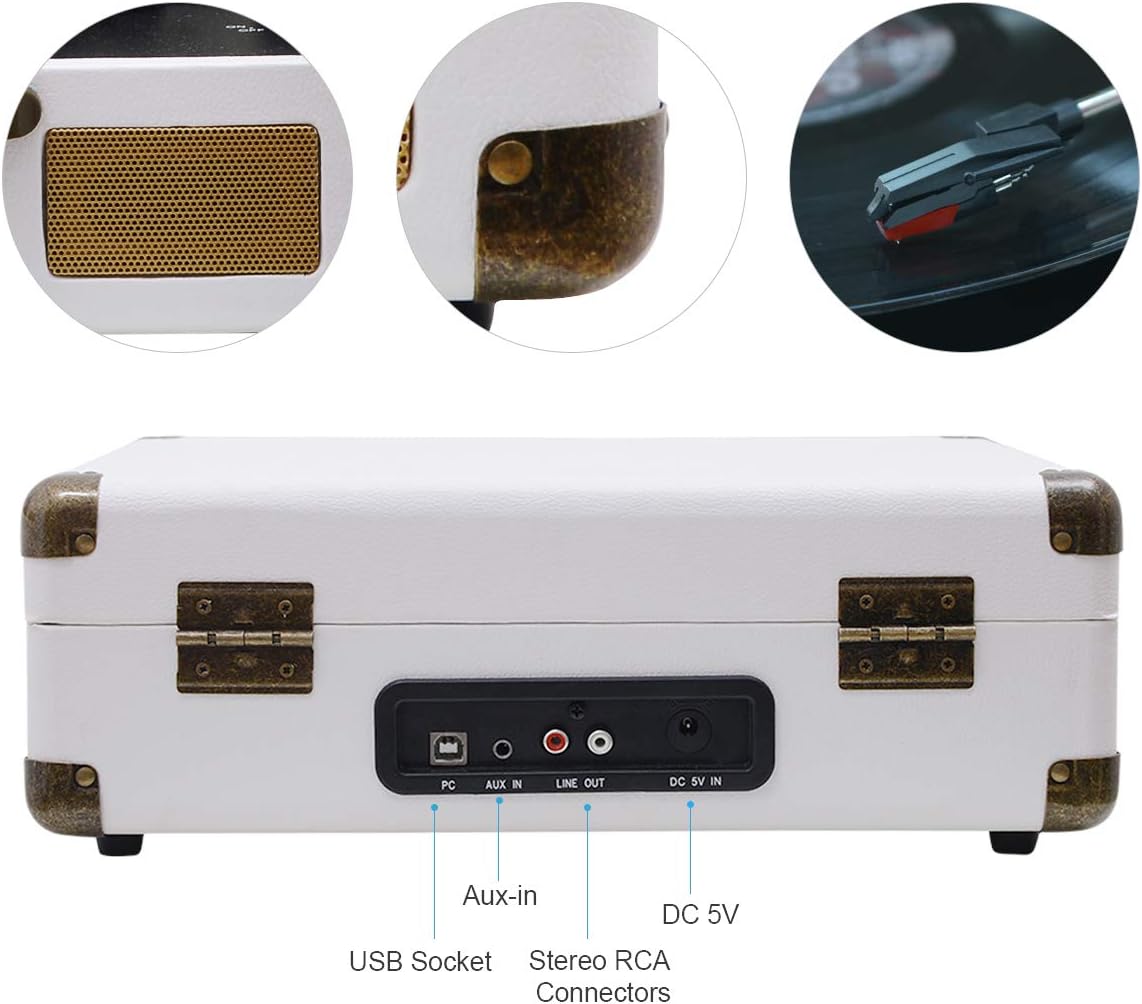
Image 3.2: Rear Panel Connections
This image shows the rear of the turntable, indicating the USB Socket, Aux-in port, Stereo RCA Connectors (Line Out), and DC 5V In power input.
- Toma USB: For connecting to a computer for recording vinyl to digital files.
- Entrada auxiliar: Entrada de 3.5 mm para conectar dispositivos de son externos.
- Stereo RCA Connectors (Line Out): Para conectar a dispositivos externos amplevantadores ou altofalantes alimentados.
- DC 5V In: Entrada de alimentación para o adaptador incluído.

Image 3.3: Connectivity Options
A closer look at the headphone jack, RCA output, and 3.5mm Aux-in port, illustrating their functions for connecting various audio equipment.
4. Configuración
- Desempaquetar: Retire con coidado o prato xiratorio da súa embalaxe.
- Colocación: Coloque o prato xiratorio sobre unha superficie estable e nivelada, lonxe da luz solar directa, de fontes de calor e de po ou vibracións excesivas.
- Conexión de alimentación: Connect the DC 5V power adapter to the 'DC 5V In' port on the rear of the turntable and plug the adapter into a wall outlet.
- Funda antipolvo: Open the dust cover. Remove any protective packaging materials from the platter and tonearm.
- Stylus Protection: Remove the stylus protective cap.
5. Instrucións de funcionamento
5.1 Reproducción de discos de vinilo
- Encendido: Turn the Power & Volume Control knob clockwise to power on the unit.
- Seleccionar velocidade: Set the Turntable Speed Switch to the appropriate speed (33, 45, or 78 RPM) for your record. Use the 45 RPM adapter for 7-inch singles if needed.
- Rexistro do lugar: Coloque un disco de vinilo no prato do tocadiscos.
- Parada automática: If desired, set the Auto Stop Switch to ON for the platter to stop automatically at the end of the record. Set to OFF for continuous play or for records with short lead-out grooves.
- Posición do brazo: Use the Arm Raise Lever to lift the tonearm. Manually move the tonearm over the desired track of the record.
- Brazo inferior: Gently lower the tonearm onto the record using the Arm Raise Lever. The music will begin to play through the integrated speakers.
- Axustar o volume: Adjust the volume using the Power & Volume Control knob.
- Reprodución final: At the end of the record (if Auto Stop is ON), the platter will stop. If Auto Stop is OFF, manually lift the tonearm using the lever and return it to the tonearm rest.
5.2 Reprodución por Bluetooth
Connect your Bluetooth-enabled device to the turntable for wireless audio streaming.

Image 5.1: Bluetooth Pairing
This image illustrates the process of pairing a mobile phone with the MUSITREND turntable via Bluetooth for instant wireless audio streaming.
- Encendido: Turn the Power & Volume Control knob clockwise to power on the unit.
- Activar Bluetooth: Set the BT Switch to the 'BT' position. The Bluetooth indicator light will flash, indicating pairing mode.
- Parear dispositivo: On your Bluetooth-enabled device (e.g., smartphone, tablet), enable Bluetooth and search for 'MUSITREND'. Select it to pair.
- Confirmación: Once paired, the Bluetooth indicator light will stop flashing and remain solid.
- Reproducir música: Start playing music on your device. The audio will stream through the turntable's speakers.
- Axustar o volume: Adjust the volume using the Power & Volume Control knob on the turntable and/or your connected device.
5.3 Aux-in Playback
Connect external audio sources using the 3.5mm Aux-in port.
- Encendido: Turn the Power & Volume Control knob clockwise to power on the unit.
- Cable de conexión: Connect a 3.5mm audio cable (not included) from your external audio device's headphone jack or line-out to the 'Aux-in' port on the turntable.
- Reproducir música: Comeza a reproducir música no teu dispositivo externo.
- Axustar o volume: Adjust the volume using the Power & Volume Control knob on the turntable and/or your connected device.
5.4 USB Recording (MP3/WAV Conversion)
Converte os teus discos de vinilo en MP3/WAV dixitais files no teu ordenador.

Image 5.2: USB Recording Setup
This diagram illustrates how to connect the turntable to a computer via USB to convert vinyl records into MP3/WAV format music files.
- Conectar ao PC: Connect the turntable to your computer using the supplied USB cable.
- Instalación de software: Install appropriate recording software on your computer (e.g., Audacity, often available as a free download).
- Configuración do software: Follow the software's instructions to select the turntable as the audio input device.
- Comezar a gravar: Begin recording in the software, then start playing your vinyl record on the turntable (refer to section 5.1).
- Gardar File: Once the record finishes, stop recording in the software and save the digital audio file in your desired format (MP3, WAV, etc.).
6. Mantemento
6.1 Limpeza do prato xiratorio
- Use a soft, dry cloth to wipe the turntable's exterior.
- Non empregue produtos de limpeza abrasivos, ceras nin solventes.
- Keep the dust cover closed when not in use to prevent dust accumulation.
6.2 Coidado do punteiro
- Handle the stylus with extreme care. Avoid touching the stylus tip.
- Clean the stylus regularly with a soft brush, brushing gently from back to front.
- Replace the stylus approximately every 300-500 hours of playback, or if you notice a decrease in sound quality.
6.3 Coidado de rexistros
- Keep records clean and free of dust. Use a carbon fiber brush before each play.
- Garda os discos en vertical nas súas fundas, lonxe da calor e da luz solar directa.
7 Solución de problemas
| Problema | Causa posible | Solución |
|---|---|---|
| Sen poder | O adaptador de corrente non está conectado ou está avariado. | Asegúrate de que o adaptador de corrente estea conectado correctamente ao tocadiscos e a unha toma de corrente que funcione. |
| Non hai son dos altofalantes | Volume too low; Aux-in or Bluetooth mode active; external speakers connected. | Increase volume. Ensure BT switch is in correct position for vinyl playback. Disconnect external speakers if using internal ones. |
| Turntable speed is incorrect | Velocidade incorrecta seleccionada. | Adjust the Turntable Speed Switch to 33, 45, or 78 RPM as required by the record. |
| Son con saltos ou distorsión | Dirty record; dirty or worn stylus; turntable not level. | Clean the record. Clean or replace the stylus. Ensure the turntable is on a level surface. |
| Bluetooth non se sincroniza | Turntable not in pairing mode; device too far; device already paired. | Ensure BT switch is in 'BT' position and indicator is flashing. Move device closer. Forget 'MUSITREND' on your device and try pairing again. |
8. Especificacións
| Característica | Especificación |
|---|---|
| Nome do modelo | M316White-EU |
| Dimensións do produto (L x W x H) | 39.79 x 37.7 x 16.4 cm |
| Peso do elemento | 3.02 quilogramos |
| Cor | Branco |
| Tipo de material | Vinilo |
| Tipo de potencia | Electric Cable, Wireless |
| Velocidade máxima de rotación | 78 RPM |
| Compoñentes incluídos | Altofalantes |
| Características especiais | Integrated Speaker, Portable, Adjustable Speed |
| Dispositivos compatibles | Headphones, Speaker |
| Tipo de motor | Motor DC |
| Formato de sinal | Analóxico |
9. Garantía e soporte
MUSITREND products are designed and manufactured to the highest quality standards. For warranty information or technical support, please refer to the documentation included with your purchase or visit the official MUSITREND website. Please have your model number (M316) and purchase date ready when contacting support.


