1. Produto rematadoview
The Baseus Heyo Rotation Countdown Timer is a versatile digital timer designed for various scenarios, including kitchen cooking, study, work, and exercise. It features an intuitive rotary adjustment, a clear LCD display, and intelligent energy-saving functions.

Imaxe 1.1: Fronte view of the Baseus Heyo Rotation Countdown Timer, showcasing its sleek design and clear digital display.
2. Características clave
- Intuitive Rotary Adjustment: Easily set time by rotating the outer ring, supporting both countdown and count-up functions.
- Clear LCD Digital Display: Large, easy-to-read numbers for minutes and seconds.
- Volume axustable: Three volume settings (Loud, Low, Mute) to suit different environments.
- Intelligent Energy Saving: The display dims after 5 seconds of inactivity and shuts down after another 5 seconds to conserve battery life.
- Soporte magnético: Allows for convenient placement on metallic surfaces like refrigerators or whiteboards.
- Material duradeiro: Constructed from Acrylonitrile Butadiene Styrene for longevity.

Image 2.1: Demonstrates the easy rotation mechanism for efficient timing adjustments.

Image 2.2: Illustrates the adjustable volume settings located on the back of the timer.
3. Configuración
3.1. Contido do paquete
- Baseus Heyo Rotation Countdown Timer (1 unit)
- Manual de usuario (este documento)
- Nota: As pilas AAA non están incluídas e deben mercarse por separado.
3.2. Instalación da batería
- Localiza o compartimento das pilas na parte traseira do temporizador.
- Abra a tapa da batería.
- Insira tres (3) pilas AAA, asegurándose de manter a polaridade correcta (+/-).
- Close the battery cover securely. The LCD display will light up, indicating successful installation.

Imaxe 3.1: View of the battery compartment, showing where to insert three AAA batteries.
4. Instrucións de funcionamento
4.1. Acendido/apagado
The timer automatically powers on when batteries are installed. It enters an energy-saving mode after 5 seconds of inactivity and fully shuts down after another 5 seconds of no operation. To reactivate, simply rotate the dial or press the "O" button.
4.2. Setting the Timer (Countdown)
- Tempo de axuste: Rotate the outer ring clockwise to increase the time (minutes and seconds) and counter-clockwise to decrease it. The adjustable range is 00:00 to 99:55.
- Comezar a conta atrás: Once the desired time is set, press the "O" button on the front of the timer to begin the countdown.
- Pausa / Reanudar: Press the "O" button again during a countdown to pause it. Press it once more to resume.
- Restablecer: To reset the timer to 00:00, press and hold the "O" button for approximately 3 seconds.
- Alarma: When the countdown reaches 00:00, the timer will sound an alarm according to the selected volume setting.
4.3. Using as a Stopwatch (Count-up)
- Ensure the timer display is at 00:00. If not, reset it by holding the "O" button.
- Press the "O" button to start counting up from 00:00.
- Press the "O" button again to pause the count-up.
- Press and hold the "O" button to reset the stopwatch.
4.4. Axuste do volume
On the back of the timer, there is a switch to adjust the alarm volume. Select from three modes:
- Alto: For noisy environments or when a strong alert is needed.
- Baixo: For quiet environments or subtle alerts.
- Silenciar: The display will blink when the time is up, providing a silent notification. Ideal for libraries, offices, or study areas.
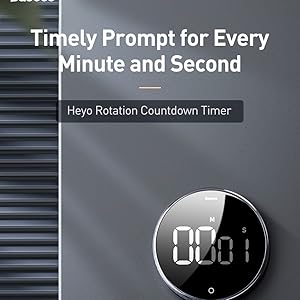
Image 4.1: The timer can be conveniently placed on magnetic surfaces for easy visibility.

Image 4.2: The timer is suitable for various settings, including professional and educational environments.
5. Mantemento
- Limpeza: Wipe the timer with a soft, dry cloth. Do not use abrasive cleaners or immerse in water.
- Substitución da batería: Replace batteries when the display becomes dim or the timer functions erratically. Always use new AAA batteries.
- Almacenamento: Store the timer in a cool, dry place when not in use for extended periods. Remove batteries if storing for more than a month to prevent leakage.
- Evita condicións extremas: Do not expose the timer to extreme temperatures, direct sunlight, or high humidity.
6 Solución de problemas
| Problema | Causa posible | Solución |
|---|---|---|
| A pantalla está en branco ou escura. | Pilas baixas ou gastadas; instalación incorrecta da pila. | Substitúa as pilas por pilas AAA novas, asegurándose de manter a polaridade correcta. |
| Timer does not start/stop. | "O" button not pressed firmly; timer in sleep mode. | Press the "O" button firmly. Rotate the dial to wake the timer from sleep mode. |
| A alarma non soa. | Volume set to Mute; low battery. | Check the volume switch on the back and set it to Loud or Low. Replace batteries if needed. |
| Numbers are incorrect or flickering. | Faulty unit; very low battery. | Substitúa as pilas. Se o problema persiste, póñase en contacto co servizo de atención ao cliente. |
7. Especificacións
- Número de modelo: ACDJS-01
- Marca: Baseus
- Material: Acrilonitrilo Butadieno Estireno (ABS)
- Cor: Negro
- Dimensións: 5 cm (profundidade) x 5 cm (ancho) x 3 cm (altura)
- Peso do artigo: 150 gramos
- Rango de temporización: 00:00 - 99:55
- Fonte de enerxía: 3 pilas AAA (non incluídas)
- Número de configuracións: 4 (referring to volume settings and timing modes)
- País de orixe: China
- UPC: 738633769932
8. Garantía e soporte
Baseus products are manufactured with high-quality standards. For warranty information and customer support, please refer to the warranty card included with your purchase or visit the official Baseus websitio. Garde o recibo de compra para reclamacións de garantía.
Fabricante: Baseus, Store2508, Dankuni, West Bengal
Importador/Empacador: MP International - Authorised Distributor
For technical assistance or inquiries, please contact your local distributor or the seller.


