Introdución
Grazas pola compraasing the Byron Statics Portable CD Boombox. This device offers versatile audio playback options, including a top-loading CD player, AM/FM radio, and an Aux-in port for external devices. Designed for portability and ease of use, this manual provides detailed instructions to help you operate and maintain your boombox effectively.
Información de seguridade
- Fonte de enerxía: Use only the specified AC power cord (AC 120V-60Hz) or 6 x 1.5V 'C' size batteries.
- Auga e humidade: Non expoña a unidade á choiva, á humidade nin a mergulle na auga.
- Fontes de calor: Manteña a unidade lonxe de fontes de calor como radiadores, reixas de calor, estufas ou outros aparellos que produzan calor.
- Ventilación: Asegúrese de que haxa unha ventilación axeitada. Non bloquee ningunha das aberturas de ventilación.
- Limpeza: Desconecte a unidade da toma de corrente antes de limpala. Use un pano suave e seco.
- Servizo: Non intente atender este produto vostede mesmo. Remita todo o servizo a persoal de servizo cualificado.
- Reproductor de CD: Nunca mire directamente ao raio láser.
Produto rematadoview
Familiarize yourself with the various parts and controls of your boombox.

Figura 1: Fronte e arriba View of the Boombox with Labeled Controls
- Porta do CD: Access for loading/unloading CDs.
- Interruptor de función: Selects between CD/AUX IN, OFF, and RADIO modes.
- Control de volume: Axusta o nivel de saída de audio.
- Antena FM: Extendable antenna for FM radio reception.
- Band Switch (AM/FM): Selects between AM and FM radio bands.
- Control de sintonía: Fine-tunes radio frequencies.
- Asa de transporte: Para unha fácil portabilidade.
- Botóns de control de CD: Repeat, Skip On/Down, Program, Stop, Play/Pause.
- Pantalla LED: Shows track number for CD or radio frequency.
- Indicador de potencia: Acende cando a unidade está acendida.
- Jack de entrada auxiliar: Para conectar dispositivos de audio externos.
- Entrada de enerxía CA: Para conectar o cable de alimentación CA.
- Compartimento de batería: Located on the bottom for 'C' size batteries.
Configuración
Alimentación da Unidade
O teu boombox pode funcionar con corrente alterna ou con baterías.
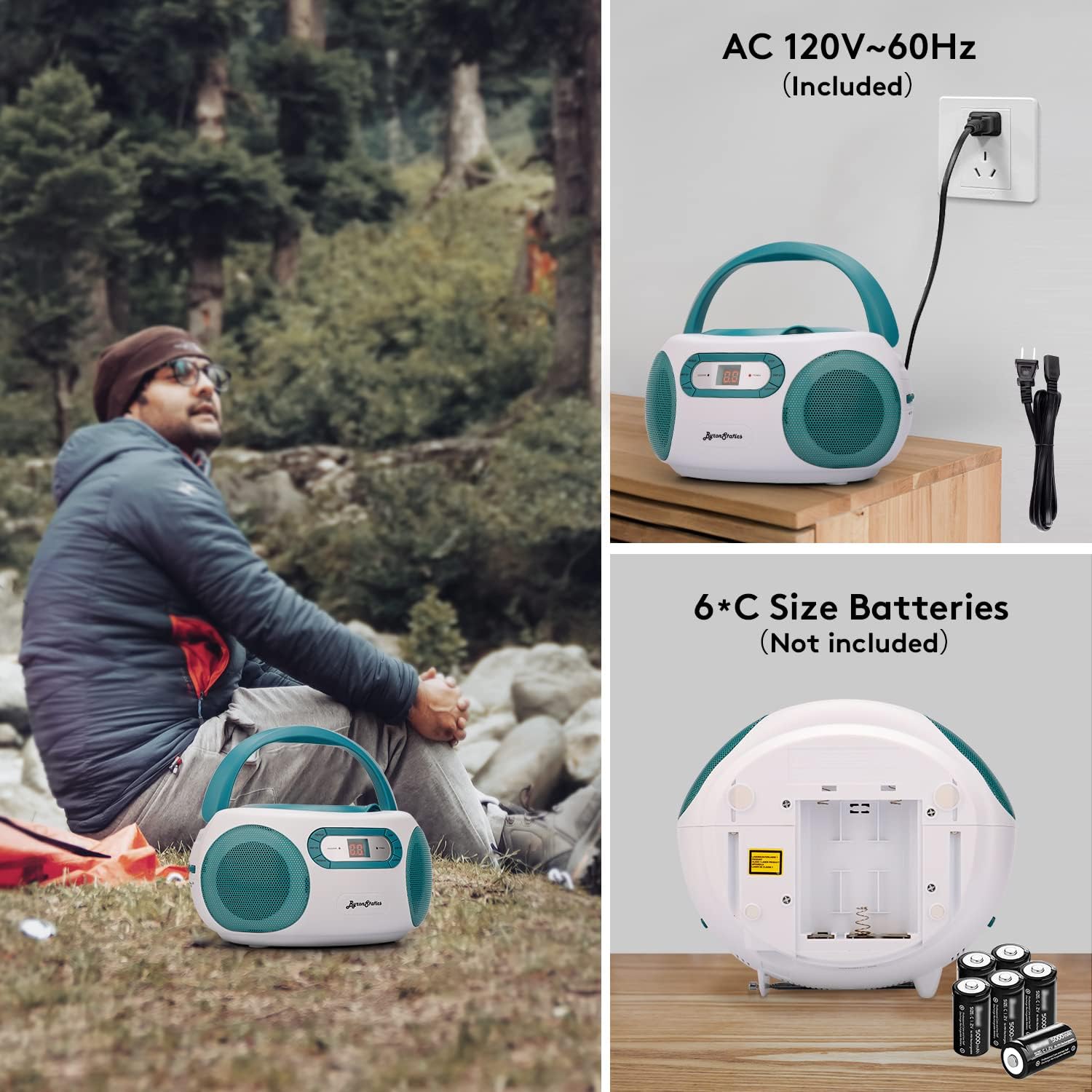
Figura 2: AC Power Connection and Battery Installation
Funcionamento de enerxía CA.
- Ensure the Function Switch is in the "OFF" position.
- Connect the supplied AC power cord to the AC power input jack on the back of the unit.
- Plug the other end of the AC power cord into a standard AC 120V-60Hz wall outlet.
Funcionamento da batería
- Ensure the Function Switch is in the "OFF" position.
- Abra a tapa do compartimento da batería situada na parte inferior da unidade.
- Insert 6 x 1.5V 'C' size batteries (not included), observing the correct polarity (+/-) as indicated inside the compartment.
- Pecha a tapa do compartimento da batería de forma segura.
- Nota: Desconecte o cable de alimentación de CA cando funcione con baterías.
Instrucións de funcionamento
Funcionamento do reprodutor de CD

Figura 3: Loading a CD into the Top-Loading Compartment
- Set the Function Switch to the "CD/AUX IN" position.
- Open the CD door by gently lifting it.
- Coloque un CD (CD, CD-R ou CD-RW) no eixo central coa etiqueta cara arriba.
- Close the CD door firmly until it clicks.
- The CD player will begin reading the disc, and the total number of tracks will appear on the LED display.
- Preme o REPRODUCIR/PAUSA button to start playback. The track number will be displayed.
- Para pausar a reprodución, prema o REPRODUCIR/PAUSA botón. Próbeo de novo para continuar.
- Para saltar á seguinte pista, prema o botón SALTAR ARRIBA botón.
- Para volver ao comezo da pista actual ou á pista anterior, prema o botón SALTAR Abaixo botón.
- Para deter a reprodución, prema o botón PARA botón.
- Función de repetición: Preme o REPETIR button once to repeat the current track. Press it again to repeat the entire disc. Press a third time to cancel repeat mode.
- Función do programa: To program tracks for playback, press the PROGRAMA button while the CD is stopped. The "PROGRAM" indicator will flash. Use the SALTAR ARRIBA/BAIXO botóns para seleccionar a pista desexada e, a seguir, prema PROGRAMA again to confirm. Repeat for up to 20 tracks. Press REPRODUCIR/PAUSA para iniciar a reprodución programada.
Funcionamento da radio AM/FM

Figura 4: Using the AM/FM Radio with Extended Antenna
- Set the Function Switch to the "RADIO" position.
- Slide the Band Switch to select either "AM" or "FM".
- For FM reception, fully extend the telescopic FM antenna. For AM reception, the unit has a built-in antenna, so no external adjustment is needed.
- Xire o TUNING control knob to select your desired radio station. The frequency will be displayed on the LED screen.
- Axustar o VOLUME control to your preferred listening level.
Aux-in Operation
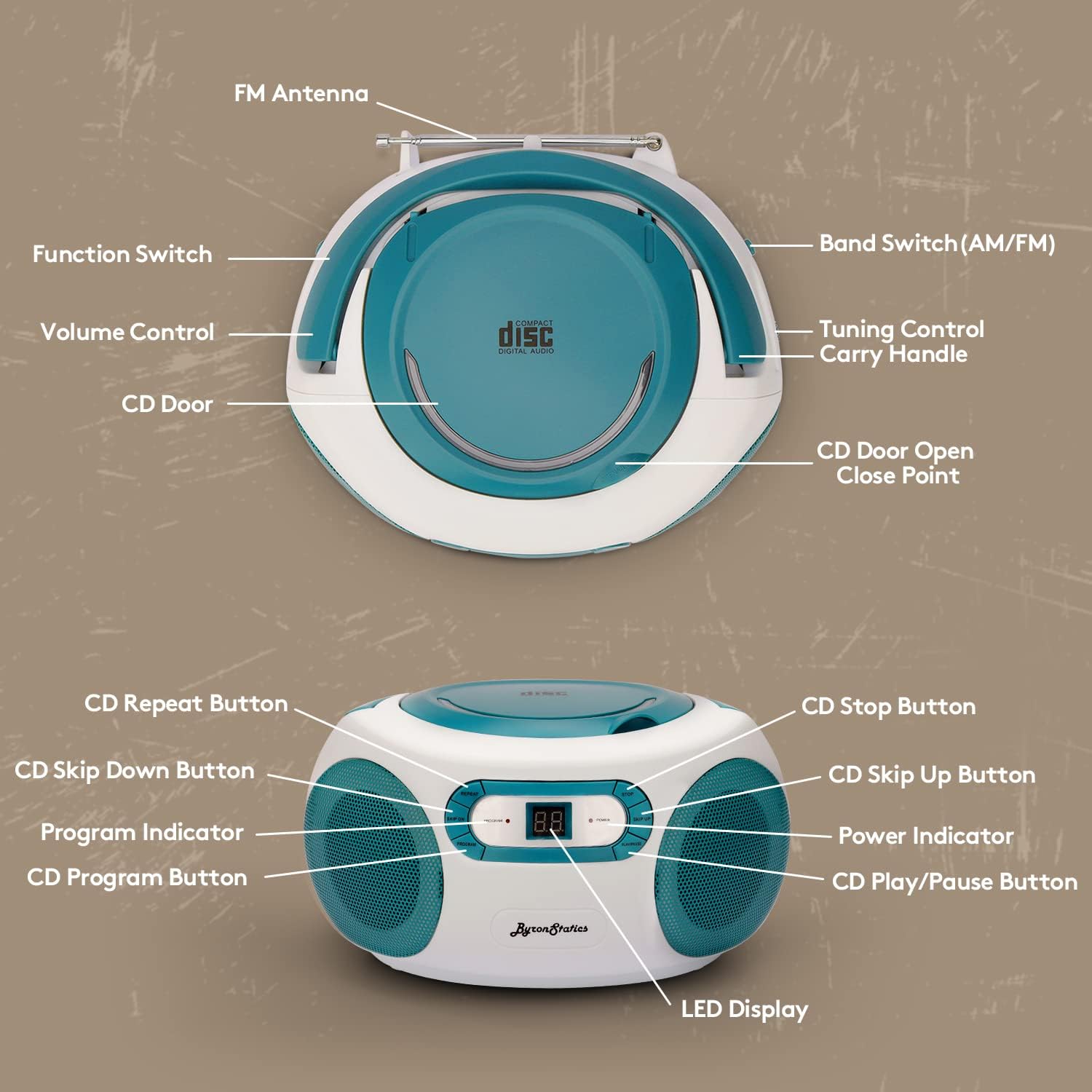
Figura 5: Connecting an External Device via Aux-in
- Set the Function Switch to the "CD/AUX IN" position.
- Connect one end of a 3.5mm audio cable (not included) to the Aux-in jack on the boombox.
- Connect the other end of the audio cable to the headphone jack or audio output of your external audio device (e.g., smartphone, tablet, MP3 player).
- Inicia a reprodución no teu dispositivo externo.
- Axuste o volume empregando o VOLUME control on the boombox and/or your external device.
Mantemento
- Limpeza da unidade: Limpe o exterior da unidade cun suave, damp pano. Non use produtos de limpeza ou disolventes abrasivos.
- Coidado das lentes de CD: If the CD player experiences reading errors, clean the lens with a commercially available CD lens cleaner.
- Substitución da batería: If using batteries, replace all six 'C' size batteries when the sound becomes distorted or the unit stops functioning. Do not mix old and new batteries.
- Almacenamento: Cando non o use durante períodos prolongados, retire as pilas e garde a unidade nun lugar fresco e seco.
Resolución de problemas
| Problema | Causa posible | Solución |
|---|---|---|
| Sen poder | Cable de CA non conectado; Pilas esgotadas ou inseridas incorrectamente. | Comprobe a conexión do cable de CA; substitúa as pilas ou asegúrese de que a polaridade sexa correcta. |
| CD not playing / Skipping | CD dirty or scratched; CD inserted incorrectly; CD door not closed; Function switch not in CD mode. | Clean or replace CD; Insert CD label-side up; Close CD door firmly; Set Function Switch to CD/AUX IN. |
| Mala recepción de radio | FM antenna not extended; Weak signal; Interference. | Fully extend FM antenna; Reposition the unit; Try tuning to a stronger station. |
| No sound from Aux-in | Aux cable not connected; Volume too low; External device not playing. | Ensure Aux cable is fully inserted; Increase volume on boombox and external device; Start playback on external device. |
Especificacións
- Modelo: KBB-250
- Fonte de enerxía: AC 120V-60Hz or 6 x 1.5V 'C' size batteries (not included)
- Reproductor de CD: Top-loading, compatible with CD, CD-R, CD-RW
- Frecuencias de radio: AM 520-1710KHz; FM 76-108MHz
- Relatores: 1W RMS x 2 Stereo Speakers
- Conectividade: Aux-in Jack (3.5mm)
- Visualización: Pantalla LCD
- Dimensións do produto: 8.3 x 7.68 x 4.73 polgadas
- Peso do artigo: 3.47 libras
Garantía e Soporte
For customer service, warranty information, or technical support, please refer to the contact details provided with your product packaging or visit the official BYRONSTATICS websitio. O noso equipo de asistencia está dispoñible para axudarche con calquera pregunta ou problema que poidas atopar.


