Introdución
This manual provides comprehensive instructions for setting up, operating, and maintaining your Macally Bluetooth Keyboard. Designed for multi-device compatibility, this wireless keyboard features a built-in stand, a rechargeable battery, and 78 keys for efficient typing across various devices including tablets, smartphones, and computers.

Image: The Macally Bluetooth Keyboard in white, with a tablet securely docked in its integrated stand, showcasing its compact design and functionality.
O que hai na caixa
Upon unboxing your Macally Bluetooth Keyboard, please ensure all the following items are present:
- Macally Bluetooth Keyboard
- Cable de carga USB
- Manual de usuario (este documento)
If any items are missing or damaged, please contact Macally customer support.
Características do produto
The Macally Bluetooth Keyboard is designed for versatility and convenience, offering several key features:
- Conectividade multidispositivo: Seamlessly switch between up to 3 Bluetooth-enabled devices (e.g., tablet, smartphone, computer).
- Soporte de dispositivo integrado: Features a built-in 10.5-inch slot to securely hold your smartphone or tablet.
- Compacto e portátil: Small enough to fit into most bags, making it ideal for on-the-go use.
- Batería recargable: Equipado cunha batería recargable de 280 mAh para un uso prolongado.
- Efficient Layout: Includes 78 quiet scissor-switch keys and 13 convenient shortcut/media keys for enhanced productivity.

Image: The keyboard demonstrating seamless Bluetooth connectivity with a 30ft wireless range, compatible with Apple, Windows, iOS, and Android operating systems.

Image: A visual representation of the keyboard's multi-device capability, showing it paired with a laptop, a desktop computer, and a smartphone simultaneously.

Image: The keyboard positioned on a desk, with both a tablet and a smartphone docked in its integrated 10.5-inch stand, highlighting its "setup anywhere" convenience.
Configuración
Cargando o teclado
Before first use, fully charge your Macally Bluetooth Keyboard. Connect the provided USB charging cable to the keyboard's charging port and the other end to a USB power source (e.g., computer USB port, USB wall adapter). The charging indicator light will show the charging status.

Image: The keyboard with its charging cable connected, illustrating the rechargeable 280mAh battery and the included charging cable.
Emparejamento Bluetooth
Sigue estes pasos para emparellar o teclado cun dispositivo:
- Ensure the keyboard is charged and powered on. The power switch is located on the top right of the keyboard.
- On your device (tablet, smartphone, computer), enable Bluetooth.
- Manteña premido o Fn tecla e unha das teclas do canal Bluetooth (B1, B2, ou B3) simultaneously for a few seconds until the corresponding Bluetooth indicator light starts blinking rapidly. This indicates the keyboard is in pairing mode.
- On your device, search for "Macally Keyboard" or a similar name in the Bluetooth device list and select it to connect.
- Once connected, the indicator light will stop blinking and remain solid for a moment before turning off, indicating successful pairing.
To pair additional devices, repeat steps 3-5 using a different Bluetooth channel key (B1, B2, or B3).
Instrucións de funcionamento
Cambio entre dispositivos
Para cambiar entre dispositivos emparellados, simplemente prema o botón Fn key along with the corresponding Bluetooth channel key (B1, B2, ou B3) for the desired device. The keyboard will quickly connect to the selected device.
Using Shortcut Keys
The keyboard features 13 dedicated shortcut/media keys for quick access to common functions. These keys are typically located on the top row (F1-F12 and an additional key). Functions may vary slightly depending on the operating system of your connected device.
Common shortcut functions include:
- Media playback controls (play/pause, next/previous track)
- Control de volume (silenciar, subir/baixar volume)
- Axuste de brillo da pantalla
- Home screen/desktop access
- Función de busca
Refer to your device's operating system documentation for specific compatibility and functionality of these keys.

Imaxe: Unha detallada view of the keyboard's layout, emphasizing its 78 quiet scissor-switch keys and the 13 dedicated shortcut/media keys for efficient use.
Mantemento
To ensure the longevity and optimal performance of your Macally Bluetooth Keyboard, follow these maintenance guidelines:
- Limpeza: Usa un pano suave, seco e sen fiapos para limpar a superficie do teclado. Para a sucidade persistente, d lixeiramenteampEnxágüe o pano con auga ou un limpador suave e non abrasivo. Evite a humidade excesiva.
- Almacenamento: Cando non o use durante períodos prolongados, garde o teclado nun lugar fresco e seco, lonxe da luz solar directa e de temperaturas extremas.
- Coidado da batería: To preserve battery life, avoid fully discharging the keyboard frequently. Recharge it when the low battery indicator appears. If storing for a long time, charge it to about 50% every few months.
- Evitar verteduras: Keep liquids away from the keyboard to prevent internal damage.
Resolución de problemas
If you encounter issues with your Macally Bluetooth Keyboard, try the following solutions:
| Problema | Posible Solución |
|---|---|
| O teclado non se acende. | Ensure the keyboard is charged. Connect it to a power source using the USB cable. |
| Unable to pair the keyboard. |
|
| O teclado desconéctase con frecuencia. |
|
| As chaves non responden. |
|
If these solutions do not resolve the issue, please contact Macally customer support for further assistance.
Especificacións
| Característica | Detalle |
|---|---|
| Número de modelo | BTTABKEYBAT |
| Tecnoloxía de conectividade | Bluetooth |
| Número de chaves | 78 |
| Tipo de batería | 1 batería de iones de litio (incluída) |
| Peso do elemento | 1.92 libras |
| Dimensións do paquete | 13.98 x 7.91 x 2.48 polgadas |
| Fabricante | Mace Group Inc / Macally Peripherals |
| Dispositivos compatibles | PC, Tablet, Apple devices, Windows Desktop/Laptop, Surface, Chromebook, Smartphones, TVs (any device with Bluetooth) |
| Usos recomendados | Office, School, Everyday Use, Personal, Education, Business |
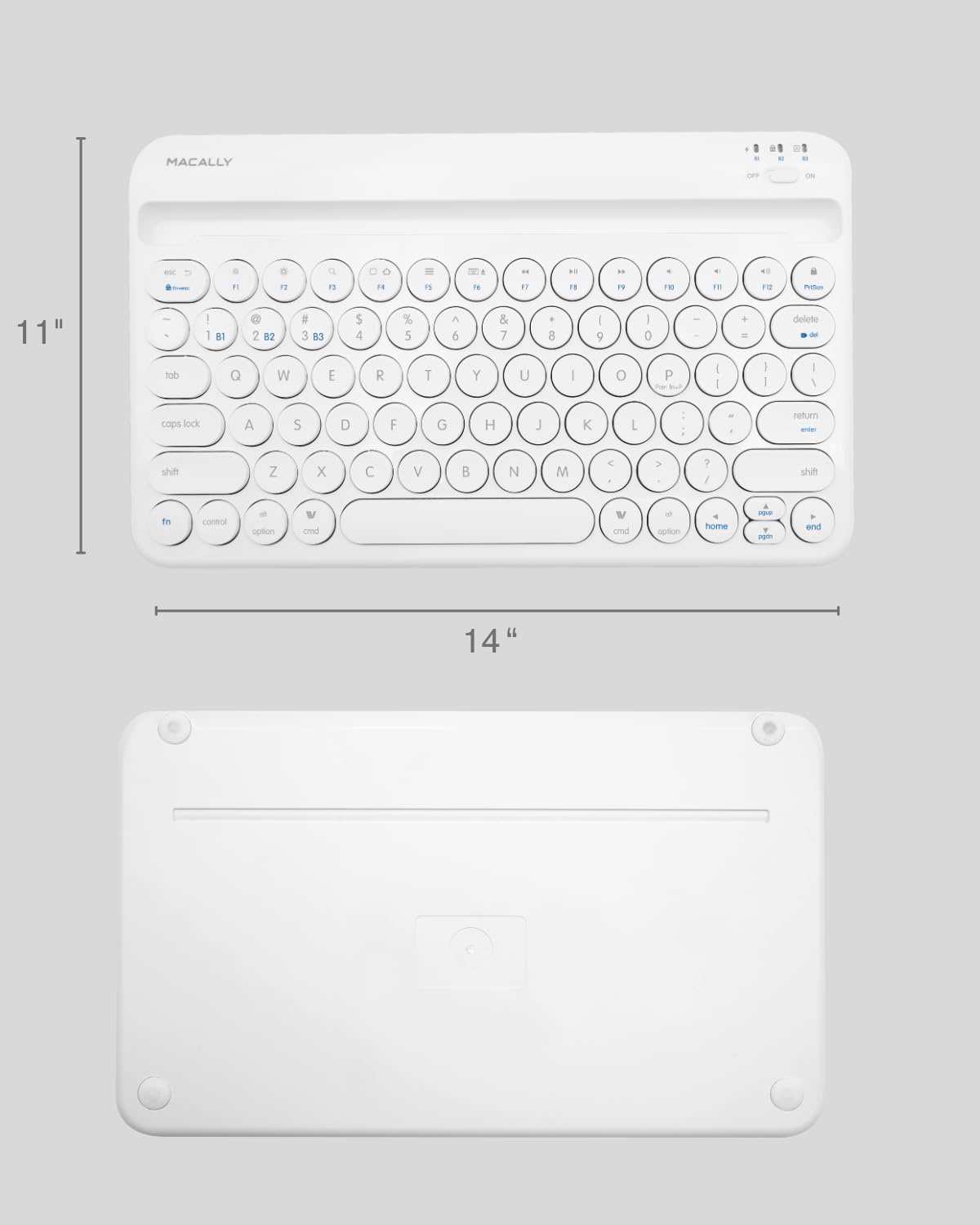
Image: The physical dimensions of the keyboard, measuring approximately 11 inches in width and 14 inches in length.

Image: The keyboard fitting easily into a backpack, demonstrating its compact size and suitability for travel and on-the-go use.
Garantía e Soporte
Macally products are designed for quality and reliability. For information regarding product warranty, technical support, or service, please visit the official Macally websitio web ou póñase en contacto co seu departamento de atención ao cliente. Garde o recibo da compra como proba de compra para reclamacións de garantía.
Podes atopar máis información e apoio en Macally Store on Amazon.


