1. Introdución
This manual provides detailed instructions for the IPEGA PG-SW023 Bluetooth Wireless Game Controller. This versatile controller is designed to enhance your gaming experience across multiple platforms, including N-S consoles, PlayStation 3 (PS3), Android devices, and personal computers running Windows 7, 8, or 10.
Please read this manual carefully before using the product to ensure proper operation and to maximize its features.
2. Características do produto
- Compatibilidade multiplataforma: Suitable for gaming on N-S consoles, PS3, Android devices, and PCs (Windows 7/8/10).
- Experiencia de xogo mellorada: Supports vibration feedback and a six-axis gyroscope function for immersive gameplay and precise control.
- Customizable Macro Function: Rear buttons can be configured as common keys or combination keys for simplified actions.
- Continuous TURBO Function: Features a dedicated TURBO button for rapid-fire actions, compatible with N-S Pro gamepads.
- Deseño ergonómico: Engineered for comfort during extended gaming sessions, fitting securely in the palm.

Image: The IPEGA PG-SW023 Wireless Game Controller highlighting its key features: two vibrating motors, six-axis design, high-sensitive buttons, and Turbo function.
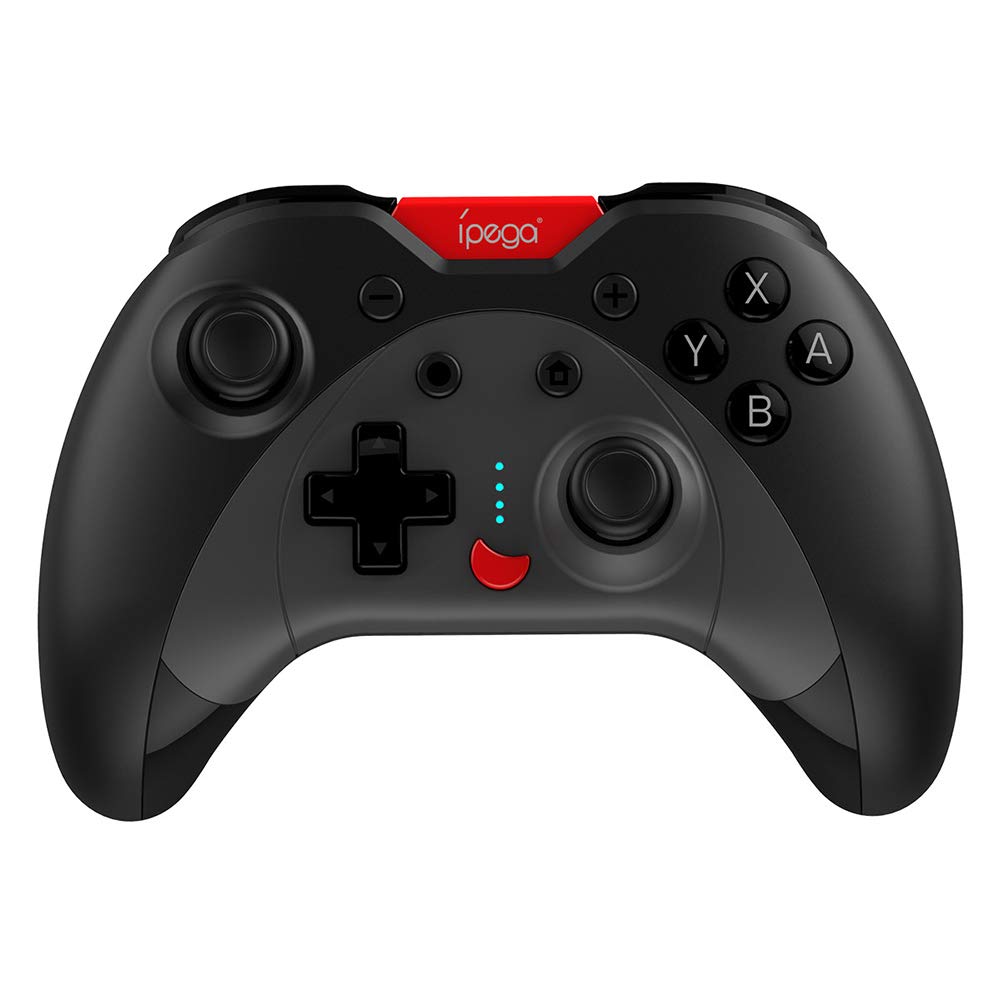
Image: A green IPEGA PG-SW023 controller illustrating its built-in six-axis gyroscope design for improved body feeling and accurate targeting.
3. Contido do paquete
Comprobe que todos os elementos estean presentes no paquete:
- 1 x IPEGA PG-SW023 Wireless Game Controller
- 1 x cable de carga tipo C
- 1 x Manual de usuario
4. Especificacións
| Característica | Especificación |
|---|---|
| Marca | Ipega |
| Modelo | PG-SW023 |
| Opcións de cor | Black, Green, Blue, Yellow |
| Vol. Operativotage | DC 3.7 V |
| Corrente de funcionamento | <30 mA |
| Corrente estática | <20uA |
| Tempo de xogo continuo | Aprox. 15 horas |
| Vol. De entradatage / Actual | DC 5 V/500 mA |
| Tempo de carga | Aprox. 2 horas |
| Versión Bluetooth | 3.0 |
| Distancia de transmisión | ≤ 8 metros |
| Capacidade da batería | 400 mAh |
| Dimensións do produto | 15 x 10 x 5.5 cm (5.91 x 3.94 x 2.17 polgadas) |
| Peso do produto | Aproximadamente 215 g (7.58 onzas) |
| Dispositivos compatibles | N-S Console, PS3, Android, PC (Win 7/8/10) |
| Conectividade | Sen fíos (Bluetooth) |
| Fonte de enerxía | Alimentado por batería |
5. Configuración
5.1 Carga do controlador
- Connect the provided Type-C charging cable to the controller's charging port.
- Connect the other end of the cable to a USB power source (e.g., PC, USB wall adapter).
- The indicator lights on the controller will show charging status. Once fully charged (approx. 2 hours), the lights will indicate completion or turn off.
5.2 Emparellamento con dispositivos
The pairing method varies slightly depending on the device. Ensure the controller is sufficiently charged before attempting to pair.

Image: A blue IPEGA PG-SW023 controller positioned in front of a Nintendo Switch, PlayStation 3, and a laptop, illustrating its multi-platform compatibility.
5.2.1 Pairing with N-S Console
- On your N-S console, go to the HOME Menu.
- Selecciona "Controlantes" > "Cambiar agarre/orde".
- Press and hold the pairing button on the IPEGA controller (refer to controller diagram for exact location) until the indicator lights begin to flash rapidly.
- The console will detect the controller. Once paired, the indicator light will become solid.
5.2.2 Pairing with PS3
- Connect the controller to the PS3 console using the Type-C cable.
- Preme o botón HOME do controlador.
- Once recognized, you can disconnect the cable and the controller should remain paired wirelessly.
5.2.3 Emparellamento con dispositivos Android
- Activa o Bluetooth no teu dispositivo Android.
- On the controller, press and hold the Android pairing button combination (refer to controller diagram or quick start guide for specific button combination, usually 'A' + HOME or 'X' + HOME) until the indicator lights flash rapidly.
- On your Android device, search for new Bluetooth devices and select 'IPEGA PG-SW023' (or similar name) from the list.
- Unha vez emparellado, a luz indicadora do controlador acenderase de forma fixa.
5.2.4 Pairing with PC (Windows 7/8/10)
- Asegúrate de que o teu PC teña o Bluetooth activado.
- Go to 'Settings' > 'Devices' > 'Bluetooth & other devices' and click 'Add Bluetooth or other device'.
- Selecciona "Bluetooth".
- On the controller, press and hold the PC pairing button combination (refer to controller diagram or quick start guide for specific button combination, usually 'L1' + HOME or 'Y' + HOME) until the indicator lights flash rapidly.
- Select 'IPEGA PG-SW023' (or similar name) from the list of available devices on your PC.
- Unha vez emparellado, a luz indicadora do controlador acenderase de forma fixa.
6. Instrucións de funcionamento
6.1 Funcións básicas dos botóns
The controller features standard gaming buttons including directional pad, analog sticks, action buttons (A, B, X, Y), shoulder buttons (L1, R1), and triggers (L2, R2). Specific button mapping may vary by game and platform.

Image: Hands comfortably gripping a black IPEGA PG-SW023 controller, showcasing its ergonomic design for comfortable and convenient use.
6.2 Función TURBO
The TURBO function allows for continuous rapid input of a selected button. This can be useful in games requiring fast, repeated button presses.
- To activate TURBO: Press and hold the desired action button (e.g., A, B, X, Y) and then press the TURBO button simultaneously. The button will now continuously input as long as it's held down.
- To deactivate TURBO: Repeat the same process (press the action button and TURBO button simultaneously).

Image: A yellow IPEGA PG-SW023 controller with its prominent TURBO button, shown with a Nintendo Switch console, illustrating the auto-fire feature.
6.3 Funcións macro
The macro function allows you to assign a sequence of button presses or a single common button to the programmable rear buttons. This can simplify complex in-game actions.
- Refer to the specific instructions provided in the quick start guide or on the manufacturer's website for detailed steps on programming macro buttons, as this process can vary.
6.4 Vibración e xiroscopio
The controller features dual motors for vibration feedback, providing tactile sensations that correspond to in-game events. The built-in six-axis gyroscope allows for motion control in supported games, offering a more immersive and precise aiming experience.

Image: A blue IPEGA PG-SW023 controller in use, with visual cues indicating its double motor vibrating design for immersive feedback during gameplay.
7. Mantemento
Un coidado axeitado prolongará a vida útil do seu controlador:
- Limpeza: Use un pano suave e seco para limpar o controlador. Para a sucidade persistente, dóreo lixeiramente.ampEnxágüe o pano con auga ou unha solución de limpeza suave. Evite produtos químicos agresivos.
- Almacenamento: Garde o controlador nun lugar fresco e seco, lonxe da luz solar directa e de temperaturas extremas.
- Evitar impacto: Non deixe caer o controlador nin o someta a impactos fortes, xa que isto pode danar os compoñentes internos.
- Exposición ao líquido: Keep the controller away from liquids. If it comes into contact with liquid, power it off immediately and allow it to dry completely before attempting to use it again.
8 Solución de problemas
If you encounter issues with your IPEGA PG-SW023 controller, try the following solutions:
- O controlador non se conecta:
- Asegúrate de que o controlador estea completamente cargado.
- Verifica que o Bluetooth estea activado no teu dispositivo.
- Try re-pairing the controller by following the setup instructions for your specific device.
- Move the controller closer to the device to ensure it is within the 8-meter transmission range.
- Reinicia tanto o controlador como o teu dispositivo de xogos.
- Botóns que non responden:
- Check if the controller is properly connected and paired.
- Test the controller with another game or application to rule out software-specific issues.
- Asegúrate de que non haxa residuos aloxados debaixo dos botóns.
- A vibración non funciona:
- Verify that the game or system settings have vibration enabled.
- Some games may not support vibration feedback.
- Duración da batería curta:
- Ensure the controller is fully charged before use.
- Battery life can vary based on usage intensity (e.g., continuous vibration).
- Evite cargar en ambientes extremadamente quentes ou fríos.
9. Garantía e soporte
For warranty information, technical support, or service inquiries regarding your IPEGA PG-SW023 Bluetooth Wireless Game Controller, please refer to the product packaging or contact the manufacturer directly through their official websitio web ou canles de atención ao cliente. Garde o recibo de compra como proba de compra para calquera reclamación de garantía.


