1. Introdución
This user manual provides essential information for the safe and efficient operation of your Philips Audio HTL1020/94 Soundbar. Please read these instructions carefully before using the product and retain them for future reference.
The Philips HTL1020/94 is a 20W soundbar designed to enhance your audio experience with versatile connectivity options including Bluetooth 5.0, AUX, and USB. Its low-rise profile allows for flexible placement in various home entertainment setups.

Imaxe 1.1: Fronte view of the Philips HTL1020/94 Soundbar.
2. Información de seguridade
Siga sempre as precaucións de seguridade básicas ao usar este produto para reducir o risco de incendio, descarga eléctrica e lesións persoais.
- Non expoña a barra de son á choiva nin á humidade.
- Non bloquee ningunha abertura de ventilación.
- Asegúrese de que a fonte de alimentación adecuada voltage como se indica no produto.
- Keep the soundbar away from heat sources and direct sunlight.
- Use só anexos/accesorios especificados polo fabricante.
3. Que hai na caixa
Desembala con coidado o contido e asegúrate de que estean presentes todos os elementos:
- Philips Audio HTL1020/94 Soundbar
- Cable de alimentación
- Guía de inicio rápido
- Control remoto
- Manual de usuario (este documento)
- Tarxeta de garantía
4. Produto rematadoview
4.1. Controis e Indicadores
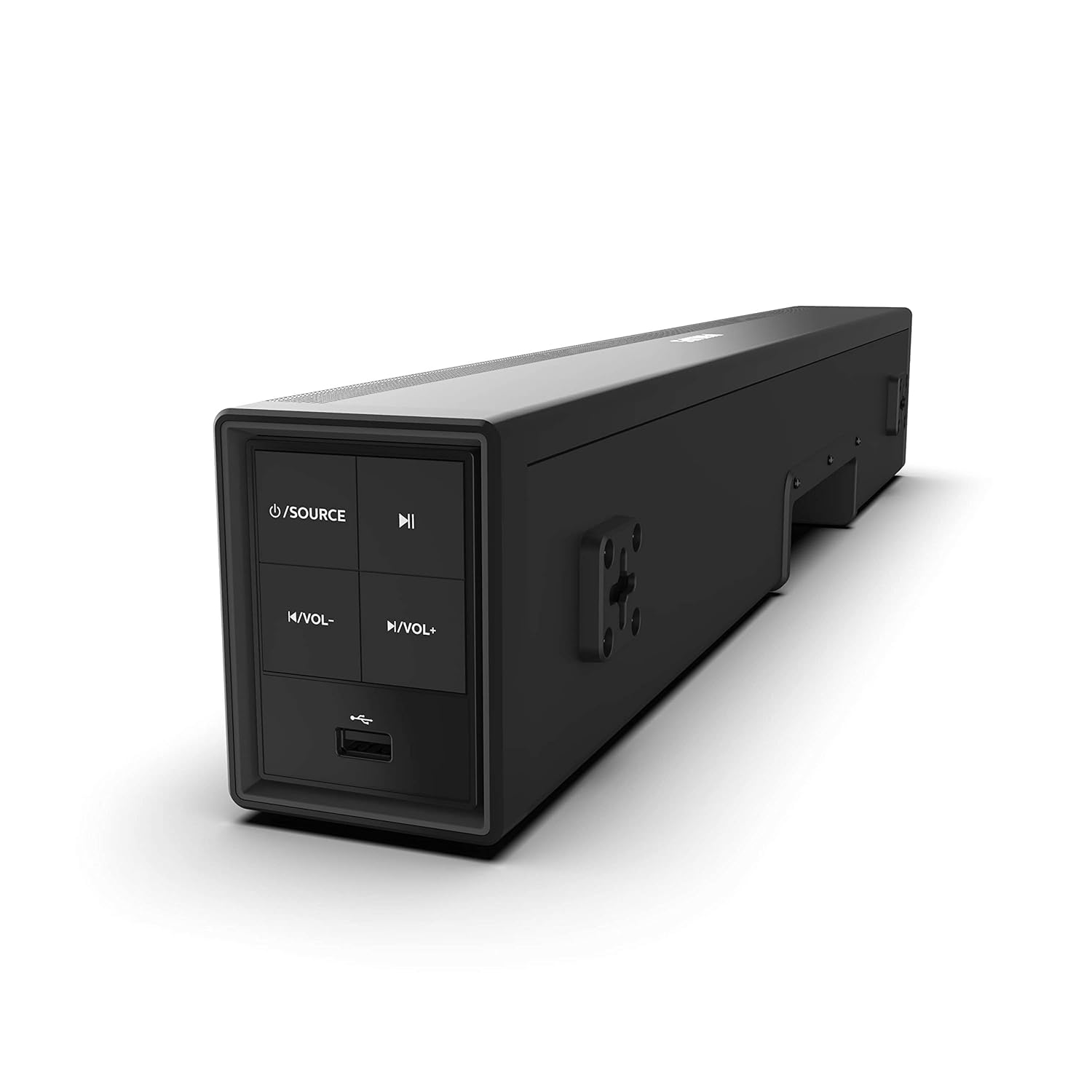
Image 4.1: Side panel controls of the Philips HTL1020/94 Soundbar.
- Botón de acendido/fonte: Press to turn on/off or switch input sources (Bluetooth, AUX, USB).
- Botón Reproducir/Pausa: Controls media playback in Bluetooth or USB mode.
- Botón para baixar o volume: Diminúe o nivel de volume.
- Botón para subir o volume: Aumenta o nivel de volume.
- Porto USB: For playing audio from USB storage devices.
4.2. Conexións do panel traseiro
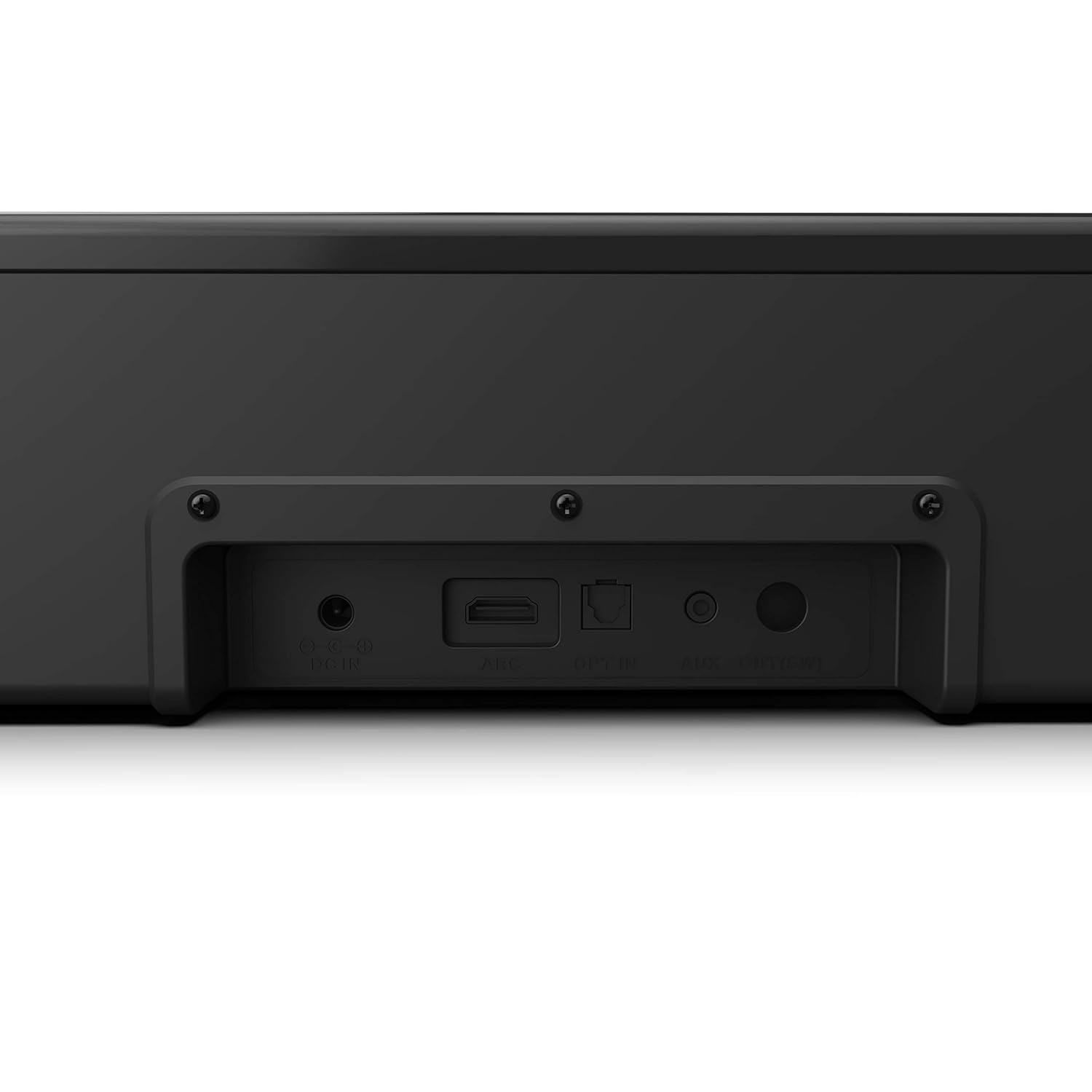
Image 4.2: Rear panel connections of the Philips HTL1020/94 Soundbar.
- DC IN: Conecte o adaptador de alimentación aquí.
- ARC (HDMI): Connect to a TV's HDMI ARC port for audio input.
- PARTICIPAR: Connect to a TV or audio device's optical digital output.
- AUX IN: Connect to an audio device's analog output using a 3.5mm audio cable.
5. Configuración e instalación
5.1 Colocación
The soundbar can be placed on a tabletop or mounted on a wall. Ensure it is positioned centrally in front of your television for optimal sound distribution.
- Colocación de mesa: Place the soundbar on a stable, flat surface below your TV.
- Montaxe na parede: Use appropriate wall mounting hardware (not included) and follow the instructions provided in the Quick Start Guide for secure installation.
5.2. Conectando ao poder
- Conecte o cable de alimentación ao DC IN porto na parte traseira da barra de son.
- Conecte o outro extremo do cable de alimentación a unha toma de corrente.
5.3. Conexión de fontes de son
Escolla un dos seguintes métodos para conectar a súa fonte de son:
5.3.1. Conexión Bluetooth
- Preme o Fonte de enerxía button on the soundbar or remote control to select Bluetooth mode. The indicator light will flash.
- No teu dispositivo móbil, activa o Bluetooth e busca os dispositivos dispoñibles.
- Select "Philips HTL1020/94" from the list.
- Unha vez vinculado, o indicador luminoso deixará de parpadear e permanecerá fijo.
5.3.2. Conexión AUX
- Connect a 3.5mm audio cable (not included) from your audio device's headphone jack or AUX output to the AUX IN porto na barra de son.
- Preme o Fonte de enerxía botón para seleccionar o modo AUX.
5.3.3. Conexión USB
- Insert a USB storage device (e.g., USB flash drive) into the Porto USB on the side panel of the soundbar.
- Preme o Fonte de enerxía button to select USB mode. The soundbar will automatically begin playing compatible audio files.
5.3.4. HDMI ARC Connection
- Connect an HDMI cable (not included) from your TV's HDMI ARC port to the ARC porto na barra de son.
- Asegúrate de que a función HDMI ARC do teu televisor estea activada na configuración.
- Preme o Fonte de enerxía button to select ARC mode.
5.3.5. Conexión óptica
- Connect an optical cable (not included) from your TV's optical digital output to the ACTIVAR porto na barra de son.
- Preme o Fonte de enerxía button to select OPTICAL mode.
6. Funcionamento
6.1. Acendido/apagado
Preme o Fonte de enerxía botón da barra de son ou do mando a distancia para acender ou apagar a unidade.
6.2. Selección da fonte
Prema repetidamente o Fonte de enerxía button on the soundbar or the remote control to cycle through available input sources: Bluetooth, AUX, USB, ARC, Optical.
6.3. Control de volume
Usa o Subir volume e Baixar o volume buttons on the soundbar or the remote control to adjust the audio level.
6.4. Bluetooth Pairing (Re-pairing)
If the soundbar is not automatically connecting to a previously paired device, or if you wish to pair a new device:
- Ensure the soundbar is in Bluetooth mode (indicator light flashing).
- On your device, go to Bluetooth settings and select "Philips HTL1020/94" to connect.
7. Mantemento
Para garantir a lonxevidade e o rendemento óptimo da túa barra de son, segue estas pautas de mantemento:
- Limpeza: Usa un pano suave e seco para limpar a superficie da barra de son. Non empregues produtos de limpeza líquidos nin materiais abrasivos.
- Ventilación: Manteña despexadas as aberturas de ventilación para evitar o sobrequecemento.
- Almacenamento: Se vai gardar a barra de son durante un período prolongado, desconéctea da corrente e gárdea nun lugar fresco e seco.
8 Solución de problemas
Se tes problemas coa barra de son, consulta os seguintes problemas e solucións comúns:
| Problema | Causa posible | Solución |
|---|---|---|
| Sen poder | Cable de alimentación non conectado; Toma de corrente non activa | Asegúrate de que o cable de alimentación estea conectado correctamente; proba a toma de corrente con outro dispositivo |
| Sen son | Incorrect source selected; Volume too low; Cables not connected | Select correct input source; Increase volume; Check all audio cables |
| O emparejamento por Bluetooth falla | A barra de son non está en modo de emparellamento; o dispositivo está demasiado lonxe; a interferencia | Ensure soundbar is in Bluetooth mode; Move device closer; Restart both devices |
| Problemas de reprodución por USB | Incompatible file format; USB device not recognized | Garantir o audio files are compatible (e.g., MP3); Try a different USB device |
9. Especificacións
Technical specifications for the Philips Audio HTL1020/94 Soundbar:
| Característica | Especificación |
|---|---|
| Nome do modelo | HTL1020/94 |
| Tipo de altofalante | Barra de son |
| Canles de saída de audio | 2.0 |
| Potencia de saída total | 20 vatios |
| Tecnoloxía de conectividade | Bluetooth 5.0, AUX, USB, HDMI ARC, Optical |
| Método de control | Toque, mando a distancia |
| Dimensións (LxWxH) | 60 x 15 x 9.2 cm |
| Peso do elemento | 2 kg |
| Fonte de enerxía | Eléctrico con cable |
| Relación sinal-ruído | 55 dB |
| Compoñentes incluídos | Power cord, Quick Start Guide, Remote, User Manual, Warranty Card |
10. Garantía e soporte
Your Philips Audio HTL1020/94 Soundbar comes with a 1-year warranty. Please refer to the included Warranty Card for detailed terms and conditions.
For technical support or service inquiries, please contact Philips Audio customer service. Contact information can typically be found on the Philips Audio official website or on your Warranty Card.


