1. Introdución
This manual provides essential information for the proper installation, operation, and maintenance of your Lowrance Active Imaging 3-In-1 Transducer (Model: 000-14489-001). This transducer is designed to enhance your marine electronics system by providing detailed sonar imaging capabilities. Please read this manual thoroughly before installation and use.
2. Información de seguridade
Observe as seguintes precaucións de seguridade para evitar lesións e danos no equipo:
- Always disconnect power to the marine electronics system before installing or servicing the transducer.
- Ensure all connections are secure and waterproof to prevent electrical shorts or corrosion.
- Mount the transducer in a location where it will not interfere with boat operation or pose a hazard to swimmers.
- Avoid exposing the transducer to extreme temperatures or harsh chemicals.
3. Contido do paquete
Comprobe que todos os compoñentes estean presentes antes de comezar a instalación:
- Lowrance Active Imaging 3-In-1 Transducer
- Transom Mount Bracket
- Ferraxes de montaxe (parafusos, arandelas, porcas)
- Modelo de instalación (se está incluído)
4. Configuración e instalación
The Lowrance Active Imaging 3-In-1 Transducer is designed for transom mounting. Proper placement is crucial for optimal performance.
4.1 Localización de montaxe
Select a location on the transom that is:
- Free from obstructions (e.g., propellers, strakes, other transducers).
- In an area of smooth water flow, minimizing turbulence.
- Accessible for installation and maintenance.
4.2 Instalación física
- Position the transom mount bracket on the selected location. Ensure the bottom of the transducer will be slightly below the hull line when deployed.
- Marque os orificios usando o soporte como patrón.
- Drill pilot holes. Apply marine sealant to prevent water intrusion.
- Secure the transom mount bracket to the boat using the provided mounting hardware.
- Attach the transducer to the bracket. Adjust the angle so the transducer face is parallel to the waterline.

Figura 1: En ángulo view of the Lowrance Active Imaging 3-In-1 Transducer with its transom mount bracket.

Figura 2: Lado view of the transducer, illustrating its profile and mounting position.
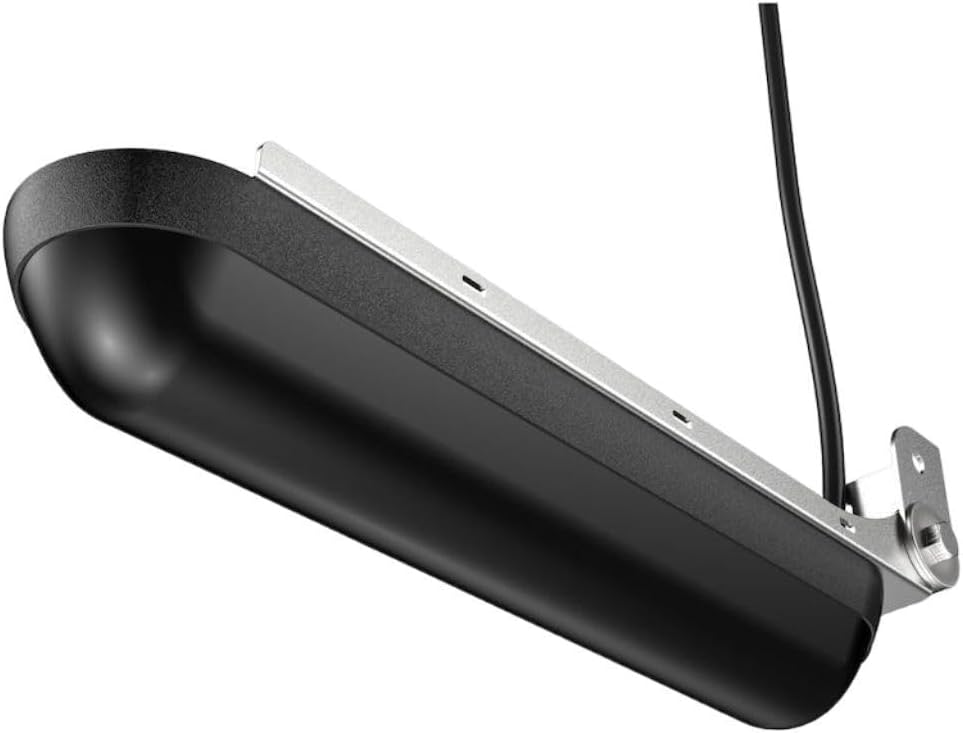
Figura 3: Abaixo view of the transducer, showing the sonar elements.
4.3 Conexión eléctrica
Route the transducer cable to your compatible Lowrance display unit (e.g., HDS LIVE, HDS Carbon, Elite Ti2). The transducer features a 9-Pin connection. Ensure the connector is fully seated and the locking collar is tightened to create a waterproof seal.
5. Instrucións de funcionamento
The Active Imaging 3-In-1 Transducer combines multiple sonar technologies to provide a comprehensive view do ambiente subacuático.
5.1 Sonar Frequencies and Modes
- Med/High CHIRP: Provides traditional sonar views for fish arches and bottom tracking.
- SideScan: Offers wide, high-resolution views of structure and fish to the sides of your boat.
- DownScan: Delivers picture-like views of structure and fish directly below your boat.
Refer to your Lowrance display unit's manual for detailed instructions on selecting and optimizing these sonar modes.
6. Mantemento
Regular maintenance ensures optimal performance and longevity of your transducer.
- Limpeza: Periodically clean the transducer face with mild soap and water to remove marine growth, dirt, or oil. Avoid abrasive cleaners or solvents.
- Inspección: Regularly inspect the transducer cable for cuts, kinks, or damage. Check the mounting bracket for looseness or corrosion.
- Invernización: If operating in freezing conditions, ensure the transducer is not exposed to ice formation, which can cause damage.
7 Solución de problemas
Se tes problemas co teu transdutor, considera os seguintes problemas e solucións comúns:
| Problema | Causa posible | Solución |
|---|---|---|
| No Sonar Reading | Loose connection, power issue, transducer not submerged. | Check cable connections, verify power to display unit, ensure transducer is in water. |
| Poor or Intermittent Imaging | Air bubbles, marine growth, incorrect mounting angle, electrical interference. | Clean transducer face, adjust mounting angle, check for sources of electrical noise, reposition transducer if necessary. |
| SideScan/DownScan Not Working | Incorrect display unit settings, damaged transducer element. | Verify sonar settings on your display unit. If problem persists, contact support. |
For persistent issues, consult your Lowrance display unit's manual or contact Lowrance customer support.
8. Especificacións
- Modelo: 000-14489-001
- Tipo: Active Imaging 3-In-1 Transducer
- Frecuencias: Med/High CHIRP, SideScan, DownScan
- Conexión: 9-pin
- Tipo de montaxe: Montaxe de travesaño
- Dimensións: Aproximadamente 8 x 6 x 4 polgadas (20.3 x 15.2 x 10.2 cm)
- Peso: Aproximadamente 3.66 libras (1.66 kg)
- Unidades compatibles: HDS LIVE, HDS Carbon, Elite Ti2 series
9. Garantía e soporte
This Lowrance Active Imaging 3-In-1 Transducer (Model: 000-14489-001) is covered by a Garantía limitada de 90 días desde a data de compra. Esta garantía cobre defectos de materiais e fabricación en condicións de uso normal.
For warranty claims, technical support, or further assistance, please refer to the official Lowrance websitio web ou póñase en contacto co seu departamento de atención ao cliente. Garde o comprobante de compra para a validación da garantía.


