1. Introdución
This manual provides comprehensive instructions for the SHARKOON Elite Shark CA300T Extended ATX PC Case. It covers the product's features, setup procedures, operational guidelines, maintenance tips, troubleshooting solutions, and detailed technical specifications. Please read this manual thoroughly before installation and use to ensure optimal performance and longevity of your PC case.
2. Características clave
- Deseño futurista: The CA300T features an expressive front panel with a geometric pattern, framed by brushed aluminum, giving it a distinctive and modern aesthetic.
- Advanced Airflow: Equipped with three pre-installed 120mm RGB LED fans at the front and one at the rear, ensuring consistent airflow. The front panel includes a mesh grille for optimal ventilation, and the top panel offers a perforated cover for additional fan/radiator mounting.
- Illuminated I/O Panel: The side-mounted I/O panel includes standard audio ports, USB 3.0 ports, and a USB-C port, all featuring their own RGB illumination.
- Paneis de vidro temperado: Two tempered glass side panels provide a clear view of internal components. The right-side panel is partially tinted to conceal the power supply tunnel while highlighting SSDs or HDDs.
- Interior amplo: Designed to accommodate large components, including graphics cards up to 42.5 cm, power supplies up to 24 cm, and CPU coolers up to 16.5 cm.
- Xestión eficiente de cables: Features a spacious, foldable cable compartment and a sliding cable cover to keep wiring organized and out of sight.
- Opcións de almacenamento: Supports up to seven 2.5-inch drives or four 3.5-inch drives.
3. Contido do paquete
The SHARKOON Elite Shark CA300T PC Case package typically includes:
- SHARKOON Elite Shark CA300T PC Case (White)
- Pre-installed 120mm RGB LED Fans (3x Front, 1x Rear)
- Caixa de accesorios (parafusos, bridas, separadores, etc.)
- Manual de usuario (este documento)
Note: Specific contents may vary slightly. Please check the packaging for a complete list.
4. Instrucións de configuración
Follow these steps to set up your SHARKOON Elite Shark CA300T PC case and install your components.
4.1. Preparación do caso
- Desembalar a caixa: Retire con coidado a carcasa do PC da súa embalaxe.
- Eliminar os paneis laterais: Unscrew the thumbscrews on the rear of the case for both tempered glass side panels. Gently slide and lift the panels to remove them. Place them on a soft, flat surface to prevent scratches.
- Caixa de accesorios: Locate the accessory box inside the case, which contains all necessary screws and mounting hardware.
4.2. Instalación da placa base
- Instalar separadores: Ensure the correct standoffs are installed for your motherboard form factor (ATX, SSI EEB). The case typically has pre-installed standoffs for standard ATX.
- Instalar o protector de E/S: If your motherboard requires an external I/O shield, install it into the rear opening of the case before mounting the motherboard.
- Montar a placa base: Carefully place your motherboard onto the standoffs, aligning the screw holes. Secure the motherboard with the provided screws.
4.3. Instalación da fonte de alimentación (PSU)
- Posición da fonte de alimentación: The PSU mounts at the rear bottom of the case. Slide your PSU into the designated compartment from the rear.
- Fonte de alimentación segura: Align the PSU with the screw holes and secure it with the provided screws from the rear of the case.
- Xestión de cables Route PSU cables through the cutouts to the back of the motherboard tray for organized cable management.
4.4. Instalación da unidade de almacenamento
The CA300T supports various drive configurations:
- 2.5-inch Drives (SSDs): Mount SSDs to the dedicated brackets behind the motherboard tray or within the PSU shroud.
- 3.5-inch Drives (HDDs): Install HDDs into the drive cages located under the PSU shroud.
4.5. Instalación da tarxeta gráfica e da tarxeta de expansión
- Retirar as cubertas das ranuras: Retire as tapas das ranuras de expansión necesarias da parte traseira da caixa.
- Instalar tarxeta: Insira a súa tarxeta gráfica ou outras tarxetas de expansión nas ranuras PCIe correspondentes da placa base.
- Tarxeta segura: Secure the card with the provided screws.
4.6. Conexión dos cables do panel frontal
Connect the front panel cables (USB 3.0, USB-C, HD Audio, Power Switch, Reset Switch, Power LED, HDD LED) to their corresponding headers on your motherboard. Refer to your motherboard manual for exact pin layouts.
4.7. Asemblea Final
- Xestión de cables Use the cable ties and routing channels to organize all internal cables behind the motherboard tray.
- Volve conectar os paneis laterais: Carefully reattach both tempered glass side panels and secure them with the thumbscrews.
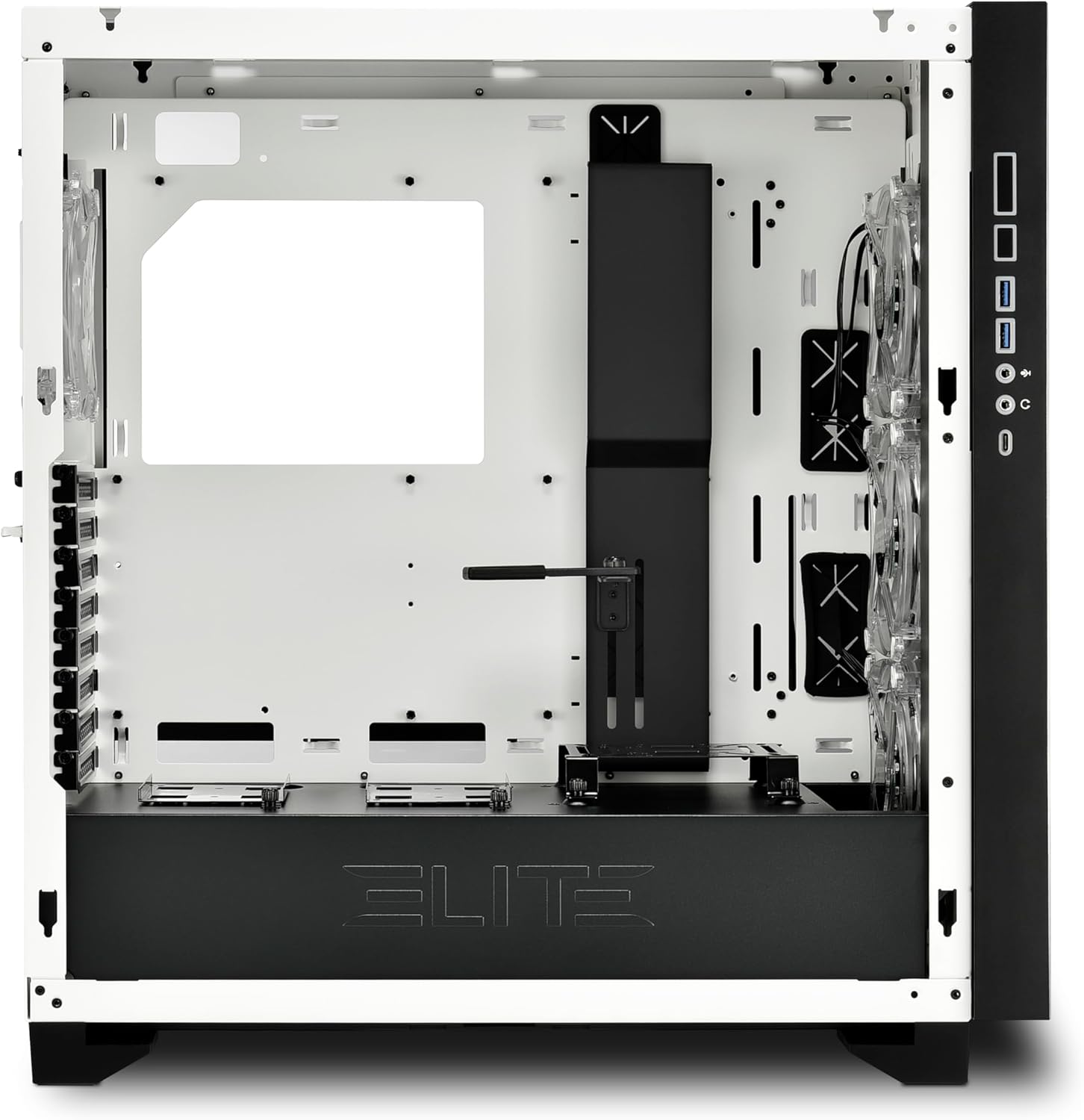
Figura 1: Interior view of the CA300T, highlighting component space.
5. Instrucións de funcionamento
5.1. Acender o sistema
After all components are installed and cables are connected, plug your power supply into a wall outlet and flip the PSU's power switch to the 'ON' position. Press the power button on the case's front I/O panel to start your computer.
5.2. Control da iluminación RGB
The pre-installed RGB fans and illuminated I/O panel can be controlled via your motherboard's RGB software (if compatible) or a dedicated RGB controller if included with your motherboard or purchased separately. Refer to your motherboard manual for specific RGB header locations and software instructions.
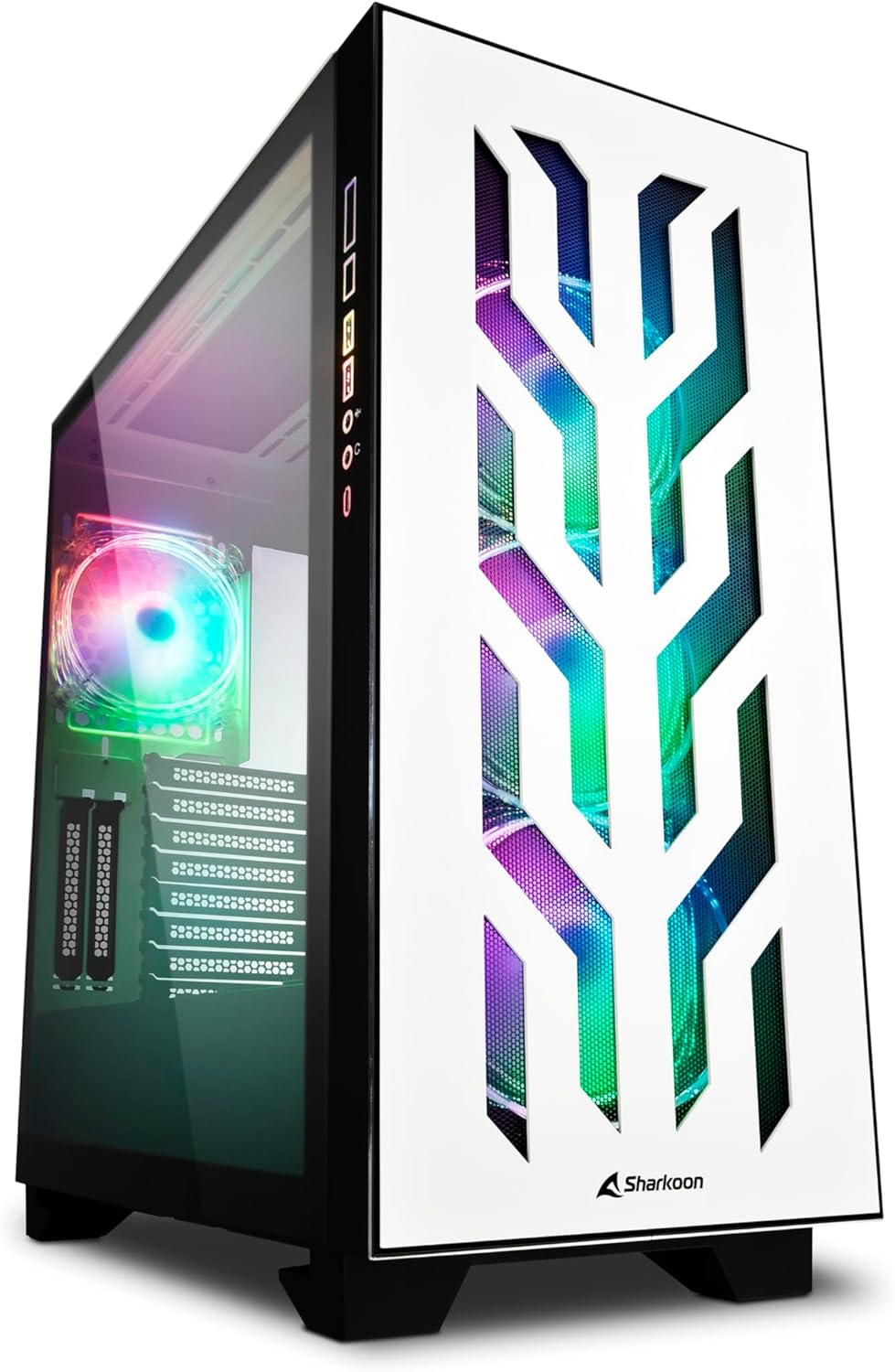
Figure 2: The CA300T with its illuminated RGB fans and distinctive front panel.
6. Mantemento
Regular maintenance helps ensure optimal performance and extends the lifespan of your PC components.
6.1. Limpeza do filtro de po
The CA300T includes magnetic dust filters. It is recommended to clean these filters every 1-3 months, depending on your environment, to maintain optimal airflow and prevent dust buildup inside the case.
- Locate Filters: Identify the dust filters on the top, front, and bottom of the case.
- Eliminar filtros: Gently pull or slide out the magnetic dust filters.
- Limpar filtros: Use a soft brush, vacuum cleaner, or rinse with water (ensure completely dry before reinstallation) to remove accumulated dust.
- Reinstall Filters: Place the clean filters back into their respective positions.
6.2. Limpeza xeral
For external surfaces, use a soft, damp cloth to wipe down the case. Avoid abrasive cleaners or solvents that could damage the finish or tempered glass.

Figura 3: Arriba view of the CA300T, showing the perforated top panel.
7 Solución de problemas
Esta sección aborda problemas comúns que podes atopar durante a configuración ou o funcionamento.
7.1. O sistema non se acende
- Check PSU: Ensure the power supply unit is properly connected to the wall outlet and the PSU's power switch is in the 'ON' position.
- Conexións do panel frontal: Verify that the power switch cable from the case's front panel is correctly connected to the motherboard's power header.
- Internal Power Cables: Confirm that all necessary power cables (24-pin ATX, CPU 8-pin, GPU PCIe) are securely connected to the motherboard and components.
7.2. Os ventiladores non xiran / O RGB non se ilumina
- Conexións do ventilador: Ensure all fan power cables are securely connected to the motherboard's fan headers or a fan controller.
- Conexións RGB: Verify that RGB cables are correctly connected to the motherboard's RGB headers or a dedicated RGB controller.
- Software/Controller: Check your motherboard's BIOS/UEFI settings or RGB software to ensure fans and RGB lighting are enabled and configured correctly.
7.3. Os portos USB non funcionan
- Internal USB Headers: Confirm that the internal USB 3.0 and USB-C cables from the case's front panel are securely connected to the corresponding headers on your motherboard.
- Motherboard Drivers: Ensure all necessary motherboard chipset and USB drivers are installed.
8. Especificacións técnicas
| Marca | Sharkoon |
| Nome do modelo | CA300T |
| Cor | Branco |
| Tipo de caso | Extended ATX Tower |
| Material | Metal, vidro temperado |
| Compatibilidade da placa base | ATX, SSI EEB |
| Montaxe da fonte de alimentación | Montaxe traseira |
| Método de arrefriamento | Aire |
| Ventiladores preinstalados | 4x 120mm RGB LED Fans (3x Front, 1x Rear) |
| Portos de E / S dianteiros | USB 3.0 (x2), USB-C (x1), Audio In/Out |
| Max. GPU Length | 42.5 cm |
| Máx. Altura do enfriador da CPU | 16.5 cm |
| Máx. Lonxitude da PSU | 24 cm |
| Unidade Bays | Up to 7x 2.5" or 4x 3.5" |
| Uso recomendado | Xogos |
9. Garantía e soporte
9.1. Garantía do produto
The SHARKOON Elite Shark CA300T PC Case comes with a 2 ano de garantía on spare parts. This warranty covers defects in materials and workmanship under normal use. Please retain your proof of purchase for warranty claims.
9.2. Actualizacións de software
Software updates, if applicable for any integrated components or controllers, are guaranteed until 13 de abril de 2030.
9.3. Atención ao cliente
Para asistencia técnica, reclamacións de garantía ou outras consultas, póñase en contacto co servizo de atención ao cliente de Sharkoon a través do seu servizo oficial website or the retailer where the product was purchased. Have your product model and proof of purchase ready when contacting support.


