Introdución
Thank you for choosing the SBS Music Hero Wireless Bluetooth Earphones. This manual provides essential information for the proper setup, operation, and maintenance of your device. Please read it carefully before use.

Image: The SBS Music Hero Wireless Bluetooth Earphones, shown in their light blue charging case. The earbuds are partially visible, indicating their in-ear design.
Contido do paquete
- SBS Music Hero Wireless Bluetooth Earphones
- Estuche de carga
- Ear tips/earpads
- Cable de carga USB
- Manual de usuario

Imaxe: Primeiro plano view of the two individual SBS Music Hero wireless earphones, highlighting their design and earbud shape.
Guía de configuración
1. Carga dos auriculares e da funda
Antes do primeiro uso, carga completamente os auriculares e a caixa de carga.
- Connect the Micro-USB charging cable to the charging port on the bottom of the case.
- Conecte o outro extremo do cable a unha fonte de alimentación USB (por exemplo, un ordenador, un adaptador de parede).
- The LED indicator on the case will illuminate during charging and turn off when fully charged.
- Place the earphones into the charging case. The earphones will begin charging automatically.

Image: The bottom of the earphone charging case, showing the Micro-USB charging port and an LED indicator light.
A full charge for the case and earphones typically takes approximately 1 hour. The earphones provide about 2-3 hours of play time on a single charge, with the case offering additional charges for up to 24 hours of standby time.

Image: The open charging case, illustrating the estimated battery life: 2-3 hours play time, 24 hours standby time, and 1 hour charge time.
2. Emparejamento cun dispositivo Bluetooth
The earphones use Bluetooth technology for wireless connection.
- Asegúrese de que os auriculares estean cargados.
- Open the charging case and remove both earphones. They will automatically enter pairing mode. The LED on one earphone will flash, indicating it's ready to pair.
- No teu dispositivo (teléfono intelixente, tableta, portátil), activa o Bluetooth e busca novos dispositivos.
- Select "SBS Music Hero" or a similar name from the list of available devices.
- Once connected, the LED indicator on the earphone will stop flashing and remain solid or turn off, depending on the model.
If pairing fails, place the earphones back into the case, close it, and then repeat the steps.
Instrucións de funcionamento
The earphones feature a multifunction button for controlling various functions.
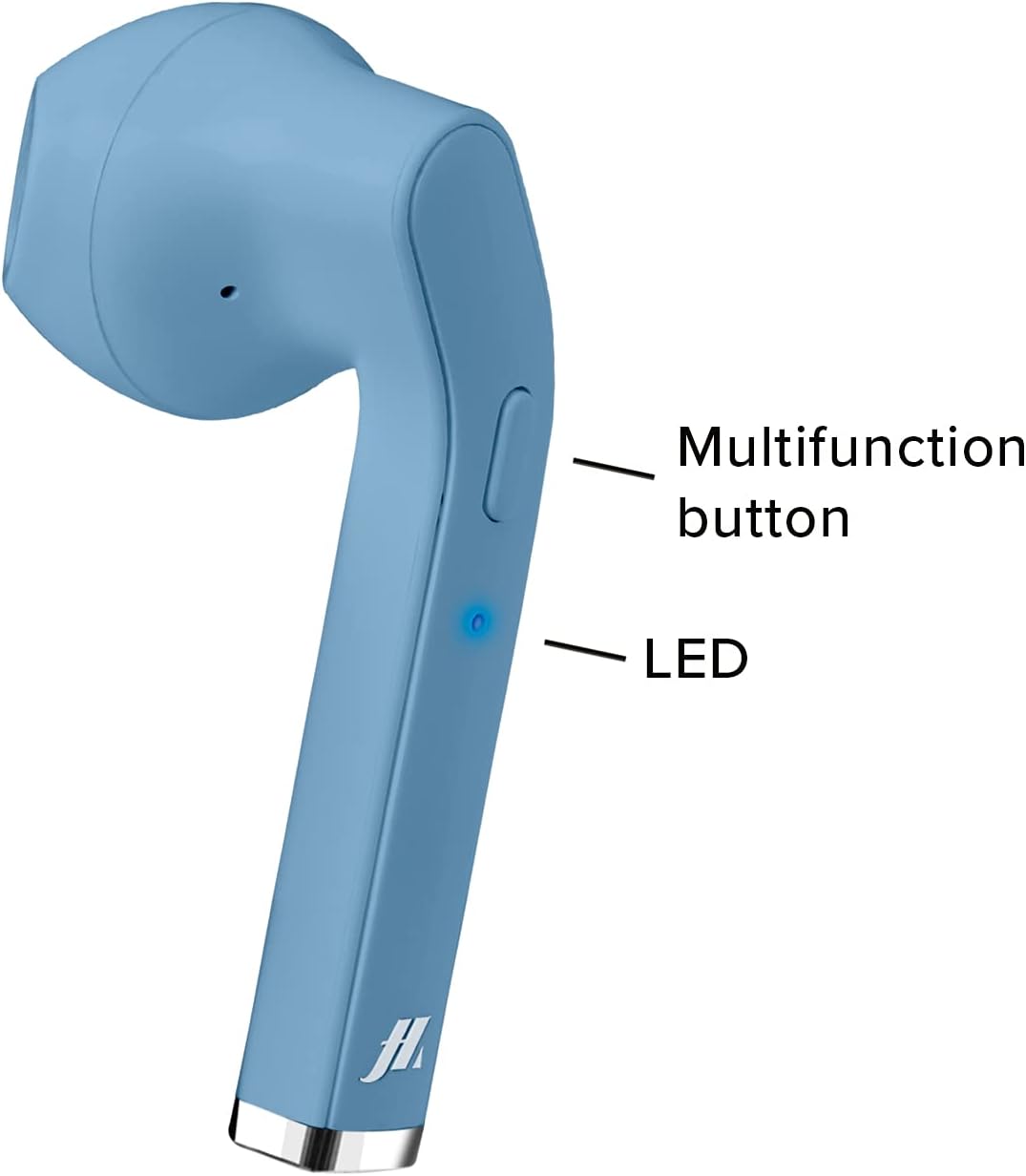
Image: A close-up of one earphone, pointing out the location of the multifunction button and the LED indicator light.
Reprodución de música
- Reproducir/Pausa: Prema o botón multifunción unha vez.
- Próxima pista: Double-press the right earphone's multifunction button.
- Pista anterior: Double-press the left earphone's multifunction button.
Xestión de chamadas
- Responder/Finalizar chamada: Press the multifunction button once during an incoming call or during an active call.
- Rexeitar a chamada entrante: Press and hold the multifunction button for approximately 2 seconds during an incoming call.
- Volver a marcar o último número: Triple-press the multifunction button.

Image: An earphone accompanied by icons illustrating its control functions: play/pause, answer/end call, reject incoming call, and redial last number.
Encendido/apagado
- Encendido: The earphones power on automatically when removed from the charging case. Alternatively, press and hold the multifunction button for 3 seconds.
- Apagado: Place the earphones back into the charging case. They will power off automatically. Alternatively, press and hold the multifunction button for 5 seconds.
Mantemento e coidados
- Limpa os auriculares e a caixa de carga regularmente cun pano suave e seco.
- Non use produtos de limpeza ou disolventes abrasivos.
- Keep the charging contacts on the earphones and inside the case clean to ensure proper charging.
- Avoid exposing the device to extreme temperatures, humidity, or liquids, as it is not water-resistant.
- Garda os auriculares no seu estoxo de carga cando non os uses para protexelos e mantelos cargados.
Resolución de problemas
| Problema | Causa posible | Solución |
|---|---|---|
| Os auriculares non se acenden. | Batería baixa. | Cargue completamente os auriculares e a caixa de carga. |
| Non se pode emparellar co dispositivo. | Bluetooth is off on device; earphones not in pairing mode; too far from device. | Ensure Bluetooth is enabled. Place earphones back in case, then remove to re-enter pairing mode. Move closer to the device. |
| Sen son ou mala calidade de son. | Volume too low; earphones not properly connected; ear tips not sealed. | Increase volume on your device. Reconnect earphones. Adjust ear tips for a better fit. |
| Only one earphone works. | Un auricular non está cargado; problema de emparellamento. | Ensure both earphones are charged. Place both earphones back in the case, then remove them together to re-establish stereo pairing. |
Especificacións do produto
| Característica | Detalle |
|---|---|
| Número de modelo | MHTWSSTYLEBTB |
| Conectividade | Tecnoloxía sen fíos Bluetooth |
| Earphone Style | In-Ear |
| Material | Plástico |
| Rango de frecuencias | 20 Hz - 20,000 Hz |
| Sensibilidade | 90 dB |
| Tipo de batería | Polímero de litio (requírese 3, incluído) |
| Average Battery Life (Play Time) | 2 horas |
| Tempo de carga | Approx. 1 Hour (Fast Charging) |
| Dimensións | 4 x 18 x 9 cm |
| Peso | 90 g |
| Resistencia á auga | Non (Non resistente á auga) |
| Dispositivos compatibles | Smartphones, Tablets, Laptops, Desktop Computers |
| Control de ruído | Cancelación activa de ruído |
Información da garantía
Specific warranty details are not provided in the product data. Please refer to the retailer's return policy or contact the manufacturer directly for warranty information.
Atención ao cliente
For technical support or further assistance, please contact the manufacturer or your point of purchase. Keep your product model number (MHTWSSTYLEBTB) and purchase details ready when contacting support.


