1. Introdución
Grazas pola compraasing the SHARP XL-B512 Stereo Sound System. This micro sound system offers a rich 45-watt sound experience with versatile connectivity options including Bluetooth, CD player, USB, and FM radio. Its elegant design with a wooden speaker housing and LED display complements any living space. This manual provides essential information for setting up, operating, and maintaining your device to ensure optimal performance and longevity.
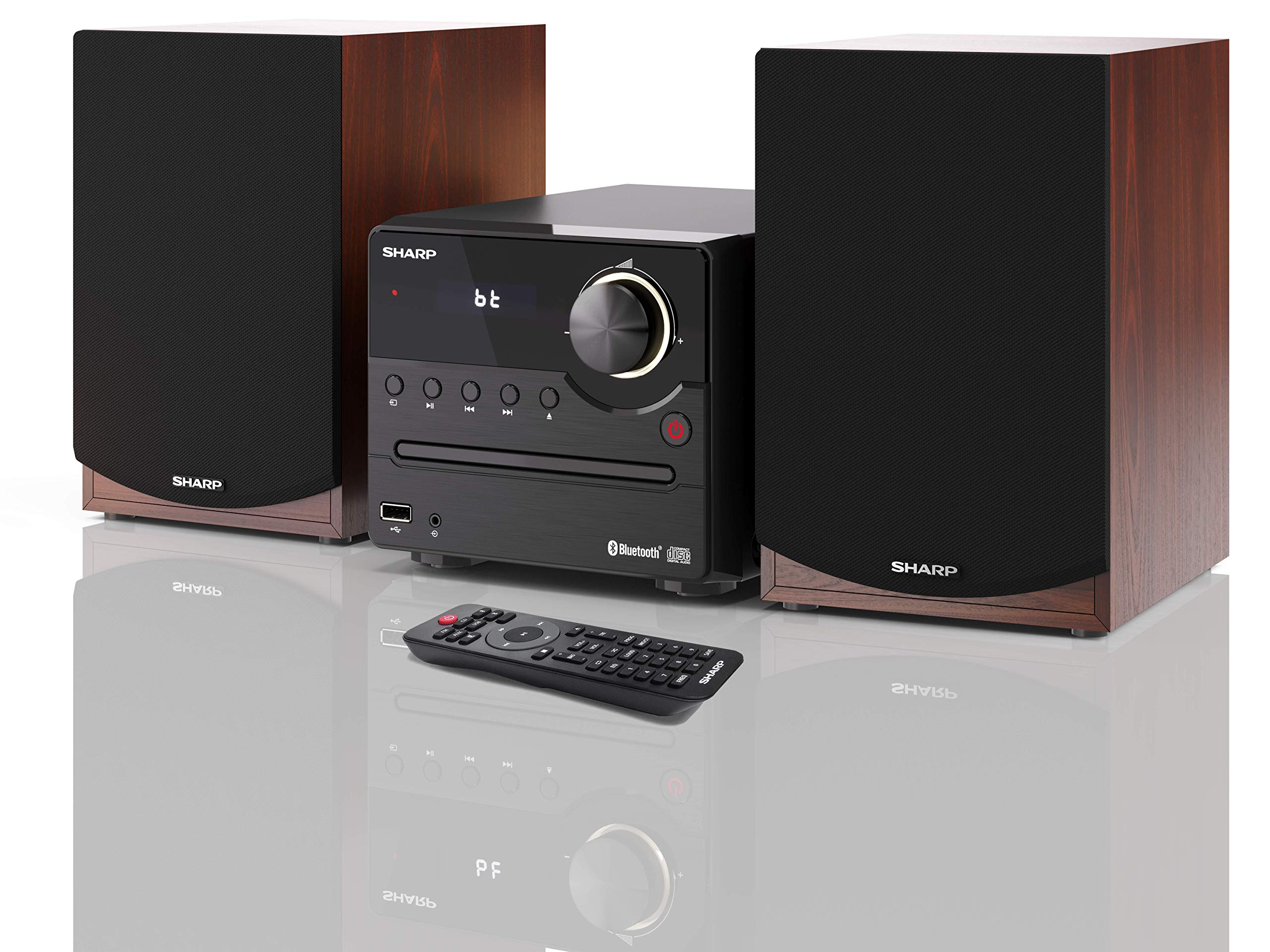
Figura 1: SHARP XL-B512 Stereo Sound System. This image shows the central unit flanked by two wooden-cased speakers, reflecting on a polished surface.
2. Información de seguridade
Lea atentamente todas as instrucións de seguridade antes de usar o produto. Garde este manual para futuras consultas.
- Fonte de enerxía: Use only the specified power supply. Ensure the voltage coincide coa súa fonte de alimentación local.
- Ventilación: Non bloquee ningunha abertura de ventilación. Deixe espazo suficiente arredor da unidade para un fluxo de aire axeitado.
- Auga e humidade: Non expoña a unidade á choiva, á humidade nin a líquidos que goteen/salpiquen. Non coloque obxectos cheos de líquido, como vasos, enriba do aparello.
- Calor: Manteña a unidade lonxe de fontes de calor como radiadores, rexistros de calor, estufas ou outros aparellos (incluídos amplificadores) que producen calor.
- Limpeza: Desconecte a unidade da toma de corrente antes de limpala. Use só un pano seco.
- Servizo: Non intente atender este produto vostede mesmo. Remita todo o servizo a persoal de servizo cualificado.
3. Contido do paquete
Verifique que todos os elementos que se indican a continuación estean incluídos no seu paquete:
- SHARP XL-B512 Micro Sound System (Main Unit)
- Two Speakers (with wooden housing)
- Cable de alimentación
- Mando a distancia (con pilas)
- Manual de instrucións (este documento)
- Guía de inicio rápido
4. Configuración
4.1 Conexión de altofalantes
Connect the two speakers to the main unit using the provided speaker cables. Ensure correct polarity (positive to positive, negative to negative) for optimal sound quality.
4.2 Conexión de alimentación
Connect the power cable to the AC IN port on the rear of the main unit, then plug it into a wall outlet.

Figura 2: Rear panel connections. This image displays the back of the central unit with ports for speaker wires and the AC power input, alongside the rear of the two speakers.
4.3 Encendido inicial
Press the Power button on the main unit or the remote control to turn on the system. The LCD display will illuminate.
5. Instrucións de funcionamento
5.1 Controis do panel frontal

Figura 3: Front panel controls. This close-up shows the central unit's display, volume knob, and various control buttons for playback and source selection.
- Botón de encendido: Acende ou apaga a unidade.
- Botón de orixe: Cycles through available input sources (CD, FM, Bluetooth, USB, AUX).
- Botón de volume: Axusta o nivel de volume principal.
- Controis de reprodución: Play/Pause, Stop, Skip Forward/Backward for CD and USB modes.
- Porto USB: For connecting USB storage devices for music playback.
- Entrada AUX: Conector de 3.5 mm para conectar dispositivos de son externos.
5.2 Reprodución de CD
- Preme o Fonte button to select 'CD' mode.
- Open the CD tray by pressing the Eject button.
- Place a CD (CD/CD-R/CD-RW/MP3 format) with the label side up into the tray.
- Close the CD tray. The system will read the disc and begin playback automatically or display track information.
- Use the playback controls (Play/Pause, Stop, Skip) to manage your music.
5.3 Radio FM
- Preme o Fonte button to select 'FM' mode.
- The system will automatically search for available stations or you can manually tune.
- To save a station as a preset, tune to the desired station, then press and hold the Predefinido button (if available on remote) or follow on-screen instructions. The system supports 40 preset memories.
- Usa o Predefinido Arriba/Abaixo botóns para navegar polas estacións gardadas.
5.4 Emparejamento Bluetooth
- Preme o Fonte button to select 'Bluetooth' mode. The display will show 'bt' and flash, indicating it's in pairing mode.
- No teu dispositivo móbil, activa o Bluetooth e busca os dispositivos dispoñibles.
- Select 'SHARP XL-B512' from the list of devices.
- Once paired, the 'bt' indicator on the system's display will stop flashing. You can now stream audio from your device.
Reprodución por USB 5.5
- Insert a USB storage device into the USB port on the front panel.
- Preme o Fonte button to select 'USB' mode.
- The system will automatically detect and play compatible audio files (MP3).
- Use the playback controls to navigate tracks.
5.6 Entrada AUX
- Connect an external audio device (e.g., smartphone, MP3 player) to the AUX IN jack on the front panel using a 3.5mm audio cable (not supplied).
- Preme o Fonte button to select 'AUX' mode.
- Play audio from your connected device. The sound will be output through the SHARP XL-B512 system.
5.7 Axustes do ecualizador
The system features 6 preset equalizers with independent treble and depth control. Use the EQ button on the remote control or main unit to cycle through the presets and adjust sound to your preference.
6. Mantemento
6.1 Limpeza da unidade
Wipe the unit with a soft, dry cloth. Do not use abrasive cleaners, waxes, or solvents as they may damage the finish. Ensure the unit is unplugged before cleaning.
6.2 Coidado de CD
Manipula os CD polos bordos. Mantelos limpos e sen rabuñaduras. Garda os CD nas súas fundas cando non os uses.
6.3 Speaker Care
The wooden speaker housing can be cleaned with a soft, dry cloth. Avoid placing heavy objects on the speakers or exposing them to direct sunlight or extreme temperatures.
7 Solución de problemas
If you encounter any issues with your SHARP XL-B512 system, refer to the following table for common problems and solutions.
| Problema | Causa posible | Solución |
|---|---|---|
| Sen poder | Power cable not connected securely; Power outlet not active. | Comprobe a conexión do cable de alimentación; probe cunha toma de corrente diferente. |
| Sen son | Volume too low; Incorrect source selected; Speaker cables disconnected. | Increase volume; Select correct input source; Check speaker cable connections. |
| Bluetooth non se sincroniza | System not in pairing mode; Device too far; Bluetooth disabled on device. | Ensure system is in Bluetooth pairing mode; Move device closer; Enable Bluetooth on your device. |
| Non se reproduce o CD | CD inserted incorrectly; CD is dirty or scratched; Incorrect format. | Reinsert CD correctly; Clean CD; Ensure CD is a supported format (CD/CD-R/CD-RW/MP3). |
| O control remoto non funciona | As pilas están gastadas ou inseridas incorrectamente; Obstrución entre o mando a distancia e a unidade. | Substitúa as baterías; asegúrese de que a polaridade das baterías sexa correcta; retire calquera obstrución. |
Se o problema persiste despois de probar estas solucións, póñase en contacto co servizo de atención ao cliente.
8. Especificacións
Below are the technical specifications for the SHARP XL-B512 Stereo Sound System:
- Modelo: XL-B512
- Potencia de saída total: 45 vatios
- Modo de saída de audio: Estéreo
- Speaker Output Channel Quantity: 2
- Formatos de audio admitidos: MP3, CD, CD-R, CD-RW
- Tecnoloxía do sintonizador: FM PLL Tuner
- Rango de frecuencias FM: 87.5 a 108 MHz
- FM Preset Memory: 40 estacións
- Conectividade: Bluetooth, USB, Auxiliary (3.5mm)
- Características especiais: 6 Preset Equalizers, LCD Display with white backlight
- Sound System Dimensions (W x H x D): 17 x 22 x 15 cm
- Speaker Dimensions (W x H x D): 14.5 x 17.7 x 22.3 cm (cada un)
- Peso do artigo: 4 kg
- Fonte de enerxía: Eléctrico con cable
- Control remoto: Si (pilas incluídas)
9. Garantía e soporte
Your SHARP XL-B512 Stereo Sound System comes with a standard manufacturer's warranty. Please refer to the warranty card included in your package for specific terms and conditions, including the warranty period and coverage details.
For technical support, service inquiries, or further assistance, please contact your local SHARP customer service center. Contact information can typically be found on the manufacturer's websitio web ou na documentación da garantía.


