VOCOO Digital Kitchen Timer
Modelo: 5260
Manual de instrucións do usuario
Introdución
Thank you for choosing the VOCOO Digital Kitchen Timer. This device is designed for precise time management in various settings, including cooking, studying, fitness, and more. Featuring a large LED display, adjustable volume, and magnetic backing, it offers ease of use and versatility for all ages.

Imaxe: Fronte view of the VOCOO Digital Kitchen Timer, displaying "08:24" on its large LED screen. The timer is white with a black display area.
Información de seguridade
- Keep the device away from water and excessive moisture to prevent damage.
- Do not expose the timer to extreme temperatures or direct sunlight for prolonged periods.
- Handle with care; avoid dropping or subjecting the device to strong impacts.
- Asegúrese de que as pilas estean inseridas correctamente segundo as marcas de polaridade.
- Manteña as pilas fóra do alcance dos nenos.
Contido do paquete
Ao abrir o paquete, comproba que todos os elementos estean presentes e en bo estado:
- 1 x VOCOO Digital Kitchen Timer (Model 5260)
- 3 pilas AAA (preinstaladas ou incluídas por separado)
- 1 x Manual de usuario (este documento)
Produto rematadoview
The VOCOO Digital Kitchen Timer features a sleek design with intuitive controls. Key components include:
- Pantalla LED grande: Shows time clearly.
- Dial rotativo: Used for setting minutes and seconds.
- Botón Inicio / Parada: Integrated into the display, press to start or pause.
- Soporte magnético: Allows attachment to metal surfaces.
- Almofadas antideslizantes: Provide stability on flat surfaces.
- Interruptor de volume: Located on the back, for adjusting alarm volume (Loud, Soft, Mute).
- Interruptor de brillo: Located on the back, for adjusting display brightness (Bright, ECO).

Image: A person's hands holding the VOCOO Digital Kitchen Timer, highlighting its compact and ergonomic design for easy handling.
Configuración
1. Instalación da batería
The timer requires three AAA batteries. These are typically included. If not, or if replacing, follow these steps:
- Localice a tapa do compartimento das pilas na parte traseira do temporizador.
- Deslice a tapa para abrir.
- Insert three AAA batteries, ensuring the correct polarity (+/-) as indicated inside the compartment.
- Pecha a tapa do compartimento da batería de forma segura.
2. Acendido inicial
Once batteries are installed, the timer should automatically power on and display "00:00". If not, check battery installation.
3. Anexo magnético
The timer features powerful magnets on its back, allowing it to be securely attached to any iron surface, such as a refrigerator or oven. Ensure the transparent film on the silicone pads is removed for stronger magnetic adhesion.
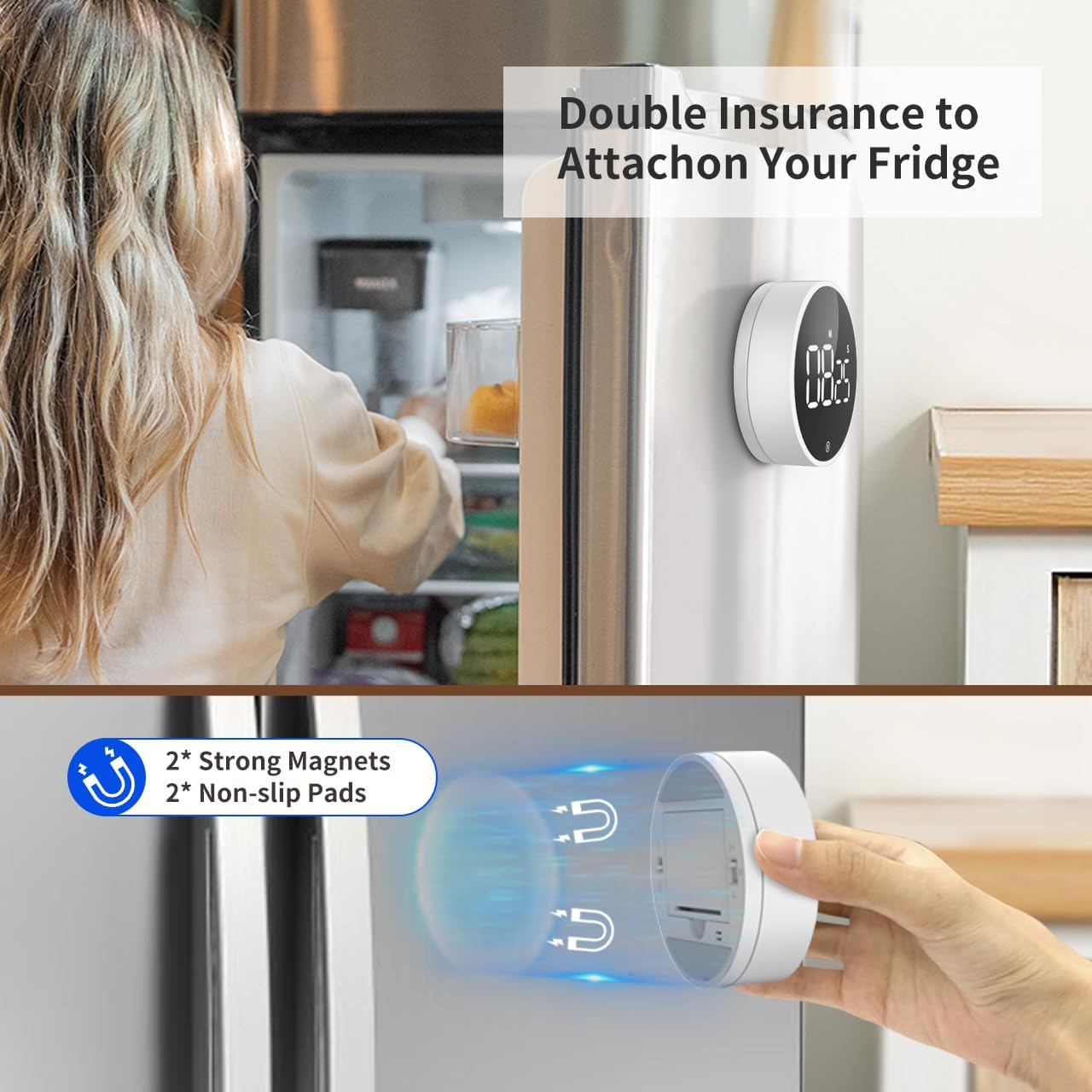
Image: The VOCOO Digital Kitchen Timer magnetically attached to the side of a refrigerator, demonstrating its convenient placement.

Imaxe: Unha detallada view of the back of the timer, illustrating the two strong magnets and two non-slip silicone pads designed for secure attachment.
Instrucións de funcionamento
1. Setting Time (Countdown Mode)
Para configurar un tempo de conta atrás:
- Ensure the display shows "00:00". If not, press and hold the front button to reset it.
- Rotate the outer dial clockwise to increase the time.
- Xire lentamente para axustar os segundos.
- Rotate quickly to adjust minutes.
- O tempo máximo da conta atrás é de 99 minutos e 55 segundos.
2. Starting and Pausing the Timer
Once the desired time is set, press the front button (the large circular area on the display) once to start the countdown. To pause the timer, press the button again. Pressing it a third time will resume the countdown.
3. Resetting the Timer
To reset the timer to "00:00" at any point, press and hold the front button for approximately 3 seconds.
4. Count-Up Mode (Stopwatch)
Para usar o temporizador como cronómetro:
- Ensure the display shows "00:00". If not, press and hold the front button to reset it.
- Press the front button once to start counting up from "00:00".
- Press the button again to pause the count-up.
- Press and hold the button to reset the stopwatch to "00:00".

Image: Illustration of the two counting modes: Count-up (stopwatch) from 00:00 to 99:55, and Countdown from 99:55 to 00:00. Examples show the timer used during exercise and baking.
5. Axustar o volume da alarma
On the back of the timer, locate the volume switch. You can select from three alarm levels:
- Alto: Approximately 80-90dB, suitable for noisy environments.
- Suave: Approximately 60-75dB, for quieter settings.
- Silenciar: The numbers will blink on the display to indicate time is up without an audible alarm, ideal for silent environments like libraries or meetings.

Image: The timer's volume settings are illustrated, showing a loud setting (80-90dB) for a kitchen environment, a soft setting (60-75dB) for a quiet home, and a mute setting where numbers blink, suitable for an office or classroom.
6. Axustar o brillo da pantalla
Also on the back of the timer, there is a switch to adjust the display brightness:
- Brillante: For optimal visibility in well-lit conditions.
- ECO: A dimmer setting to conserve battery life, suitable for low-light conditions.
The timer automatically enters power-saving mode 5 seconds after being paused or stopped. Press the front button to reactivate the display.
Mantemento
Limpeza
To clean the timer, wipe it gently with a soft, dry, or slightly damp pano. Non use produtos de limpeza abrasivos nin somerxa o dispositivo en auga.
Substitución da batería
When the display dims significantly or the timer stops responding, it's time to replace the batteries. Follow the battery installation steps outlined in the "Setup" section.
Almacenamento
If storing the timer for an extended period, it is recommended to remove the batteries to prevent leakage and potential damage to the device.
Resolución de problemas
| Problema | Causa posible | Solución |
|---|---|---|
| Timer does not turn on. | As baterías están agotadas ou están mal instaladas. | Substitúa as pilas ou asegúrese de que a polaridade sexa correcta. |
| A pantalla está escasa. | ECO brightness mode is selected or batteries are low. | Switch to "Bright" mode on the back. Replace batteries if still dim. |
| A alarma non soa. | Mute volume mode is selected. | Switch to "Loud" or "Soft" mode on the back. |
| Timer does not stick to surface. | Transparent film on silicone pads not removed or surface is not iron. | Remove the transparent film. Ensure the surface is magnetic (iron/steel). |
| Time setting is too sensitive. | Rapid rotation of the dial. | Rotate the dial more slowly for precise second adjustments. Rotate quickly for minute adjustments. |
Especificacións
| Característica | Detalle |
|---|---|
| Número de modelo | 5260 |
| Dimensións | 3.07"D x 3.07"W x 1.06"H (7.8 x 7.8 x 2.7 CM) |
| Peso | 4.2 onzas (120 gramos) |
| Material | Acrilonitrilo Butadieno Estireno (ABS) |
| Max Count Time | 99 minutos 55 segundos |
| Fonte de enerxía | 3 pilas AAA (incluídas) |
| Niveis de volume da alarma | Loud (80-90dB), Soft (60-75dB), Mute (blinking digits) |
| Brillo da pantalla | Bright, ECO |
| Características | Magnetic Backing, Non-slip Pads, Memory Function |
Garantía e Soporte
Información da garantía
VOCOO products are manufactured with high-quality materials and undergo strict quality control. For specific warranty details, please refer to the product packaging or contact VOCOO customer support. Typically, electronic devices come with a limited warranty covering manufacturing defects.
Atención ao cliente
If you encounter any issues or have questions regarding your VOCOO Digital Kitchen Timer, please contact our customer support team. You can usually find contact information on the product packaging, the official VOCOO websitio web ou a través da túa plataforma de compra.
When contacting support, please have your product model number (5260) and purchase details ready to assist in a quicker resolution.


