Introdución
The APPS2Car Car Phone Holder Mount is designed to provide a secure and convenient solution for holding your smartphone in your vehicle. This versatile mount can be placed on either the dashboard or the windshield, offering flexibility to suit various vehicle types and user preferences. It features a robust suction cup for stable attachment and adjustable components for optimal viewing angles, ensuring a safer and more comfortable driving experience.
Características do produto
- Opcións de montaxe 2 en 1: This car mount offers dual placement capabilities, allowing secure attachment to either the dashboard or the windshield. This adaptability makes it suitable for a wide range of vehicles, including cars, pickups, SUVs, and taxis.
- Ampla compatibilidade: The APPS2Car phone mount is compatible with smartphones ranging from 4.0 to 7.0 inches in size. It can accommodate devices with cases up to 20mm thick, including popular models like iPhone 16/15/15 Pro/14 Pro/13 Pro/12, Samsung Galaxy, Google Pixel, and Motorola.
- Axuste flexible do ángulo: Equipped with a 360° rotatable ball joint and a 270° adjustable telescopic arm, the mount allows for precise positioning of your phone. The telescopic arm extends from 5.24 inches (13.3 cm) to 7.24 inches (18.4 cm), enabling you to achieve the ideal viewángulo de inflexión sen obstruír a condución view.
- Stable and Secure Hold: The mount features a dual-lock suction cup made from heat-resistant TPU material, ensuring strong and reliable adhesion. The phone cradle's arm and support feet are lined with ultra-soft, elastic silicone pads, providing robust shock absorption and protecting your phone from scratches and impacts while keeping it securely in place.
- Operación cunha man: Designed for ease of use, the APPS2Car car phone holder includes a quick-release button. This allows for effortless one-handed insertion and removal of your smartphone, minimizing distractions and enhancing safety during driving, whether you are navigating, making calls, or listening to music.
O que hai na caixa
Upon opening the product packaging, you will find the following components:
- Car Phone Holder (Main Unit)

Image: The product packaging contents, including the phone holder and the suction cup base.
Especificacións
| Atributo | Detalle |
|---|---|
| Dimensións do produto | 6.65 x 2.72 x 3.62 polgadas |
| Peso do elemento | 7.7 onzas |
| ASIN | B08ML21C99 |
| Número de modelo do artigo | H9-S6 |
| Cor | Negro |
| Fabricante | Wiiki-tech |
| Data de primeira dispoñibilidade | 1 de febreiro de 2021 |
| Dispositivos compatibles | Teléfonos intelixentes (4.0-7.0 polgadas) |
| Modelos de teléfonos compatibles | iPhone, Samsung, Moto, Google, All SmartPhones |
| Tipo de montaxe | Windshield & Dashboard |
| Características especiais | One-Hand Operation, Quick Release Button, Universal, Easy to Install and Remove, No Tools Needed |
Configuración e instalación
The APPS2Car phone mount is designed for easy installation without the need for tools. Follow these steps for optimal adhesion and stability:
- Escolla lugar de montaxe: Decide whether to mount the holder on your car's windshield or a flat, smooth section of your dashboard. For dashboard mounting, ensure the surface is clean and flat. If your dashboard is uneven or textured (e.g., leather), a separate 3M dashboard pad (not included) may be required for proper adhesion.
- Limpar a superficie: Thoroughly clean the chosen mounting surface. Dust, dirt, or oils can significantly reduce the suction cup's adhesion. Use a clean cloth and a suitable cleaner, then allow the surface to dry completely.
- Prepare the Suction Cup: Remove the protective film from the bottom of the suction cup.
- Fixar o soporte: Place the suction cup firmly onto the cleaned surface. Press down on the suction cup for at least 10 seconds to expel any air.
- Engage the Lock Lever: While maintaining pressure, press down the 'LOCK' lever located on the suction cup base. This will create a vacuum seal, securing the mount in place.
- Allow Adhesion Time: For best results and maximum stickiness, allow the universal car phone holder to set for 24 hours before placing a phone in it or driving.

Image: The phone holder can be securely mounted on either the automobile's front windshield or the instrument panel/dashboard.

Imaxe: Detallada view of the suction cup's construction, emphasizing its strong adhesion and durability.
Instrucións de funcionamento
Once installed, the APPS2Car phone holder provides flexible and secure phone placement:
- Adjust the Arm and Angle: The telescopic arm can be adjusted up to 270° to extend or retract, allowing you to bring your phone closer or push it further away. The ball joint at the back of the phone cradle allows for a full 360° rotation, enabling you to orient your phone in portrait or landscape mode, or any angle in between. Loosen the adjustment knob to change the angle, then tighten it to secure the position.
- Introduza o seu teléfono: Press the quick-release button, typically located on the side or back of the phone cradle. This will open the adjustable embracing arms.
- Place Phone Securely: Carefully place your smartphone into the cradle. The arms will automatically close or can be gently pressed to secure your phone. Ensure the bottom feet are extended if needed to support larger phones or those with thick cases.
- Elimina o teu teléfono: To remove your phone, simply press the quick-release button again. The arms will open, allowing you to retrieve your device with one hand.

Image: Adjust the mount as desired with its telescopic arm and multi-angle rotation capabilities.

Image: The quick-release button and adjustable bottom foot allow for easy one-handed phone insertion and removal.
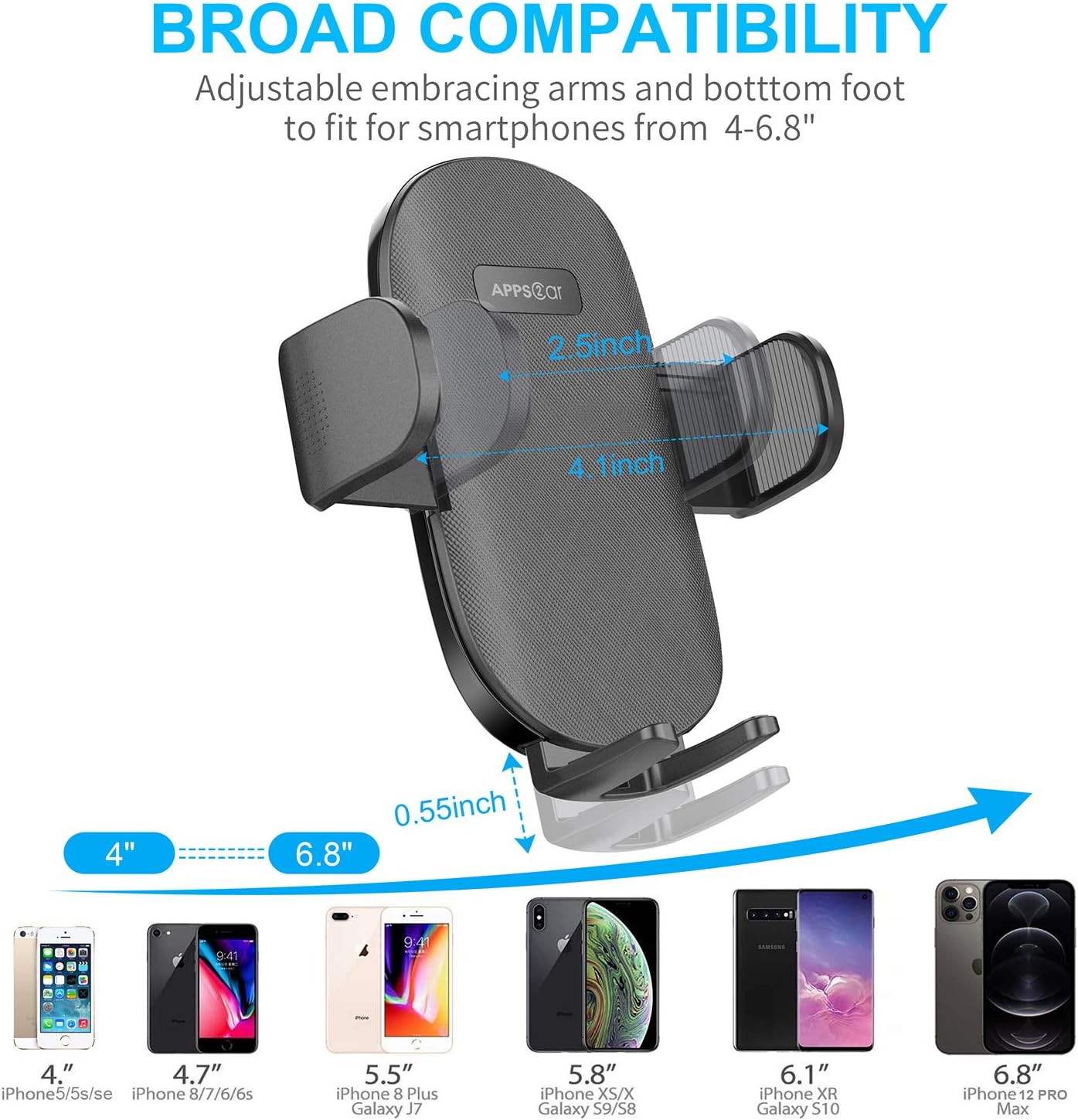
Image: The adjustable arms and bottom foot ensure broad compatibility with smartphones from 4 to 6.8 inches, including those with thick cases.
Mantemento
Proper maintenance ensures the longevity and optimal performance of your APPS2Car phone holder:
- Limpeza de ventosas: If the suction cup loses its stickiness, rinse the bottom of the suction cup with warm water. Allow it to air-dry completely before re-attaching it to a surface. This process can restore its adhesive properties.
- Removing the Mount: To remove the mount from a surface, gently grab the small tab on the edge of the suction cup and peel it loose. Apply slow, steady pressure. If necessary, a plastic tool like dental floss, a plastic shovel, or a plastic knife can be used to carefully separate the suction cup from the surface. Avoid using sharp metal objects that could damage the surface or the suction cup.
- Limpeza xeral: Wipe the main body of the phone holder with a soft, damp cloth to remove dust and grime. Avoid harsh chemicals or abrasive cleaners.
Resolución de problemas
If you encounter issues with your APPS2Car Car Phone Holder Mount, consider the following solutions:
- Mount Not Sticking/Falling Off:
- Limpeza da superficie: Ensure the mounting surface (windshield or dashboard) is thoroughly clean and free of dust, dirt, or oils. Even small particles can prevent a strong seal.
- Tipo de superficie: The suction cup works best on smooth, flat surfaces. Leather or uneven/textured dashboards are generally not compatible with direct suction cup attachment. In such cases, mount on the windshield or use a separate 3M dashboard pad (not included) on a flat dashboard area.
- Técnica de aplicación: Press the suction cup firmly for at least 10 seconds to remove all air before engaging the lock lever. Allow 24 hours for the adhesive to fully set before use.
- Temperatura: Extreme heat (e.g., direct sun exposure in a parked car) can sometimes affect the suction cup's seal. If the mount falls off in high temperatures, re-clean the surface and the suction cup (as per maintenance instructions) and re-apply. Consider using a sunshade when parked to reduce interior temperatures.
- Suction Cup Condition: If the suction cup has yellowed or become less pliable over time, its effectiveness may be reduced. Regular cleaning and proper removal can help maintain its condition.
- Phone Falling Out of Holder:
- Arm Tightness: Ensure the adjustable embracing arms are securely gripping your phone. After placing the phone, gently press the arms inward if they don't automatically close tightly.
- Bottom Foot Adjustment: For larger or heavier phones, ensure the adjustable bottom foot is extended to provide adequate support. This prevents the phone from sliding downwards or tilting out.
- Axuste de ángulo: If the phone feels unstable, slightly adjust the tilt angle of the phone cradle. Sometimes, a slight upward tilt can improve stability, especially during sudden movements or on bumpy roads.
- Mount Wobbles/Loose Joints:
- Apertar os botóns: Check all tightening knobs and joints on the mount (e.g., for the telescopic arm and ball joint). Ensure they are securely tightened after adjusting the position.
Garantía e Soporte
APPS2Car stands behind the quality of its products. This car phone mount includes a one-year quality assurance desde a data de compra.
If you experience any issues with your APPS2Car Car Phone Holder Mount, or have questions regarding its installation or operation, please do not hesitate to contact our customer support team. We are committed to providing quick assistance and are always here to help ensure your satisfaction.
For support, please visit the official APPS2Car store on Amazon or refer to the contact information provided with your product packaging.


