1. Introdución
Thank you for choosing the MIFA X11 True Wireless Earbuds. This manual provides essential information on how to set up, operate, and maintain your earbuds to ensure optimal performance and longevity. Please read this manual thoroughly before using the product.
2. Que hai na caixa
- MIFA X11 True Wireless Earbuds (Left & Right)
- Estuche de carga
- Almofadas para os oídos (varios tamaños)
- Cable de carga USB
- Manual de usuario
3. Características do produto
- Deseño verdadeiramente inalámbrico: Bluetooth 5.0 for total freedom, switch between Twin Mode and Mono Mode.
- Expertly Tuned Sound: Powerful bass and clear details with advanced Qualcomm chip, supporting APT-X and ACC.
- Impermeable IPX7: Protection against sweat, rain, and snow, ideal for sports.
- Batería potente: Up to 5 hours of playtime on a single charge, with the charging case providing up to 100 additional hours.
- Deseño ergonómico: Unique ear-fins for a secure, comfortable fit.
- CVC 8.0 Noise Reduction: Built-in microphone with CVC 8.0 for crystal-clear phone calls and voice assistant support.
4. Configuración
4.1 Carga inicial
Before first use, fully charge both the earbuds and the charging case. Place the earbuds into the charging case. Connect the USB charging cable to the case and a power source. The indicator lights on the case will show the charging status.
4.2 Emparejamento
The MIFA X11 earbuds feature one-step pairing for convenience.
- Take both earbuds out of the charging case. They will automatically power on and connect to each other.
- On your mobile device, open the Bluetooth settings.
- Select "MIFA X11" from the list of available devices to pair.
- Unha vez conectado, escoitarás unha mensaxe de confirmación.
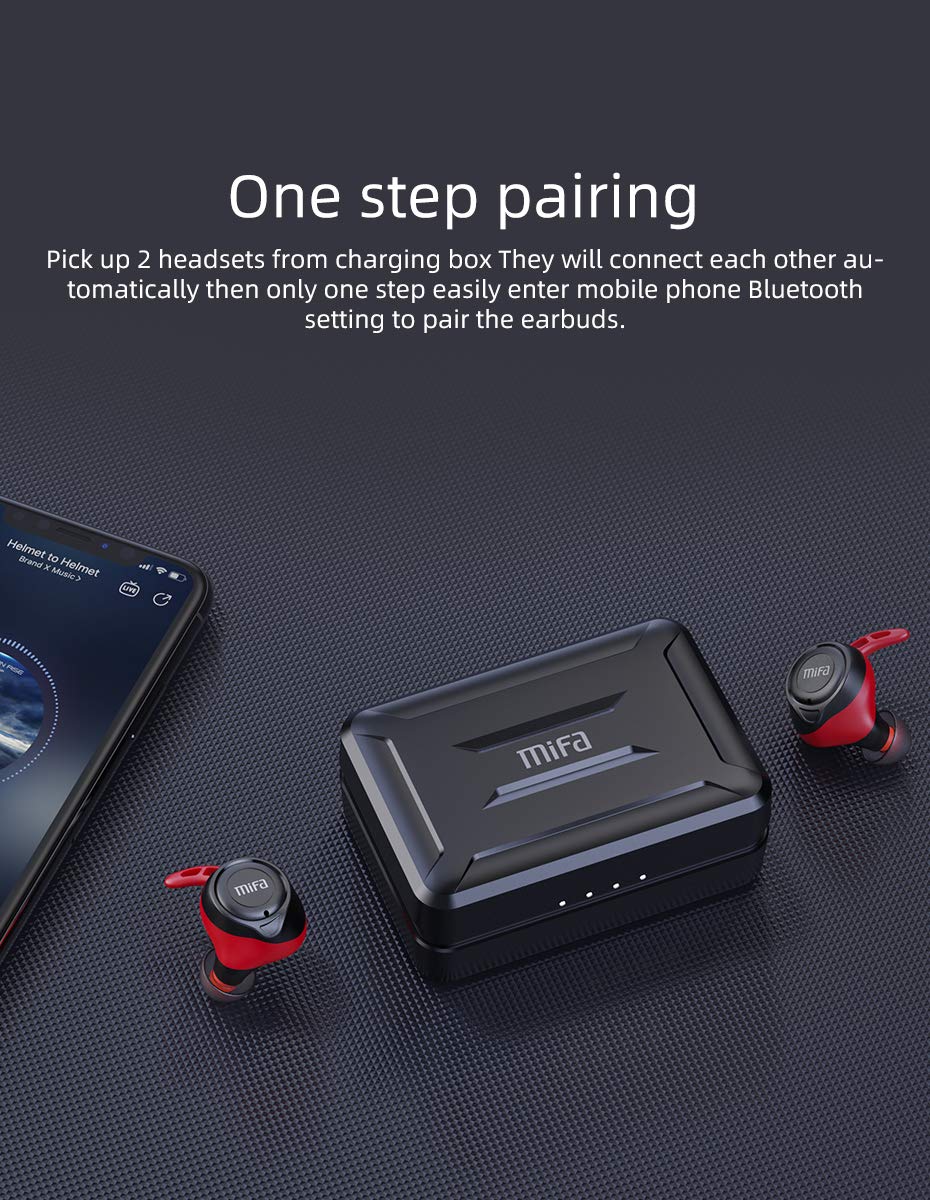
Figure 4.2.1: One-step pairing process with earbuds and charging case.
5. Instrucións de funcionamento
5.1 Controis básicos
The MIFA X11 earbuds feature physical buttons for reliable control. Specific functions may vary slightly based on your device and application.
- Encendido/apagado: Earbuds power on automatically when removed from the case and power off when placed back in.
- Reproducir/Pausa: Prema o botón de calquera dos auriculares unha vez.
- Próxima pista: Preme dúas veces o botón do auricular dereito.
- Pista anterior: Preme dúas veces o botón do auricular esquerdo.
- Subir volume: Triple-press the button on the right earbud.
- Baixar volume: Triple-press the button on the left earbud.
5.2 Mono Mode and Twin Mode
The earbuds can be used individually (Mono Mode) or together (Twin Mode).
- Modo Mono: Simply take one earbud out of the charging case. It will automatically connect to your device, allowing you to use it independently for calls or audio while maintaining awareness of your surroundings.
- Modo dobre: Take both earbuds out of the charging case. They will automatically connect to each other and then to your device, providing an immersive stereo sound experience.
5.3 Chamadas telefónicas
The MIFA X11 earbuds support call control functions.
- Responder/Finalizar chamada: Prema o botón de calquera dos auriculares unha vez.
- Rexeitar a chamada: Press and hold the button on either earbud for 2 seconds.
5.4 Asistente de voz
Activa o asistente de voz do teu dispositivo (Siri, Asistente de Google, etc.) directamente desde os auriculares.
- Activar o asistente de voz: Press and hold the button on either earbud for 2 seconds (after rejecting a call, if applicable).

Figure 5.4.1: Activating voice assistant with MIFA X11 earbuds.
6. Mantemento
6.1 Limpeza
Unha limpeza regular axuda a manter a calidade do son e a hixiene.
- Limpe con coidado os auriculares e a funda de carga cun pano suave, seco e sen fiapos.
- For ear tips, remove them and clean with a mild soap solution if necessary, then rinse thoroughly and dry completely before reattaching.
- Non use produtos de limpeza ou disolventes abrasivos.
6.2 Resistencia á auga (IPX7)
The MIFA X11 earbuds are IPX7 waterproof, meaning they can withstand immersion in water up to 1 meter for 30 minutes. This makes them suitable for workouts and use in rainy conditions.
- Do not intentionally submerge the charging case, as it is not waterproof.
- Asegúrate de que os auriculares estean secos antes de volvelo colocar na caixa de carga para evitar danalos.
- IPX7 rating applies to fresh water; exposure to salt water, chlorinated water, or other liquids may cause damage.

Figure 6.2.1: MIFA X11 earbuds demonstrating IPX7 waterproof capability.
7 Solución de problemas
If you encounter issues with your MIFA X11 earbuds, try the following solutions:
- Auriculares que non se emparellan entre si: Place both earbuds back into the charging case, close the lid for a few seconds, then take them out again. They should automatically connect.
- Os auriculares non se conectan ao dispositivo: Ensure Bluetooth is enabled on your device. Forget "MIFA X11" in your device's Bluetooth settings and attempt to pair again.
- Sen son dun auricular: Asegúrate de que ambos auriculares estean cargados. Tenta colocalos de novo na funda e sacalos de novo. Se o problema persiste, reinicia os auriculares (consulta o manual de instrucións do fabricante) websitio web para obter instrucións específicas de restablecemento se é necesario).
- Problemas de carga: Ensure the charging cable is securely connected and the power source is working. Clean the charging contacts on both the earbuds and the case with a dry cotton swab.
- Mala calidade de son: Ensure earbuds are properly seated in your ears. Try different sized ear tips for a better seal. Check if there is any debris in the earbud nozzles.
Para obter máis axuda, póñase en contacto co servizo de atención ao cliente de MIFA.
8. Especificacións
| Nome do modelo | MIFA X11 |
| Tecnoloxía de conectividade | Sen fíos (Bluetooth 5.0) |
| Nivel de resistencia á auga | Impermeable IPX7 |
| Duración da batería (auriculares) | Ata 5 horas |
| Duración da batería (co estoxo de carga) | Ata 100 horas |
| Micrófono | Yes (with CVC8.0 Noise Reduction) |
| Tipo de control | Call Control, Remote |
| Dispositivos compatibles | Smartphones, Tablets, Laptops, Bluetooth-enabled Devices |
| Material | Silicona, Plástico |
| Dimensións do produto | 3.1 x 2.5 x 2.6 cm |
| Peso do elemento | 249 g |
9. Garantía e soporte
MIFA products are manufactured to the highest quality standards. For information regarding warranty coverage, technical support, or service inquiries, please visit the official MIFA websitio web ou póñase en contacto directamente co servizo de atención ao cliente. Garde o comprobante de compra para reclamacións de garantía.


