1. Introdución
Thank you for choosing the Inateck 360° Protective Laptop Bag Case. This product is designed to provide comprehensive protection and convenient portability for your laptop and accessories. Crafted with durable, water-resistant materials and featuring intelligent design elements, this case ensures your device remains safe from daily wear and tear, accidental bumps, and splashes.
2. Características do produto
- 360° Enhanced Protection: The interior features a thick protective strip to prevent zipper scratches. Elastic shockproof cotton on the bottom and sides, combined with a soft flannel lining, offers all-round protection against scratches, dust, and shocks.
- Elastic Handle: A retractable PU handle allows the case to function as both a briefcase and a laptop sleeve. The handle can be hidden for easy placement into a backpack or extended for convenient carrying.
- Waterproof Exterior: The outer layer is constructed from splashproof 600D polyester fabric, safeguarding your device from accidental liquid spills.
- Almacenamento adicional: A large front zipper pocket provides convenient space for power adapters, cables, a mouse, and other essential accessories.
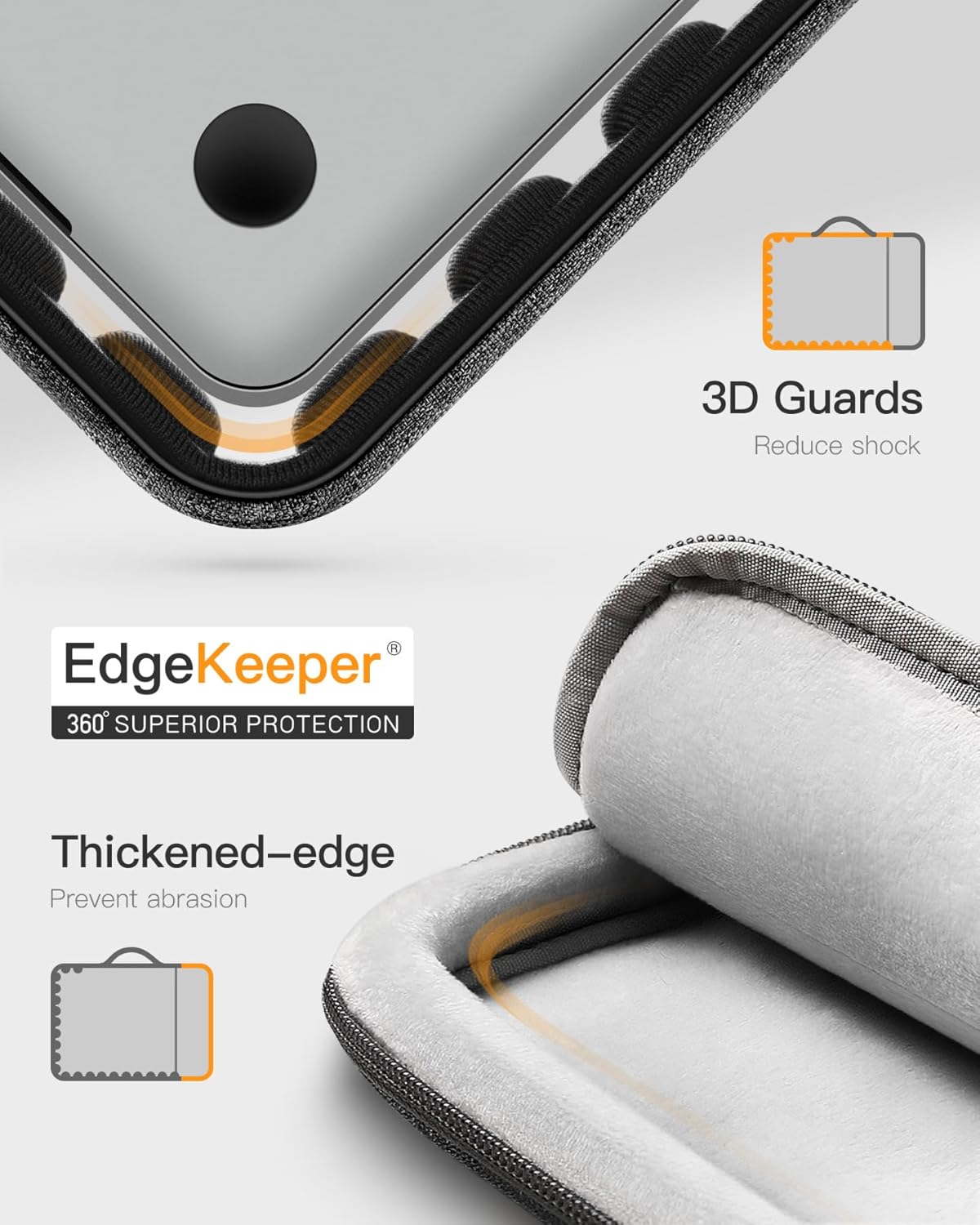
Imaxe: Primeiro plano view illustrating the 360° EdgeKeeper superior protection with thickened edges and 3D guards to reduce shock and prevent abrasion.

Image: Detail of the water-resistant external fabric with water droplets and the ultra-soft flannelette internal lining.

Image: The front accessory pocket shown holding a power adapter, cables, and a mouse, demonstrating its storage capacity.
Vídeo: Un overview of the Inateck Laptop Briefcase LB02006, highlighting its design, features, and functionality.
3. Compatibilidade
This laptop sleeve is compatible with a wide range of devices. Please verify your device's dimensions against the internal dimensions provided below for the best fit.
- 14-inch MacBook Pro/Max M5/M4/M3/M2/M1 (A3434, A3112, A2918, A2992, A2779, A2442) 2021-2025 models
- 13.5-inch Surface Laptop 6/5, Surface Book 3
- 13.3-inch MacBook Air A1466, A1369
- 13-inch MacBook Pro Retina A1502, A1425
- 13-inch MacBook Pro/Air M2/M1 2010-2022 models
- 12.3-inch Surface Pro 3/4/5/6/7/8/9/X
Dimensións internas: 32.5 x 23 x 2 cm (12.8 x 9 x 0.8 polgadas)
Dimensións externas: 35 x 25.5 x 4 cm (13.8 x 10 x 1.6 polgadas)

Image: A visual guide to compatible MacBook models and the internal dimensions of the sleeve.
4. Instrucións de uso
4.1 Inserting Your Laptop
- Unzip the main compartment of the laptop bag.
- Carefully slide your laptop into the main compartment. Ensure it sits snugly within the soft flannel lining for maximum protection.
- Zip up the main compartment completely. The internal protective strip will prevent the zipper from scratching your device.
4.2 Utilizing the Accessory Pocket
- Locate the large zipper pocket on the front of the bag.
- Open the zipper and place your power adapter, charging cables, mouse, or other small peripherals inside.
- Close the zipper securely to keep your accessories organized and safe.
4.3 Using the Elastic Handle
- For Briefcase Mode: Gently pull the PU handle upwards from its concealed position. The handle will extend, allowing you to carry the bag like a traditional briefcase.
- For Sleeve Mode: Push the PU handle downwards until it retracts and lies flat against the bag. This allows the case to be easily slipped into a larger backpack or travel bag.

Image: A person demonstrating how to carry the laptop bag using its retractable handle.
5. Coidados e mantemento
- Limpeza: For minor spills or dirt, gently wipe the exterior with a damp pano. Evite o uso de produtos químicos agresivos ou produtos de limpeza abrasivos.
- Secado: If the bag gets wet, allow it to air dry completely in a well-ventilated area, away from direct sunlight or heat sources.
- Almacenamento: Store the bag in a cool, dry place when not in use to maintain its material integrity.
- Evitar o lavado: Do not machine wash, bleach, iron, or dry clean the laptop bag, as this may damage the materials and protective coatings.
Video: A customer review highlighting the sleeve's protective qualities and mentioning that it should not be washed.
6 Solución de problemas
If you encounter any issues with your Inateck laptop bag, please consider the following:
- Pegado de cremalleiras: Ensure the zipper path is clear of any fabric or debris. Apply a small amount of zipper lubricant if necessary.
- Problemas de axuste: Double-check your laptop's dimensions against the internal dimensions provided in the compatibility section. Overstuffing the bag can strain zippers and seams.
- Resistencia á auga: While the exterior is splashproof, it is not fully waterproof. Avoid submerging the bag in water or exposing it to heavy rain for extended periods.
7. Especificacións
| Atributo | Valor |
|---|---|
| Dimensións do produto | 13.78 x 10.04 x 1.57 polgadas |
| Peso do elemento | 8.5 onzas |
| ASIN | B08NTCLLB8 |
| Número de modelo do artigo | B09D38SL3F |
| Marca | Inateck |
| Cor | Gris negro |
| Factor de forma | Sleeve, Case, Bag |
| Tipo de carcasa | Suave |
8. Que hai na caixa
- 1x Inateck Laptop Sleeve
9. Garantía e soporte
Inateck products come with a standard manufacturer's warranty. For specific warranty details, product support, or any inquiries, please refer to the official Inateck websitio web ou póñase en contacto directamente co servizo de atención ao cliente. Garde o recibo de compra para reclamacións de garantía.


