1. Introdución
Grazas pola compraasing the Fenton LIVE102 Karaoke Speaker System. This professional-grade speaker system features an integrated media player, Bluetooth connectivity, and vibrant LED lighting, making it ideal for home entertainment and small events. This manual provides essential information for safe and effective use, including setup, operation, and maintenance.

Figure 1: Fenton LIVE102 Speaker System with included KMD55 LED Microphones.
The Fenton LIVE102 is a versatile karaoke speaker system designed for ease of use and powerful audio output. It includes a 10-inch woofer and a 3.5-inch tweeter for clear sound reproduction across all frequencies. The system comes with two KMD55 LED microphones, featuring color-changing lights for an enhanced party atmosphere.
2. Instrucións de seguridade
Please read these safety instructions carefully before using the device and keep them for future reference.
- Fonte de enerxía: Conecte a unidade só a unha toma de corrente con conexión a terra e o volume correctotage (220-240V AC, 50Hz).
- Auga e humidade: Non expoña a unidade á choiva nin á humidade. Non coloque obxectos cheos de líquidos, como vasos, enriba da unidade.
- Ventilación: Ensure adequate ventilation. Do not cover ventilation openings.
- Calor: Non coloque a unidade preto de fontes de calor como radiadores, rexistros de calor, estufas ou outros aparellos (incluídos amplificadores) que producen calor.
- Limpeza: Limpe a unidade só cun pano seco.
- Servizo: Non intente reparar a unidade vostede mesmo. Encomende calquera tarefa de mantemento a persoal de servizo cualificado.
- Micrófonos: Handle microphones with care. Avoid dropping them or exposing them to excessive force.
- Nenos: Manteña o dispositivo fóra do alcance dos nenos.
3. Configuración
3.1 Desembalaxe
Carefully remove the speaker system and all accessories from the packaging. Ensure all components are present:
- Fenton LIVE102 Speaker Unit
- 2 x KMD55 LED Microphones
- Cable de alimentación
- Manual de usuario (este documento)
3.2 Conexión de enerxía
Connect the supplied power cable to the AC IN socket on the rear panel of the speaker and then plug it into a suitable mains power outlet.
3.3 Conexión de micrófonos
The LIVE102 system includes two wired KMD55 LED microphones. Plug each microphone's cable into the MIC 1 or MIC 2 input jacks located on the top control panel.

Figure 2: KMD55 LED Microphone.
The KMD55 microphones feature integrated color-changing LEDs. These dynamic microphones are designed for clear vocal pickup and are robust for regular use.
3.4 Connecting External Audio Sources (RCA)
To connect external audio devices such as a CD player, DVD player, or television, use an RCA cable (not included). Connect one end of the RCA cable to the LINE IN (RCA) ports on the rear panel of the LIVE102 and the other end to the audio output of your external device.
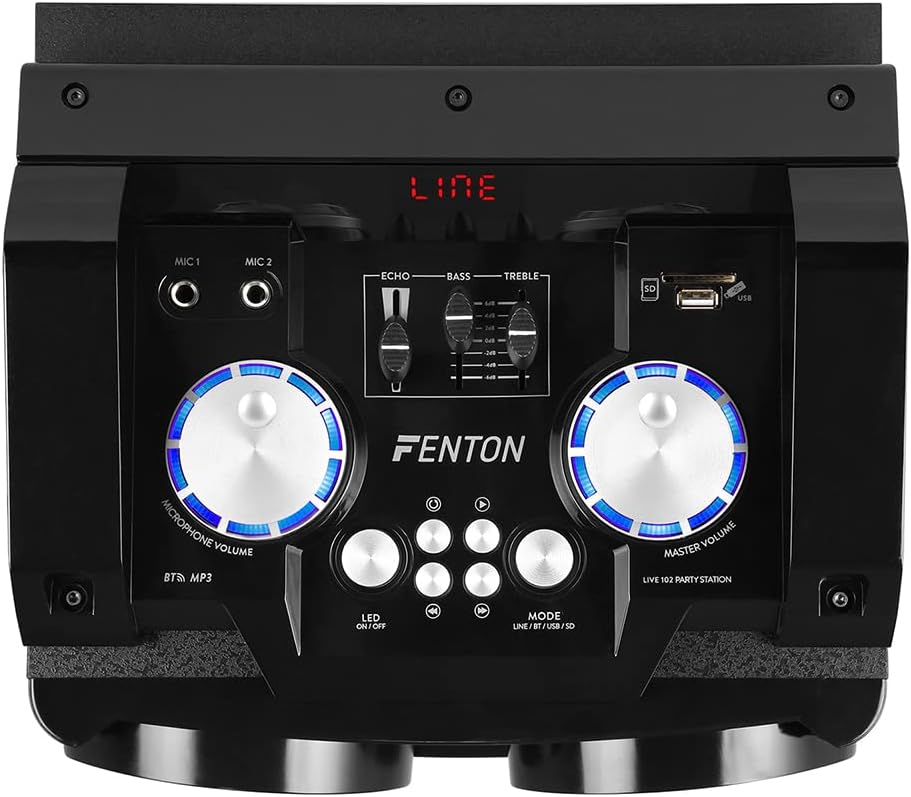
Figure 3: Rear panel connections of the LIVE102 speaker.
The rear panel provides the main power switch, AC power input, RCA line input for external audio sources, and an antenna for FM radio reception (if applicable, though not explicitly mentioned in features, it's visible).
4. Instrucións de funcionamento
4.1 Encendido/apagado
Locate the main power switch on the rear panel of the speaker. Flip the switch to the "ON" position to power on the unit. The display on the top panel will illuminate. To power off, flip the switch to the "OFF" position.
4.2 Top Control Panel Overview

Figure 4: Top control panel of the LIVE102 speaker.
The top panel features controls for microphone volume, master volume, echo, bass, treble, media playback (USB/SD), Bluetooth pairing, and LED light control.
4.3 Emparejamento Bluetooth
- Power on the LIVE102 speaker.
- Press the "MODE" button on the top panel until "BT" (Bluetooth) is displayed. The unit will enter pairing mode, indicated by a flashing Bluetooth icon or similar on the display.
- No teu teléfono intelixente, tableta ou outro dispositivo con Bluetooth, activa Bluetooth e busca os dispositivos dispoñibles.
- Select "Fenton LIVE102" from the list of devices.
- Once paired, the unit will emit a confirmation sound, and the "BT" indicator will stop flashing. You can now stream audio wirelessly from your device.
4.4 Using USB/SD Media Player
- Insira unha unidade flash USB no porto USB ou unha tarxeta SD na ranura para tarxetas SD do panel superior.
- Press the "MODE" button until "USB" or "SD" is displayed. The unit will automatically begin playing audio files dos soportes inseridos.
- Use the playback control buttons (Play/Pause, Previous, Next) to manage your music.

Figure 5: USB port in use on the control panel.
The USB and SD card slots allow for direct playback of digital audio files. Ensure your media is formatted correctly and contains compatible audio files (por exemplo, MP3).
4.5 Uso e efectos do micrófono
- Volume do micrófono: Adjust the "MICROPHONE VOLUME" knob on the top panel to control the loudness of the connected microphones.
- Efecto de eco: Use the "ECHO" slider to add a reverberation effect to your vocals. Slide it up to increase the echo intensity.
4.6 Controis de audio
- Volume principal: The "MASTER VOLUME" knob controls the overall output volume of the speaker system.
- Bass and Treble: Use the "BASS" and "TREBLE" sliders to adjust the low and high frequencies of the audio output, respectively, to suit your preference.
4.7 Control da luz LED
The LIVE102 speaker features integrated LED lights in the woofer cone. Press the "LED ON/OFF" button on the top panel to toggle the lights on or off.

Figure 6: LIVE102 speaker with illuminated red LED lighting.
The speaker's woofer cone features dynamic LED lighting that changes color, adding a visual element to your audio experience.
5. Mantemento
5.1 Limpeza
- Desenchufe sempre a unidade da toma de corrente antes de limpala.
- Use a soft, dry cloth to wipe the exterior surfaces of the speaker and microphones.
- Non empregues produtos de limpeza abrasivos, ceras ou disolventes, xa que poden danar o acabado.
- Evite pulverizar líquidos directamente sobre a unidade.
5.2 Almacenamento
When not in use for extended periods, store the speaker system in a cool, dry place, away from direct sunlight and extreme temperatures. It is recommended to keep the original packaging for storage and transport.
6 Solución de problemas
If you encounter any issues with your Fenton LIVE102 system, please consult the table below before contacting support.
| Problema | Causa posible | Solución |
|---|---|---|
| Sen poder | Cable de alimentación non conectado; interruptor de alimentación apagado; sen alimentación da toma de corrente. | Ensure power cable is securely connected. Turn the power switch to "ON". Check the power outlet with another device. |
| Sen saída de son | Master volume too low; Incorrect input mode selected; External device not playing or connected incorrectly. | Increase "MASTER VOLUME". Press "MODE" to select the correct input (BT, USB, SD, LINE). Check connections and playback on the external device. |
| O micrófono non funciona | Microphone not plugged in; Microphone volume too low; Microphone damaged. | Ensure microphone is fully plugged into MIC 1 or MIC 2. Increase "MICROPHONE VOLUME". Test with another microphone if available. |
| Fallou o emparejamento por Bluetooth | Device too far; Bluetooth not enabled on source device; Incorrect device selected. | Ensure source device is within range. Enable Bluetooth on your device. Select "Fenton LIVE102" from the list. Try restarting both devices. |
| Problemas de reprodución con USB/SD | Modo incorrecto; Incompatible file formato; Medios corrompidos. | Ensure "USB" or "SD" mode is selected. Check if files are in a compatible format (e.g., MP3). Try another USB drive or SD card. |
7. Especificacións
| Característica | Detalle |
|---|---|
| Marca | Fenton |
| Modelo | EN VIVO 102 |
| Tecnoloxía de conectividade | Bluetooth, RCA |
| Fonte de enerxía | Electric Cable (AC 220-240V, 50Hz) |
| Configuración do altofalante | 2-way (10" Woofer, 3.5" Tweeter) |
| Número de canles | 2 |
| Tipo de micrófono | Wired Dynamic (KMD55 LED Microphones included) |
| Características adicionais | Integrated LED lighting, USB/SD media player, Microphone Echo effect, Bass/Treble control. |
8. Garantía e soporte
For detailed warranty information, please refer to the warranty card included with your product or contact your retailer.
If you require technical support or have questions not covered in this manual, please contact Fenton customer service or your local dealer. Please have your product model number (LIVE102) and purchase details ready.


