Introdución
This manual provides essential instructions for the safe and correct operation of your Classic Phono by Lenco TT-110 turntable. Please read this manual thoroughly before using the device and retain it for future reference. The TT-110 combines a retro design with modern features, allowing playback of vinyl records at multiple speeds and wireless audio streaming via Bluetooth.
Información importante de seguridade
- Non expoña a unidade á choiva nin á humidade.
- Non bloquee ningunha abertura de ventilación.
- Asegúrese de que o cable de alimentación non estea pisado nin pisado.
- Use só anexos/accesorios especificados polo fabricante.
- Encargue toda a reparación a persoal de servizo cualificado.
Contido do paquete
Verificar que todos os elementos estean presentes e en bo estado:
- Classic Phono by Lenco TT-110 Turntable Unit
- Adaptador de alimentación
- Manual de usuario (este documento)
Produto rematadoview
The Classic Phono TT-110 is a portable turntable designed for playing vinyl records and streaming audio via Bluetooth. It features a belt-drive system, built-in speakers, and multiple connectivity options.

Image: The Classic Phono by Lenco TT-110 turntable shown open, revealing the platter, tonearm, and controls. The interior is red, and the exterior is black with red accents.

Image: The Classic Phono by Lenco TT-110 turntable shown closed, resembling a briefcase. It features a black faux leather finish with a prominent red stripe and the Lenco logo.
Configuración
1. Desembalaxe e colocación
- Retire con coidado o prato xiratorio da súa embalaxe.
- Place the unit on a stable, level surface away from direct sunlight, heat sources, and excessive dust or vibrations.
- Abre a tapa do tocadiscos.
2. Identificación de compoñentes
Familiarízate cos compoñentes principais:
- Prato: Onde descansa o rexistro.
- Arma: Holds the stylus and tracks the record grooves.
- Estilete (agulla): The part that reads the record. It comes with a protective cap.
- Selector de velocidade: Switch for 33, 45, or 78 RPM.
- Botón de potencia/volume: Acende/apaga a unidade e axusta o volume.
- Interruptor de función: Selects between Phono (vinyl), Bluetooth, or Aux-in.
- Jack de entrada auxiliar: Para conectar dispositivos de audio externos.
- Conectores de saída RCA: Para conectar a dispositivos externos amplevantadores ou altofalantes alimentados.
- Conector de entrada de CC: Para conectar o adaptador de alimentación.
- Jack para auriculares: Para escoita privada.

Image: The rear panel of the Classic Phono by Lenco TT-110, displaying the Aux-in, RCA output (L/R), and DC In power connection ports.
3. Preparación Inicial
- Remove the white protective cap from the stylus. Be careful not to damage the stylus.
- Libere o bloqueo do brazo.
- Ensure the drive belt is correctly positioned around the motor pulley and the platter. This unit uses a belt-drive system.
4. Conexión de alimentación
- Connect the power adapter to the DC In jack on the back of the turntable.
- Enchufe o adaptador de alimentación a unha toma de corrente.
Instrucións de funcionamento
1. Reproducindo un disco de vinilo
- Turn the Power/Volume knob clockwise to turn on the unit.
- Set the Function Switch to "PHONO".
- Coloca un disco no prato.
- Select the appropriate speed (33, 45, or 78 RPM) using the speed selector switch. For 45 RPM records, place the included 45 RPM adapter on the spindle.
- Gently lift the tonearm using the cueing lever and position it over the desired track of the record.
- Baixa o brazo lentamente sobre o disco usando a palanca de sinalización. O disco comezará a reproducirse.
- Axuste o volume usando o botón de acendido/volume.
- At the end of the record, the auto-stop function will automatically stop the platter rotation. Lift the tonearm and return it to its rest.

Image: The Classic Phono by Lenco TT-110 turntable with a red vinyl record playing on the platter, demonstrating its primary function.
2. Funcionamento Bluetooth
The TT-110 can receive audio wirelessly from Bluetooth-enabled devices.
- Turn on the unit and set the Function Switch to "BT" (Bluetooth). The Bluetooth indicator light will flash, indicating it's in pairing mode.
- Activa o Bluetooth no teu teléfono intelixente, tableta ou outro dispositivo de son.
- Busca "TT-110" in your device's Bluetooth list and select it to pair.
- Once paired, the Bluetooth indicator light will stop flashing and remain solid. You can now stream audio from your device to the TT-110's built-in speakers.
- Adjust the volume using the Power/Volume knob on the turntable and/or your connected device.
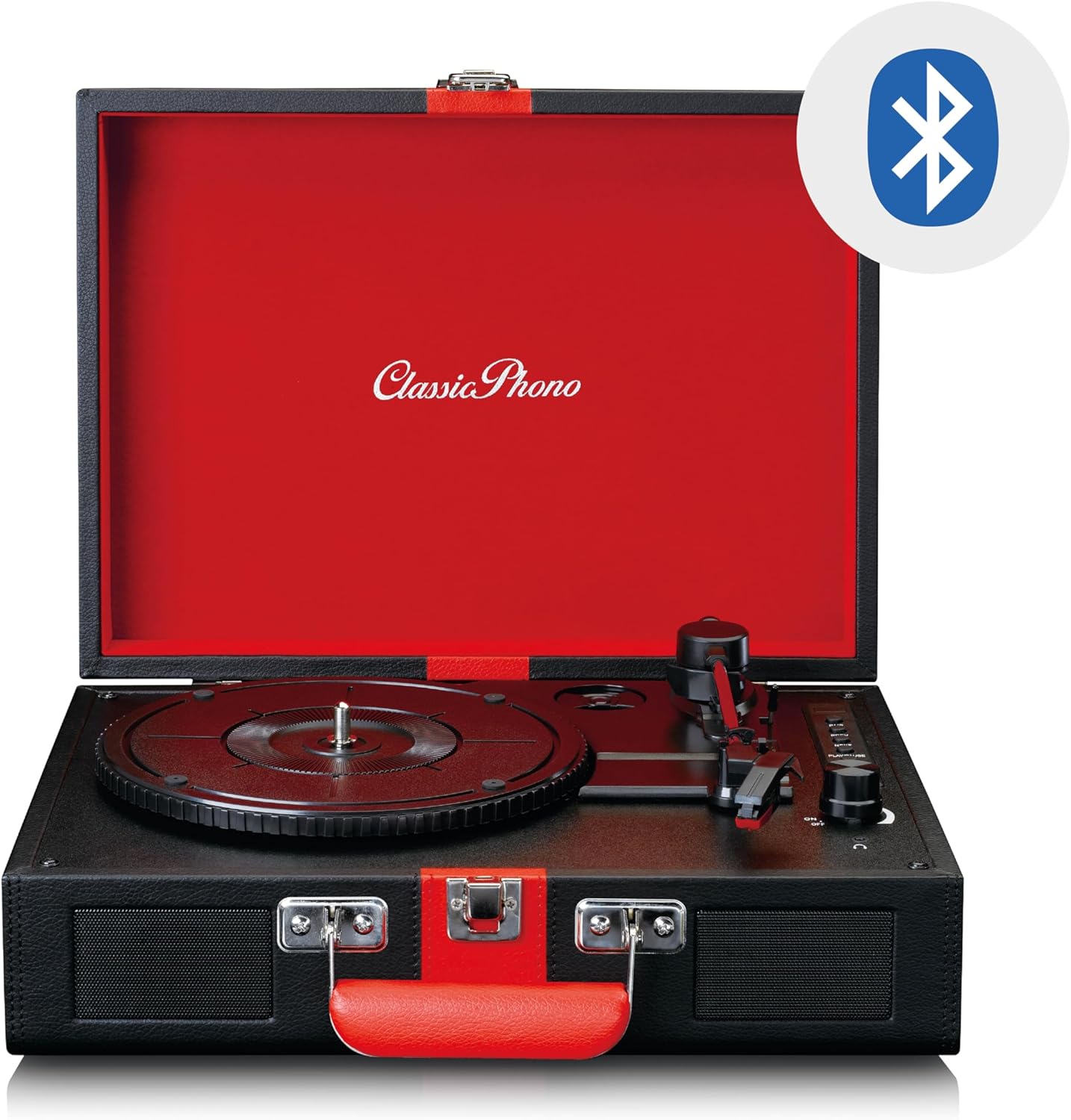
Image: The Classic Phono by Lenco TT-110 turntable shown open, with a Bluetooth logo superimposed, indicating its wireless connectivity feature.
3. Conexión de entrada auxiliar
Connect external audio sources using a 3.5mm audio cable.
- Turn on the unit and set the Function Switch to "AUX".
- Connect one end of a 3.5mm audio cable (not included) to the Aux-in jack on the turntable.
- Connect the other end of the cable to the headphone jack or audio output of your external device (e.g., MP3 player, smartphone).
- Play audio from your external device. The sound will be output through the TT-110's speakers.
- Adjust the volume using the Power/Volume knob on the turntable and/or your external device.
4. Uso de auriculares
For private listening, connect headphones to the headphone jack.
- Plug a 3.5mm stereo headphone jack into the headphone port on the unit.
- The built-in speakers will automatically mute.
- Axuste o volume usando o botón de acendido/volume.
5. Saída RCA
To connect the turntable to an external amplifier or powered speakers, use the RCA output jacks.
- Connect an RCA cable (not included) to the L/R RCA output jacks on the back of the turntable.
- Connect the other end of the RCA cable to the corresponding audio input on your amplifier ou altofalantes alimentados.
- Asegurar o amplifier/speakers are set to the correct input.
- Adjust the volume via the connected amplifier/altofalantes.
Mantemento
1. Limpeza do punteiro
- Use a soft brush, specifically designed for stylus cleaning, to gently brush the stylus from back to front.
- Do not brush from side to side or front to back, as this can damage the stylus.
- Clean the stylus regularly to ensure optimal sound quality and prevent damage to your records.
2. Rexistros de limpeza
- Always handle records by their edges or the label.
- Use a record cleaning brush or cloth to remove dust and debris before each play.
- For deeper cleaning, use a specialized record cleaning solution and cloth, following the product's instructions.
3. General Unit Cleaning
- Limpe o exterior da unidade cun pano suave e seco.
- Non empregues produtos de limpeza abrasivos, ceras ou solventes, xa que poden danar o acabado.
- Asegúrese de que a unidade estea desenchufada antes de limpala.
4. Substitución do punteiro
The stylus is a consumable part and will wear out over time (typically after 300-500 hours of playback). A worn stylus can damage records and degrade sound quality. Refer to the manufacturer's website or your retailer for information on purchasing a replacement stylus for the TT-110.
- Carefully remove the old stylus by pulling it downwards and forwards.
- Insert the new stylus by pushing it upwards and backwards until it clicks into place.
- Always handle the stylus assembly with care to avoid bending the cantilever or damaging the tip.
Resolución de problemas
| Problema | Causa posible | Solución |
|---|---|---|
| Sen poder | Power adapter not connected; outlet not working. | Ensure power adapter is securely connected to the unit and a working outlet. |
| Non hai son dos altofalantes | Volume too low; Function switch incorrect; Headphones connected. | Increase volume; Set Function switch to PHONO/BT/AUX; Disconnect headphones. |
| Salto de rexistro | Record dirty or scratched; Stylus dirty or worn; Turntable not level. | Clean record; Clean/replace stylus; Place turntable on a level surface. |
| Bluetooth non se sincroniza | Unit not in BT mode; Device too far; Already paired with another device. | Set Function switch to BT; Move device closer; Disconnect from other devices. |
| Velocidade de reprodución incorrecta | Seleccionouse unha velocidade incorrecta. | Adjust the speed selector switch to match the record's speed (33, 45, or 78 RPM). |
Se o problema persiste despois de probar estas solucións, póñase en contacto co servizo de atención ao cliente.
Especificacións
| Característica | Detalle |
|---|---|
| Marca | Lenco (Classic Phono) |
| Número de modelo | TT-110BKRD |
| Velocidades de reprodución | 33, 45, 78 RPM |
| Tipo de unidade | Unidade de correas |
| Conectividade | Bluetooth 5.0, Aux-in (3.5mm), RCA Out, Headphone Jack (3.5mm) |
| Altofalantes incorporados | Si (2 altofalantes) |
| Tipo de estilete | Ceramic cartridge with needle |
| Función de parada automática | Si |
| Material | Wood cabinet with synthetic leather surface |
| Cor | Negro/Vermello |
| Peso | 2.35 quilogramos |
Garantía e Soporte
Información da garantía
This product is covered by a manufacturer's warranty. Please refer to the warranty card included with your purchase or the retailer's terms and conditions for specific details regarding warranty duration and coverage. Retain your proof of purchase for warranty claims.
Atención ao cliente
For technical assistance, troubleshooting beyond this manual, or warranty inquiries, please contact your retailer or the manufacturer's customer support. Contact details can typically be found on the manufacturer's official websitio web ou na documentación da súa compra.
Nota: Non intente reparar a unidade vostede mesmo. As reparacións non autorizadas anularán a garantía.


