Introdución
Welcome to the user manual for your new TTfone TT240 mobile phone. This device is designed for simplicity and ease of use, while offering modern features powered by KaiOS. It combines the familiarity of a traditional keypad phone with smart capabilities like internet browsing, social media, and GPS. This manual will guide you through the setup, operation, maintenance, and troubleshooting of your TT240 phone.
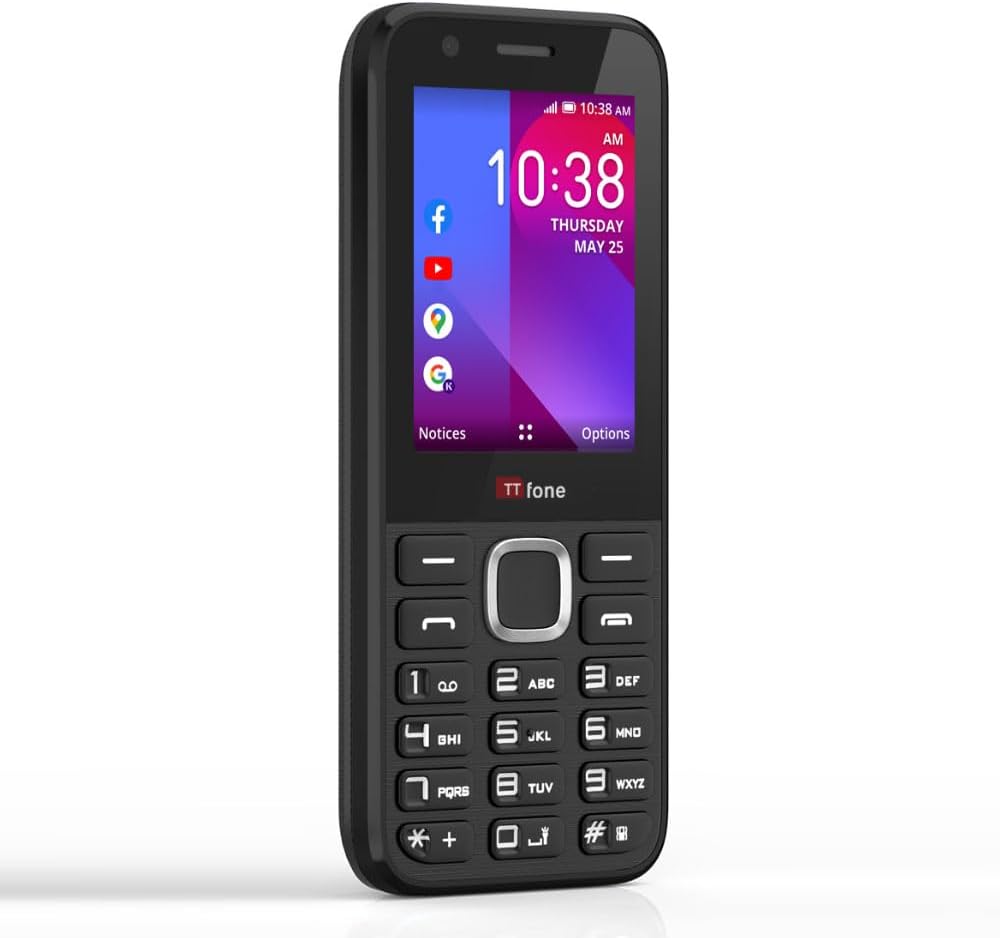
The TTfone TT240, a simple yet smart mobile phone with a clear display and physical keypad.
O que hai na caixa
Upon unboxing your TTfone TT240, please ensure all the following items are present:
- Teléfono móbil TTfone TT240
- Batería recargable de iones de litio
- Cable de carga USB
- Manual de usuario (este documento)
- Mains Charger Head
Configuración
1. Inserción da tarxeta SIM e da batería
Before using your phone, you need to insert the SIM card(s) and the battery.
- Retire con coidado a tapa traseira do teléfono.
- Locate the SIM card slot(s). Insert your SIM card(s) into the designated slot(s) with the gold contacts facing down, ensuring it clicks into place.
- Insert the battery into the battery compartment, aligning the gold contacts on the battery with those in the phone.
- Replace the back cover, pressing gently until it snaps securely into place.

The TTfone TT240, ready for SIM and battery insertion.
2. Acendido inicial
To power on your TT240, press and hold the Acender/Finalizar chamada button until the screen illuminates and the TTfone logo appears. Follow any on-screen prompts for initial setup, such as language selection.
3. Cargando o dispositivo
For optimal performance, fully charge the battery before first use. Connect the USB cable to the phone's charging port and the other end to the provided mains charger head. Plug the charger into a wall outlet. The battery indicator on the screen will show charging progress.

The TTfone TT240 displaying its charging status.
Instrucións de funcionamento
1. Navegación básica
The TT240 features a traditional keypad for navigation and input:
- Teclas de navegación: Use the directional keys (Up, Down, Left, Right) around the central OK button to move through menus and options.
- Botón Aceptar: Press the central button to select an item or confirm an action.
- Teclas programables: The two keys directly below the screen (left and right) are context-sensitive. Their function changes depending on what is displayed on the screen above them.
- Call/Answer Key: Prema para facer unha chamada ou responder a unha chamada entrante.
- Fin de chamada/Tecla de acendido/apagado: Press to end a call or return to the home screen. Long press to power the phone on/off.
- Teclado numérico: Used for dialing numbers and text input.
2. Realización e recepción de chamadas
- Para facer unha chamada: From the home screen, dial the number using the keypad and press the Chamar / Responder key. To call a contact, navigate to 'Contacts', select the desired contact, and press the Chamar / Responder chave.
- Para recibir unha chamada: Cando reciba unha chamada, prema o botón Chamar / Responder clave para aceptar.
- Para finalizar unha chamada: Preme o Finalizar chamada/Acender/Acender chave.
3. Envío e recepción de mensaxes
Para enviar unha mensaxe de texto:
- From the main menu, select 'Messages'.
- Choose 'New Message' or 'Compose'.
- Introduza o número do destinatario ou seleccione un dos contactos.
- Type your message using the keypad. The phone supports predictive text (ensure English US language setting for best performance).
- Press the 'Send' option (usually the left soft key).
Received messages will appear in your inbox. You will receive a notification on the home screen.
4. Internet and Applications (KaiOS)
The TTfone TT240 runs on KaiOS, providing access to various smart features and applications:
- Wi-Fi e Bluetooth: Connect to Wi-Fi networks for internet access and pair with Bluetooth devices like headphones or car kits.
- GPS: Utilize Google Maps for navigation and location services.
- Aplicacións preinstaladas: Access popular applications such as Facebook, YouTube, Google Maps, Weather, and News directly from your phone.
- App Store: Download additional applications from the KaiStore.
- WhatsApp: Please note that the TT240 does not support WhatsApp.

The TTfone TT240's KaiOS interface with various applications.

Utilize Google Maps for navigation on your TT240.
5. Uso da cámara
The TT240 includes a basic camera for capturing photos. To access the camera, navigate to the 'Camera' application from the main menu. Use the navigation keys to frame your shot and the OK button to take a picture. Photos are saved to the phone's internal memory or an inserted microSD card (if applicable).
Mantemento
1. Limpeza do dispositivo
To keep your TT240 in good condition, regularly clean it with a soft, dry, lint-free cloth. Avoid using harsh chemicals, cleaning solvents, or strong detergents, as these can damage the phone's surface or internal components.
2. Coidado da batería
Para maximizar a duración da batería e garantir un funcionamento seguro:
- Use only the original TTfone charger and cable.
- Evite expor a batería a temperaturas extremas.
- Non fures, desmontes nin modifiques a batería.
- If the battery appears damaged or swollen, discontinue use immediately and dispose of it properly.
3. Actualizacións de software
Periodically check for software updates to ensure your phone has the latest features and security enhancements. You can usually find this option in the 'Settings' menu under 'Device' or 'About Phone'. Connect to Wi-Fi before downloading updates to avoid mobile data charges.
Resolución de problemas
If you encounter issues with your TTfone TT240, refer to the following common problems and solutions:
| Problema | Posible Solución |
|---|---|
| O teléfono non se acende | Asegúrate de que a batería estea inserida e cargada correctamente. Tenta cargar o teléfono durante polo menos 30 minutos. |
| Sen sinal de rede | Check if the SIM card is properly inserted. Ensure you are in an area with network coverage. Restart the phone. Note: Does not work on Three (3), ID, and Smarty networks. |
| Non se poden facer/recibir chamadas | Verify network signal. Check if call barring or flight mode is enabled. Ensure your SIM card is active. |
| Non se pode conectar á wifi | Ensure Wi-Fi is enabled on the phone. Check if the Wi-Fi password is correct. Restart your Wi-Fi router. |
| Screen is scratched easily | The screen is plastic and prone to scratches. Consider using a screen protector for added durability. |
| Os botóns non responden ou están pegañentos | Ensure the phone is clean and free of debris around the buttons. A soft reset (power off/on) may resolve temporary issues. |
Especificacións
Below are the technical specifications for the TTfone TT240 mobile phone:
| Característica | Detalle |
|---|---|
| Nome do modelo | TT240 |
| Sistema Operativo | KaiOS |
| Tamaño da pantalla | 2 polgadas (diagonal da pantalla visible: 6 cm) |
| Resolución | 240*320 |
| Tamaño da memoria RAM instalada | 512 MB |
| Capacidade de almacenamento da memoria | 4 GB |
| Tecnoloxía Celular | 2G |
| Portador sen fíos | Unlocked for All Carriers (except Three (3), ID, and Smarty networks) |
| Baterías | 1 pilas de iones de litio necesarias (incluídas) |
| Dimensións do produto | 1.2 x 2.3 x 12.3 cm; 99 g |
| Fabricante | TTfone |
| País de Orixe | China |
Garantía e Soporte
Your TTfone TT240 mobile phone comes with a standard manufacturer's warranty. For specific details regarding the warranty period and coverage, please refer to the warranty card included with your product or visit the official TTfone website. For technical support, troubleshooting assistance, or any other inquiries, please contact TTfone customer service through their official channels.


