1. Introdución
The Arducam IMX477 Autofocus and Software-Controlled Focus HQ Camera is a high-quality camera module designed for advanced imaging applications. It features a 12.3-megapixel Sony IMX477 sensor and an M12 lens, offering motorized focus capabilities controlled via software. This manual provides essential information for the proper installation, operation, and maintenance of your camera module.

Figure 1: Arducam IMX477 Camera Module with Ribbon Cable
2. Características clave
- Foco motorizado: Enables precise focus control through software, eliminating manual lens adjustment. Supports fine-tuning with keyboard input and autofocus via OpenCV examples.
- Fácil integración: Focus motor is controlled via camera I2C, requiring no hardware modifications for compatible platforms.
- Imaxe de alta calidade: Utilizes a 1/2.3″ 12.3 Megapixel IMX477 sensor, providing a maximum still resolution of 4056(H) x 3040(V).
- Especificacións ópticas: Visible Light Only (no IR sensitivity). Field of View (FoV): 100° (Diagonal), 87° (Horizontal), 71° (Vertical).
- Aplicación versátil: Suitable for home surveillance, 3D printer monitoring, object recognition, tracking, and other machine vision applications requiring high resolution and motorized control.
3. Compatibilidade
This camera module is primarily designed for use with Nvidia Jetson Developer Kits, including Jetson Orin NX and AGX Orin. It does not require hardware modifications for these platforms.
- Jetson Platform: Compatible with Jetson Developer Kits. It relies on kernel drivers for functionality.
- Requisitos do condutor: Requires specific kernel drivers. Versions earlier than JetPack 4.3 (L4T 32.3.1) are not supported. Operating system updates that change the kernel version will necessitate re-installation of a matching driver.
- Raspberry Pi Compute Module: Can be used with Raspberry Pi Compute Modules (e.g., CM3, CM3+).
- Incompatible Platforms: Not compatible with standard Raspberry Pi models (e.g., Raspberry Pi 3/3B+/4). Compatibility with other third-party boards is not guaranteed.
4. Instrucións de configuración
Follow these steps to set up your Arducam IMX477 camera module with a compatible Jetson board:
- Prepare the Jetson Board: Ensure your Nvidia Jetson Developer Kit is powered off and disconnected from any power source.
- Connect the Ribbon Cable: Carefully connect one end of the provided ribbon cable to the CSI camera connector on the Arducam IMX477 module. Ensure the contacts are facing the correct direction.
- Connect to Jetson: Connect the other end of the ribbon cable to the CSI camera input on your Jetson board. Ensure a secure connection.
- Encendido: Reconnect power to your Jetson board and power it on.
- Instalación de controladores: Install the necessary kernel drivers for the Arducam IMX477 camera on your Jetson operating system. Refer to Arducam's official documentation or support resources for specific driver installation guides for your JetPack version.
- Verificación: After driver installation, verify camera detection and functionality using appropriate software tools or example scripts provided by Arducam.

Figure 2: Camera Module Connected to a Jetson Board

Figure 3: Camera Module and Ribbon Cable
5. Instrucións de funcionamento
The Arducam IMX477 camera offers software-controlled focus, providing flexibility for various applications.
5.1 Control de enfoque
The motorized focus can be controlled in two primary ways:
- Manual Fine-tuning: Utilize keyboard arrow keys within compatible software applications to precisely adjust the focus.
- Enfoque automático: Implement autofocus functionality using provided OpenCV examples or custom scripts. This allows the camera to automatically adjust focus for optimal image clarity.
Refer to Arducam's software documentation and example code for detailed instructions on implementing and utilizing these focus control methods.
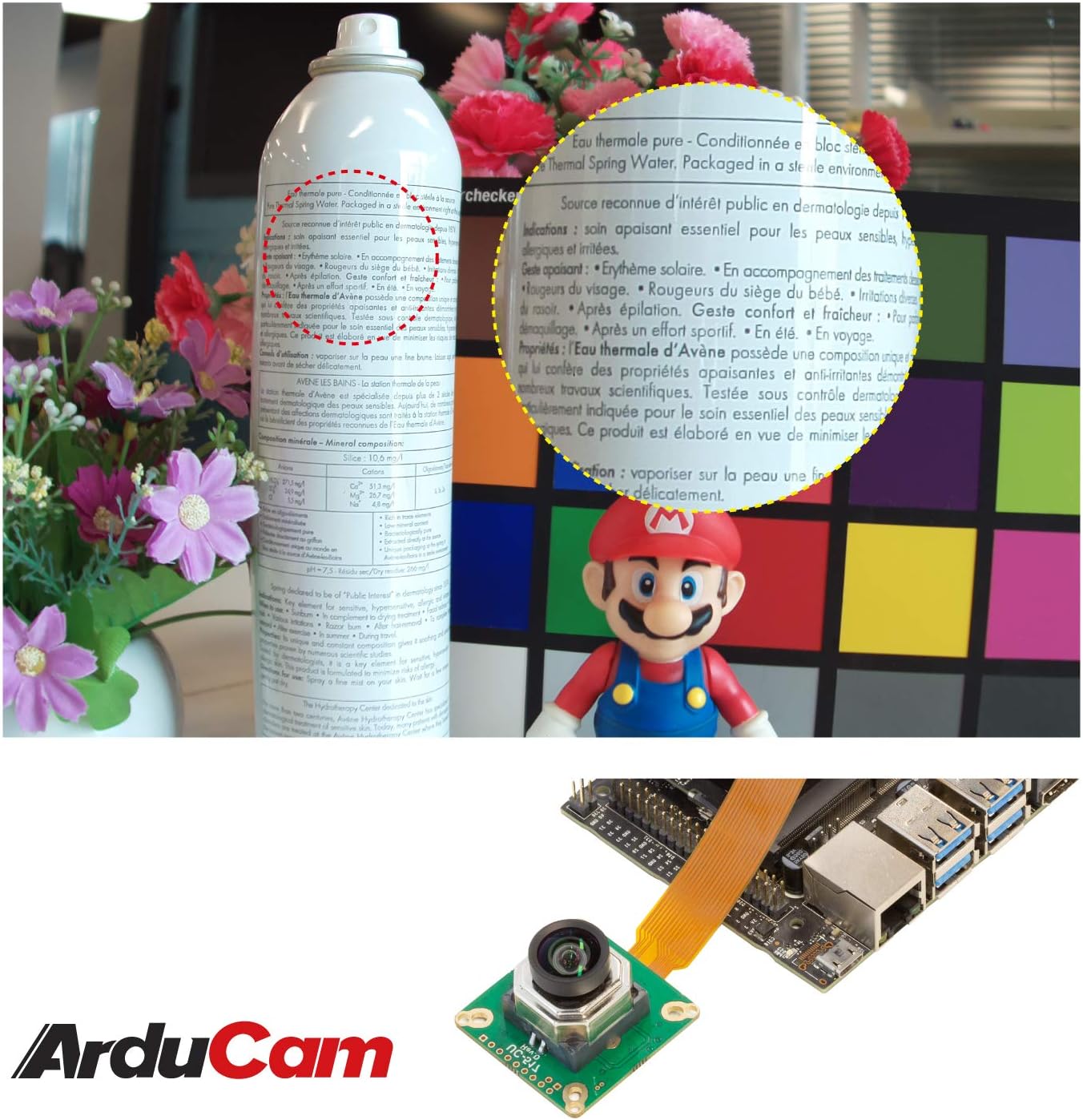
Figura 4: Example of Camera Focus Capability
6. Mantemento
Un mantemento axeitado garante a lonxevidade e o rendemento óptimo do módulo da cámara.
- Limpeza da lente: Use a soft, lint-free microfiber cloth specifically designed for optical lenses to gently clean the camera lens. Avoid abrasive materials or harsh chemicals.
- Manexo: Handle the camera module by its edges to avoid touching the lens or the sensor area. Static electricity can damage electronic components.
- Almacenamento: When not in use, store the camera in a clean, dry, and dust-free environment, preferably in its original packaging or an anti-static bag.
- Condicións ambientais: Avoid exposing the camera to extreme temperatures, high humidity, or direct sunlight for extended periods.
7 Solución de problemas
If you encounter issues with your Arducam IMX477 camera, consider the following troubleshooting steps:
- Cámara non detectada:
- Verify that the ribbon cable is correctly and securely connected to both the camera module and the Jetson board. An incorrect or loose connection is a common cause.
- Ensure the correct kernel drivers are installed for your specific JetPack version. If your OS has been updated, drivers may need to be re-installed.
- Confirm that your Jetson board is an official NVIDIA Developer Kit, as compatibility with third-party Jetson-like boards is not guaranteed.
- Problemas de enfoque:
- Check if the software application you are using supports motorized focus control.
- Ensure the I2C communication for the focus motor is properly configured and not blocked by other processes.
- Image Quality Problems:
- Clean the lens carefully as described in the Maintenance section.
- Adjust exposure and white balance settings in your software to suit the lighting conditions.
- Inestabilidade xeral:
- Ensure your Jetson board's power supply is adequate.
- Consult Arducam's official support forums or documentation for the latest drivers and known issues.
8. Especificacións
| Característica | Detalle |
|---|---|
| Número de modelo | B0273 |
| Sensor | Sony IMX477 |
| Resolución | 12.3 megapíxeles |
| Max Still Resolution | 4056 (H) x 3040 (V) |
| Formato óptico | 1/2.3″ |
| Tipo de lente | M12 |
| Campo de View (FoV) | 100° (D) / 87° (H) / 71° (V) |
| Sensibilidade IR | Visible Light Only |
| Control de foco | Motorized, Software-Controlled (I2C) |
| Dimensións do paquete | 2.09 x 1.65 x 1.54 polgadas |
| Peso do elemento | 1.13 onzas |
| Fabricante | Arducam |
| ASIN | B08PDZ68D7 |
| Data de primeira dispoñibilidade | 2 de decembro de 2020 |

Figure 5: Camera Module Dimensions
9. Garantía e soporte
For technical support, driver updates, or further assistance with your Arducam IMX477 camera module, please visit the official Arducam website or contact their customer support. Information regarding product warranty is typically available on the manufacturer's website or included with your purchase documentation.
You can find more resources and contact information at the Arducam Store.


