1. Produto rematadoview
The Philips Audio TAT1215 True Wireless Earbuds offer a seamless audio experience with up to 18 hours of playtime, clear sound, and a secure fit. Designed for convenience, these earbuds feature intuitive controls and IPX4 splash resistance.
O que hai na caixa
- 1 pair of Philips TAT1215 True Wireless Headphones
- 1 cable de carga USB tipo C
- 1 Estuche de carga
- 3 sets of Ear Tips (Small, Medium, Large)
- 1 Manual de usuario (este documento)
- 1 Guía de inicio rápido

Image: Philips TAT1215 True Wireless Earbuds in their charging case, illustrating the product and its primary accessory.
2. Guía de configuración
2.1 Cargar os auriculares e a funda
Before first use, fully charge the earbuds and the charging case. A full charge provides up to 18 hours of total playtime (6 hours on a single charge from the earbuds, plus 12 hours from the charging case).
- Coloca os auriculares na caixa de carga. Asegúrate de que estean correctamente asentados.
- Connect the USB Type-C charging cable to the charging case's port and the other end to a USB power source.
- The charging indicator on the case will illuminate to show charging status. A full charge typically takes 2 hours.

Image: Philips TAT1215 Earbuds removed from their charging case, ready for use or charging.
2.2 Emparellamento cun dispositivo Bluetooth
Follow these steps for initial pairing with your smartphone, tablet, or other Bluetooth-enabled device.
- Asegúrate de que os auriculares estean cargados.
- Abre a caixa de carga. Os auriculares entrarán automaticamente no modo de emparellamento, o que se indicará cunha luz LED intermitente nos auriculares.
- No teu dispositivo, vai á configuración de Bluetooth e activa Bluetooth.
- Select "Philips TAT1215" from the list of available devices.
- Unha vez conectados, o indicador LED dos auriculares deixará de parpadear.
Os auriculares volverán conectarse automaticamente ao último dispositivo emparellado ao retiralos da funda, se o Bluetooth está activado no dispositivo.
3. Instrucións de funcionamento
The Philips TAT1215 earbuds feature integrated controls for managing audio and calls.
3.1 Controis dos auriculares
The earbuds utilize physical buttons for control. Pressing the button on either earbud performs specific functions:
- Reproducir/pausar música: Prema unha vez en calquera dos auriculares.
- Próxima pista: Double-press the right earbud.
- Pista anterior: Double-press the left earbud.
- Responder/Finalizar chamada: Prema unha vez en calquera dos auriculares.
- Rexeitar a chamada: Mantén premido durante 2 segundos en calquera dos auriculares.
- Activar o asistente de voz: Triple-press on either earbud.
3.2 Asistente de voz
The earbuds support voice assistant activation. Triple-press the button on either earbud to activate your device's voice assistant (e.g., Google Assistant, Siri).
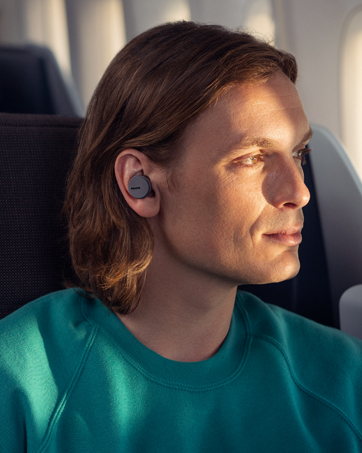
Image: A person wearing Philips TAT1215 earbuds, demonstrating typical usage during daily activities.
4. Mantemento
4.1 Limpeza
Unha limpeza regular axuda a manter un rendemento e unha hixiene óptimos.
- Limpe con coidado os auriculares e a funda de carga cun pano suave, seco e sen fiapos.
- Retire as almofadas dos oídos e límpeas con auga e xabón suave, logo séqueas ben antes de volvelas colocar.
- Non empregue produtos de limpeza abrasivos, alcol nin disolventes químicos.
4.2 Almacenamento
Cando non estean en uso, garde os auriculares no seu estoxo de carga para protexelos e garantir que sigan cargados.
4.3 Resistencia á auga (IPX4)
The Philips TAT1215 earbuds are IPX4-rated, meaning they are resistant to splashing water from any direction. This makes them suitable for workouts and light rain. However, they are not designed for submersion in water.
- Non mergulles os auriculares na auga intencionadamente.
- If the earbuds get wet, wipe them dry before placing them back in the charging case.

Image: Philips TAT1215 Earbuds in their charging case with water droplets, visually representing their IPX4 splash resistance.
5 Solución de problemas
If you encounter issues with your Philips TAT1215 earbuds, refer to the following common solutions:
| Problema | Posible Solución |
|---|---|
| Os auriculares non se emparejan |
|
| Sen son nin baixo volume |
|
| Un auricular non funciona |
|
| Problemas de carga |
|
6. Especificacións técnicas
| Característica | Especificación |
|---|---|
| Nome do modelo | TAT1215 |
| Tecnoloxía de conectividade | Bluetooth 5.1, Sen fíos |
| Distancia máxima de operación | 10 metros |
| Tempo de reprodución (auriculares) | Ata 6 horas |
| Tempo de reprodución total (con estuche) | Ata 18 horas (6 + 12 horas) |
| Tempo de carga | 2 horas |
| Tamaño do controlador | 6 mm Neodymium drivers |
| Resposta en frecuencia | 20 Hz - 20000 Hz |
| Impedancia | 16 ohmios |
| Micrófono | Built-In with echo cancellation |
| Resistencia á auga | IPX4 (resistente a salpicaduras) |
| Tipo de control | Physical Buttons (Music, Call, Voice Assistant) |
| Peso do elemento | 43 g |
| Dimensións do produto | 3.6 x 6.5 x 3.3 cm |
7. Garantía e soporte
7.1 Información da garantía
This Philips Audio TAT1215 product comes with a 1 anos de garantía do fabricante desde a data de compra. Conserve o comprobante de compra para reclamacións de garantía.
7.2 Atención ao cliente
For further assistance, technical support, or warranty claims, please contact Philips Audio customer service. Manufacturer contact information:
- Fabricante: TPV Technology India Private Limited
- Número de contacto: 18004256396
- Enderezo: 501-508, 5TH FLOOR BESTECH CHAMBERS, BLOCK B SEC 27, SUSHANT LOK 1 GURUGRAM – 122002


