1. Introdución
This manual provides comprehensive instructions for the SonicWall NSA 2700 Secure Upgrade Plus - Advanced Edition network security appliance. It covers product overview, setup, deployment options, key technologies, operation, maintenance, troubleshooting, and technical specifications. The SonicWall NSA 2700 is a next-generation firewall designed for businesses with 250 users and up, offering advanced threat protection and network management capabilities.
2. Produto rematadoview
The SonicWall NSA 2700 is a mid-range network security appliance. Below are images illustrating the device and its various ports and indicators.

Figura 2.1: Fronte view of the SonicWall NSA 2700 appliance.

Figura 2.2: Detailed front panel of the SonicWall NSA 2700, highlighting key ports and indicators. This includes a 1 GbE Management port, Dual USB Ports, a Console port, 16 x 1 GbE Ports, and 3 x 10 GbE SFP+ Ports.
2.1 Características principais
- Next-generation security for businesses with 250+ users.
- Protection against advanced threats including ransomware and malware.
- Cloud-based and on-box capabilities: TLS/SSL decryption and inspection, application intelligence and control, secure SD-WAN.
- Real-time visualization and WLAN management.
- Operating system: SonicOS 7.0.
- Storage: 64GB M.2.
- VLAN interfaces: 256.
- Access points supported (maximum): 32.
- Integrated wireless controller for high-speed wireless security with SonicWall SonicWave access points.
- Secure remote worker access via SonicWall NetExtender (SSL-VPN).
3. Instrucións de configuración
This section outlines the general steps for setting up your SonicWall NSA 2700 appliance. For detailed configuration, refer to the SonicOS 7.0 administration guide.
- Desembalar o aparello: Carefully remove the NSA 2700 from its packaging. Verify all components are present.
- Montaxe: Install the appliance in a standard 19-inch rack using the provided rack-mount kit, or place it on a stable, flat surface. Ensure adequate ventilation.
- Conectar enerxía: Connect the power cable(s) to the appliance and a grounded power outlet.
- Conectar cables de rede:
- Conecta o Xestión port to your local network for initial configuration.
- Connect the appropriate network interfaces (1 GbE or 10 GbE SFP+) to your internal and external networks as per your network design.
- Configuración inicial:
- Encender o aparello.
- Accede a web management interface via a web browser using the default IP address (refer to the quick start guide for the default IP).
- Follow the on-screen wizard to perform initial setup, including setting a new administrator password, configuring network interfaces, and registering the device.
- Actualización de firmware: Ensure the appliance is running the latest firmware version for optimal performance and security.
- Security Services Activation: Activate and configure your SonicWall security services (e.g., Capture ATP, Gateway Anti-Virus, Intrusion Prevention, Content Filtering).
4. Deployment Options
The SonicWall NSA 2700 offers flexible deployment options suitable for various network architectures, particularly for medium and distributed enterprises.
4.1 Internet Edge Deployment
In this standard deployment, the SonicWall NSA 2700 protects private networks from malicious traffic originating from the internet. This setup allows for:
- Deployment of a Next-Generation Firewall (NGFW) solution with high performance and port density, including 10 GbE connectivity.
- Visibility and inspection of encrypted traffic, including TLS 1.3, to block evasive threats without compromising performance.
- Integrated security features such as malware analysis, cloud app security, URL filtering, and reputation services.
- Reduced complexity and increased efficiency through central management and an intuitive user interface.
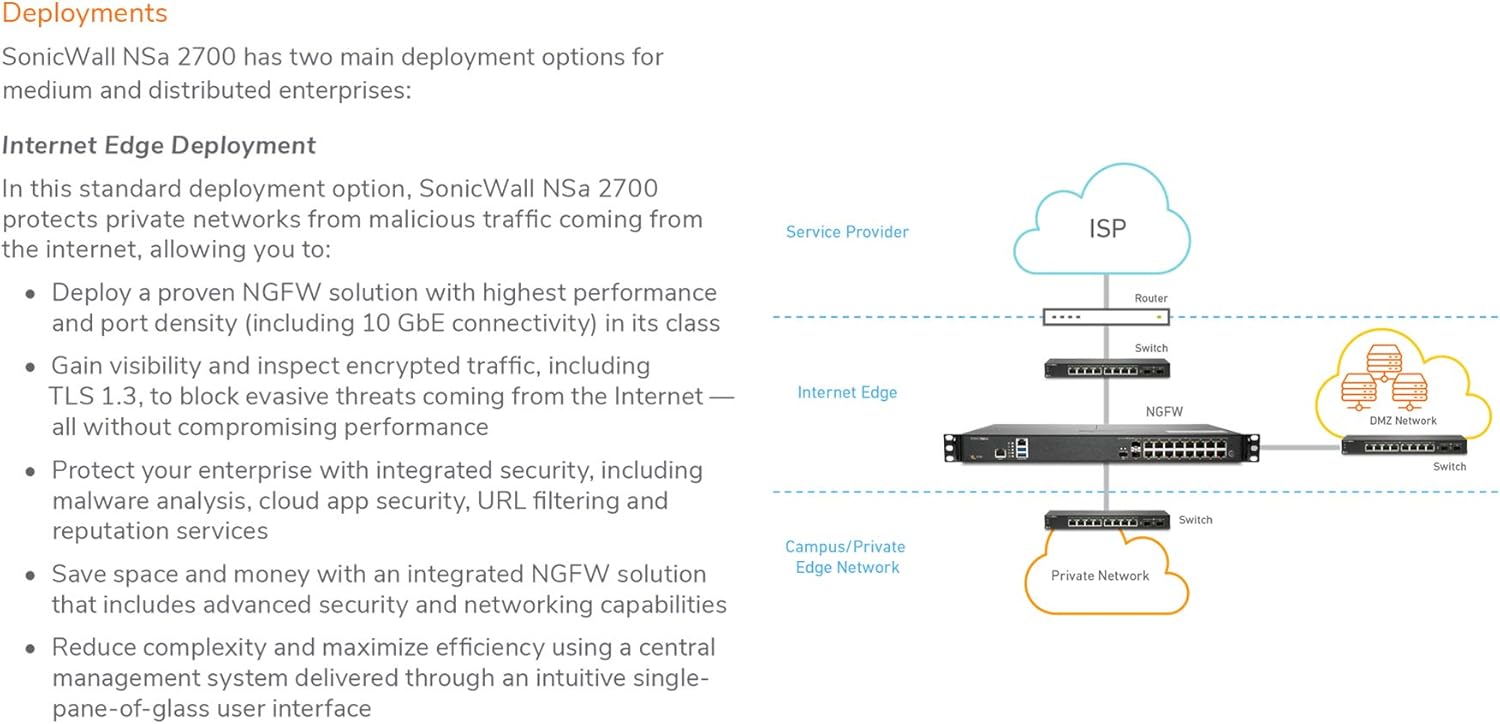
Figura 4.1: Diagram illustrating the SonicWall NSA 2700 in an Internet Edge deployment, positioned between the ISP router/switch and the internal network (Campus/Private Edge Network and DMZ Network).
4.2 Medium and Distributed Enterprises Deployment
The NSA 2700 supports SD-WAN and can be centrally managed, making it suitable for medium and distributed enterprises. This deployment model enables organizations to:
- Future-proof against evolving threat landscapes with multi-gigabit threat analysis performance.
- Provide direct and secure internet access to distributed branch offices, avoiding back-hauling through corporate headquarters.
- Allow distributed branch offices to securely access internal resources in corporate headquarters or public clouds, improving application latency.
- Automatically block threats using encrypted protocols like TLS 1.3, securing networks from advanced attacks.
- Leverage high port density, including 10 GbE connectivity, to support distributed enterprise and wide area networks.

Figura 4.2: Diagram showing the SonicWall NSA 2700 deployed in a distributed enterprise scenario, connecting branch offices and enterprise headquarters securely over the internet using SD-WAN.
5. Key Technologies
5.1 Reassembly-Free Deep Packet Inspection (RFDPI)
The SonicWall Reassembly-Free Deep Packet Inspection (RFDPI) engine is a single-pass, low-latency inspection system. It performs stream-based, bi-directional traffic analysis at high speed without proxying or buffering. This technology effectively uncovers intrusion attempts and malware downloads across Layers 3-7, even when applying to encrypted traffic like TLS/SSL. RFDPI neutralizes evasion techniques by normalizing and decrypting network streams, then analyzing them against multiple signature databases for threats.

Figura 5.1: Comparison between competitive proxy-based architecture and SonicWall's stream-based RFDPI architecture, illustrating RFDPI's efficiency in inspection time and capacity.
5.2 Secure, High-speed Wireless
The NSA 2700 can be combined with a SonicWall 802.11ac Wave 2 wireless access point (e.g., SonicWave 432i) to create a high-speed wireless network security solution. Both NSA series firewalls and SonicWave access points feature 2.5 GbE ports, enabling multi-gigabit wireless throughput. The firewall scans all wireless traffic for malware and intrusions, even over encrypted connections. Additional security features like content filtering, application control, and Capture Advanced Threat Protection can be applied to the wireless network.
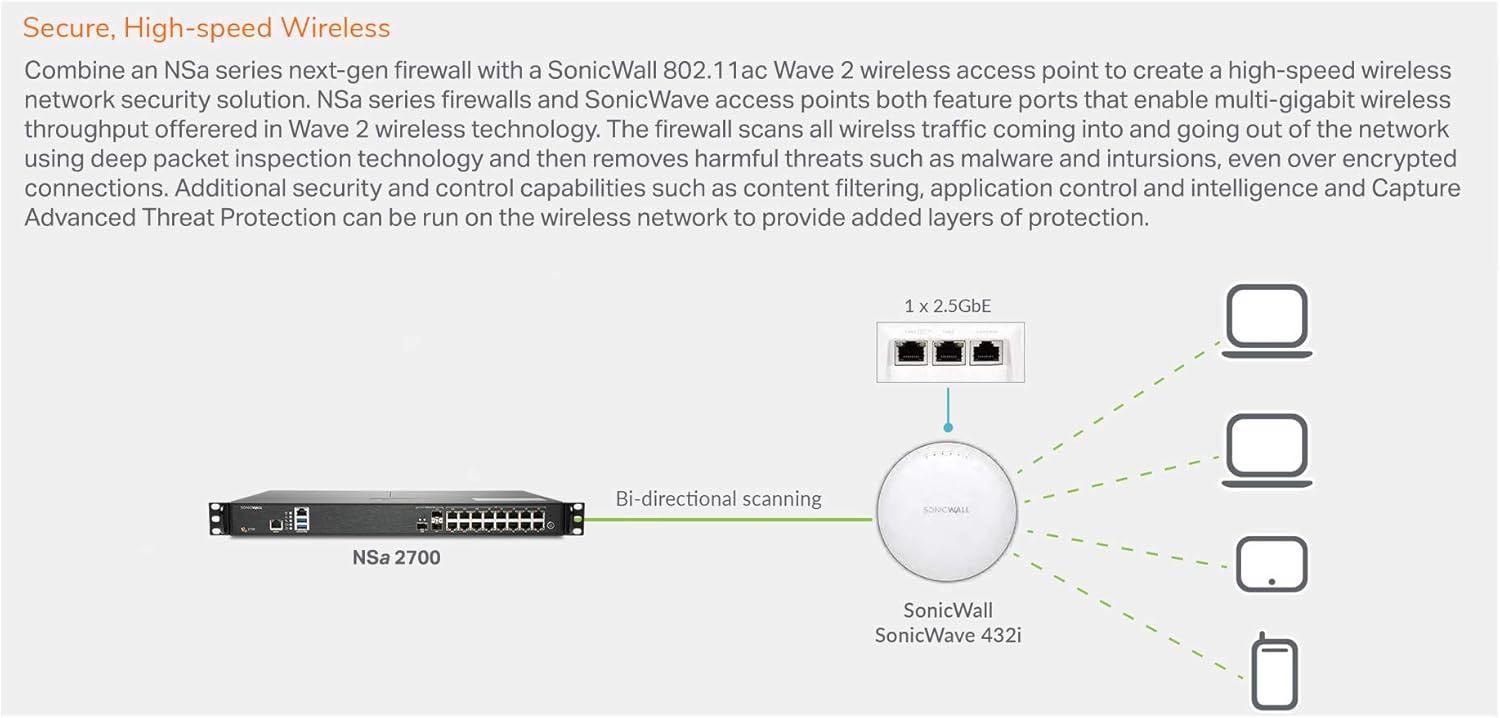
Figura 5.2: Diagram showing the NSA 2700 integrated with a SonicWall SonicWave 432i access point for secure, high-speed wireless connectivity, demonstrating bi-directional scanning.
6. Instrucións de funcionamento
Once the SonicWall NSA 2700 is set up and configured, its operation is primarily managed through the SonicOS web interface or a central management system. Key operational aspects include:
- Seguimento: Regularly monitor the appliance's status, network traffic, and security logs through the dashboard and reporting features.
- Policy Management: Create, modify, and enforce security policies, including firewall rules, access control lists, and VPN configurations.
- Xestión de usuarios: Manage user accounts, authentication methods, and access privileges.
- Configuración da VPN: Set up and manage Virtual Private Network (VPN) connections for secure remote access and site-to-site connectivity.
- Actualizacións de firmware: Periodically check for and apply firmware updates to ensure the latest security patches and features.
- Copia de seguranza e restauración: Regularly back up your configuration settings and understand the restore process in case of system failure or misconfiguration.
For detailed operational procedures, consult the SonicOS 7.0 Administrator's Guide available on the SonicWall support portal.
7. Mantemento
Proper maintenance ensures the longevity and optimal performance of your SonicWall NSA 2700 appliance.
- Control ambiental: Ensure the appliance is operated within recommended temperature and humidity ranges. Keep the area around the appliance clear for proper airflow.
- Eliminación de po: Periodically clean dust from the appliance's vents and surfaces using a soft, dry cloth or compressed air.
- Actualizacións de firmware: Regularly apply firmware updates to benefit from new features, performance enhancements, and critical security patches.
- Copias de seguridade da configuración: Perform regular backups of your appliance configuration to a secure external location. This is crucial for disaster recovery.
- Security Service Renewals: Ensure all security subscriptions (e.g., Gateway Anti-Virus, IPS, Content Filtering, Capture ATP) are current and renewed before expiration.
- Log Review: Periódicamente review system logs and security reports for any unusual activity or potential issues.
8 Solución de problemas
This section provides general troubleshooting tips for common issues. For more complex problems, refer to the SonicWall support documentation or contact technical support.
- Sen enerxía:
- Verify the power cable is securely connected to both the appliance and a working power outlet.
- Check the power source (e.g., power strip, UPS) for functionality.
- Non se pode acceder Web Interface:
- Ensure your computer is on the same network segment as the appliance's management interface.
- Verify the IP address of the appliance and your computer.
- Try pinging the appliance's IP address.
- Limpa a caché do teu navegador ou proba cun navegador diferente.
- If you suspect a forgotten password, follow the password recovery procedure outlined in the administration guide.
- Problemas de conectividade de rede:
- Check physical cable connections to all network ports.
- Verify interface status lights on the appliance.
- Review firewall rules and access policies to ensure they are not blocking legitimate traffic.
- Check DNS settings if internet access is affected.
- Rendemento lento:
- Monitor CPU and memory usage on the appliance.
- Review security services logs for high threat activity.
- Asegúrate de que o firmware estea actualizado.
- Consider network traffic patterns and potential bottlenecks.
9. Especificacións
| Característica | Detalle |
|---|---|
| Nome do modelo | NSA 2700 |
| Dimensións do produto | 23.62 x 23.62 x 33.46 polgadas |
| Peso do elemento | 4.4 libras (2 quilogramos) |
| Fabricante | SonicWall |
| Sistema Operativo | SonicOS 7.0 |
| Almacenamento | 64GB M.2 |
| VLAN Interfaces | 256 |
| Access Points Supported (Max) | 32 |
| Portos Ethernet | 16 x 1 GbE, 3 x 10 GbE SFP+ |
| Factor de forma | 1 RU |
| Threat and Malware Analysis Throughput | 2 Gbps |
| Tecnoloxía de conectividade | Wi-Fi (for integrated wireless controller) |
| Estándar de comunicación sen fíos | 802.11ac |
| Clase de banda de frecuencia | Dobre banda |
| Característica especial | Modo de punto de acceso, WPS |
| Baterías | 1 Lithium Ion battery required (internal) |
| Data de primeira dispoñibilidade | 5 de xaneiro de 2021 |
10. Garantía e soporte
For information regarding product warranty, technical support, and service agreements, please refer to the official SonicWall website or contact your authorized SonicWall reseller. Ensure your product is registered to access full support resources and warranty benefits.
Os recursos en liña adoitan incluír:
- Artigos da base de coñecemento
- Firmware downloads
- Documentation (Administrator Guides, Release Notes)
- Foros comunitarios


