1. Introdución
The Lepro PR902103-US Smart Table Lamp offers versatile lighting solutions for your home. This LED touch lamp features RGB color changing capabilities, tunable warm to cool white light, and dimmable brightness. It is designed for seamless integration with smart home ecosystems, supporting both Amazon Alexa and Google Assistant for voice control, as well as control via a dedicated mobile application. This manual provides comprehensive instructions for setup, operation, and maintenance.

Figure 1: Lepro Smart Table Lamp mostrarasing its app control interface.
2. Que hai na caixa
Comprobe que todos os compoñentes estean presentes na embalaxe:
- 1 x Lepro Smart Table Lamp (Model: PR902103-US)
- 1 x 4.9 ft USB Cable
- 1 x adaptador de alimentación
- 1 x Manual de usuario (este documento)
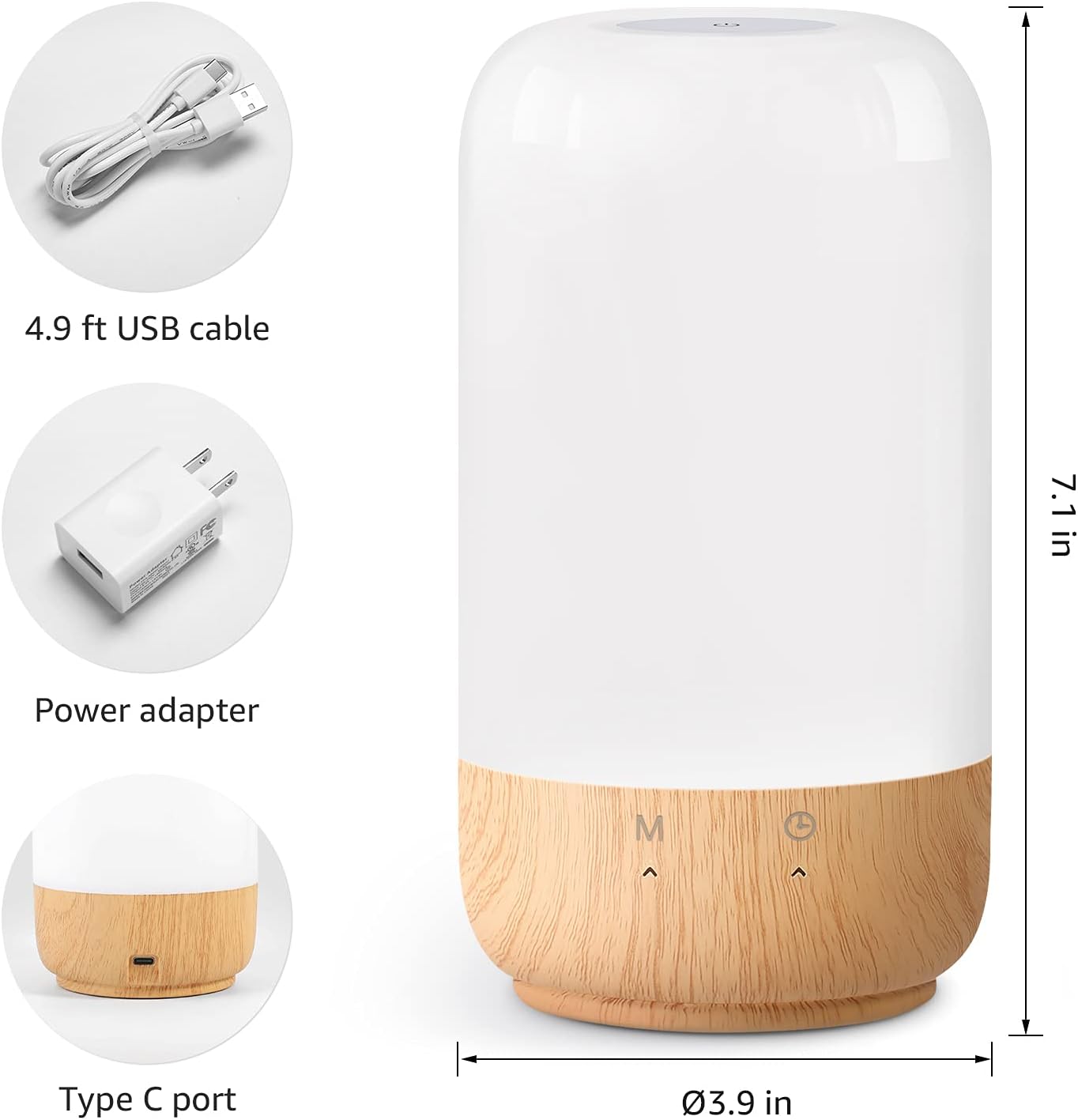
Figure 2: Included components and product dimensions.
3. Configuración
Follow these steps to set up your Lepro Smart Table Lamp:
- Conexión de alimentación: Conecte o cable USB proporcionado ao lamp's Type-C port and the power adapter. Plug the power adapter into a standard wall outlet. The lamp iluminará.
- Descarga da aplicación: Download the 'Lepro LampUX' app from your mobile device's App Store (iOS) or Google Play Store (Android).
- Rexistro da conta: Open the 'Lepro LampUX' app and register a new account or log in if you already have one.
- Emparejamento de dispositivos:
- Na aplicación, toca en "Engadir dispositivo" ou na icona "+".
- Select 'Table Lamp' from the lighting category.
- Asegurar o lamp is powered on. Long press the timer button on the lamp's base for at least 5 seconds until the indicator light blinks rapidly.
- Confirma que a luz indicadora parpadea rapidamente na aplicación e continúa.
- Select your 2.4 GHz Wi-Fi network and enter the password. (Note: The lamp only supports 2.4 GHz Wi-Fi networks. If your router is 5 GHz, please set it to 2.4 GHz during setup.)
- The app will begin adding the device. Once successfully added, you can rename your lamp for easier identification.
Video 1: Detailed steps on how to set up your Lepro Smart Lamp using the mobile application.
4. Instrucións de funcionamento
The Lepro Smart Table Lamp can be controlled via touch, the mobile app, or voice commands.
4.1. Toca Controis
- Encendido/apagado: Short press the power button (marked 'M') on the lampa base.
- Axuste de brillo: Slide your finger along the left side of the lamp's base to adjust brightness.
- Cambio de cor (RGB): Slide your finger along the right side of the lamp's base to cycle through RGB colors.
- Interruptor de modo: Short press the timer button (clock icon) to switch between white light modes (warm white, cool white) and RGB color mode.
4.2. Mobile App Controls
The 'Lepro LampUX' app provides comprehensive control over your lamp:
- Brightness & Color Temperature: Adjust the brightness level and select color temperatures from 2700K (warm white) to 5700K (cool white).
- Selección de cor RGB: Choose from 16 million colors using the color wheel in the app.
- Escenas: Select from pre-set scenes like 'Night', 'Read', 'Meeting', 'Leisure', or customize your own scenes with specific colors and effects.
- Timer & Wake-up: Set schedules for the lamp to turn on/off automatically. Utilize the 'Sunrise Simulation' feature to gradually increase light for a gentle wake-up.

Figure 3: Mobile application interface for controlling lamp axustes.

Figura 4: O lamp's timer and wake-up functions in use.
4.3. Controis de voz
The Lepro Smart Table Lamp is compatible with Amazon Alexa and Google Assistant. To enable voice control:
- Asegúrese de que o seu lamp is successfully paired with the 'Lepro LampUX' app.
- Abre a aplicación Amazon Alexa ou Google Home.
- Vaia á sección "Habilidades e xogos" (Alexa) ou "Funciona con Google" (Google Home).
- Busca and enable the 'Lepro LampUX' skill/service.
- Link your 'Lepro LampUX' account with your Alexa/Google account.
- Unha vez conectado, podes usar comandos de voz como:
- "Alexa, activa [L]"amp Nome]."
- "Ola Google, configura [Lamp Name] to warm white."
- "Alexa, change [Lamp Nome] a azul."
- "Hey Google, dim [Lamp Nome] ao 50%."

Figure 5: Voice control integration with Amazon Alexa.
Video 2: Demonstration of the Lepro Smart Table Lamp working with Alexa and Google Home.
5. Mantemento
To ensure the longevity and optimal performance of your Lepro Smart Table Lamp, please follow these maintenance guidelines:
- Limpeza: Desconecte a alimentación antes de limpar. Use un pano suave e seco para limpar a lamp's surface. Avoid using abrasive cleaners, solvents, or harsh chemicals, as these may damage the finish or electronic components.
- Almacenamento: Se almacena o lamp for an extended period, ensure it is clean and dry. Store it in a cool, dry place away from direct sunlight and extreme temperatures.
- Manexo: Manexa o lamp con coidado. Evite deixalo caer ou sometelo a impactos fortes.
6 Solución de problemas
If you encounter issues with your Lepro Smart Table Lamp, consulte os seguintes problemas e solucións comúns:
| Problema | Causa posible | Solución |
|---|---|---|
| Lamp non acende. | Sen fonte de alimentación. | Comprobe se o adaptador de corrente está conectado correctamente á toma de correnteamp and the wall outlet. Ensure the outlet is functional. |
| Non se pode conectar á wifi. | Incorrect Wi-Fi band (5 GHz). Contrasinal incorrecto. Sinal wifi débil. | Ensure your Wi-Fi network is 2.4 GHz. Verify the Wi-Fi password. Move the lamp closer to your router. |
| O control por voz non funciona. | Skill not enabled/linked. Incorrect device name. | Ensure the 'Lepro LampUX' skill is enabled and linked in your Alexa/Google Home app. Use the exact device name configured in the app. |
| Lamp non responde. | Fallo temporal do software. | Desenchufe o lamp from the power outlet for 10 seconds, then plug it back in to perform a soft reset. |
7. Especificacións
| Característica | Detalle |
|---|---|
| Marca | Leproso |
| Número de modelo | PR902103-EUA |
| Dimensións do produto | 3.9" D x 3.9" W x 7.1" H |
| Peso do elemento | 1.19 libras |
| Material | Plástico, madeira |
| Tipo de fonte de luz | LED |
| Wattage | 7 vatios |
| Brillo | 350 lúmenes |
| Cor clara | RGB + CCT (Tunable White 2700-5700K) |
| Método de control | App, Touch, Voice (Alexa, Google Assistant) |
| Conectividade | Só WiFi de 2.4 GHz |
| Uso interior/exterior | Interior |
8. Garantía e soporte
Lepro products are designed and manufactured to the highest quality standards. For warranty information and technical support, please refer to the contact details provided on the product packaging or visit the official Lepro websitio. Garde o recibo da compra como xustificante de compra para reclamacións de garantía.


