1. Introdución
This manual provides essential information for the safe and efficient operation of your DOOGEE S97 Pro Rugged Smartphone. Please read it thoroughly before using your device.

Image 1.1: The DOOGEE S97 Pro Rugged Smartphone, showcasing its robust design and display.
2. Dispositivo rematadoview
The DOOGEE S97 Pro is a rugged smartphone designed for durability and performance. Key features include:
- Sistema operativo: Android 11
- Procesador: Helio G95 Octa Core 2.1GHz 12nm
- Memoria: 8 GB de RAM + 128 GB de ROM
- Batería: 8500mAh Super Battery with 33W Fast Charging and 10W Wireless Charging
- Visualización: 5.71-inch Corning Gorilla Glass
- Cámara traseira: Samsung 48MP AI Main Camera (48MP + 8MP + 2MP + 2MP)
- Cámara frontal: 16 MP
- Características especiais: 40m Rangefinder, IP68 Waterproof, Dustproof, Shockproof, NFC Support
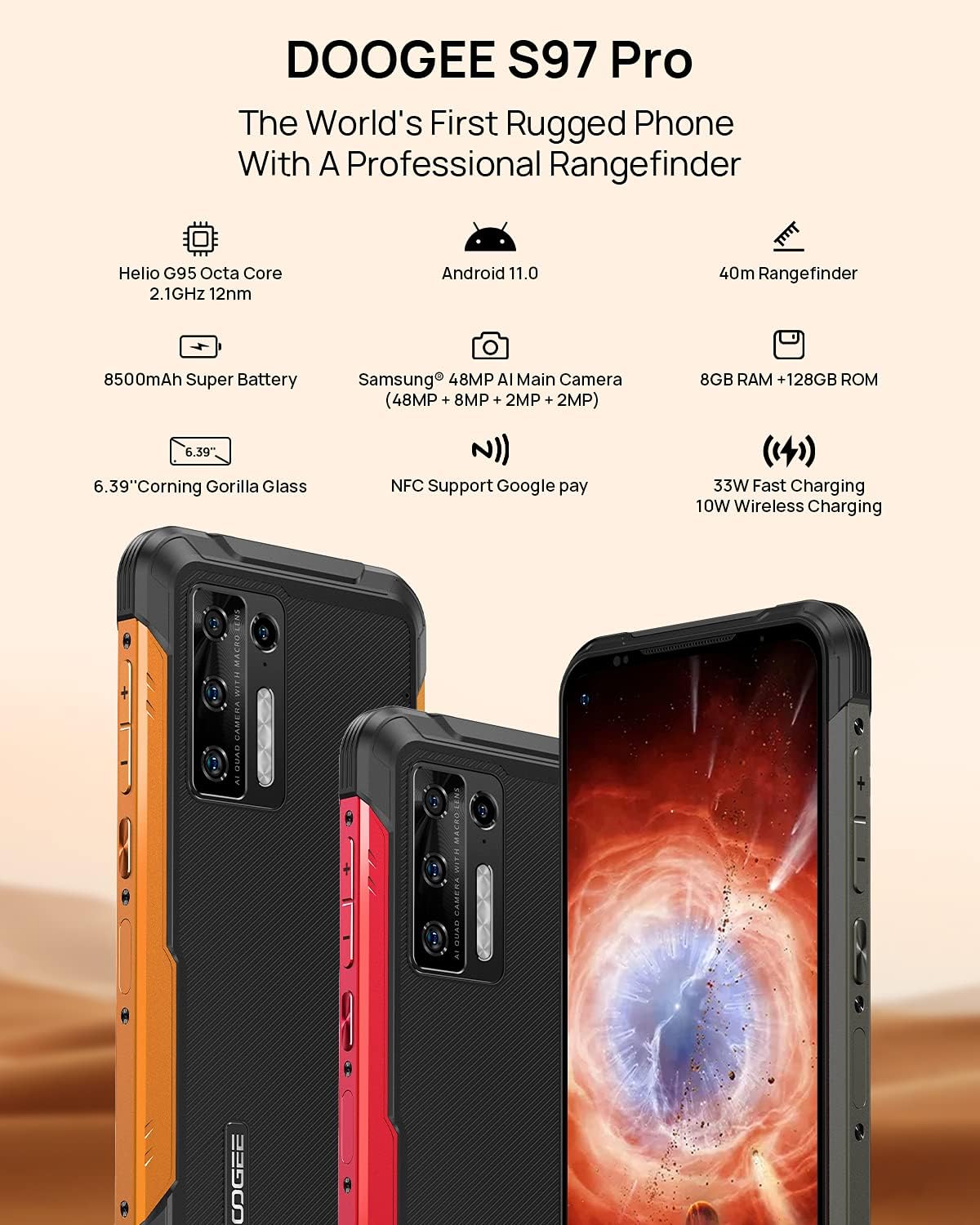
Image 2.1: Visual representation of the DOOGEE S97 Pro's main features, including processor, battery, camera, and display.
3. Configuración
3.1 Instalación da tarxeta SIM
- Localiza a bandexa da tarxeta SIM no lateral do teu dispositivo.
- Usa a ferramenta de expulsión da tarxeta SIM fornecida para abrir a bandexa.
- Carefully place your Nano SIM card(s) into the designated slots. Ensure proper orientation.
- Gently push the SIM card tray back into the device until it is flush with the body.
Nota: This device supports specific frequency bands. Please verify compatibility with your network carrier before use. The DOOGEE S97 Pro does not support certain CDMA network carriers such as Verizon, Sprint, Xfinity, and TracFone.
3.2 Encendido inicial
- Press and hold the Power button located on the side of the device until the DOOGEE logo appears.
- Siga as instrucións na pantalla para completar a configuración inicial, incluíndo a selección do idioma, a conexión wifi e a configuración da conta de Google.
4. Instrucións de funcionamento
4.1 Navegación básica
- Back Function: Swipe from the left or right edge of the screen towards the center.
- Pantalla de inicio: Pasa o dedo cara arriba desde a parte inferior da pantalla para volver á pantalla de inicio.
- Aplicacións recentes: Swipe up from the bottom of the screen and hold briefly to view recent applications. Swipe left or right along the very bottom of the screen to scroll through recent apps.
- Caixón de aplicacións: The device does not feature a traditional app drawer. All installed applications are displayed on the home screen. Additional home screens are automatically added to the right as more apps are installed.
4.2 Uso da cámara
O DOOGEE S97 Pro está equipado cun sistema de cámaras versátil:
- Cámara traseira: 48MP main sensor, 8MP ultra-wide angle, 2MP portrait, and 2MP macro lens.
- Cámara frontal: 16MP para selfies e videochamadas.
To access the camera, tap the Camera icon on your home screen. Select desired modes (Photo, Video, Portrait, Macro, etc.) from the interface.

Imaxe 4.1: Primeiro plano view of the Samsung 48MP AI Quad Rear Camera system on the DOOGEE S97 Pro.
4.3 Rangefinder Functionality
The integrated 40m laser rangefinder allows for precise distance measurements. To use:
- Locate and open the 'Rangefinder' application on your device.
- Select the desired measurement mode (Length, Area, Volume, Pythagoras).
- Follow the on-screen instructions to aim the laser and take measurements.

Image 4.2: Screenshots of the DOOGEE S97 Pro's 40m Rangefinder application interface, showing various measurement modes.
4.4 Xestión da batería
The DOOGEE S97 Pro features an 8500mAh battery. To optimize battery life and charging:
- Carga por cable: Use the provided USB Type-C cable and a compatible 33W fast charger for optimal charging speed.
- Carga sen fíos: The device supports 10W wireless charging. Place the phone on a compatible wireless charging pad.
- Optimización da batería: Access battery settings to manage app power usage and enable power-saving modes.

Image 4.3: Illustration of the DOOGEE S97 Pro's 8500mAh Super Battery and charging capabilities.
4.5 Características de durabilidade
The S97 Pro is built to withstand harsh environments:
- Clasificación IP68: Provides protection against dust ingress and immersion in water up to 1.5 meters for 30 minutes.
- A proba de golpes: Designed to resist drops and impacts.
- Corning Gorilla Glass: Enhances screen durability against scratches and minor impacts.

Image 4.4: Demonstrations of the DOOGEE S97 Pro's waterproof, dustproof, and shockproof capabilities.
Video 4.5: An official video from DOOGEE showcasing the rugged features and capabilities of the S59 Pro smartphone.
4.6 Sistema operativo Android 11
The device runs on Android 11, offering enhanced privacy controls, improved notification management, and a streamlined user experience.

Image 4.6: Visual representation of the Android 11 operating system interface on the DOOGEE S97 Pro.
5. Mantemento
5.1 Limpeza do dispositivo
Due to its waterproof design, the DOOGEE S97 Pro can be cleaned with water. Ensure all ports are securely closed before rinsing. Use a soft, damp cloth to wipe the screen and body. Avoid harsh chemicals or abrasive materials.
5.2 Actualizacións de software
Comprobe e instale regularmente actualizacións de software para garantir un rendemento, unha seguridade e un acceso óptimos a novas funcións. Vaia a Configuración > Sistema > Actualización do sistema para comprobar se hai actualizacións dispoñibles.
6 Solución de problemas
Se tes problemas co teu dispositivo, consulta as seguintes solucións habituais:
- O dispositivo non responde: Manteña premido o botón de acendido/apagado durante aproximadamente 10-15 segundos para forzar un reinicio.
- Problemas de conectividade de rede: Verify your SIM card is correctly inserted. Check network settings (Configuración > Rede e Internet > Rede móbil). Reinicie o dispositivo.
- Problemas de carga: Ensure the USB cable and charger are securely connected and undamaged. Try a different charger or cable. For wireless charging, ensure the phone is correctly positioned on the charging pad.
- Fingerprint Sensor Inaccuracy: Asegúrate de que o dedo estea limpo e seco. Rexistra de novo as túas impresións dixitais en Configuración > Seguridade > Pegada dixital.
- Rendemento lento: Close unused applications. Clear cache (Settings > Apps & notifications > See all apps > [App Name] > Storage & cache > Clear cache). Consider a factory reset as a last resort (Configuración > Sistema > Opcións de restablecemento > Borrar todos os datos (restablecemento de fábrica)).
7. Especificacións
| Característica | Detalle |
|---|---|
| Dimensións do produto | 6.41 x 3.19 x 0.63 polgadas |
| Peso do elemento | 12 onzas (340 gramos) |
| Sistema Operativo | Android 11.0 |
| RAM | 8 GB (Note: Product data shows 4GB RAM, but images and title indicate 8GB. This manual uses 8GB as per prominent product claims.) |
| Capacidade de almacenamento da memoria | 128 GB |
| Tamaño da pantalla | 5.71 polgadas |
| Capacidade da batería | 8500 millónsamp Hours (Note: Product data shows 10050 mAh, but images and title indicate 8500 mAh. This manual uses 8500 mAh as per prominent product claims.) |
| Tecnoloxías de comunicación sen fíos | Móbil, Wi-Fi |
| Tecnoloxía Celular | LTE |
| Tipo de conector | USB tipo C |
| Entrada da interface humana | Botóns |
| O que hai na caixa | Cable USB |
For detailed specifications, please refer to the product packaging or the official DOOGEE websitio.

Image 7.1: The DOOGEE S97 Pro highlighting its 8GB RAM and 128GB ROM, powered by a Helio G95 Octa Core processor.
8. Garantía e soporte
Your DOOGEE S97 Pro smartphone is covered by a manufacturer's warranty. Please refer to the warranty card included in your product packaging for specific terms and conditions, including warranty duration and coverage details.
For technical support, product inquiries, or service requests, please visit the official DOOGEE website or contact their customer service department. Contact information can typically be found on the DOOGEE websitio ou na embalaxe do produto.


