Introdución
This manual provides detailed instructions for the setup, operation, and maintenance of your ipega PG-9191 Elvis Dual Rocker Wireless Gamepad. Please read this manual thoroughly before use to ensure optimal performance and longevity of your device.
Contido do paquete
- 1 x IPEGA Elvis wireless handle
- 1 x Type-C line
- 2 x Tapón de silicona
- 1 x Rocker ball
- 1 x Manual de usuario
Produto rematadoview
The ipega PG-9191 is a versatile wireless gamepad designed for mobile gaming on Android and iOS devices, and also supports wired connections for N-Switch, PS3, and PC. It features dual joysticks and multiple operating modes to enhance your gaming experience.
Disposición do dispositivo

Fronte view of the ipega PG-9191 gamepad, showing the dual joysticks, D-pad, action buttons (A, B, X, Y), HOME button, SELECT, START, TURBO, LT/L2, RT/R2 buttons, and a smartphone mounted in the integrated holder.

Close-up of the ipega PG-9191 gamepad's classic arcade six-key layout, highlighting the D-pad, action buttons, and function keys.
Configuración
Carga inicial
Before first use, charge the controller for approximately 5-8 hours. Use the provided Type-C cable.
Conexión sen fíos (Bluetooth)
The gamepad supports direct connection and direct play for Android and iOS devices without requiring extra game platforms or complex activation.
Android V3 Direct Play Mode
For Android devices (version 6.0 or higher). No additional settings required; connect and play. This mode supports a wide range of games.
iOS V3 Direct Play Mode
For iOS devices (version 11.0 to 13.3.1). No additional settings required; connect and play.
Important Note: This gamepad is NOT compatible with iOS 13.4, iOS 13.5, or later systems. Ensure your iOS device is running a compatible version (iOS 11.0 - 13.3.1) before purchase and use.
Modo estándar de Android
This mode is for Android devices only and requires downloading and installing a game platform. It supports a limited number of games.
Modo de conexión por cable
The ipega PG-9191 can be connected via wire to PC, PS3, Smart TV, TV Box, and N-Switch hosts.
- Ensure the handle is off.
- Press and hold the "R1 button" on the upper edge of the handle.
- While holding R1, insert the USB cable (Type-C) into the device. The red light will flash, indicating pairing mode.
- Once connected successfully, the handle's LED light will remain solid.
- For PC connection, the default mode is X-input 360. To switch to D-input mode, press and hold SELECT + START buttons simultaneously for 3 seconds.
- In D-input mode, the left motor start keys are LT/L2 and L2; the right motor start keys are RT/R2 and R2.
Instrucións de funcionamento
Gamepad Modes
The controller offers different modes for various gaming experiences.
Handle Mode
Use the device as a traditional gamepad, holding it in your hands.

Illustration of the ipega PG-9191 in 'Handle Mode', where the device is held like a standard gamepad, and 'Fighting Mode', where the device is placed on a desktop with the rocker ball attached.
Fighting Mode
For arcade-style games, place the gamepad on a desktop and use the attached rocker ball for precise control.

A user's hands operating the ipega PG-9191 in 'Fighting Mode', with the gamepad resting on a wooden surface and a smartphone displaying a fighting game.
Gamepad Mode (TV Connection)
Connect the gamepad to a TV or monitor to play games in a larger format.

The ipega PG-9191 gamepad being used wirelessly to play a game displayed on a television screen, demonstrating its 'Gamepad Mode' for TV gaming.
Función TURBO
The TURBO function allows for one-click burst or continuous firing, reducing finger fatigue during repetitive actions.
Para activar: Prema o botón TURBO button simultaneously with an action key (e.g., A, B, X, Y).
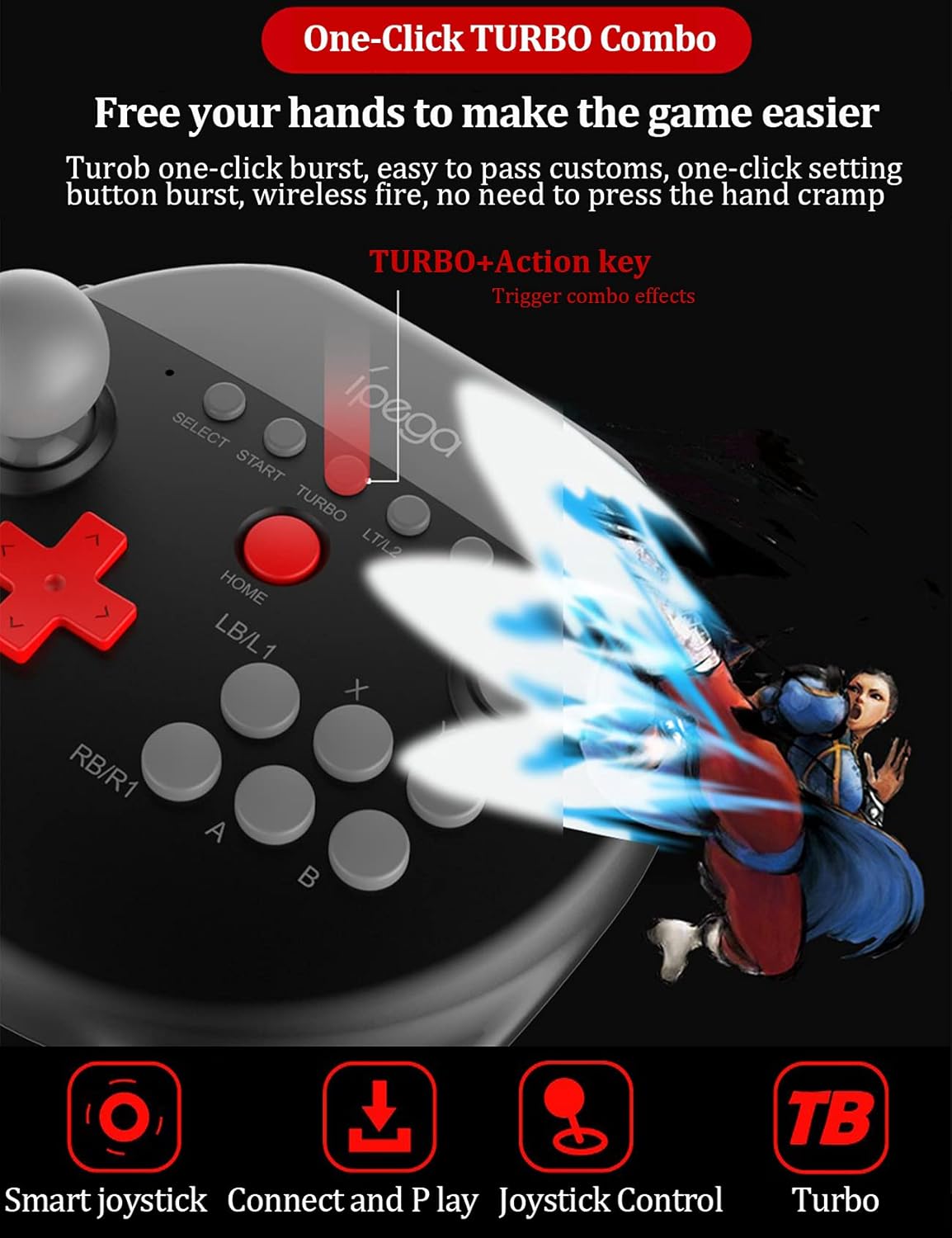
Close-up of the ipega PG-9191 gamepad highlighting the 'TURBO' button and its interaction with action keys for combo effects, with a visual representation of a burst.
Rocker Ball Installation and Use
The included rocker ball can be installed on the left joystick for enhanced arcade game control.
- Locate the left joystick cap.
- Turn the existing joystick ball counter-clockwise to remove it.
- Screw the rocker ball clockwise into the left joystick cap.
Note: The rocker ball can only be installed on the left side, not the right.

Parte inferior view of the ipega PG-9191 gamepad, illustrating the screw-in point for the rocker ball on the left joystick. Also visible are product details like working voltage e corrente.
Compatibilidade
- Android: Supports Android 6.0 or higher system devices. Not compatible with phones using MediaTek chips.
- iOS: Supports iOS 11.0, iOS 12, and iOS 13 systems (specifically up to iOS 13.3.1). NOT compatible with iOS 13.4, iOS 13.5, or later systems.
- Conexión por cable: Compatible with N-Switch, PS3, Android devices, and computers (Windows 7 and above).
Resolución de problemas
Problemas comúns e solucións
- Q: The gamepad doesn't work.
- A: The IPEGA PG-9191 supports Android 6.0 and iOS 11.0 or higher. If your device is running a lower version, it is not compatible. Also, it is not compatible with iOS 13.4/iOS 13.5 systems.
- Q: The product's Bluetooth connection is often disconnected or stuck.
- A: Frequent Bluetooth disconnections can be caused by low power in the gamepad. Additionally, issues with Android phone or device memory can lead to similar problems. Ensure the gamepad is fully charged and your device has sufficient memory.
- Q: The right analog stick of the gamepad does not work properly.
- A: The function for the right stick may not be enabled. You need to open the "shootingplusV3" application, access the button interface settings, click on "R", select "view mode", and then save the settings.
- Q: Android devices don't work.
- A: Ensure your Android device is running version 6.0 or higher. Also, confirm that the gamepad is set to the Android button mode.
- Q: iOS devices can't work.
- A: Ensure your iOS device is running a system above 11.0 (up to 13.3.1). Also, confirm that the gamepad is set to the iOS button mode.
Especificacións
| Característica | Detalle |
|---|---|
| Marca | ipega |
| Nome do modelo | PG-9191 |
| Fabricante | ipega |
| Cor | Negro |
| Tecnoloxía de conectividade | Wireless (Bluetooth 5.0), Wired |
| Tipo de controlador | Gamepad |
| Dispositivos compatibles | Android, iOS, N-Switch, PS3, PC (Win7+) |
| Fonte de enerxía | Alimentado por batería |
| Pilas incluídas | Si |
| Contido de enerxía da batería de litio | 1.2 vatios horas |
| Peso da batería de litio | 0.15 g |
| Número de botóns | 12 |
| Cantidade do paquete do artigo | 1 |
| Dimensións do paquete | 24.89 x 20.19 x 7.7 cm |
| Peso do elemento | 340 g |
| Primeira data dispoñible | 19 de xaneiro de 2021 |
Mantemento
To ensure the longevity and proper functioning of your ipega PG-9191 gamepad, follow these maintenance guidelines:
- Manteña o dispositivo limpo cun pano suave e seco. Evite o uso de produtos de limpeza abrasivos ou solventes.
- Garda o gamepad nun lugar fresco e seco, lonxe da luz solar directa e de temperaturas extremas.
- Evite deixar caer ou someter o dispositivo a fortes impactos.
- Do not attempt to disassemble the gamepad, as this will void the warranty and may cause damage.
- Cargue a batería regularmente, mesmo se non a usa con frecuencia, para manter o estado da batería.
Garantía e Soporte
This product comes with a standard manufacturer's warranty. For any issues or inquiries regarding your ipega PG-9191 controller, please do not hesitate to contact the seller or manufacturer's customer service. They are committed to providing satisfactory after-sales service.
Refer to the original purchase documentation for specific warranty terms and contact information.


