1. Introdución
This manual provides essential information for the proper setup, operation, maintenance, and troubleshooting of your Datalogic PowerScan M8500 Wireless Barcode Scanner. Please read this manual thoroughly before using the device to ensure optimal performance and longevity.
2. Produto rematadoview
The Datalogic PowerScan M8500 is a robust wireless barcode scanner designed for industrial applications. It features USB connectivity for its cradle and wireless communication for the scanner unit, allowing for flexible operation.

Figura 2.1: Fronte view of the Datalogic PowerScan M8500 wireless barcode scanner, highlighting the scanning window and trigger button.
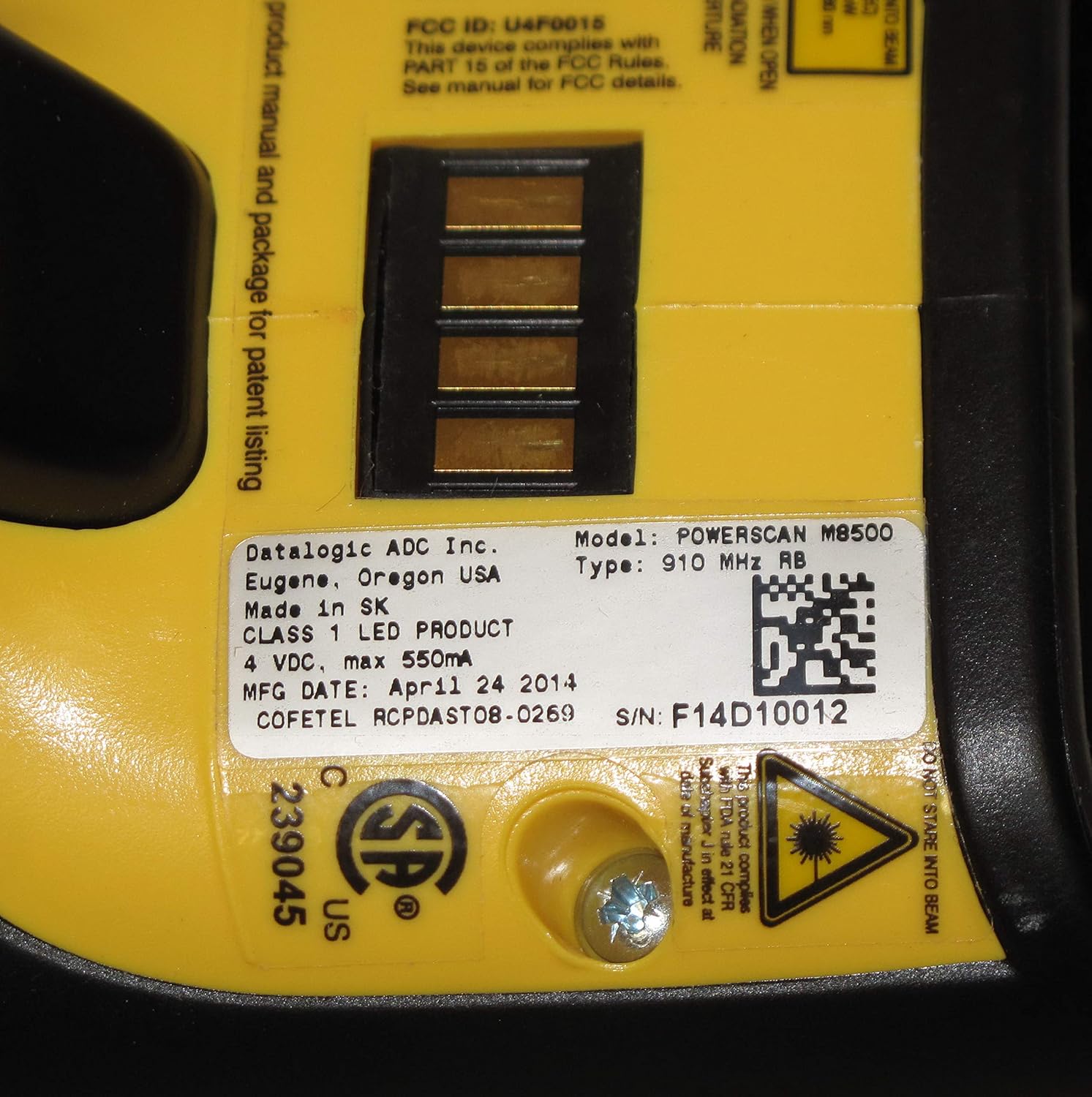
Figura 2.2: Traseira view of the Datalogic PowerScan M8500 barcode scanner, displaying the product label with essential information such as model number, FCC ID, and electrical specifications.
3. Configuración
3.1 Desembalaxe
Carefully remove all components from the packaging. Verify that all items are present: the PowerScan M8500 scanner, its charging/communication cradle, and a USB cable.
3.2 Cradle Connection
- Connect one end of the provided USB cable to the USB port on the cradle.
- Connect the other end of the USB cable to an available USB port on your desktop or laptop computer.
- Ensure the cradle receives power. An indicator light on the cradle should illuminate.
3.3 Initial Scanner Charging and Pairing
- Place the PowerScan M8500 scanner into the cradle. Ensure it is seated correctly.
- The scanner will begin charging. Allow sufficient time for a full charge before initial use.
- The scanner and cradle are typically pre-paired. If pairing is required, refer to the full Datalogic PowerScan M8500 programming manual for specific barcode sequences.
4. Instrucións de funcionamento
4.1 Escaneado de códigos de barras
- Sujete o escáner coa xanela de dixitalización orientada cara ao código de barras.
- Press and hold the trigger button. A red aiming pattern will project from the scanner.
- Align the aiming pattern over the barcode you wish to scan.
- Once the barcode is successfully read, the scanner will emit an audible beep and/or a visual indicator (e.g., green light).
- Release the trigger button.

Figura 4.1: The Datalogic PowerScan M8500 scanner in operation, showing the red aiming pattern used for precise barcode targeting.
4.2 Funcionamento sen fíos
The PowerScan M8500 communicates wirelessly with its cradle, allowing for freedom of movement within the specified range. Ensure the scanner remains within range of the cradle for uninterrupted data transmission.
5. Mantemento
5.1 Limpeza do escáner
Para manter un rendemento óptimo da dixitalización, manteña limpa a xanela da dixitalización. Use un pano suave e sen fiapos lixeiramenteampened with water or a mild, non-abrasive cleaning solution. Do not use harsh chemicals or abrasive materials, as these can damage the scanning window.
5.2 Coidado coa batería
For models with removable batteries, ensure proper insertion and removal. If the scanner is not used for an extended period, it is recommended to fully charge the battery before storage and periodically recharge it to prevent deep discharge.
5.3 Manexo xeral
The PowerScan M8500 is designed for durability, but avoid dropping the device or exposing it to extreme temperatures, excessive moisture, or direct sunlight for prolonged periods.
6 Solución de problemas
6.1 O escáner non le os códigos de barras
- Check aiming: Ensure the aiming pattern is correctly centered over the barcode.
- Barcode quality: Verify the barcode is not damaged, smudged, or poorly printed.
- Distancia: Axusta a distancia entre o escáner e o código de barras.
- Nivel de batería: Ensure the scanner has sufficient battery charge.
- Symbology enabled: Confirm that the barcode symbology (e.g., Code 128, QR Code) is enabled in the scanner's configuration. Refer to the full programming manual.
6.2 No Data Transmission to Computer
- Cradle connection: Ensure the USB cable is securely connected to both the cradle and the computer.
- Cradle power: Verify the cradle is powered on.
- Scanner-cradle link: Confirm the scanner is properly linked (paired) with its cradle. Re-pairing may be necessary.
- Instalación de controladores: Ensure the necessary USB drivers for the cradle are installed on your computer.
6.3 Scanner Not Powering On
- Carga da batería: Place the scanner in the cradle to charge for at least 30 minutes.
- Estado da batería: If the battery is old or damaged, it may need replacement.
7. Especificacións
| Característica | Especificación |
|---|---|
| Modelo | PowerScan M8500 |
| Fabricante | Datalogic |
| Tecnoloxía de conectividade | USB Cable (for cradle), Wireless (for scanner) |
| Fonte de enerxía | Corded Electric (for cradle) |
| Dispositivos compatibles | Escritorio, portátil |
| UPC / GTIN | 649661723868 |
8. Información da garantía
This Datalogic PowerScan M8500 unit is a renewed product. It comes with a Garantía limitada de 90 días from the seller. Additionally, renewed products purchased through Amazon are typically eligible for replacement or refund under the Amazon Renewed Guarantee if you are not satisfied with the purchase. Please refer to your purchase documentation for specific terms and conditions.
9. Apoio
For further assistance, technical support, or warranty claims, please contact the seller from whom you purchased this renewed product. You may also visit the official Datalogic website for product documentation and general support resources for the PowerScan M8500 series.


