1. Introdución
This manual provides detailed instructions for the installation, operation, and maintenance of your Mars Gaming MC500 ATX PC Case. Please read this guide thoroughly before beginning assembly or use to ensure proper functionality and safety. The MC500 is designed for high-performance computing, featuring exceptional cooling capabilities and a stylish FRGB lighting system.

Figure 1: Mars Gaming MC500 PC Case with tempered glass design.
2. Contido do paquete
Verifica que todos os compoñentes estean presentes no paquete:
- Mars Gaming MC500 ATX PC Case
- Accessory box (screws, standoffs, cable ties)
- Manual de usuario (este documento)
3. Configuración e instalación
Follow these steps for proper assembly of your PC components within the MC500 case.
3.1 Preparación do caso
- Retire con coidado a caixa da súa embalaxe.
- Coloque a caixa sobre unha superficie estable e plana.
- Remove the tempered glass side panel by unscrewing the thumb screws at the rear of the case.
3.2 Instalación da placa base
- Install the I/O shield into the motherboard tray opening.
- Align the motherboard with the pre-installed standoffs. Ensure the standoffs match your motherboard's form factor (ATX, Micro-ATX, Mini-ITX).
- Fixe a placa base cos parafusos proporcionados.
3.3 Instalación da unidade de almacenamento
The MC500 supports up to 4 x 2.5" SSDs or 2 x 3.5" HDDs.
- For 2.5" SSDs: Locate the dedicated mounting points on the motherboard tray or drive cages. Secure the SSDs with screws.
- For 3.5" HDDs: Utilize the drive cages located in the dual chamber design. Slide the HDDs into the trays and secure them.

Figure 2: Internal layout showing storage drive mounting locations.
3.4 Instalación da Unidade de Alimentación (PSU).
- Install the PSU into the dedicated compartment at the bottom rear of the case.
- Fixe a fonte de alimentación con parafusos na parte traseira da caixa.
3.5 Instalación da tarxeta gráfica e da tarxeta de expansión
- Retire as tapas das ranuras PCIe necesarias da parte traseira da caixa.
- Insira a súa tarxeta gráfica ou outras tarxetas de expansión nas ranuras PCIe correspondentes da placa base.
- Fixa as tarxetas con parafusos.
3.6 Xestión de cables
Utiliza os recortes de cableado e os puntos de suxeición que hai detrás da bandexa da placa base para xestionar os cables. Isto mellora a circulación do aire e a estética.
4. Instrucións de funcionamento
4.1 Acendido
After all components are installed and connected, close the side panel. Connect your monitor, keyboard, mouse, and power cable. Press the power button on the top I/O panel to start your system.
4.2 Funcionamento do ventilador
The MC500 comes with two pre-installed 18cm XXL FRGB fans at the front, providing excellent airflow. These fans operate automatically once the system is powered on, drawing cool air into the case.
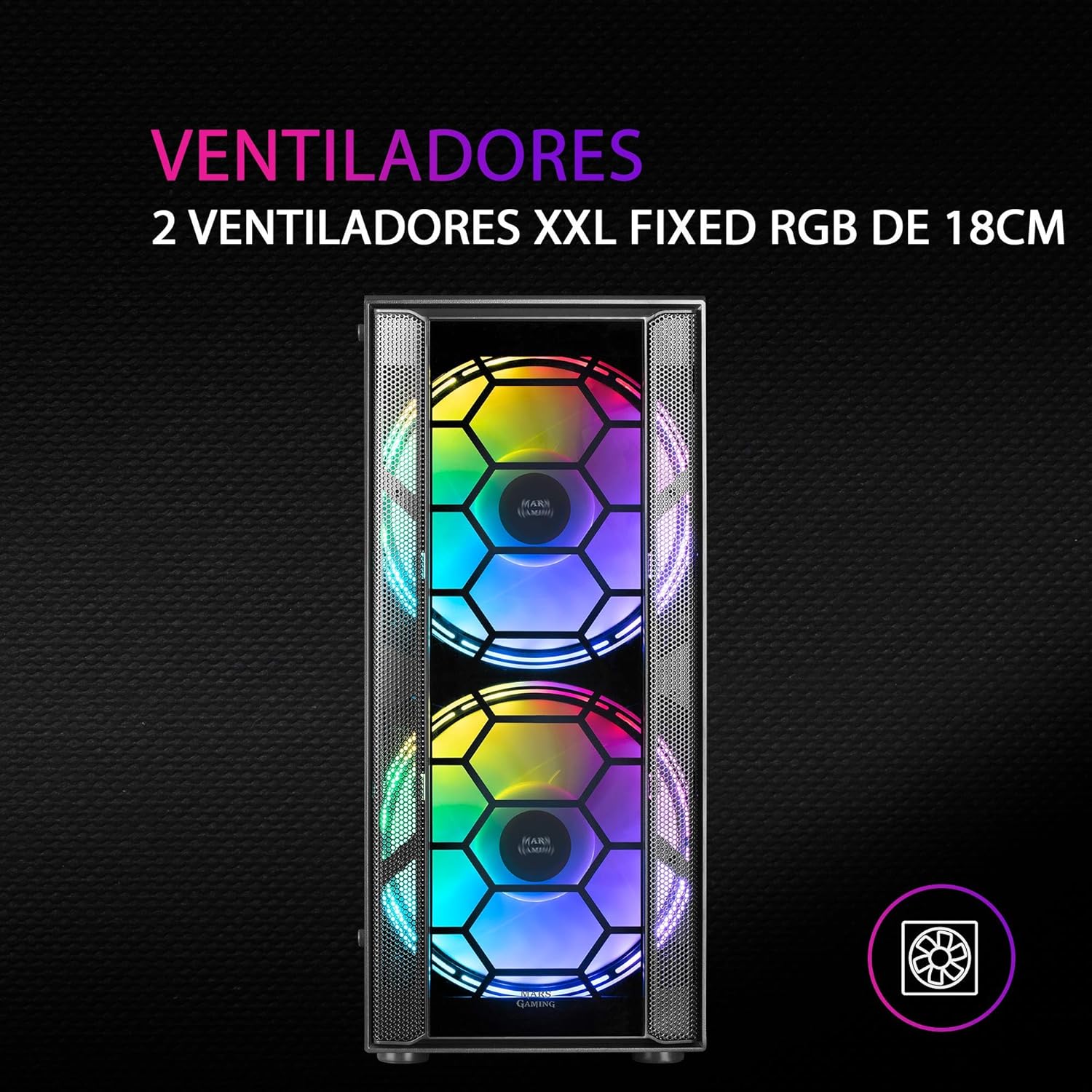
Figura 3: Fronte view highlighting the two 18cm XXL FRGB fans.
4.3 FRGB Lighting
The front fans feature Fixed RGB (FRGB) lighting. This lighting system provides a constant stream of colors and activates automatically when the fans receive power. No additional software or controller is required for its operation.

Figure 4: Detail of the FRGB ring lighting on the fans.
5. Mantemento
Un mantemento regular garante un rendemento óptimo e unha maior duración da carcasa do teu PC.
5.1 Limpeza do filtro de po
The MC500 is equipped with two removable dust filters to prevent dust buildup inside the case. It is recommended to clean these filters periodically (e.g., monthly) depending on your environment.
- Power off your computer and disconnect the power cable.
- Gently remove the dust filters (typically located on the top and bottom/front of the case).
- Clean the filters using compressed air or by rinsing them with water. If using water, ensure they are completely dry before re-installing.
- Re-install the dust filters.

Figure 5: Removable dust filter for easy cleaning.
5.2 Limpeza xeral
Limpe o exterior da carcasa cun pano suave eamp pano. Evite o uso de produtos químicos agresivos ou materiais abrasivos que poidan danar o acabado ou o vidro temperado.
6 Solución de problemas
If you encounter issues with your MC500 PC case, consider the following common solutions:
- O sistema non se acende: Ensure all power cables (24-pin ATX, 8-pin CPU, GPU power) are securely connected to the motherboard and components. Verify the PSU switch is in the 'ON' position. Check front panel header connections to the motherboard.
- Os ventiladores non xiran: Confirm that the fan power cables are correctly connected to the motherboard fan headers or a fan controller. Check BIOS settings for fan speed control.
- FRGB Lighting Not Working: Since the FRGB lighting is fixed and powered by the fans, ensure the fans are spinning and receiving power.
- Fluxo de aire deficiente/sobrequecemento: Ensure all case fans are oriented correctly (intake/exhaust). Clean dust filters regularly. Verify no cables are obstructing airflow.
- Compoñentes soltos: If you hear rattling, check that all screws for the motherboard, drives, and expansion cards are tightened.
For persistent issues, consult the documentation for your individual PC components (motherboard, PSU, etc.) or contact Mars Gaming support.
7. Especificacións
| Característica | Especificación |
|---|---|
| Marca | Marte Xogos |
| Modelo | MC500 |
| Dimensións do produto | 37.5 x 44.8 x 20.2 cm |
| Peso do elemento | 5.1 kg |
| Factor de forma | ATX |
| Compatibilidade da placa base | ATX, Micro ATX, Mini ITX |
| Tipo de caso | Torre |
| Material | Vidro |
| Fans incluídos | 2 x 18cm XXL FRGB Fans (Front) |
| Soporte de refrixeración líquida | 240/120mm (Top), 120mm (Rear) |
| Bahías de almacenamento | Up to 4 x 2.5" SSDs or 2 x 3.5" HDDs |
| Filtros de po | 2 (Removable) |
| Cor | Negro |
8. Garantía e soporte
8.1 Información da garantía
For detailed warranty information regarding your Mars Gaming MC500 PC Case, please refer to the official Mars Gaming websitio web ou a tarxeta de garantía incluída coa compra. Os termos e condicións da garantía poden variar segundo a rexión.
8.2 Soporte técnico
If you require technical assistance or have questions not covered in this manual, please visit the official Mars Gaming support page or contact their customer service directly. Contact information can typically be found on their websitio.


