1. Introdución
The Enttec OCTO Mk2 (model 71521) is a robust and reliable 8-universe, dual-output eDMX to LED pixel data converter designed for installation-grade projects. This smart controller connects directly to LED lights and supports various eDMX protocols including Art-Net, sACN, ESP, and KiNet. It is compatible with most SPI LED strips and offers features like standalone FX mode, Overdrive Mode for increased universe output, and an intuitive web interface para a configuración.
2. Información de seguridade
- Ensure the device is installed by qualified personnel in accordance with local electrical codes.
- Use only the specified power supply (DC 4-60V, 5W max) to prevent damage.
- Non expoñas o dispositivo a humidade, temperaturas extremas ou ambientes corrosivos.
- Desconecte a alimentación antes de facer calquera conexión ou realizar mantemento.
- O dispositivo está deseñado só para uso en interiores.
3. Contido do paquete
The Enttec OCTO Mk2 package typically includes:
- Enttec OCTO Mk2 Unit
- Power Supply (with universal connectors)
- Cable Ethernet
- Guía de inicio rápido (non incluída neste manual dixital)
4. Produto rematadoview
The OCTO Mk2 features a compact 4-module DIN-rail form factor with dual pixel outputs. It includes an Identify/Reset button for wiring verification and flexible mounting options.
4.1. Fronte View

Figura 1: Fronte view of the Enttec OCTO Mk2, highlighting the status LEDs for Power, Data RX, Data TX, and IP connection, along with the Identify button.
4.2. Traseira View (Mounting and Ethernet Ports)

Figura 2: Traseira view of the Enttec OCTO Mk2, illustrating the DIN rail mounting clip and the Ethernet IN and THROUGH ports.
4.3. Ethernet Ports Detail

Figura 3: detallada view of the Ethernet 10/100 IN and THROUGH ports, along with the Reset/Identify button.
4.4. Power and Output Terminals
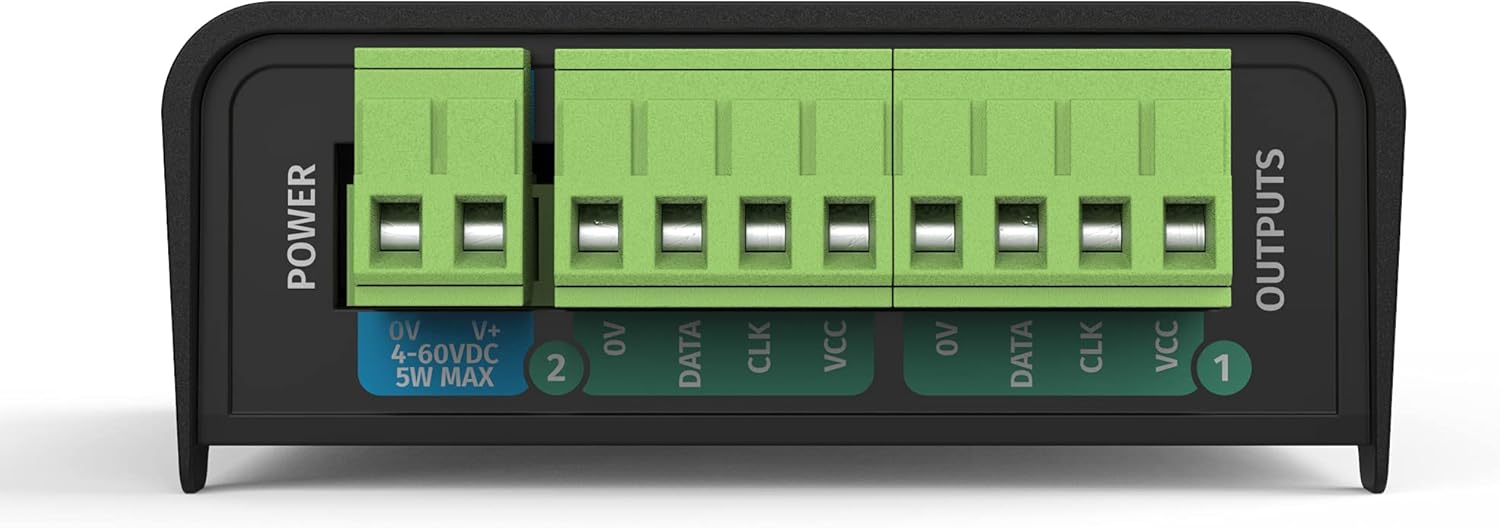
Figure 4: Close-up of the power input terminals (0V, V+, DC 4-60V) and the dual SPI-TTL data output terminals (0V, Data, CLK, VCC for each output).
5. Configuración
5.1. Conexións físicas
- Conexión de alimentación: Connect the provided power supply to the "POWER" terminals (0V and V+) on the OCTO Mk2. Ensure the voltage is within the DC 4-60V range.
- Conexión Ethernet: Connect an Ethernet cable from your network switch or computer to the "IN" Ethernet port on the OCTO Mk2. For daisy-chaining, use the "THROUGH" port to connect to another network device.
- LED Pixel Output: Connect your SPI LED strips or pixel dots to the "OUTPUTS" terminals. Each output provides connections for 0V (Ground), Data, CLK (Clock), and VCC (Power). Refer to your LED strip's specifications for correct wiring.
5.2. Network Configuration (Accessing the Web Interface)
The OCTO Mk2 features a built-in web interface for configuration. To access it, your computer needs to be on the same network as the OCTO Mk2.
- Conexión inicial: Connect your computer directly to the OCTO Mk2 using an Ethernet cable, or ensure both are on the same local network.
- Identify IP Address: The default IP address for the OCTO Mk2 is typically printed on the device or found in the quick start guide. If using DHCP, the device will obtain an IP address from your network.
- Acceso Web Interface: Abrir a web browser and enter the IP address of the OCTO Mk2 into the URL bar. This will open the device's configuration page.
- Configurar a configuración da rede:
- Navega ata o Configuración ficha.
- To assign a static IP address, uncheck the Activar DHCP opción.
- Manually enter the desired Enderezo IP, Máscara de rede, e Pasarela. Ensure the IP address is unique on your network and within the same subnet as your control computer.
- Fai clic Solicitar para gardar os cambios.
Refer to the datasheet image for an example da web interface settings:

Figure 5: Excerpt from the Enttec OCTO Mk2 datasheet, showing an overview da web interface with network and DMX port settings.

Figure 6: Excerpt from the Enttec OCTO Mk2 datasheet, detailing updated features like UL Certification, Overdrive Mode, Standalone Mode, and Free ELM Software License.
6. Modos de funcionamento
6.1. eDMX Control
The OCTO Mk2 supports various eDMX protocols for controlling your LED pixels from a compatible DMX software or console.
- Protocolos compatibles: Art-Net, sACN, ESP, and KiNet.
- Configuración: No web interface baixo DMX Port Settings, establece o Tipo to "Output (DMX Out)" and select your desired Protocolo (e.g., Art-Net). Configure the Universo settings (Net, Subnet, Uni) to match your DMX setup.
- Fusión de saída: The device supports output merging options like "LTP Merge (Latest Takes Precedence)" to handle multiple DMX sources.
6.2. Standalone Mode with Inbuilt FX Engine
The OCTO Mk2 can operate in Standalone Mode, allowing you to create and run gradient effects directly from the device without an external DMX source.
- Access the inbuilt FX engine via the web interface to design and edit effects.
- Configure the device to run these standalone shows automatically upon power-up.
6.3. Overdrive Mode
Overdrive Mode allows the OCTO Mk2 to output more than 4 universes per port, boosting total output up to 16 universes. This feature is useful for managing a higher universe count.
- Note that utilizing Overdrive Mode may result in a lower maximum Frames Per Second (FPS). Evaluate your specific needs to determine its suitability.
7. Supported SPI LED Protocols
The OCTO Mk2 is compatible with a wide range of SPI LED protocols, including but not limited to:
- APA 104
- GS8208B
- SPXL (16-bit & 8-bit)
- SK6812
- TM1804, TM1812, TM1814
- UCS1903, UCS2903, UCS2904, UCS8903 (16-bit & 8-bit), UCS8904 (16-bit & 8-bit)
- WS2811, WS2812, WS2812B, WS2813, WS2815, WS2818
- AHL003 (16-bit & 8-bit)
- SJ1221 (16-bit & 8-bit)
- TLC5973 (16-bit & 8-bit)
- Ability to create custom pixel output protocols (refer to the user manual for criteria).
8. Mantemento
- Limpeza: Usa un pano suave e seco para limpar o dispositivo. Non empregues produtos de limpeza líquidos nin en aerosol.
- Actualizacións de firmware: Comproba regularmente enttec.com for the latest firmware updates. Always review release notes for special instructions before updating.
- Almacenamento: Garda o dispositivo nun lugar fresco e seco cando non estea en uso.
9 Solución de problemas
- Sen enerxía: Check power connections and ensure the power supply is functioning correctly. Verify the input voltage está dentro do intervalo especificado.
- Sen conexión de rede:
- Ensure Ethernet cables are securely connected.
- Verify network settings (IP address, subnet mask, gateway) in the web interface are correct for your network.
- If using a static IP, ensure it is unique and not conflicting with other devices.
- No DMX/Pixel Output:
- Check the DMX Port Settings in the web interface (Type, Protocol, Universe).
- Verify the wiring of your LED strips to the output terminals (Data, CLK, VCC, GND).
- Use the Identify button on the device to check correct wiring without a data source.
- Ensure your DMX control software is correctly configured to send data to the OCTO Mk2's IP address and universe.
- Lower FPS in Overdrive Mode: This is expected behavior. If higher FPS is critical, consider reducing the number of universes or adjusting your setup.
10. Especificacións
| Característica | Detalle |
|---|---|
| Número de modelo | OCTO (71521) |
| Dimensións do produto | 3.96 x 2.84 x 1.34 polgadas |
| Peso do elemento | 3.88 onzas |
| Entrada de enerxía | DC 4-60V, 5W max |
| Universos DMX | 8 (up to 16 with Overdrive Mode) |
| Protocolo de enlace de datos | Ethernet |
| eDMX Protocols | Art-Net, sACN, ESP, KiNet |
| Opcións de montaxe | TS35 DIN rail or Surface mount |
| Certificación UL | Yes (Serial numbers 2374307 or higher) |
11. Garantía e soporte
For warranty information, technical support, and additional resources, please visit the official Enttec websitio en www.enttec.com. You can also find information regarding the free ELM software 8 Universe license and the latest firmware downloads there.


