1. Introdución
The Insta360 ONE X2 is a versatile 360-degree camera designed for capturing immersive video and photos. It features 5.7K 360 video resolution, H.265 encoding, and advanced AI-driven image processing for high-quality content. This manual provides essential information for setting up, operating, maintaining, and troubleshooting your Insta360 ONE X2 camera.
2. Que hai na caixa
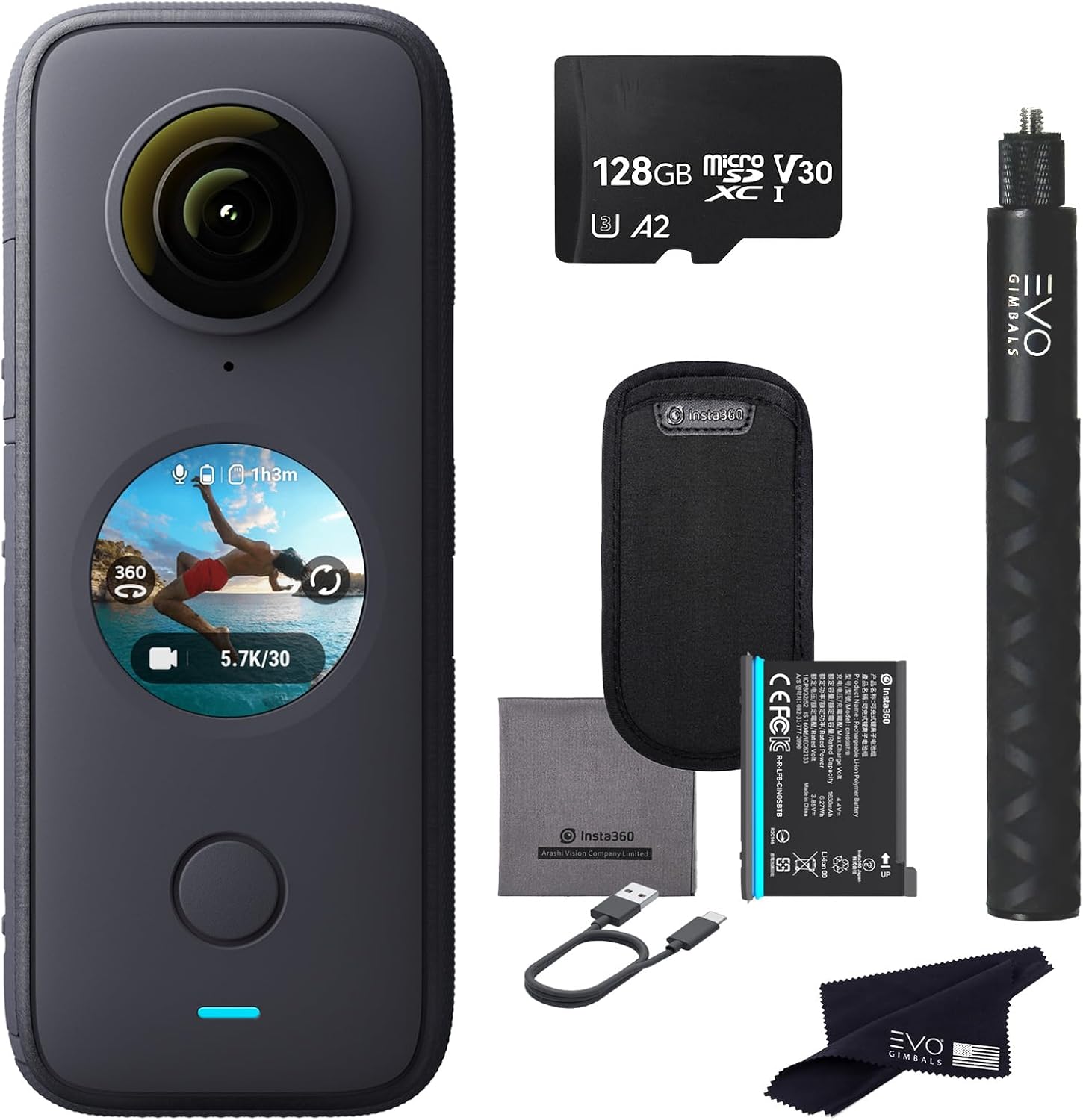
Image: The Insta360 ONE X2 camera shown with its bundled accessories, including a memory card, battery, charging cable, and selfie stick.
Upon unboxing, verify that all the following items are included:
- Insta360 ONE X2 360 Camera (x1)
- Insta360 Invisible Selfie Stick (x1)
- 1630mAh Battery (x1)
- 128GB Extreme microSDXC V30 Memory Card (x1)
- Charging Cable (USB) (x1)
- Protective Pouch (x1)
- Tarxeta de garantía (x1)
- Guía de inicio rápido (x1)
- EVO Gimbals Microfiber Cleaning Cloth (x1)
3. Produto rematadoview
The Insta360 ONE X2 features a compact design with dual lenses for 360-degree capture and a circular touchscreen for intuitive control.

Imaxe: Fronte view of the Insta360 ONE X2, highlighting the main lens and touchscreen display.

Imaxe: Costas view of the Insta360 ONE X2, showing the secondary lens and control button.
Os compoñentes clave inclúen:
- Lentes dobres: For 360-degree capture.
- Pantalla táctil: Para preview, settings adjustment, and playback.
- Botón de acendido/obturador: Controls power and initiates recording/photo capture.
- Porto USB-C: Para carga e transferencia de datos.
- Compartimento de batería: Houses the removable battery.
- Ranura para tarxetas MicroSD: Para o almacenamento de contidos multimedia capturados.
- Micrófonos: Four integrated microphones for 360 audio capture.
4. Configuración
- Cargar a batería:
Before first use, fully charge the included 1630mAh Lithium Ion battery. Connect the camera to a USB power source using the provided USB charging cable. The indicator light will show charging status.

Image: The Insta360 ONE X2 with its battery compartment open, showing the 1630mAh battery.
- Insira a tarxeta MicroSD:
Open the side port and insert the 128GB Extreme microSDXC V30 Memory Card into the designated slot. Ensure the card is inserted correctly with the contacts facing the proper direction. Close the port securely to maintain waterproofing.
- Encendido/apagado:
Press and hold the power button (usually located below the touchscreen) for a few seconds to power the camera on or off.
- Install the Insta360 App:
Download the official Insta360 app on your iOS or Android smartphone. This app is essential for advanced control, preview, editing, and sharing your content. Refer to the Quickstart Guide for QR codes or direct links to the app stores.

Image: Screenshot of the Insta360 ONE X2 mobile application interface, demonstrating editing features.
5. Instrucións de funcionamento
The Insta360 ONE X2 offers various modes and features for capturing dynamic content.
5.1. 360 Video and Photo Capture

Imaxe: Unha imaxe superiorview of the Insta360 ONE X2's key features, including 5.7K 360 capture, FlowState Stabilization, and Pureshot.
The camera captures immersive 360-degree video at 5.7K resolution and 360-degree photos at 18MP. Use the touchscreen to switch between video and photo modes and adjust settings.
5.2. Steady Cam Mode
For traditional wide-angle footage, activate Steady Cam mode. This mode utilizes one lens to capture ultra-stable, wide-angle video, ready for immediate sharing. FlowState Stabilization ensures smooth footage.

Image: Illustration of Steady Cam mode (single-lens) and 360 Cam mode (dual-lens) on the Insta360 ONE X2.
5.3. Pureshot
Pureshot is designed to enhance low-light photography. This feature improves the dynamic range of your photos, reduces noise, and preserves detail, achieving results that typically require multiple bracketed shots.

Image: A comparison demonstrating the improved image quality in low light when using the Pureshot feature on the Insta360 ONE X2.
5.4. Múltiplesview
Multiview allows you to record from both lenses simultaneously and display the footage in a split-screen format. This is particularly useful for vlogging, enabling you to capture both your perspective and the surrounding environment.

Imaxe: Un example of the Multiview feature, showing two perspectives captured simultaneously by the Insta360 ONE X2.
5.5. 4-Mic 360 Audio
The ONE X2 features four integrated microphones for premium 360-degree audio capture with wind noise reduction. It also supports external microphones via a USB-C to 3.5mm adapter (sold separately) and can be paired with Apple AirPods for wireless audio input (via firmware update).

Image: Diagram illustrating the placement of the four microphones on the Insta360 ONE X2 and their role in capturing 360-degree audio.
5.6. Impermeabilización
The Insta360 ONE X2 is IPX8 waterproof up to 5 meters (16.4 feet) when fully assembled in its mounting bracket. For deeper underwater use, optional dive cases are available (up to 30m for dual-lens 360 Mod and 60m for 4K Mod, sold separately).

Image: The Insta360 ONE X2 camera partially submerged in water, demonstrating its waterproof capability.
5.7. AI-Powered Editing
The Insta360 app provides a comprehensive editing suite. It allows direct editing of footage from the ONE X2 without requiring a full download to your smartphone, saving storage space. AI-powered tools simplify the editing process on both iOS and Android devices.
For optimal performance, ensure your smartphone meets the recommended device list for compatibility.
5.8. Control de voz
The camera supports voice activation for hands-free operation, allowing you to initiate recording, take photos, or power down the camera using voice commands.
6. Mantemento
- Coidado das lentes: Use the provided microfiber cleaning cloth to gently clean the camera lenses. Avoid abrasive materials that could scratch the lenses.
- Coidado da batería: Store the battery in a cool, dry place. Avoid extreme temperatures. If storing for extended periods, charge the battery to approximately 50% to prolong its lifespan.
- Waterproofing Seals: Before using the camera in or near water, always inspect the battery and USB port seals for any debris or damage. Ensure they are properly closed and free of obstructions.
- Limpeza xeral: Limpe o corpo da cámara cun pano suave eamp pano. Non use produtos químicos agresivos.
- Actualizacións de firmware: Regularly check for and install firmware updates via the Insta360 app to ensure optimal performance and access to new features.
7 Solución de problemas
This section addresses common issues you might encounter with your Insta360 ONE X2.
| Problema | Causa posible | Solución |
|---|---|---|
| Camera shuts off unexpectedly. | Low battery, overheating, or firmware issue. | Ensure battery is fully charged. Allow camera to cool down if it feels hot. Check for and install the latest firmware update. |
| Difficulty editing videos on computer. | Insufficient computer specifications. | Editing 360 video requires significant processing power. Ensure your computer has at least an i7 processor, 16GB RAM, and a dedicated graphics card for smooth editing. The mobile app offers AI-powered editing for convenience. |
| Water damage despite being waterproof. | Improperly sealed ports/battery cover, or exceeding depth limits without a dive case. | Always ensure all ports and covers are securely closed before water exposure. Do not exceed the 5-meter depth limit without an appropriate dive case. Inspect seals for damage before each use. |
| Mala calidade de audio. | High wind, microphone obstruction. | Utilize the camera's wind noise reduction feature. Ensure microphones are not covered. Consider an external microphone for critical audio needs. |
| Camera not responding. | Software glitch, low battery. | Perform a hard reset by holding the power button for 10-15 seconds. Ensure the battery is charged. |
If you encounter issues not listed here, please refer to the official Insta360 support resources or contact customer service.
8. Especificacións
| Característica | Detalle |
|---|---|
| Marca | Insta360 |
| Número de modelo | CINOSXX/A |
| Peso do elemento | 1.76 libras |
| Dimensións do produto | 1.82 x 4.45 x 1.17 polgadas |
| Baterías | 1 batería de iones de litio (incluída) |
| Cor | Negro |
| Características especiais | Codificación H.265 |
| Tecnoloxía do sensor fotográfico | CMOS |
| Resolución de captura de vídeo | 5.7 mil |
| Distancia focal máxima | 7.2 milímetros |
| Apertura máxima | f/2 |
| Tipo de memoria flash | Micro SD |
| Formato de captura de vídeo | MP4, INSV |
| Formato de audio compatible | AAC |
| Tamaño da pantalla | 2.4 polgadas |
| Tecnoloxía de conectividade | USB |
| Clasificación impermeable | IPX8 (ata 5 metros / 16.4 pés) |
9. Garantía e soporte
Your Insta360 ONE X2 camera comes with a manufacturer's warranty. Please refer to the included Warranty Card for specific terms and conditions, including coverage duration and claim procedures.
For technical support, product inquiries, or warranty claims, please visit the official Insta360 support website or contact their customer service department. Keep your proof of purchase and the product's serial number readily available when seeking support.
Recursos en liña:
- Official Insta360 Websitio: www.insta360.com
- Insta360 Support Page: (Refer to official website for direct link)


