1. Introdución
The CONTEC-08A is a desktop electronic sphygmomanometer designed for fully automatic blood pressure measurement. It features a high-definition color LCD display and supports both English and Chinese interfaces for strong visibility. This device is suitable for household use and can measure blood pressure for adults, pediatric, and neonatal patients. It offers convenient storage of readings for multiple users, making it ideal for family use.
2. Información de seguridade
Please read this manual carefully before using the CONTEC-08A Blood Pressure Monitor. Keep this manual for future reference.
- This device is intended for non-invasive measurement of blood pressure and pulse rate.
- Do not use this device on infants or individuals who cannot express their consent.
- Consulta co teu médico para a interpretación das medicións da presión arterial. O autodiagnóstico e o tratamento baseados nas medicións poden ser perigosos.
- Do not use the device in the presence of flammable gases or liquids.
- Keep the device and cuffs out of reach of children.
- Non desmonte nin intente reparar o dispositivo vostede mesmo. Consulte persoal de servizo cualificado.
- As declaracións sobre suplementos dietéticos non foron avaliadas pola FDA e non están destinadas a diagnosticar, tratar, curar ou previr ningunha enfermidade ou condición de saúde.
3. Contido do paquete
Verifique que todos os seguintes elementos estean incluídos no seu paquete:
- One (1) CONTEC-08A Main Unit Monitor
- Un (1) cable USB
- Three (3) Blood Pressure Cuffs (Adult, Pediatric, Infant)
- Un (1) manual de usuario
- PC Software (available for download, no CD included)
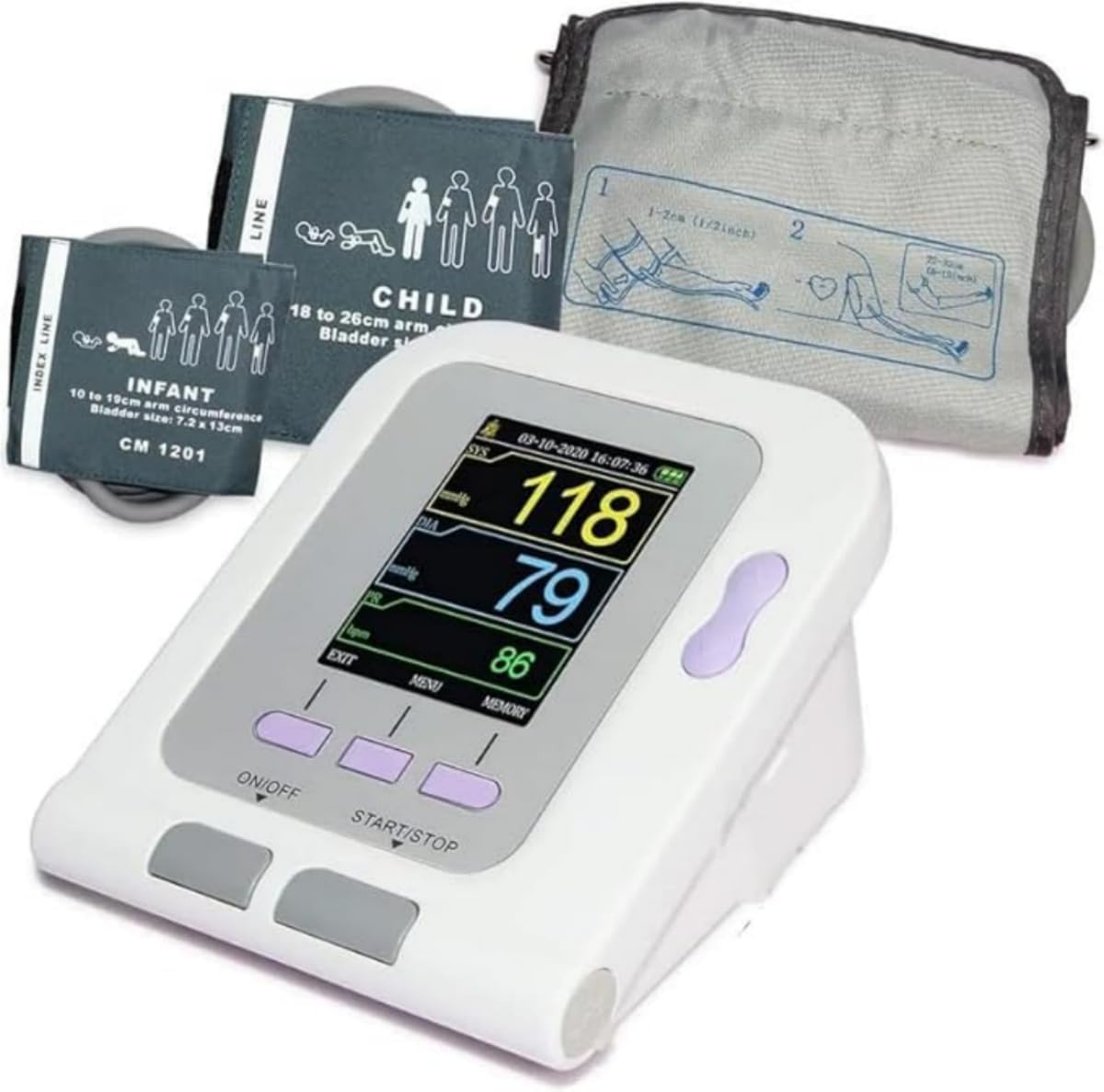
Image: The CONTEC-08A monitor shown with the adult, pediatric, and infant cuffs included in the package.
4. Produto rematadoview
Familiarize yourself with the components and display of your CONTEC-08A Blood Pressure Monitor.

Imaxe: Unha detallada view of the monitor's display, indicating Systolic Pressure, Diastolic Pressure, Pulse Rate, Arm Reminder, Power Display, Up/Down Button, Menu Button, On/Off Button, and Start/Stop Button.
4.1. Indicadores de visualización
- SIS (Presión Sistólica): The top number in a blood pressure reading, indicating the pressure in your arteries when your heart beats.
- DIA (presión diastólica): The bottom number in a blood pressure reading, indicating the pressure in your arteries between beats.
- PR (Pulse Rate): Your heart rate, measured in beats per minute (bpm).
- Arm Reminder: An icon indicating proper arm positioning.
- Pantalla de potencia: Mostra o nivel actual da batería.
4.2. Botóns
- Botón ON/OFF: Acende ou apaga o dispositivo.
- Botón START/STOP: Initiates or stops a blood pressure measurement.
- Botón MENÚ: Accesses the system settings and other functions.
- Botón Arriba/Abaixo: Navega polas opcións do menú e axusta a configuración.
4.3. Cuffs
The CONTEC-08A comes with three different cuff sizes to accommodate various users:
- Adult Cuff: For arm circumference 8.7-12.6 inches (22-32 cm).
- Child Cuff: For arm circumference 7.1-10.2 inches (18-26 cm).
- Infant Cuff: For arm circumference 3.9-7.5 inches (10-19 cm).

Image: Visual representation of the three cuff sizes and their corresponding arm circumference ranges for accurate measurement.
5. Configuración
5.1. Alimentando o dispositivo
The CONTEC-08A can be powered by either batteries or an AC adapter.
- Alimentado por batería:
Choose four (4) "AA" batteries. The battery specification is DC 1.5V. For rechargeable batteries, please choose 1.5V specification. Install batteries as shown in the diagram below, ensuring correct polarity.
- Adaptador de CA alimentado:
Connect the sphygmomanometer to the power adapter. Insert the power adapter plug into the power adapter socket on the right side of the device.
Nota:
- The power adapter does not have the function of charging the battery.
- Cando a fonte de alimentación regulada e as baterías se usan ao mesmo tempo, a enerxía da batería non se consumirá.
- Switch regulated power supply and battery as power supply when the device is off, otherwise, the device may shut down due to power failure.
- When switching between the power adapter and the battery, please do it when the device is off, otherwise the instrument may shut down due to power failure.

Image: Instructions for battery installation and AC adapter connection.
5.2. Conexión do manguito
Select the appropriate cuff size for the user. Connect the cuff's air tube securely to the air jack on the side of the monitor.
Video: An official product video demonstrating the connection of the cuff to the CONTEC-08A monitor and the measurement process.
6. Instrucións de funcionamento
6.1. Before Measurement
- Rest for at least 5 minutes before measurement.
- Evite comer, beber alcohol, fumar, facer exercicio e bañarse durante 30 minutos antes da medición.
- Sente nunha posición cómoda coas costas apoiadas e os pés planos no chan.
- Place the cuff on your bare upper arm, ensuring the center of the cuff is at the same height as your heart.
- Do not talk or move your body during the measurement.

Image: Proper posture and cuff placement for accurate blood pressure measurement. A tip is included to measure three times for more data points to reduce effects of breathing or exercise.
6.2. Performing a Measurement
- Preme o ON/OFF botón para acender o dispositivo.
- Ensure the correct user profile is selected (see "User Type Selection" below).
- Preme o INICIAR/PARAR botón para iniciar a medición. O manguito inflarase automaticamente.
- Remain still and quiet until the measurement is complete and the results are displayed on the screen.
- The device will display Systolic Pressure (SYS), Diastolic Pressure (DIA), and Pulse Rate (PR).
- The measurement will automatically be saved to the selected user's memory.
6.3. User Type Selection
The CONTEC-08A allows you to select the user type (Adult, Neonatal, Pediatric) to ensure appropriate measurement parameters.
- Preme o MENÚ button to enter the system setup.
- Usa o Arriba/Abaixo buttons to navigate to "USER TYPE".
- Preme o ENTRAR button (often the middle button) to select.
- Usa o Arriba/Abaixo buttons to choose between ADU (Adult), NEO (Neonatal), or PED (Pediatric).
- Preme ENTRAR para confirmar a súa selección.

Image: The system setup screen, illustrating how to select the user type (Adult, Neonatal, Pediatric) for accurate readings.
6.4. Physiological Alarm Function
The device has a physiological alarm function that can be set to alert you if blood pressure readings exceed high limits or fall below low limits.
- Access the alarm settings through the MENÚ.
- Set the desired high and low blood pressure limits.
- The alarm switch can be turned on or off as needed.
7. Xestión de datos
7.1. Memory Storage
The CONTEC-08A can store up to 300 readings, with 100 readings for each of the three user profiles. This allows for convenient tracking of blood pressure trends over time for your entire family.
- Para view stored readings, press the MEMORIA botón.
- Usa o Arriba/Abaixo buttons to scroll through past measurements.

Image: Illustration of the device's memory capacity, storing 100 readings per user for up to three users.
7.2. PC Software and Data Upload
The CONTEC-08A supports data upload to a PC for further analysis and reporting. The software is available for download from the manufacturer's websitio.
Descarga de software: http://www.dlsoftw.com (INDEX CODE: 06SFB031)
A. Software use steps:
- Click "Open the software".
- Open the machine, connect the right square port with a USB cable to PC.
- Open the software. Click "Download the data".
- Click the icon, choose the case in storage path when setting.
- Open the data, choose the different function for analysis.

Image: The software interface, highlighting features such as four graph display modes, data upload and download, statistics by period, and print report functionality.
8. Mantemento
8.1. Limpeza
- Limpa o dispositivo e o manguito cun pano suave e seco.
- Se é necesario, use un pano lixeiramente humedecidoamplimpa con auga ou un deterxente suave. Non empregue produtos de limpeza abrasivos nin mergulle o dispositivo en auga.
8.2. Almacenamento
- Garde o dispositivo nun lugar limpo e seco, lonxe da luz solar directa, de temperaturas extremas e da humidade.
- Se non utiliza o dispositivo durante un período prolongado, retire as pilas para evitar fugas.
8.3. Substitución da batería
When the power display indicates low battery, replace all four "AA" batteries with new ones, ensuring correct polarity.
9 Solución de problemas
| Problema | Causa posible | Solución |
|---|---|---|
| O dispositivo non se acende. | As pilas están gastadas ou inseridas incorrectamente; o adaptador de CA non está conectado correctamente. | Replace batteries or ensure correct polarity. Check AC adapter connection. |
| "Leak" error message. | Cuff is not properly connected or there is a leak in the cuff/tube. | Ensure cuff tube is securely connected to the monitor. Check cuff and tube for any visible damage or holes. |
| Lecturas inexactas ou inconsistentes. | Improper cuff placement; movement or talking during measurement; incorrect cuff size; physiological factors. | Ensure correct cuff placement and size. Remain still and quiet during measurement. Consult a healthcare professional if readings remain inconsistent. |
| "Power Low" message when plugged in. | Faulty AC adapter or internal power issue. | Ensure you are using the correct AC adapter. If the issue persists, contact customer support. |
10. Especificacións
- Modelo: CONTEC08A
- Tipo de visualización: LCD
- Fonte de enerxía: Corded Electric (AC Adapter) or 4x AA Batteries (DC 1.5V)
- Compoñentes incluídos: Main Unit, USB Cable, 3 Cuffs (Adult, Pediatric, Infant)
- Tamaños de puños:
- Adult: 8.7-12.6 inches (22-32 cm) arm circumference
- Child: 7.1-10.2 inches (18-26 cm) arm circumference
- Infant: 3.9-7.5 inches (10-19 cm) arm circumference
- Memoria: Up to 300 readings (100 per user for 3 users)
- Fabricante: CONTEC MEDICAL SYSTEMS CO., LTD
- Dimensións do paquete: 6.42 x 4.8 x 4.72 polgadas
- Peso do artigo: 1.48 libras
11. Garantía e soporte
For any questions, technical support, or warranty claims, please contact CONTEC customer service. While specific warranty details are not provided here, it is recommended to retain your purchase receipt for proof of purchase.
Please note that customer reviews indicate potential challenges with direct manufacturer support from China. For issues, it is often best to contact the retailer where the product was purchased.


